
Grok Bot · Auto Review
Learn the approval cards once, and you can trust your Bot with more.
Grok Bot Auto Review is the safety check that looks at what your Bot is about to do and decides if it should stop and ask you. Most actions run on their own. The risky ones show an approval card.
I read the Approvals page of the official docs and the October 2026 changelog on November 9, 2026. Here is the plain version, with rule examples you can copy.
TL;DR
Auto Review is on by default. Approval cards offer Allow once, Always allow, or Deny. Custom Rules let you add Ask first or Allow automatically in plain words. Ask first always wins.
What Auto Review does
The docs say Auto Review checks each action your Bot is about to take. That could be running a command, using a connected app, or using its computer. Most actions run on their own. When one needs your OK, the Bot shows an approval card with the action and its inputs, and waits.
Auto Review looks at what you asked for in your own messages. Text from somewhere else, like an email or a web page, does not count as your request. Some cards carry a warning, such as This can't be undone.
What each button does
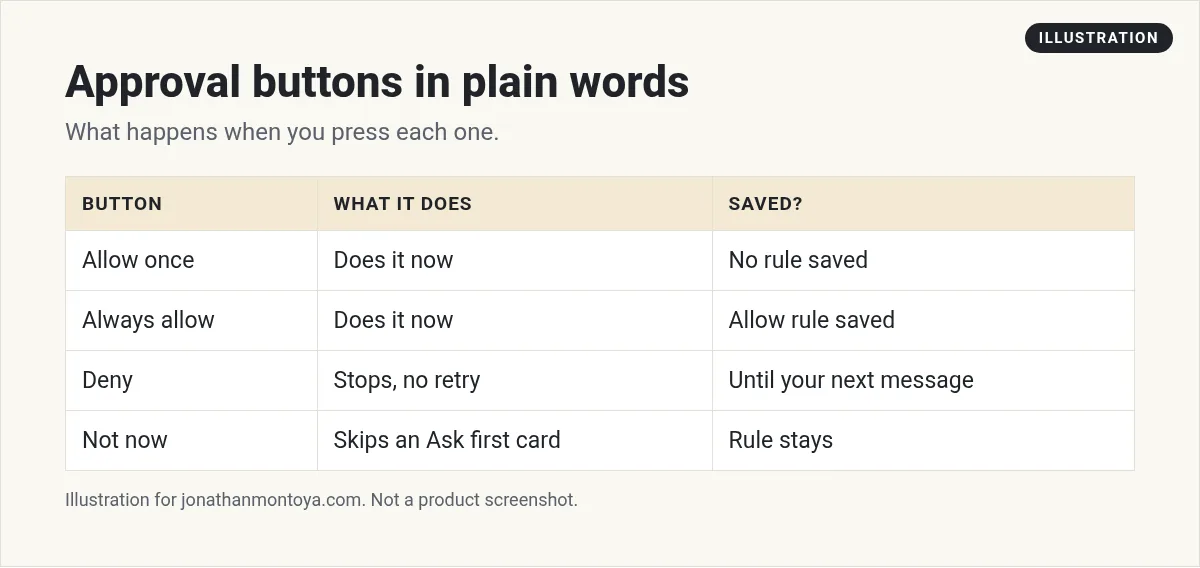
- Allow once: the Bot does the action now. No rule is saved.
- Always allow: the Bot does the action now and saves an Allow rule to your Custom Rules, so similar actions run on their own.
- Deny: the Bot does not do it. It will not try again until you send another message.
Some cards use other labels. A terminal command card shows Allow and Skip. A card paused by one of your Ask first rules shows Allow and Not now, and Edit rule opens your Custom Rules.
One more tip. An approval controls the next action. It does not reverse work already done.
From the Seisan channel (not mine): A video on whether you can trust a Bot with business systems.
How to write a Custom Rule
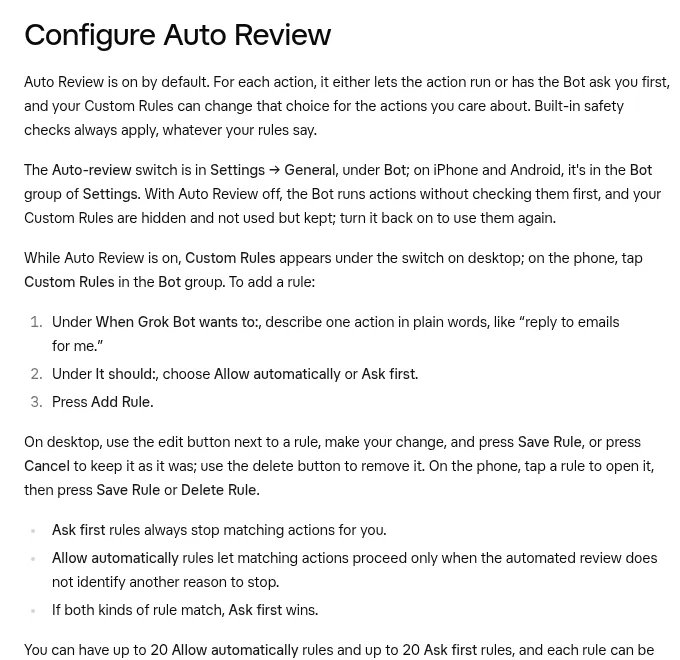
Open Settings, then General, and find the Auto-review switch under Bot. With it on, Custom Rules shows under the switch. To add one:
- Under When Grok Bot wants to, describe one action in plain words, like reply to emails for me.
- Under It should, choose Allow automatically or Ask first.
- Press Add Rule.
Ask first rules always stop matching actions for you. Allow automatically rules let matching actions go only when the automated review finds no other reason to stop. If both kinds match, Ask first wins.
Limits and a smart habit
You can have up to 20 Allow automatically rules and up to 20 Ask first rules. Each rule can be up to 1,000 characters. If you already have 20 Allow rules, pressing Always allow removes your oldest Allow rule and tells you which one.
Write one short, narrow rule for each action. The docs give good examples:
Ask first before sending any external email.
Ask first before changing a production dashboard.
Avoid broad rules such as allow everything in the browser. Websites change, and Auto Review is model based. The docs say it should complement least privilege and clear approval boundaries, not replace them.
What happens if you do not answer
When the work started from a chat message, the card waits for your answer and does not expire on a timer. When a routine, an incoming message, or other background work raised the card, it expires after 30 minutes. A closed card shows Expired and says the Bot did not do the action.
If the card offered a rule, you can still press Always allow next time. To finish the task now, ask the Bot to try again. Sending a new message closes any open card in that chat, and changing your Auto Review settings also closes open cards.
From the Van Did This! channel (not mine): A creator lists costly Bot mistakes and how to avoid them.
Teams and shared Bots
If your admin requires Auto Review, the switch stays on and says it is required. Team rules appear in the same table and cannot be edited. Your own rules sit on top and can only make behavior stricter.
On a shared Bot, each teammate answers cards for their own requests. In a Slack thread, the card has Allow once, Deny, and View details, and only the person who asked can answer. Group chat cards do not offer Always allow.
Bots can suggest rules too
On October 24, 2026, the changelog added a card where a Bot offers to add, change, or remove one of your Auto Review rules. You confirm it. Settings also has a Permissions section that lists rules under Always Ask and Allow without Asking, each with an Add Rule button.
The same update says Auto-review takes a second look before showing a card, so fewer safe actions need one. Auto-review also asks less often for an action you asked for in your own words.
A business team inside Grok Bot
Safety rules protect your work. A business team decides which work to do.
AIM Agent is an AI Chief of Staff for business owners. It comes with an AI C-suite (COO, CMO, CFO, CRO and CTO), a Business Bot Builder and 100+ business skills, and it runs on AIM OS, a private vault that holds your notes and memory. AIM Agent is a ready-made AI business team that works inside Grok Bot, so you skip the setup and get to work.
Here is what you get:
- An AI Chief of Staff that helps you plan and run your business
- An AI C-suite: COO, CMO, CFO, CRO and CTO
- A Business Bot for each business or project. Give it a real task and it brings the work back for you to review
- 100+ business skills for content, offers, research and more
- Step by step setup guides and email support
So your Bots work inside a business system, not a pile of chats.

Want an AI team to help run your business? Meet AIM Agent, an AI Chief of Staff for business owners. I am a co-founder of AIM Agent and have a financial interest in the product.
Get a business team inside Grok Bot
AIM Agent gives you an AI Chief of Staff, an AI C-suite, and 100+ business skills, with step by step setup guides and email support.
See AIM AgentFrequently asked questions
Is Auto Review on by default?
Yes. You can turn it off in Settings, but then the Bot runs actions without checking them first.
What does Always allow do?
It does the action now and saves an Allow rule to your Custom Rules.
What if an Ask first and an Allow rule both match?
Ask first wins.
How many rules can I have?
Up to 20 Allow automatically and 20 Ask first rules, each up to 1,000 characters.
Do approval cards expire?
Cards from background work expire after 30 minutes. Cards from a chat message wait for you.
Does it replace good judgment?
No. The docs say it should complement least privilege and clear boundaries.
What is AIM Agent?
AIM Agent gives you an AI Chief of Staff, an AI C-suite, and 100+ business skills inside Grok Bot, with step by step setup guides and email support.
Sources
Checked November 9, 2026. Plans, prices, and rules can change.
