
Grok Bot · Drafts
Drafts are the seatbelt for email and Slack. Here is how they work.
Grok Bot drafts are the cards that let your Bot write an email or a Slack message and then wait for you. You read it, then you press Send or Discard. This one feature is why many people feel safe letting a Bot write for them.
I checked the changelog and docs on November 9, 2026. Drafts started on September 8, 2026 and have grown since.
TL;DR
A draft card shows what the Bot wants to send. You choose Send or Discard. Drafts from routines always wait for you. You can turn drafts off for one Bot, but I would keep them on.
What a draft card is
On September 8, 2026, the changelog added drafts. Your Bot can write an email or a Slack message as a draft for you to review, then Send or Discard it. The draft shows up as a card in the chat.
Later updates made the cards better. Email drafts can be formatted, so people see headings, bold text, and lists. Slack drafts show a formatted preview and who the message will notify. They warn you when Slack cannot confirm the channel. Email draft cards show attachments as file cards and mark any that cannot be sent.
What to check before you press Send
- To and From. Is it the right person and the right address?
- Who gets notified. On Slack, check the preview.
- Attachments. Look for the file cards and any warning marks.
- Tone and facts. Read it like a stranger would.
- Links. The changelog says the Bot opens links before sending and leaves out broken ones, but you should still click one.
If the draft is not right, tell the Bot what to change. Then tell it to remember your fix.
From the Matt Palmer channel (not mine): A weekly update video from Matt Palmer, early November.
Any results mentioned in videos are not typical and are not a promise of income. Your results depend on your work and your market.
When drafts are forced
The docs list clear rules for email from the Bot's own address.
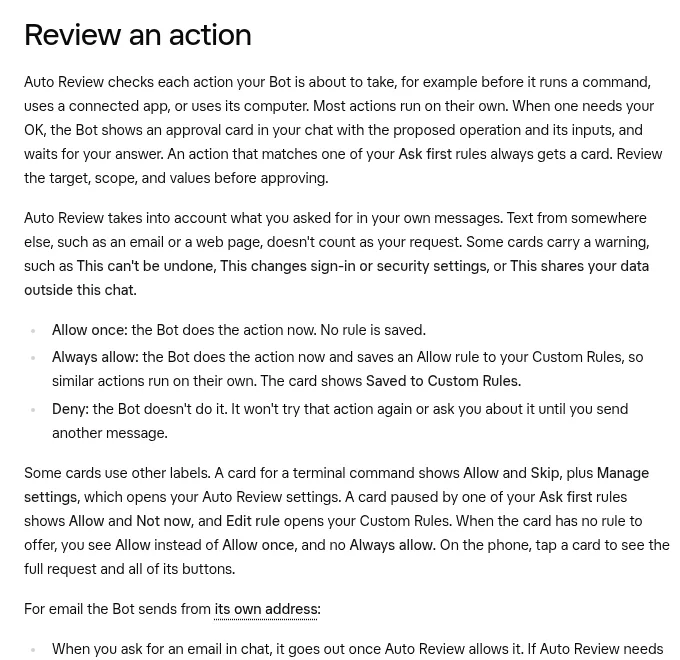
- When you ask for an email in chat, it goes out once Auto-review allows it. If Auto-review needs you, you see an approval card first.
- Email from a routine, an incoming message, or other work you did not start with that request waits as a draft until you press Send.
- A forward, or an email with an attachment Auto-review cannot fully read, always waits for your OK.
This is a smart design. The risky moments, like a routine running at 3 a.m., are the ones where a human must click.
Turning drafts off for one Bot
The draft cards offer Disable drafts for this Bot. After you choose it, that Bot sends messages directly, without a draft card. To turn drafts back on, ask the Bot.
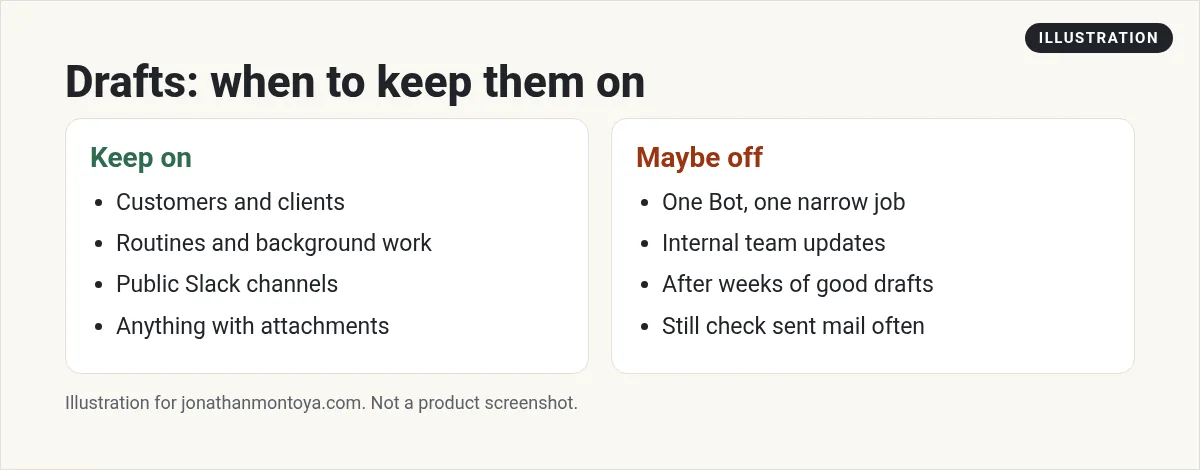
My advice is simple. Keep drafts on for anything that goes to customers, clients, or a public channel. If you turn them off, do it for one Bot with a narrow job, like an internal team update, and review the Bot's sent mail often.
Discard is a feature, not a failure
The changelog says email draft cards have a Discard button again, so you can drop a draft without sending it. Use it. A good habit is to discard the first few drafts and say why. The Bot learns from your notes faster than from silent edits.
If you deny an approval card instead, the Bot stops and does not try that action again until you send another message.
Slack drafts and who sees them
In Slack, the Bot checks what a reply is answering before it acts. In shared Slack conversations, it checks each post against who can read it before sending. When a Bot posts to Slack for you, such as from a routine, your phone is not notified and the unread badge does not go up.
If a safety check blocks a reply, the Bot says so and suggests trying a different message.
From the Aaron Makelky channel (not mine): A creator explains why he does not hand over a main inbox.
Prompts that give better drafts
Draft a two paragraph reply to this customer. Keep it friendly. Do not promise a date.
Write a Slack update for the team. Use three short bullets. Show me who it will notify.
Draft only. Do not send anything until I press Send.
A business team inside Grok Bot
Good drafts come from a good plan. A plan is what most people are missing.
AIM Agent is an AI Chief of Staff for business owners. It comes with an AI C-suite (COO, CMO, CFO, CRO and CTO), a Business Bot Builder and 100+ business skills, and it runs on AIM OS, a private vault that holds your notes and memory. AIM Agent is a ready-made AI business team that works inside Grok Bot, so you skip the setup and get to work.
Here is what you get:
- An AI Chief of Staff that helps you plan and run your business
- An AI C-suite: COO, CMO, CFO, CRO and CTO
- A Business Bot for each business or project. Give it a real task and it brings the work back for you to review
- 100+ business skills for content, offers, research and more
- Step by step setup guides and email support
So your Bots work inside a business system, not a pile of chats.

Want an AI team to help run your business? Meet AIM Agent, an AI Chief of Staff for business owners. I am a co-founder of AIM Agent and have a financial interest in the product.
Get a business team inside Grok Bot
AIM Agent gives you an AI Chief of Staff, an AI C-suite, and 100+ business skills, with step by step setup guides and email support.
See AIM AgentFrequently asked questions
What is a Grok Bot draft?
It is a card in the chat with an email or Slack message the Bot wrote. You can Send or Discard it.
Can I edit a draft?
Yes. Ask the Bot to change it, or edit it before you send where the card allows.
Why did my routine only make a draft?
Email from routines always waits as a draft until you press Send.
Can I turn drafts off?
Yes, for one Bot, with Disable drafts for this Bot. Ask the Bot to turn them back on.
Do drafts work with Outlook and Gmail?
Yes. Gmail and Outlook drafts show up in chat for review.
What if an approval expires?
A closed card says Expired and the Bot did not act. Ask the Bot to try again.
What is AIM Agent?
AIM Agent gives you an AI Chief of Staff, an AI C-suite, and 100+ business skills inside Grok Bot, with step by step setup guides and email support.
Sources
Checked November 9, 2026. Plans, prices, and rules can change.
