
Grok Bot · Slack
Grok Bot Slack setup sounds like one thing, but it is really three. Here is the difference between the Slack app, a shared Bot in Slack, and a Slack trigger, and how to set each one up without surprises.
Grok Bot Slack support lets your Bots read and post in Slack, answer teammates in channels, and start work when a message shows up. If your team lives in Slack, this is where your Bots should live too.
I checked the official help pages on October 29, 2026. The big lesson: there are three different Slack features, and mixing them up is the main reason people get stuck. Here is each one, in plain words.
TL;DR
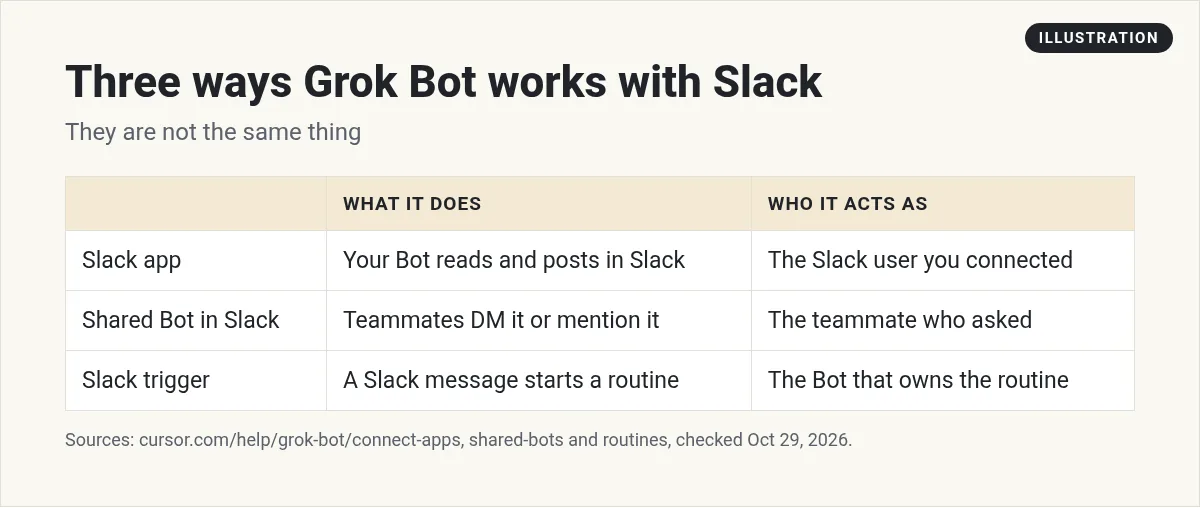
Grok Bot works with Slack in three ways. The Slack app lets your Bot read and post in Slack as the Slack user you connected. A shared Bot can be added to your team's Slack with its own handle, so teammates can DM it or mention it in channels, and it acts for whoever asked. A Slack trigger is part of a routine, and it starts work when the Bot is mentioned, a phrase appears, you react, or any message arrives. Keep triggers narrow, because every run spends usage. AIM Agent gives you a ready business team you can bring into the tools you already use.
Three Slack features that are easy to mix up
Here is the short version before we go deep. One feature lets your Bot use Slack for you. One lets your team talk to a Bot in Slack. And one lets a Slack message start a job.
1. The Slack app: your Bot posts as you
When you connect Slack from Connect apps, your Bot can read and post in Slack. The help page is clear about how it shows up: "The Slack app posts as the Slack user you connected, not as a separate bot that has to be invited."
So it can only post where you can post. It cannot post in a private channel you are not in, or in a channel where your workspace blocks posting. To use another Slack workspace, you connect that workspace too.
Slack can connect from your phone, but the phone sign in needs your workspace password. If that is a pain, connect from your computer. Apps belong to your account, so it then works on your phone too.
Good jobs for the Slack app:
- A morning summary of channels you do not have time to read.
- Finding the thread where a decision was made.
- Drafting a status update for you to post.
Slack messages wait as drafts
This is a big safety feature. The docs say "Bots draft outgoing messages for your review by default." When a Bot prepares a Slack message, you see an editable draft. Check it, then choose Send message, or Discard.
You can turn drafts off for a Bot from the draft menu, with Disable drafts for Bot. I would not do that early on. A Slack post is public to your team. Review it first. My Grok Bot safety guide covers the rest of the approval settings.
2. Shared Bots in Slack: your team talks to a Bot
This is the one most teams want. You share a Bot with your team, then bring it into Slack. It gets its own Slack app and handle, and anyone in the channel can give it work.
The help page lists the steps. The owner or a Manager does this after sharing the Bot:
- Click the Bot's name at the top of the chat.
- Find Bring to your team's Slack and choose Connect.
- If it says Awaiting admin approval, a Slack workspace admin needs to approve the app.
- Once it says Connected, teammates can message the Bot directly or mention it in channels.
Each teammate links their Slack account first. They open Settings, then General, then Shared Bots, and choose Link. If they message the Bot before they link, it replies with steps.
Here is how it behaves once it is in Slack:
- It acts for whoever asked. In a thread or DM, it works for the teammate who mentioned it.
- Usage comes from the person it answers. Each teammate's own limits apply.
- Approvals stay with the asker. In a thread it posts a Review an action card, and only the person who asked can answer it.
- It uses the owner's apps. In channels and threads, a shared Bot uses its owner's apps and asks before it uses yours.
- It follows its own threads. When its routine replies in a thread, it answers later replies without an @mention.
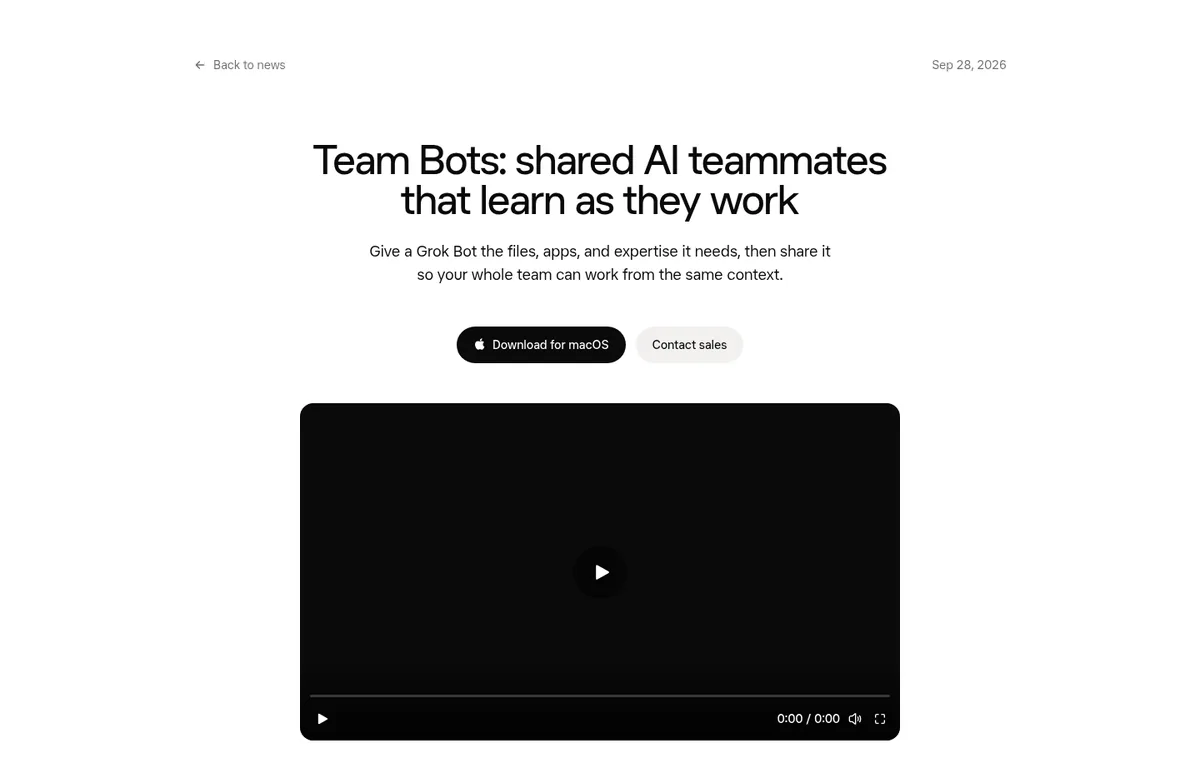
The x.ai team calls these Team Bots. In their launch post, they say each person's conversations with a shared Bot remain private, while the Bot draws on skills shared across the team.
From the Matt Palmer channel (not mine): Matt Palmer shows how Team Bots work: one Bot with shared files, apps, and skills that your whole team can use.
Personal Bot vs shared Bot in a Slack thread
One detail trips people up. A personal Bot in a Slack channel thread cannot hand work to your other Bots. The docs explain why: in a shared thread, it is not acting for any one person. It just says it cannot do that.
If you want a Bot in a channel that can pass work to other Bots, share it and add it to Slack. Then it acts for the teammate who mentioned it, and the replies land in the same thread.
3. Slack triggers: a message starts a routine
A Slack trigger is not the Slack app. The help page says "A Slack trigger is part of a routine, not the Slack app." It starts a routine when something happens in Slack.
You set one up by asking the Bot. A routine can start when:
- The Bot is mentioned
- A word or phrase is mentioned
- You react to a message
- Any message arrives
It can watch one channel or all of Slack. Only new messages count. Messages from before the trigger existed do not start a run.
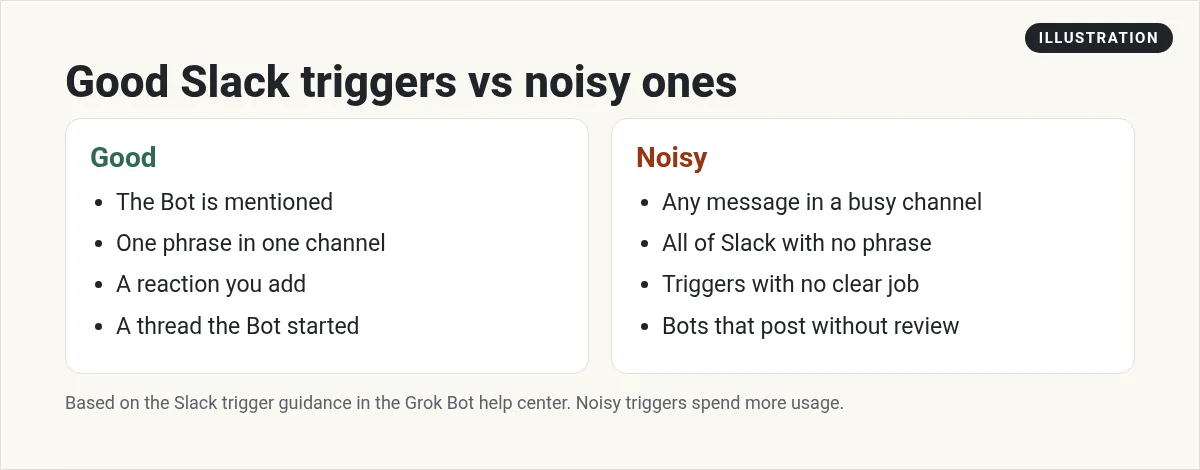
Please keep triggers narrow. The help page warns that a Slack trigger on a busy channel "can use a week of usage in a day." Pick one channel and one phrase. A good example: when someone posts bug report in the support channel, collect the details and post a summary for you to review. My Grok Bot routines guide has more on triggers.
If Slack is not working
- The Bot will not post in a channel. The connected Slack user cannot post there. Join the channel, or check workspace rules.
- The Bot asks you to link a Cursor account. Link your Slack account under Settings, General, Shared Bots.
- It says Awaiting admin approval. A Slack workspace admin needs to approve the app.
- A trigger did not run. The message must be new, in the channel the trigger watches, and match its phrase. Also check that the routine is not paused.
How I would start with Slack
- Connect the Slack app. Ask your Bot for a summary of one busy channel.
- Keep drafts on. Let it draft one update a day for you to post.
- When a Bot is useful to others, share it and bring it to your team's Slack.
- Add one narrow trigger. Watch the usage for a week.
If you run a small team, my Grok Bot for small business guide shows which Bot to set up first. For email, see my new Grok Bot email guide.
A ready team for the tools you already use
Getting a Bot into Slack is the easy part. The hard part is knowing which business jobs it should own, and where it should stop and wait for you.
AIM Agent is an AI Chief of Staff for business owners. It comes with an AI C-suite (COO, CMO, CFO, CRO and CTO), a Business Bot Builder and 100+ business skills, and it runs on AIM OS, a private vault that holds your notes and memory. AIM Agent is a ready-made AI business team that works inside Grok Bot, so you skip the setup and get to work.
Here is what you get:
- An AI Chief of Staff that helps you plan and run your business
- An AI C-suite: COO, CMO, CFO, CRO and CTO
- A Business Bot for each business or project. Give it a real task and it brings the work back for you to review
- 100+ business skills for content, offers, research and more
- Step by step setup guides and email support
So instead of building that from a blank Bot, you start with a team and skills made for business work, and your team gets help where they already talk.

Want more? Read Grok Bot connectors for the other apps, or the chief of staff Bot that can read Slack and give you a daily digest. Want an AI team to help run your business? Meet AIM Agent, an AI Chief of Staff for business owners. I am a co-founder of AIM Agent and have a financial interest in the product.
Bring a ready AI team into your business
AIM Agent gives you an AI Chief of Staff, an AI C-suite, and 100+ business skills, so your Bots have real jobs from day one.
See AIM AgentFrequently asked questions
Does Grok Bot work with Slack?
Yes. You can connect the Slack app, add a shared Bot to your team's Slack, and use Slack triggers to start routines.
Does the Slack app post as a bot?
No. The help page says it posts as the Slack user you connected, not as a separate bot that has to be invited.
How do I add a shared Bot to Slack?
After sharing it, click the Bot's name, find Bring to your team's Slack, and choose Connect. A Slack admin may need to approve it.
Can teammates use my Bot in Slack?
Yes, if you share it and add it to Slack. It acts for the teammate who asked, and uses that person's usage.
What can start a Slack trigger?
A mention of the Bot, a word or phrase, a reaction you add, or any message, in one channel or all of Slack.
Do Slack triggers use a lot of usage?
They can. A trigger on a busy channel can use a week of usage in a day, so keep the channel and phrase narrow.
Is there a faster way to get a business Bot team?
AIM Agent gives you an AI Chief of Staff, an AI C-suite, and 100+ business skills, so you start with a team built for business work.
Sources
Checked October 29, 2026. Plans, prices, and rules can change.
