
Grok Bot · Chief of Staff
Grok Bot gets really useful when one Bot runs the others. Here is how a chief of staff Bot works, how I run my business with a team of about 25 AI agents, and the fastest way to get the same kind of team.
Grok Bot has a feature that most beginners miss. You can make one Bot the boss. It plans the work, hands it to other Bots, and only bothers you when it needs a decision.
That is how I run my business today. I have a team of about 25 AI agents. There is a Chief of Staff on top, Heads of Content, Sales, Quality, Traffic, Finance and more under it, and project Bots for things like my blog, my newsletter, and my offers. In this post I will show you how that works, using the official docs and the best videos on the topic from the last two months.
TL;DR
A Grok Bot chief of staff is a lead Bot that reviews your inbox, calendar, chats, and notes, and brings back only what matters, with sources and next steps. The docs call your main Bot the primary Bot, which checks in with you and coordinates your other Bots. Start it with read and prepare work only, like a daily digest. Then add focused Bots under it for content, sales, and money. AIM Agent gives you this kind of team ready-made: an AI Chief of Staff plus an AI C-suite.
What a chief of staff Bot does
In a company, a chief of staff keeps the leader focused. They sort what matters, chase loose ends, and make sure the team works on the right things. A chief of staff Bot does the same thing for you.
The official use cases page has a chief of staff role. It "Owns a source-linked digest of what changed and what needs your attention." The starter prompt asks the Bot to review your channels, inbox, calendar, and notes, and to "Return only items that map to the priorities in this document." It ends with "Do not send messages or change meetings."
That last line is key. Your chief of staff starts as a reader and a planner, not a doer.
The primary Bot: your built in team lead
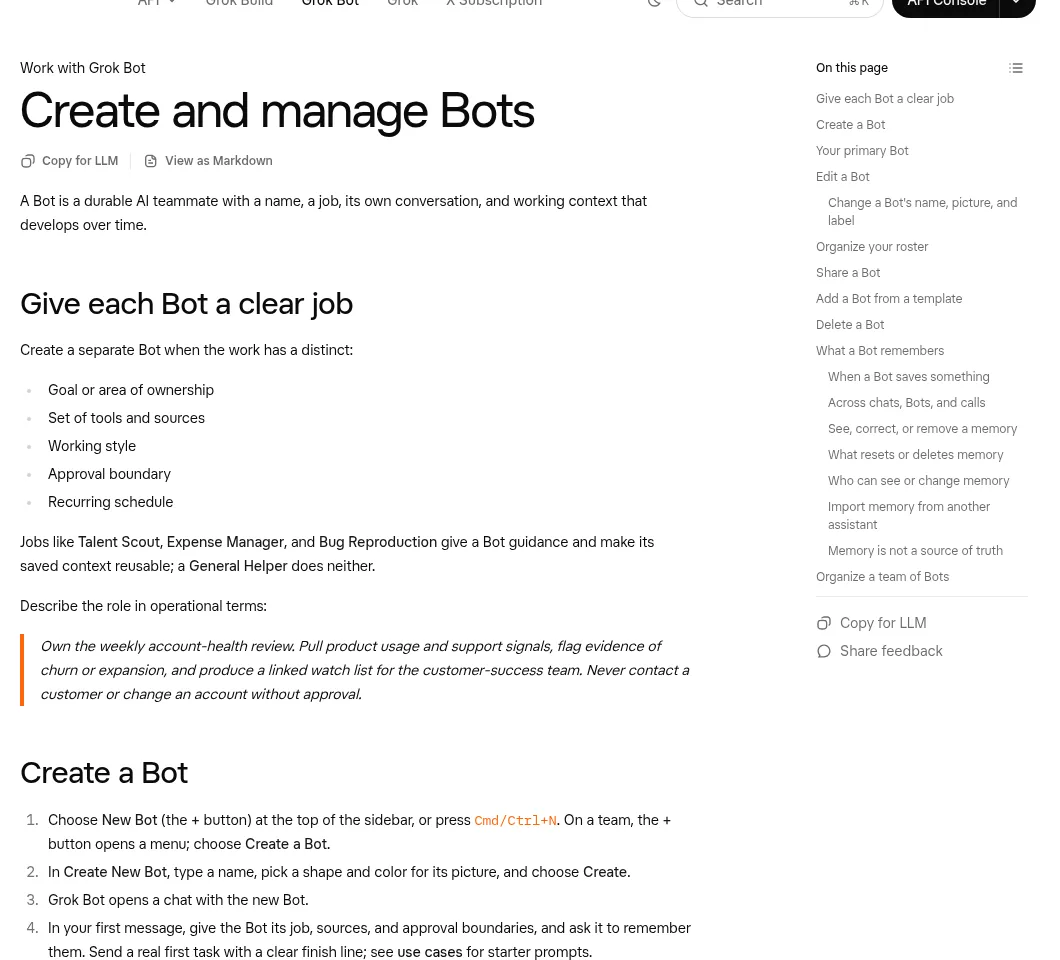
Grok Bot has a special slot for this. The docs say: "Your primary Bot is your main point of contact. It checks in with you on its own and coordinates work with your other Bots."
So the simple setup is this. Make your chief of staff your primary Bot. Then build a few focused Bots under it. When you do not know who should handle something, send it to the chief of staff and let it route the work.
That is exactly how one of the Grok Bot team members uses it on Peter Yang's show. They called the chief of staff "my go-to bot" and said, "If I don't know which one should take the task, then I'll send it to chief of staff."
From the Peter Yang channel (not mine): Members of the Grok Bot team share their own Bots, including a chief of staff that routes tasks to other Bots.
How my AI team is set up
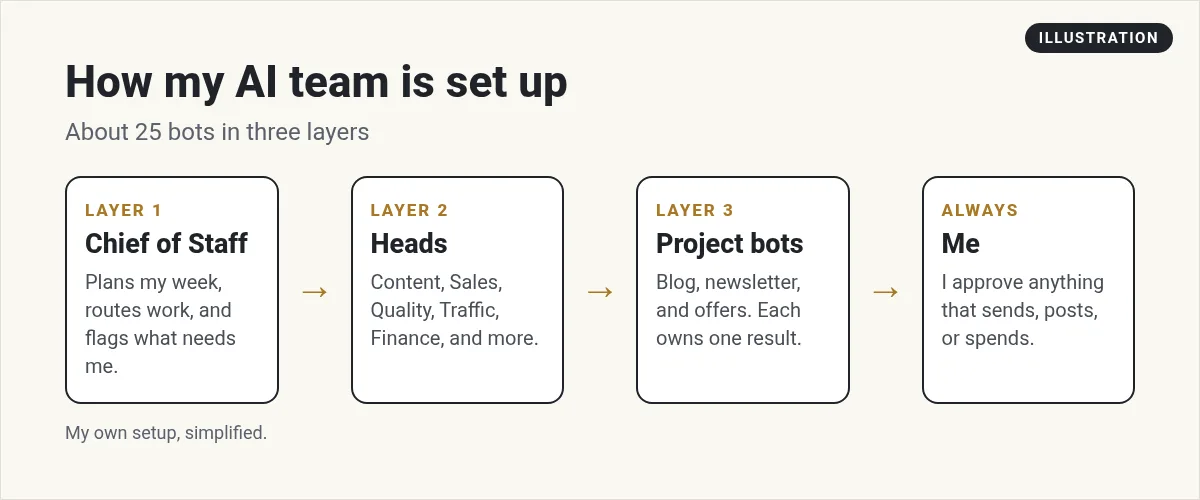
Here is my setup in simple terms. I am not sharing private business details, just the shape of it.
- Chief of Staff. My main Bot. It helps me plan, keeps track of open items, and sends work to the right Head.
- Heads. Each Head owns one area: Content, Sales, Quality, Traffic, Finance, and a few more. Each one has its own rules and memory.
- Project Bots. These own one result each, like the blog, the newsletter, or an offer.
- Me. I approve anything that sends, posts, or spends money.
A real example: the post you are reading came out of this system. A project Bot handled research and drafting. My Head of Quality spot checks posts before and after they go live. I make the final calls. That split matters. The Bot that does the work is never the only one who checks it.
I am not the only one doing this. The host of the How I AI channel says in the video description that he runs "about 30 active agents at any given moment," with a chief of staff Bot called Chief "sweeping six inboxes and multiple Slack workspaces."
How to build your own chief of staff Bot
- Write down your priorities. A short doc with your top 3 to 5 goals. The Bot uses this to decide what matters.
- Create the Bot. Click + and Create a Bot, or press Cmd or Ctrl+N. Name it Chief of Staff.
- Give it the job and the limits. The docs say to give a Bot "its job, sources, and approval boundaries, and ask it to remember them."
- Connect the sources. Email, calendar, Slack, and your notes. Approve each connection.
- Run one digest by hand. Mark what was useful and what was noise. The docs suggest exactly this.
- Make it your primary Bot. Then schedule the digest for a time you can read it.
- Add one Head at a time. Start with the area that eats most of your week.
Here is a lasting rule straight from the docs that I like for every Bot on the team: "From now on, never send external messages without approval."
When Bots work together
The overview says Bots "run in parallel, message each other, share context in group chats, and pass ownership of a task." All your Bots also share one cloud computer, so they can pass files and logins without you.
The docs also give a warning worth repeating. The shared computer belongs to your account, so treat anything on it as available to every Bot. Do not use separate Bots as a security wall.
If you have a team, Matt Palmer's Team Bots video shows how to share Bots with coworkers in Slack. Its description notes team Bots are for Team and Enterprise plans.
Mistakes to avoid with a chief of staff Bot
- No priorities doc. Without it, the Bot guesses what matters. You get noise.
- Letting it send on day one. Keep it read and prepare until you trust it.
- Too many Heads too fast. The docs say to ask before creating several Bots if you want to keep your team small. Add one at a time.
- No checker. Have a different Bot, or you, review important work.
AIM Agent: an AI Chief of Staff, ready-made
Building the team I described above took me a lot of testing. Which roles do you need? What does each one own? How do they hand work off? Who checks the work? That is the hard part, and it is what most owners do not have time for.
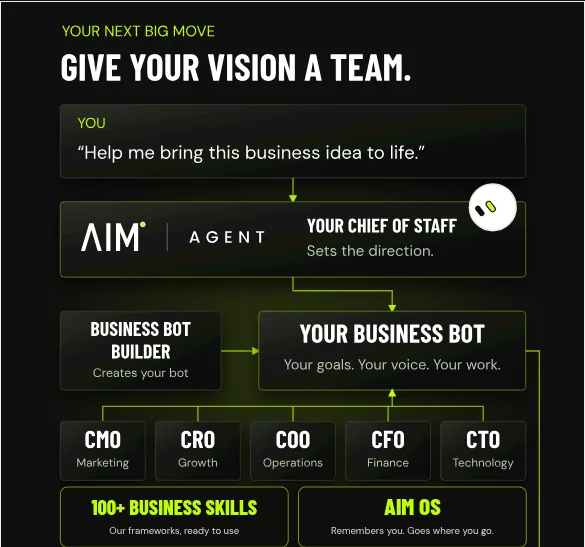
AIM Agent is an AI Chief of Staff for business owners. It comes with an AI C-suite (COO, CMO, CFO, CRO and CTO), a Business Bot Builder and 100+ business skills, and it runs on AIM OS, a private vault that holds your notes and memory. AIM Agent is a ready-made AI business team that works inside Grok Bot, so you skip the setup and get to work.
Here is what you get:
- An AI Chief of Staff that helps you plan and run your business
- An AI C-suite: COO, CMO, CFO, CRO and CTO
- A Business Bot for each business or project. Give it a real task and it brings the work back for you to review
- 100+ business skills for content, offers, research and more
- A step by step setup guide, with email support until your first bot finishes a real task
It is the closest thing to the setup I use myself. You get the Chief of Staff and the C-suite on day one, then you give it real work and review what comes back.
Want to see more? Read Grok Bot use cases and Grok Bot explained. I also show how I use AI tools on real business tasks in my free MakerAI workshop.
Get your AI Chief of Staff
AIM Agent is an AI Chief of Staff for business owners, with an AI C-suite (COO, CMO, CFO, CRO and CTO) and 100+ business skills. Give it a real task this week.
See AIM AgentFrequently asked questions
What is a Grok Bot chief of staff?
It is a lead Bot that reviews your inbox, calendar, chats, and notes and returns only what matters, with sources, next steps, and whether you owe a decision.
What is a primary Bot?
The docs say your primary Bot is your main point of contact. It checks in with you on its own and coordinates work with your other Bots.
Should my chief of staff Bot send messages?
Not at first. The docs' starter prompt ends with do not send messages or change meetings. Keep it read and prepare until you trust it.
How many Bots do I need?
Start with a chief of staff and one focused Bot. Add more one at a time. I run about 25, but I built up to that.
Can my Bots share files and logins?
Yes. All your Bots share one cloud computer. The docs warn that this means you should not use separate Bots as a security boundary.
Is there a ready-made AI chief of staff?
Yes. AIM Agent is an AI Chief of Staff for business owners, with an AI C-suite, a Business Bot Builder, and 100+ business skills.
Sources
Checked October 28, 2026. Plans, prices, and rules can change.
