
Grok Bot · Use Cases
Grok Bot can do a lot, which makes it hard to know where to start. Here are 12 jobs that real people hand off, sorted by business and life, with prompts you can copy.
Grok Bot use cases are all over YouTube right now. Some are useful. Some are just fun demos. I wanted the useful ones.
So on October 28, 2026, I went through the official use cases page and the most watched use case videos from the last two months. Here are 12 jobs worth handing off, plus the rule that keeps each one safe.
TL;DR
The best Grok Bot use cases are repeatable jobs that span a few tools and end with something you can review. For business, that includes sales research, inbox sorting, a daily chief of staff digest, expense summaries, content research, and customer follow up lists. For life, people use it to cancel free trials, track bargains, and plan appointments. The docs say to start with read and prepare work, review it, and keep sending, publishing, and buying behind approval. AIM Agent gives you a business team that already does many of these.
The rule that makes any use case work
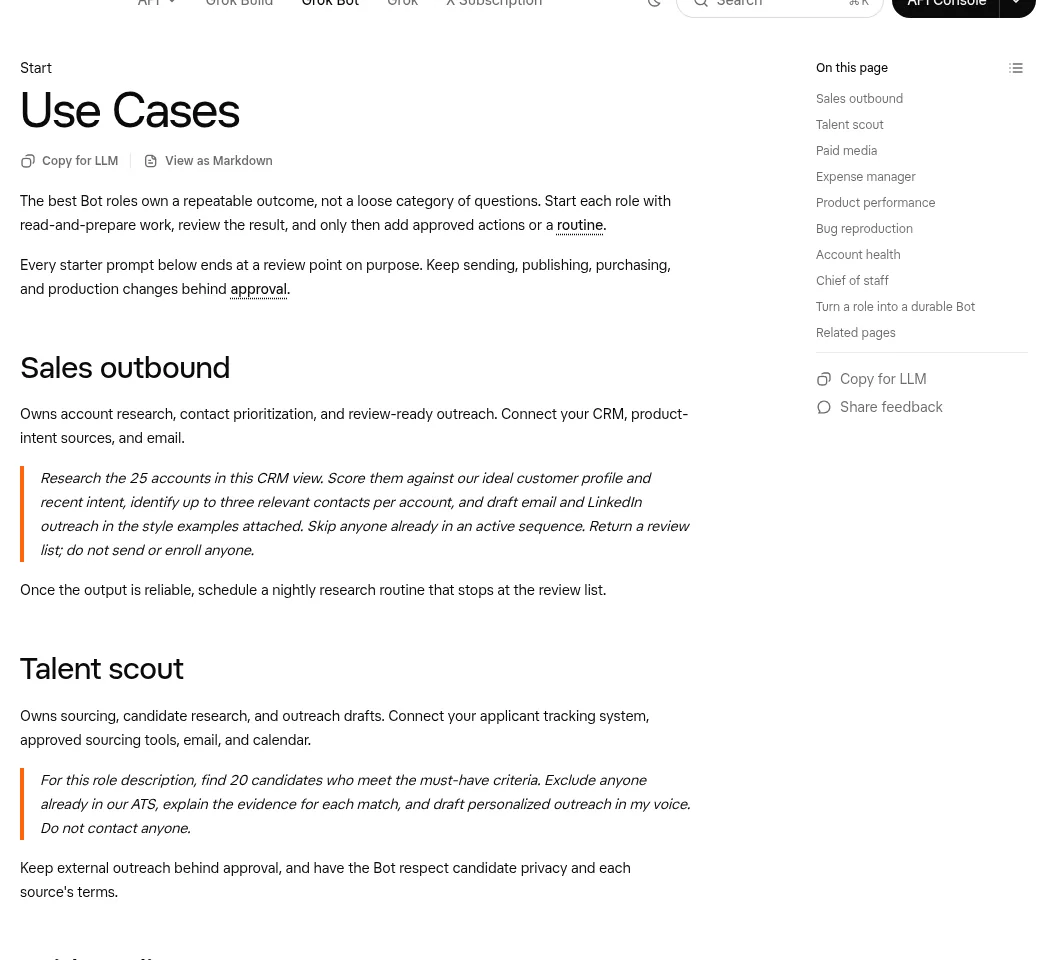
The official use cases page starts with one line I love: "The best Bot roles own a repeatable outcome, not a loose category of questions."
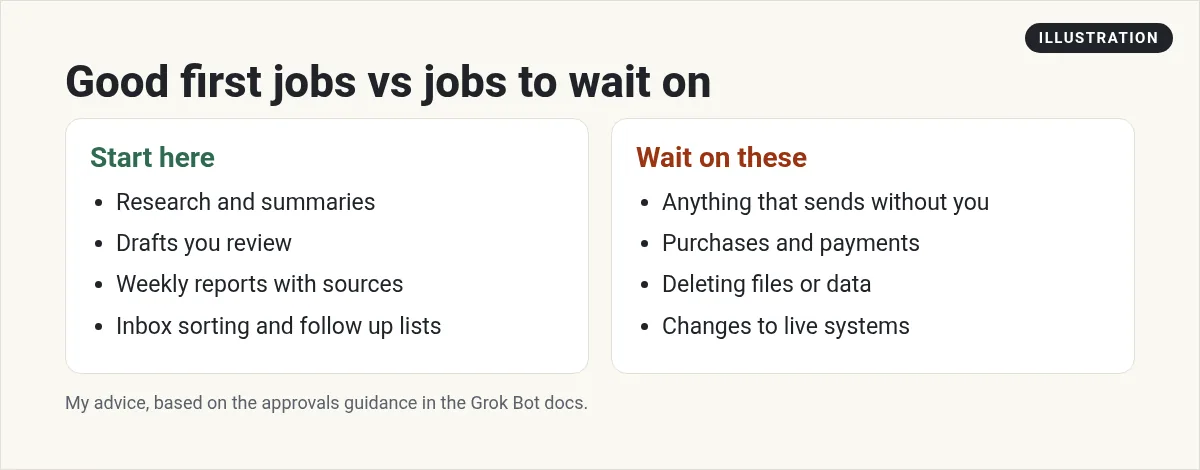
That means "help me with sales" is a weak job. "Research these 25 accounts and give me a review list" is a strong one. It also says every starter prompt "ends at a review point on purpose." Keep that in mind for everything below.
8 business use cases
1. Sales outbound research
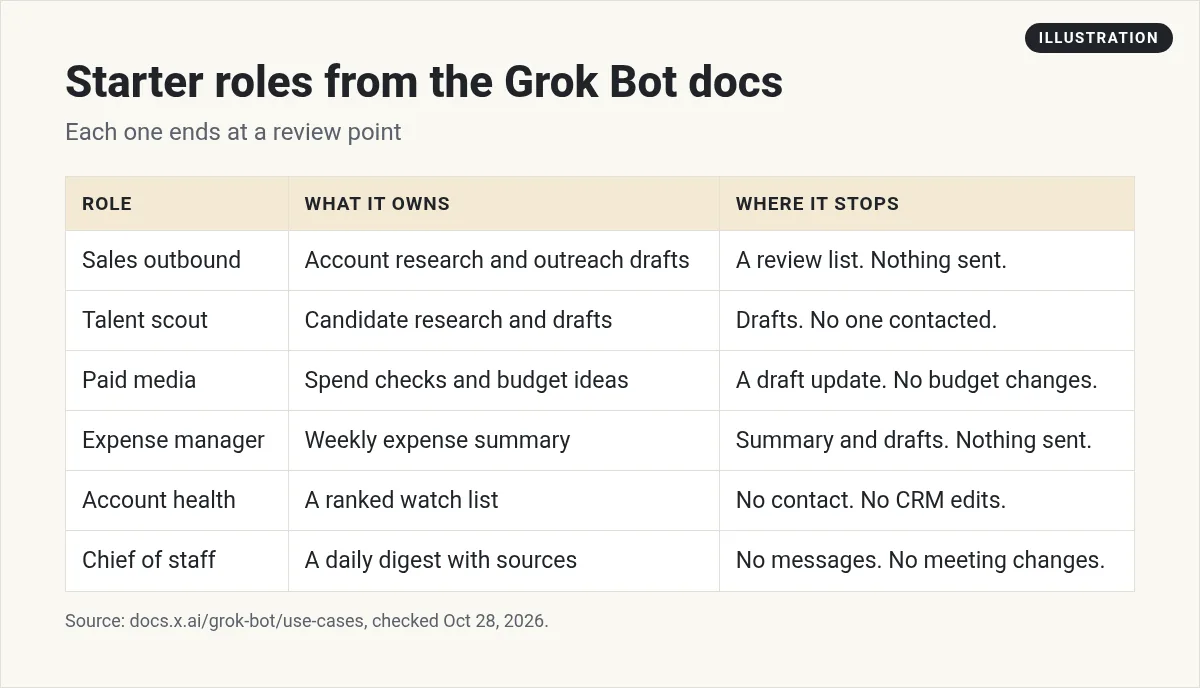
The docs describe a Bot that owns "account research, contact prioritization, and review-ready outreach." It researches accounts, picks contacts, and drafts emails. The prompt ends with: "Return a review list; do not send or enroll anyone."
2. Chief of staff digest
This one checks your channels, inbox, calendar, and notes. It returns only what matters to your priorities, with "the source, why it matters, the proposed next step, and whether I owe a decision." This is the Bot I would build first as an owner.
3. Inbox tracker
In the Kevin Stratvert channel's tutorial, a donut shop owner builds a Bot that watches email for catering orders so none get missed. It then drafts replies. Simple, and it saves real money in missed orders.
4. Expense summary
The docs describe an expense manager that builds "this week's expense summary," matches receipts, flags missing items, and drafts follow ups. It does not send anything or change reimbursements.
5. Content research
Parker Prompts built a Bot called Hunter that finds YouTube video ideas. It stays read only, never guesses a number, and shows its sources. In his test, it came back with a 20 row table of videos sorted by engagement.
6. Audience feedback
Parker also built a Bot that reads audience feedback. This is great for any business with comments, reviews, or survey replies. Ask it to group what people say into themes and quote real examples.
7. Account health watch list
From the docs: a Bot that combines usage, support issues, and renewal timing into "a ranked watch list." For a service business, swap that for a client check in list.
8. Talent scout
The docs describe a Bot that finds candidates who fit a role and drafts outreach, with "Do not contact anyone." Handy when you are hiring a contractor.
4 personal use cases people love
Paul J Lipsky built seven Bots for home life. He says in the video description that the video is sponsored by SpaceXAI, so keep that in mind. The ideas are still good:
- Cancel free trials. His Bot named Nope tracks free trials so you cancel before they bill.
- Bargain hunting. A Bot named Scout watches prices on things you want.
- Appointments. A Bot named Booker handles recurring bookings.
- Home memory. A Bot named Fixer keeps track of home repairs and parts.
From the Paul J Lipsky channel (not mine): Seven personal Bots for home, family, and errands. The creator notes in the description that this video is sponsored.
A member of the Grok Bot team shared a fun one on Peter Yang's show. They sent a Bot a photo of a mic they wanted to sell. The Bot checked prices, wrote the listing, and even asked their writer Bot how they usually write listings. That is the team idea in action.
Two starter prompts you can copy
Here are two prompts I wrote for business owners. Paste one into a new Bot and change the details.
Weekly content research:
Your job is content research for my business. Every Monday, find the 10 most talked about posts and videos in my niche from the last 7 days. For each one, give the link, the main idea, and why people are reacting. Then suggest 3 topics I could cover. Show your sources. Do not post anything.
Customer follow up list:
Your job is follow ups. Each Friday, check my inbox for customers or leads who wrote in the last 14 days and have not heard back. List each one with a link to the thread, what they asked, and a short draft reply in my voice. Do not send anything.
Both end with a clear stop point. That is what makes them safe to run every week.
How to pick your first use case
Ask yourself three questions:
- Does it repeat? Daily or weekly jobs pay off fastest.
- Does it touch a few tools? That is where a Bot beats a chat app.
- Can I check the result? A list, a draft, or a report is easy to review.
If all three are yes, it is a good fit. Then follow the docs' path: put the job and rules in the Bot's description, run one real task, fix it until you can trust it, save it as a skill, and only then make it a routine.
Get these jobs done without building every bot
Look back at the business list. Sales research, a chief of staff digest, content research, follow ups, and money checks. Those are the jobs of a small leadership team. Building and tuning each one yourself is the slow part.
AIM Agent is an AI Chief of Staff for business owners. It comes with an AI C-suite (COO, CMO, CFO, CRO and CTO), a Business Bot Builder and 100+ business skills, and it runs on AIM OS, a private vault that holds your notes and memory. AIM Agent is a ready-made AI business team that works inside Grok Bot, so you skip the setup and get to work.
Here is what you get:
- An AI Chief of Staff that helps you plan and run your business
- An AI C-suite: COO, CMO, CFO, CRO and CTO
- A Business Bot for each business or project. Give it a real task and it brings the work back for you to review
- 100+ business skills for content, offers, research and more
- A step by step setup guide, with email support until your first bot finishes a real task
Instead of eight separate experiments, you start with a team that already has roles for planning, marketing, sales, operations, money, and tech.
New to all of this? Start with Grok Bot explained or the beginner tutorial. For a wider look at agents, see AI agents for business. I also walk through AI tools on real tasks in my free MakerAI workshop.
Hand off real work this week
AIM Agent gives you an AI Chief of Staff and an AI C-suite with 100+ business skills. Give it one of the jobs above and review what it brings back.
See AIM AgentFrequently asked questions
What are the best Grok Bot use cases?
Repeatable jobs that span a few tools and end with something you can review, like sales research, a daily digest, inbox sorting, expense summaries, and content research.
Can Grok Bot help a small business?
Yes. The docs list roles like sales outbound, expense manager, account health, and chief of staff. Start with research and drafts, and keep sending behind approval.
What personal tasks can Grok Bot do?
Creators use it to track free trials, watch prices, handle bookings, and keep notes on home repairs.
Should a Bot send emails on its own?
Not at first. The docs say every starter prompt ends at a review point and to keep sending, publishing, and buying behind approval.
How many Bots should I make?
Start with one Bot for one job. Add a second when the first is reliable. A focused Bot builds better context than a catch-all helper.
Is there a ready-made option for business use cases?
Yes. AIM Agent gives you an AI Chief of Staff, an AI C-suite, and 100+ business skills for content, offers, research and more.
Sources
Checked October 28, 2026. Plans, prices, and rules can change.
