
Grok Bot · Explained
Grok Bot gives you AI teammates that do real work, not just chat. Here is what that means, how it works, and the fastest way to get a whole AI team working for your business.
Grok Bot is the AI tool everyone on YouTube is talking about right now. I watched the most popular videos from the last two months and read the official docs on October 28, 2026. This post sums it up in plain words.
Here is the short version. Grok Bot is not another chat window. It gives you AI teammates, called Bots, that can sign in to your tools, use a computer, and come back with finished work. I run my own business with a team of about 25 of these agents, so I will also show you what that looks like in real life.
TL;DR
Grok Bot is an app that gives you AI teammates called Bots. Each Bot has a name, a job, and its own memory. Bots work on a cloud computer with a browser, files, and a terminal, so they keep working when your laptop is closed. You message a Bot, it does the work in your apps, and it stops for your approval on sensitive steps. If you want a ready-made business team instead of building one bot at a time, look at AIM Agent.
What Grok Bot is, in one minute
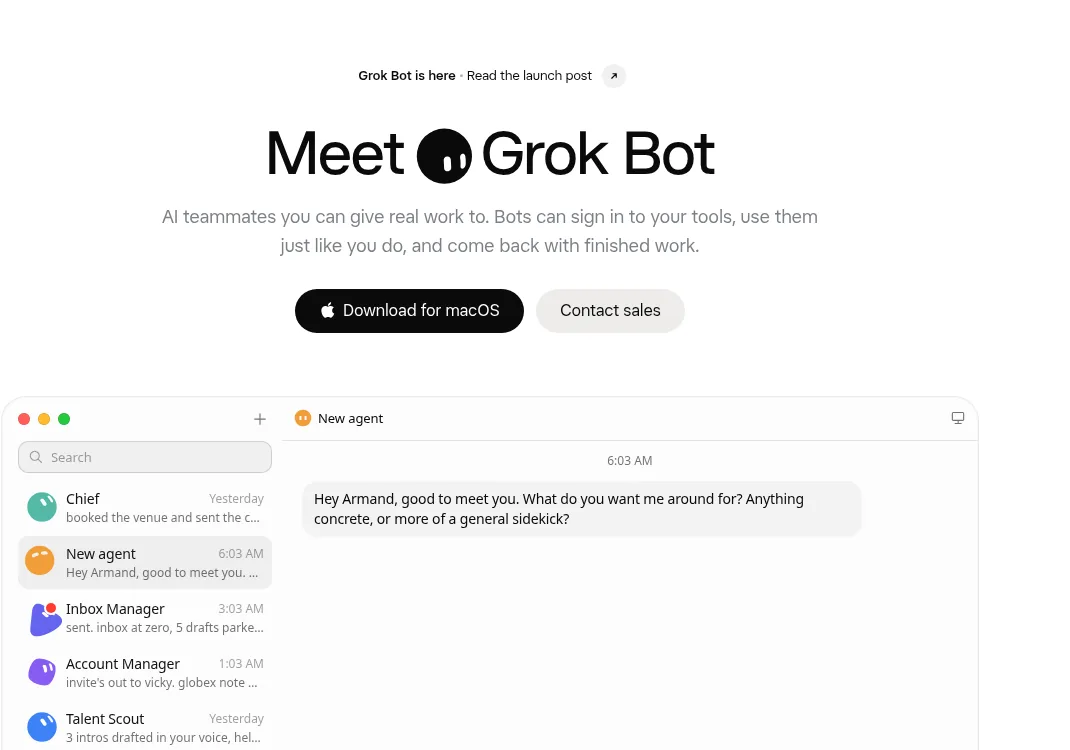
The x.ai product page sums it up in one line. Grok Bot gives you "AI teammates you can give real work to." It goes on: "Bots can sign in to your tools, use them just like you do, and come back with finished work."
The docs say the same thing in a different way. They call Bots "AI teammates with names, jobs, and context that compounds over time." That last part matters. A Bot keeps learning how you like things done, so it gets more useful the longer you use it.
Think of it like this. A chat app is like texting a smart friend. Grok Bot is more like hiring a helper who has their own desk, their own computer, and a notebook of how you like things done.
The official launch video is short. It is a good place to start if you like to see things first.
From the Grok channel (not mine): The official launch video. It shows the idea of Bots as teammates in under two minutes.
What makes it different from a chat app
The docs list a few things that set Grok Bot apart. Here they are in plain words:
- Each Bot has a computer. Bots work on "a persistent cloud computer with a browser, filesystem, and terminal." They use connected apps when they can, and they use the computer like a person for everything else.
- It keeps working when you leave. The FAQ says closing the app, your laptop, or your phone does not stop a background task or routine.
- Setup is a message. The docs put it this way: "Setup is a message, not a workflow builder." You describe the job in plain words.
- Bots work as a team. Bots can run at the same time, message each other, share group chats, and hand work off. In the docs' words, "you aren't the router between tools."
- Bots learn by watching. You can walk a Bot through a task once, and it can save that as a skill and run it again on a schedule.
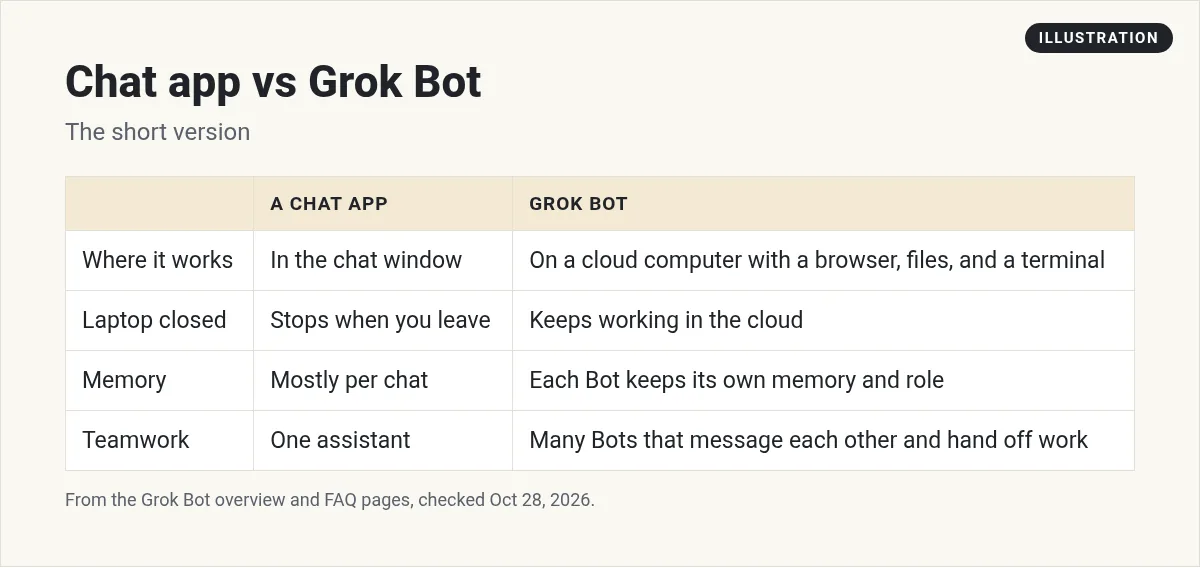
My take: the computer is the big deal. Most AI tools hand you a draft and stop. A Bot can open the website, fill in the sheet, and leave the result where you need it.
How Grok Bot works, step by step
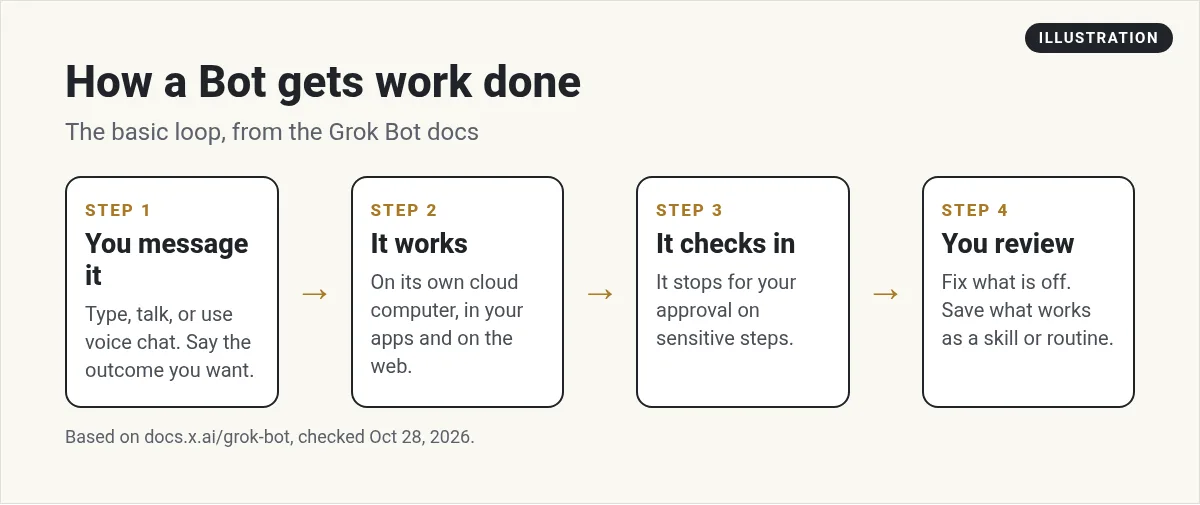
You do not need to be technical. The basic loop is simple:
- Message a Bot. Type, talk, or start a voice chat. Say what a finished result looks like.
- It does the work. It uses your connected apps and its cloud computer. You can watch its screen if you want.
- It checks in. When it hits a login, a captcha, or a sensitive step like sending or buying, it stops and asks you.
- You review. Fix anything that is off. Then save the steps that worked as a skill or a routine.
The docs give a good example of a first task. It asks a Bot to pull a pipeline list from a CRM, research the top five accounts, draft outreach "in my voice," and "leave me drafts to approve by tomorrow morning." Notice the last part. A good task always says where the Bot should stop.
The main pieces you will hear about
Every tutorial I watched uses the same handful of words. Here is what they mean:
- Bots: your AI teammates. The docs advise one main job per Bot. A focused Bot builds better context than one catch-all helper.
- Memory: each Bot keeps its own memory of your preferences and past work. A few facts, like your name and time zone, are shared by all your Bots.
- Skills: saved instructions a Bot can reuse, like a recipe.
- Routines: work that runs on a schedule or when something happens, like a new email.
- Vault: where your logins live. The docs say the Bot never sees the password.
- The shared computer: all of your Bots use the same cloud computer, so they can pass files and logins to each other.
Nate Herk's video does a great job of explaining each of these for normal people. If the words still feel fuzzy, watch it next.
From the Nate Herk channel (not mine): A plain-words walk through every main idea: Bots, memory, skills, routines, and the computer.
Where you can use it
The desktop app runs on macOS, Windows, and Linux. There are also apps for iPhone and Android. Your Bots and chats sync across all of them. The FAQ also says you can chat with Bots in X Chat, tag @bot on X, and talk to a shared Bot in Slack.
One thing confuses people. The FAQ says Grok, the chat app, and Grok Bot "are two different apps." A limit in the Grok app is not about Grok Bot. For more on the Grok chat plans, see my post on SuperGrok.
Who it is for
From the videos and the docs, Grok Bot fits best if you have work that repeats and spans a few tools. Good examples are inbox sorting, research, reports, and outreach drafts. The use cases page lists roles like sales outbound, expense manager, and chief of staff.
It is a weaker fit if you just want quick answers. A plain chat app is simpler for that. It also asks more of you up front. You have to give each Bot a clear job, connect your tools, and review its work for a while.
That setup time is the real cost for most business owners. Which brings me to the faster way.
The fastest way to get an AI team working for you
Grok Bot gives you the parts. You still have to decide which bots to make, what each one does, and how they work together. That is a lot of trial and error for a busy owner. AIM Agent skips that part.
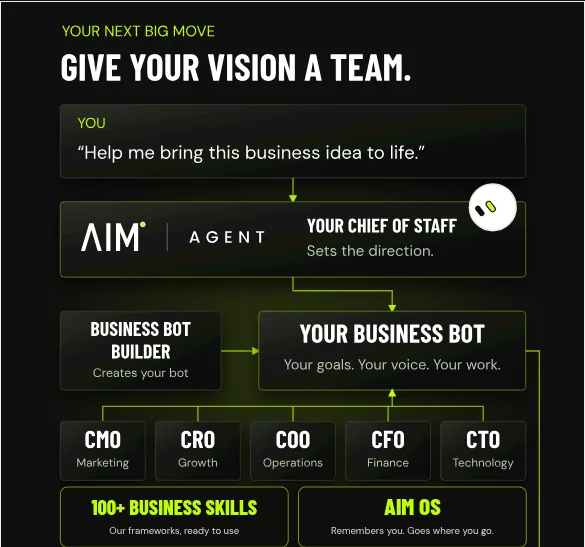
AIM Agent is an AI Chief of Staff for business owners. It comes with an AI C-suite (COO, CMO, CFO, CRO and CTO), a Business Bot Builder and 100+ business skills, and it runs on AIM OS, a private vault that holds your notes and memory. AIM Agent is a ready-made AI business team that works inside Grok Bot, so you skip the setup and get to work.
Here is what you get:
- An AI Chief of Staff that helps you plan and run your business
- An AI C-suite: COO, CMO, CFO, CRO and CTO
- A Business Bot for each business or project. Give it a real task and it brings the work back for you to review
- 100+ business skills for content, offers, research and more
- A step by step setup guide, with email support until your first bot finishes a real task
I built my own business team this way, and I have shown AIM Agent in live demos. The point is simple. You give it real work on day one instead of spending weeks figuring out the setup.
How to try it this week
If you want to learn it yourself, here is the path I recommend:
- Install the app from x.ai/bot and sign in. My Grok Bot setup guide walks through it.
- Give your first Bot one job, like sorting your inbox each morning.
- Run one real task and correct it until it is right.
- Save it as a skill. Then try a routine.
For more ideas, see Grok Bot use cases and my beginner tutorial. If you want to see AI tools used live on real business tasks, I also run a free MakerAI workshop.
Want an AI team that already knows the job?
AIM Agent is an AI Chief of Staff for business owners, with an AI C-suite, a Business Bot Builder, and 100+ business skills. Give it a real task and review what it brings back.
See AIM AgentFrequently asked questions
What is Grok Bot?
Grok Bot is an app that gives you AI teammates called Bots. Each Bot has a name, a job, and memory, and works on a cloud computer with a browser, files, and a terminal.
Is Grok Bot the same as the Grok app?
No. The Grok Bot FAQ says Grok, the chat app, and Grok Bot are two different apps. A limit in the Grok app is not about Grok Bot.
Does Grok Bot keep working when my laptop is closed?
Yes. Bot work runs on the cloud computer. The docs say closing the app, laptop, or phone does not stop a background task or routine.
Can I run more than one Bot at a time?
Yes. Bots can work in parallel, message each other, and hand off work. Each Bot gets its own screen on the shared computer.
Does Grok Bot see my passwords?
The docs say Bots sign in with logins from Vault, a password manager, or a Secure Form without seeing the values.
What is the fastest way to get started?
You can set up Bots one at a time in Grok Bot. If you want a ready-made business team, AIM Agent gives you an AI Chief of Staff, an AI C-suite, and 100+ business skills.
Sources
Checked October 28, 2026. Plans, prices, and rules can change.
