
AI Tools · Pricing
SuperGrok was xAI's paid Grok plan. In October 2026, xAI rolled it into a new plan called The X Subscription. Here is what that means and what Grok costs now.
If you searched for SuperGrok, you probably want to know what it costs and what you get. The answer changed in October 2026.
On October 12, 2026, xAI launched The X Subscription. It puts Grok, Cursor, and X Premium into one plan. Everything below comes from xAI's pricing page, its launch post, and its subscription docs, checked again on November 9, 2026. Here is what happened to SuperGrok and what Grok costs now.
Quick answer
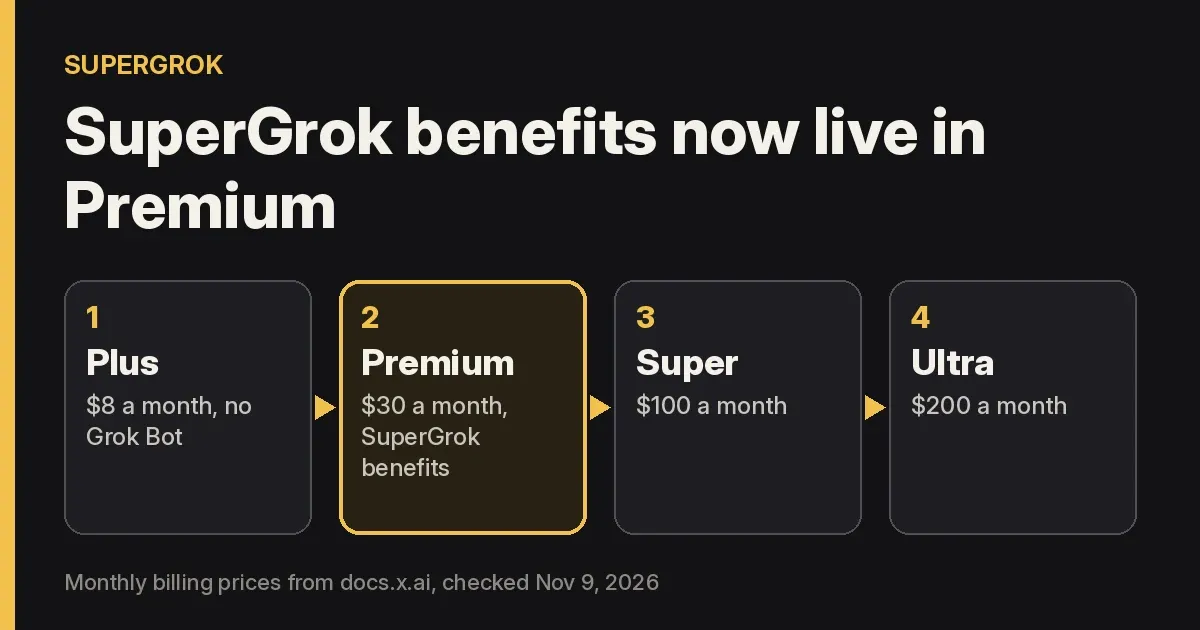
New customers can no longer pick SuperGrok on its own. xAI's docs say new self-serve customers choose from The X Subscription plans. Its Premium plan, at $30 a month billed monthly or $300 a year billed yearly, includes the benefits of SuperGrok, Cursor Pro, and X Premium+. Other plans are Free, Plus at $8, Super at $100, and Ultra at $200 a month, all billed monthly. Yearly billing costs less. If you already have SuperGrok, xAI says your plan continues and switching is optional.
What was SuperGrok?
SuperGrok was xAI's paid plan for Grok, its AI chat assistant. It gave you more usage and access to more features than the free version of Grok.
Now xAI has a new plan called The X Subscription. xAI's docs describe it as "one subscription that brings Grok, Cursor, and X together."
The docs also say: "New self-serve customers choose from The X Subscription plans. Existing Cursor, SuperGrok, and X Premium plans continue. Switching is optional."
So SuperGrok still exists for people who already had it. New people pick from the new plans.
Grok pricing now: The X Subscription plans
Here is the price table from xAI's docs. The prices were the same when checked on November 9, 2026:
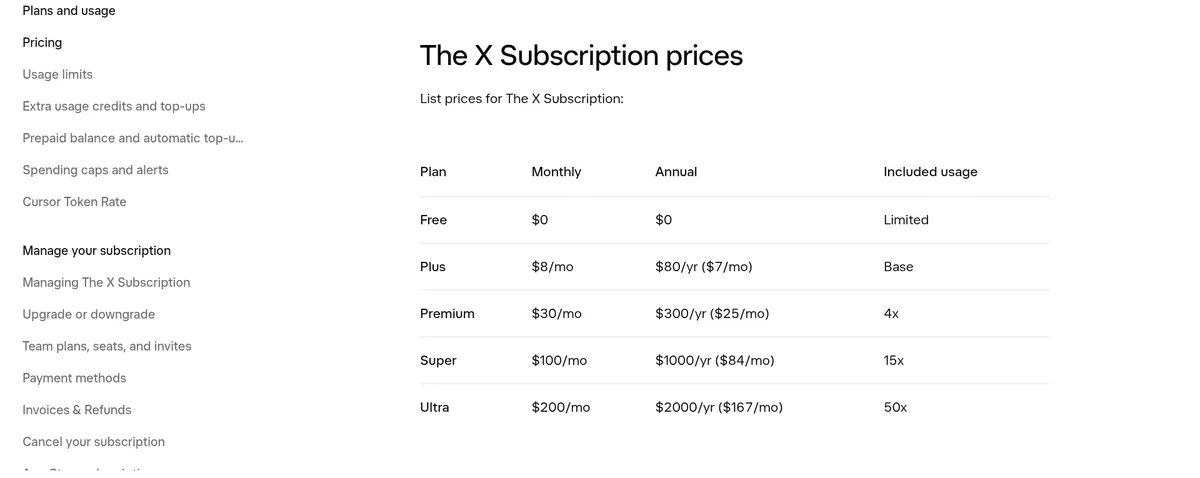
- Free: $0. Usage is "Limited."
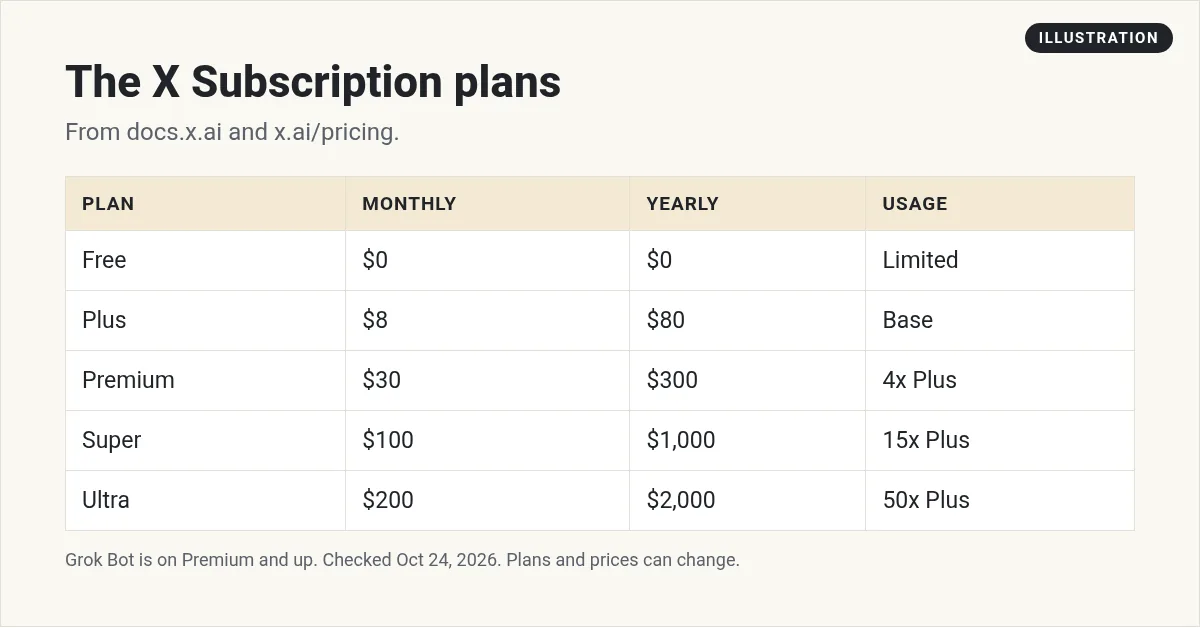
- Plus: $8 a month billed monthly, or $80 a year billed yearly (about $7 a month). This is the "Base" usage level.
- Premium: $30 a month billed monthly, or $300 a year billed yearly (about $25 a month). 4x the usage of Plus.
- Super: $100 a month billed monthly, or $1,000 a year billed yearly (about $84 a month). 15x the usage of Plus.
- Ultra: $200 a month billed monthly, or $2,000 a year billed yearly (about $167 a month). 50x the usage of Plus.
The docs add that "List prices do not include sales tax." Tax may be added at checkout. The x.ai pricing page also says you can cancel anytime, at least 24 hours before renewal.
Premium is the new SuperGrok
The plan that lines up with SuperGrok is Premium. Here is the plan table from xAI's launch post:
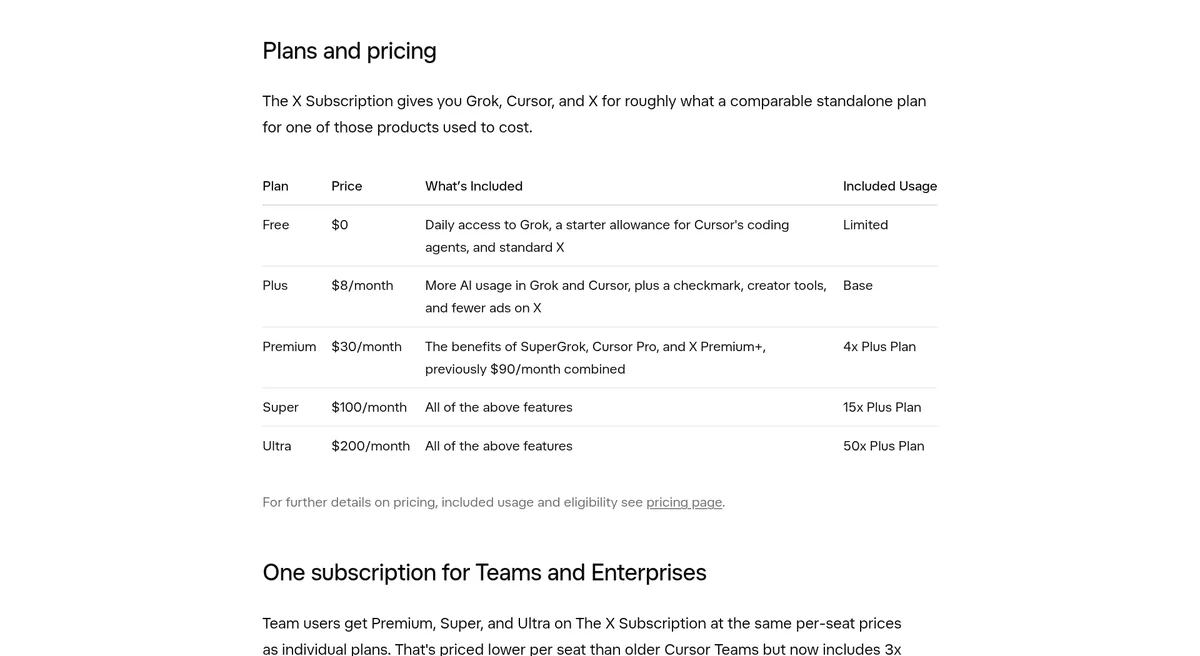
The launch post says Premium at $30 a month (billed monthly) includes "The benefits of SuperGrok, Cursor Pro, and X Premium+, previously $90/month combined."
So for $30 a month billed monthly you get:
- Grok: chat, voice, and image and video generation. My Grok Imagine guide covers the image and video tool.
- Grok Bot: xAI's AI teammates. The docs say "Grok Bot is included on Premium, Super, and Ultra. Plus does not include Grok Bot."
- Cursor: the AI coding tool.
- X Premium benefits: when you connect your personal X account.
What Plus gets you at $8 a month
The launch post says Plus gives "More AI usage in Grok and Cursor, plus a checkmark, creator tools, and fewer ads on X." It is a cheap way to try paid Grok. But it does not include Grok Bot, and it has the smallest usage pool.
How the shared usage pool works
This change is easy to miss. Paid plans do not give you separate limits for each product. They give you one pool.
The docs say "Grok and Cursor usage draw from the same included pool." The pool also covers Grok Bot. It refreshes every week.
Here is what that means in real life:
- If you code a lot in Cursor, you have less left for Grok chat and images that week.
- If you make a lot of videos in Grok, you have less left for coding.
- The docs say "Usage rates vary by product," so some tasks use more of the pool than others.
When you run out
After your weekly pool runs out, you can wait for the reset or buy top ups. The docs call this Additional Usage. You can set spending caps so top ups do not surprise you.
Other AI models in Cursor cost extra
If you use models like Claude or GPT inside Cursor, they are not part of the pool. The docs say they are "billed at API list prices from the first use and paid from your prepaid credit."
Already have SuperGrok? Here is what to know
xAI's docs are clear: "Switching is optional. If you don’t switch, your current plan continues unless you change or cancel it."
If you do switch, read this first:
- It is permanent. The docs say "The switch is permanent. It can’t be undone, and Support can’t undo it for you."
- You get a prorated refund. Your old SuperGrok, Cursor, or X Premium plans are cancelled, and you get a refund for unused time.
- The refund goes to your card, not your new plan. The docs say it "goes back to its original payment method." Your new plan is charged at full price.
- Apple billing is different. If you pay for Cursor through the Apple App Store, switching does not cancel it. You must cancel in your iPhone settings.
The launch post also says switching comes with limited time offers, which you can see in your billing settings.
Should you switch?
If you pay for SuperGrok and also pay for Cursor or X Premium, switching may cost less. The launch post says those three were "previously $90/month combined," and Premium is $30 a month billed monthly. Check what you pay today before you switch, because your own bill may be different.
If you only use Grok chat and like your current plan, there is no rush. Your plan keeps going.
What you can do with a paid Grok plan
The launch post sums up each part of the bundle in one line:
- "Grok supports chat, voice, and image and video generation."
- "Grok Bot gives you AI teammates that get work done."
- "Cursor provides leading local and cloud coding agents."
- X adds a checkmark, creator tools, and fewer ads. The post says higher tiers remove ads from the timeline entirely.
For a small business owner, that could mean writing posts and emails in Grok, making simple images for social media, and building a small tool in Cursor, all from one bill. If you only need one of those, look closely at whether Plus covers it before you pay for Premium.
The X Subscription for teams
The docs say "Team plans are available on Premium at $30 per seat, Super at $100 per seat, and Ultra at $200 per seat." Those are monthly prices per seat. You can mix seat types, such as three Premium seats and one Super seat.
The docs also say "Plus isn't available for teams." And each seat gets its own weekly pool. Seats do not share pools.
Which Grok plan should you pick?
- Free: you want to try Grok and use it now and then.
- Plus ($8 a month): you want more Grok chat and images and a checkmark on X, and you do not need Grok Bot.
- Premium ($30 a month): you want what SuperGrok used to give, plus Cursor and Grok Bot.
- Super ($100 a month): you code or make media most days and keep running out on Premium.
- Ultra ($200 a month): you are a very heavy user, often a full time developer.
Yearly vs monthly
- Plus: $8 x 12 is $96, versus $80 a year.
- Premium: $30 x 12 is $360, versus $300 a year.
- Super: $100 x 12 is $1,200, versus $1,000 a year.
- Ultra: $200 x 12 is $2,400, versus $2,000 a year.
Start monthly while you learn how fast you use the pool. Switch to yearly once you know your plan fits.
How to cancel
The docs say to go to Billing and invoices on your grok.com dashboard, open the options on your plan, and follow the prompts. "You can cancel at any time." The x.ai pricing page adds that you should cancel at least 24 hours before your plan renews.
If you signed up on X, cancel in X. If you signed up through Google Play, cancel there.
One warning from the docs: canceling "does not separate those accounts or restore your previous Cursor, SuperGrok, or X Premium subscriptions." So if you switch and then cancel, you cannot go back to old SuperGrok.
Comparing AI subscriptions? See my guides to Claude Pro vs Max, Perplexity Pro, and ChatGPT pricing.
Before I pick a Grok plan
Nothing you check here is sent or saved. Download it if you want to keep it.
Want an AI team to help run your business? Meet AIM Agent, an AI Chief of Staff for business owners. I am a co-founder of AIM Agent and have a financial interest in the product.
Meet AIM Agent
AIM Agent is an AI Chief of Staff for business owners. You give it a real task, and it brings the work back for you to review. You stay the one who approves.
Meet AIM AgentI am a co-founder of AIM Agent and have a financial interest in the product.
Frequently asked questions
Can I still buy SuperGrok?
xAI's docs say new self-serve customers choose from The X Subscription plans. Existing SuperGrok plans continue unless you change or cancel them.
How much is SuperGrok now?
The closest new plan is Premium at $30 a month billed monthly or $300 a year billed yearly. xAI says it includes the benefits of SuperGrok, Cursor Pro, and X Premium+.
How much does Grok cost per month?
As of November 9, 2026, The X Subscription has Free at $0, Plus at $8, Premium at $30, Super at $100, and Ultra at $200 a month, billed monthly. Yearly plans cost less per month.
Do I have to switch from SuperGrok?
No. xAI says switching is optional and your current plan continues. If you switch, it is permanent and you get a prorated refund for unused time.
Does Grok Plus include Grok Bot?
No. xAI's docs say Grok Bot is included on Premium, Super, and Ultra, but not Plus.
Do Grok and Cursor share usage?
Yes. On paid plans, Grok and Cursor draw from the same weekly usage pool. Third party models in Cursor are billed separately.
Want an AI team to help run your business?
Disclosure: I am a co-founder of AIM Agent and have a financial interest in the product.
AIM Agent is an AI Chief of Staff for business owners. It comes with an AI C-suite (COO, CMO, CFO, CRO and CTO), a Business Bot Builder and 100+ business skills, and it runs on AIM OS, a private vault that holds your notes and memory.
Here is what you get:
- An AI Chief of Staff that helps you plan and run your business
- An AI C-suite: COO, CMO, CFO, CRO and CTO
- A Business Bot for each business or project. Give it a real task and it brings the work back for you to review
- 100+ business skills for content, offers, research and more
- Step by step setup guides and email support
Sources
Checked November 9, 2026. Plans, prices, and rules can change.
