
AI Tools · Image and Video
Grok Imagine is xAI's tool for making images and short videos from text or photos. Here is what it does, how you pay for it, and how to get good results.
Grok Imagine is the image and video maker from xAI, the company behind Grok. You type a prompt or upload a photo, and it makes a picture or a short clip, often with sound.
On October 24, 2026, I went through xAI's Imagine API page, its pricing page, the new subscription docs, and its usage policy. Here is what Grok Imagine does, the two ways to pay, and what you are not allowed to make.
Quick answer
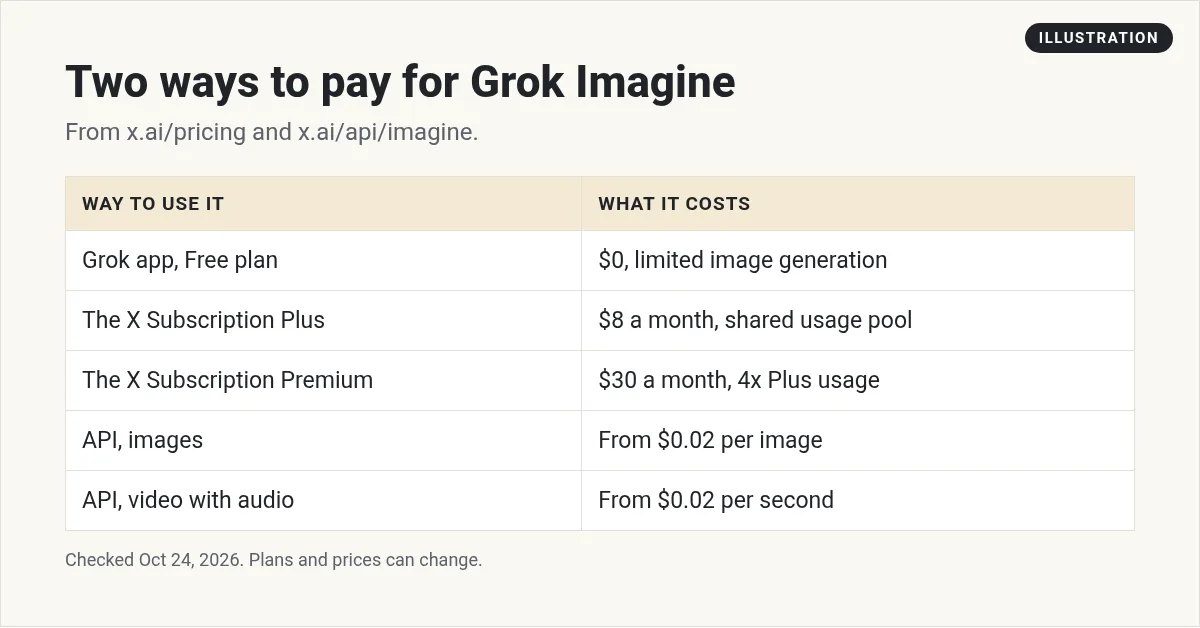
Grok Imagine is xAI's AI image and video generator. You can use it in the Grok app at grok.com/imagine or through the API. In the app, it is part of The X Subscription, where the Free plan lists image generation as limited and paid plans start at $8 a month. On the API, images start at $0.02 each and video with audio starts at $0.02 per second.
What is Grok Imagine?
Grok Imagine makes images and videos with AI. xAI calls it "State-of-the-art image and video generation, editing, and restyling" in one place.
You can use it two ways:
- In the Grok app: go to grok.com/imagine, or use the iOS and Android apps. This is the simpler way to start.
- Through the API: developers call it from code and pay per image or per second of video.
When I opened grok.com/imagine, it asked "What should we imagine?" and showed ready made templates. These included Text Edit, Photo Edit, BG Removal and Change, Profile Picture, Icon Maker, and E-Commerce Photos.
What Grok Imagine can do
Here is the top of xAI's Imagine API page on October 24, 2026:
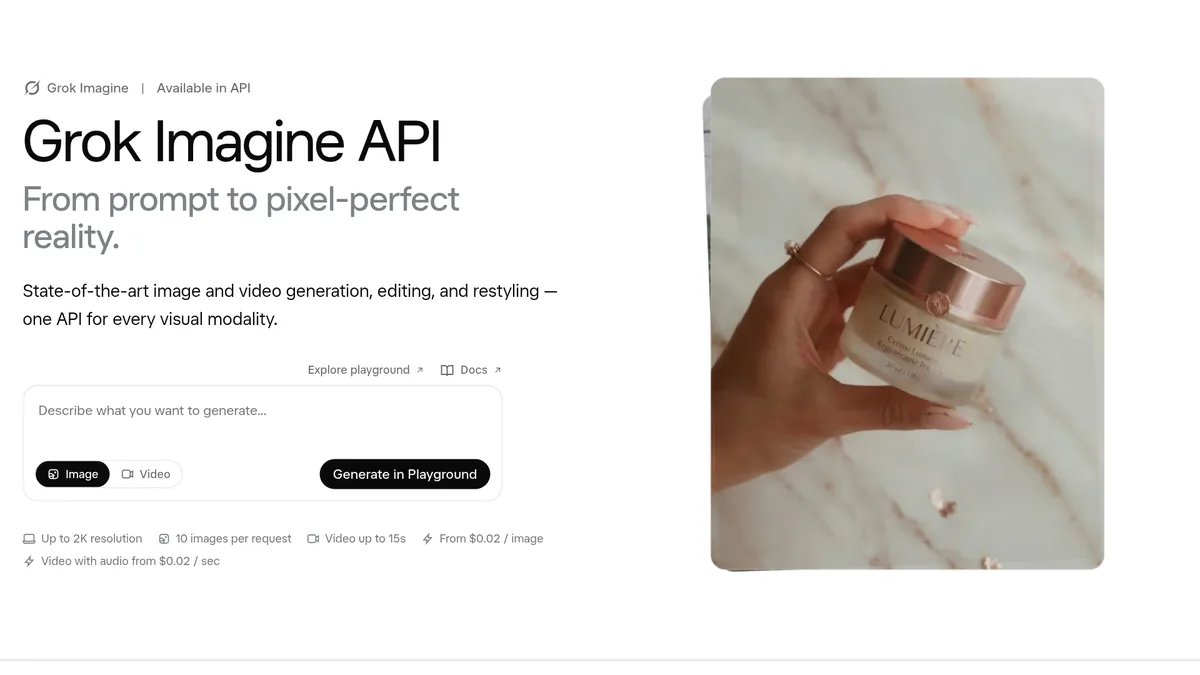
The page lists these numbers: "Up to 2K resolution," "10 images per request," and "Video up to 15s."
Images
- Make images from a text prompt.
- Edit an image with plain words, like changing a color or swapping a background.
- Restyle a picture, like cinematic, anime, retro, or watercolor.
- Combine more than one image into one scene.
Video
- Turn text into video, or turn a photo into video.
- Make clips up to 15 seconds long.
- Add sound. xAI's June post on Video 1.5 says sound effects and dialogue are "generated in the same pass" as the video.
- Edit a short video. The FAQ says you can give it a source video "up to 8.7 seconds" and a prompt.
Speed is a big selling point. xAI says Video 1.5 Fast "produces 6-second, 720p videos in about 25 seconds."
Sizes
The FAQ says images come in shapes like 1:1, 16:9, 9:16, 4:3, and 3:4. Video can be 480p, 720p, or 1080p.
One tip if you make ads: the page says "There is no 4:5 or 1.91:1 option." It suggests you crop those from 3:4 and 16:9.
Grok Imagine pricing in the app
In the Grok app, Imagine is part of a new plan called The X Subscription. xAI launched it in October 2026. Here are the plan cards from x.ai/pricing:
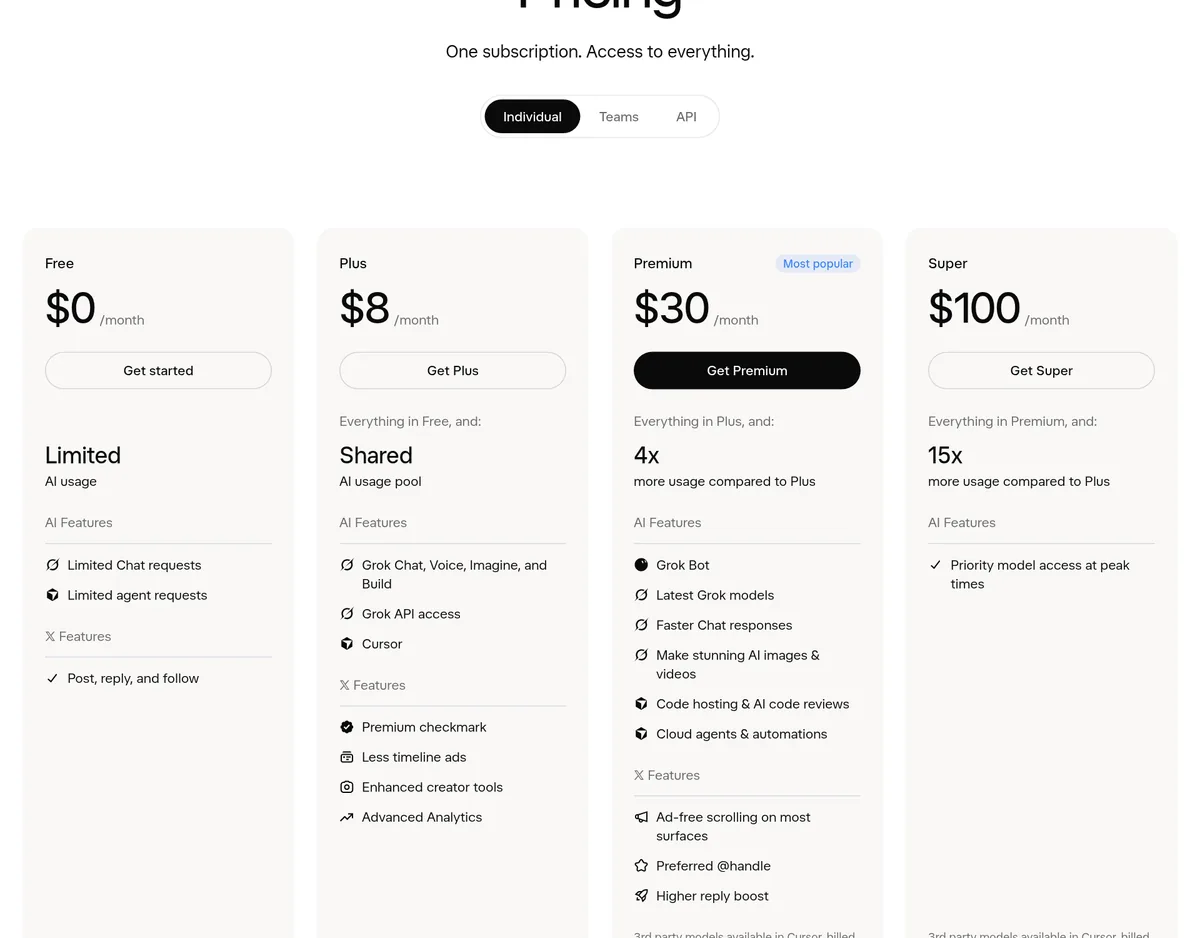
- Free: $0. The compare table lists image generation as "Limited."
- Plus: $8 a month, which the page says includes "Grok Chat, Voice, Imagine, and Build."
- Premium: $30 a month, with 4 times the usage of Plus.
- Super: $100 a month, with 15 times the usage of Plus.
- Ultra: $200 a month, with 50 times the usage of Plus.
Paid plans do not give you a set number of images. Instead, xAI says "Every tier includes a pool of AI usage shared across Grok and Cursor." That pool covers Chat, Imagine, Voice, and Bot, and it refreshes weekly.
That means heavy video use can eat into your chat time, and the other way around. Video uses more of the pool than images, since the page notes that "usage costs vary by product."
If you run out, xAI says you can buy top ups or wait for your weekly refresh. Before you upgrade, check how much of the pool you use in a normal week.
Grok Imagine API pricing
On the API, you pay for what you make. The FAQ says:
- "Images start at $0.02 each on grok-imagine-image, at 1K or 2K."
- Video is billed per second of output, "from $0.02 per second on grok-imagine-video-1.5-lite (480p, audio included)."
- "Text input is free."
Prices go up with better models and higher video quality. Check xAI's docs for the exact rate on the model you plan to use.
A simple cost example
Say you make 100 images on the API at the starting price of $0.02 each. That is $2. Now say you make ten 10 second videos on the lite model at $0.02 per second. That is 100 seconds, or $2.
That is the floor. Higher quality models and 1080p video cost more per second, so your real bill depends on what you pick.
How to use Grok Imagine, step by step
- Go to grok.com/imagine and sign in, or open the Grok app on your phone.
- Pick image or video. You can also start from a template like Photo Edit or Profile Picture.
- Write your prompt. Name the subject, the setting, the light, and the style.
- Pick a shape. Use 9:16 for Reels and TikTok, 1:1 for feeds, and 16:9 for YouTube.
- Make a few versions. Then keep the best one.
- Edit with words. Ask for small changes, like a new background or a warmer color.
- Turn it into video. Use your best image as the first frame of a short clip.
Prompt tips that help
- Be specific. A red coffee mug on a wood desk, morning light, soft shadows beats a mug.
- Describe motion for video. Say what moves and how, like a slow zoom or a pan left.
- Change one thing at a time. Small edits keep the parts you already like.
- Add sound in the prompt. If you want waves, music, or a voice, say so.
What you cannot make
This part matters. xAI's FAQ says "All generated images and videos go through automatic content moderation." Content that breaks the rules may be blocked.
xAI's acceptable use policy bans things like:
- "Violating copyright, trademark, or other intellectual property law"
- "Deceptively impersonating a real person"
- Altering a real person's image to show them in an intimate or sexual way
My rule is simple. Do not make images or videos of real people without their okay, and never pass off AI content as real. If you use AI images in ads, be honest with your audience.
Good ways to use Grok Imagine for a business
- Product photos: xAI pitches product placement, where you put your product in a new scene without a photo shoot.
- Social posts: make quick visuals for posts and stories.
- Short video hooks: turn one strong image into a 6 to 15 second clip.
- Ad tests: try several backgrounds or styles to see which one gets clicks.
- Thumbnails and icons: templates like Icon Maker help here.
AI images work best when they show your real product or idea. They work worst when they try to fake a real person or a real result.
Grok Imagine vs other AI image tools
Grok Imagine stands out for fast video with sound, and for being bundled into The X Subscription. Other tools have their own strengths:
- Midjourney is another AI image tool. See my Midjourney pricing guide.
- Ideogram's docs say it "can put text almost anywhere in an image," like a headline on a poster. See my Ideogram guide.
- HeyGen is built for talking avatar videos. See my HeyGen pricing guide.
If you already pay for Grok or X, start there. Test it on your real use case before you pay for a second tool.
Before I use Grok Imagine
Nothing you check here is sent or saved. Download it if you want to keep it.
Want to see how regular people use AI image and video tools to make content and simple offers? I walk through it in my free AI workshop.
Want to make better content with AI?
In my free workshop, I show how regular people use AI tools to create content and build simple online offers.
Join my free AI workshopFree to join. No credit card needed.
Frequently asked questions
Is Grok Imagine free?
The Free plan of The X Subscription lists image generation as limited. Paid plans start at $8 a month for Plus and include more usage.
How much does the Grok Imagine API cost?
xAI's API page says images start at $0.02 each and video with audio starts at $0.02 per second on the lite model. Text input is free.
How long can Grok Imagine videos be?
xAI's API page says video up to 15 seconds. You can also edit a source video up to 8.7 seconds long.
Can Grok Imagine make videos with sound?
Yes. xAI says Video 1.5 makes sound effects, ambience, and dialogue in the same pass as the video.
Can I make images of real people with Grok Imagine?
Be careful. xAI's policy bans deceptively impersonating a real person and sexual edits of real people. All outputs go through automatic moderation.
What sizes does Grok Imagine support?
Shapes include 1:1, 16:9, 9:16, 4:3, and 3:4. Video can be 480p, 720p, or 1080p. xAI says there is no 4:5 option.
Sources
Checked October 24, 2026. Plans, prices, and rules can change.
