
AI Tools · Image Generator
Ideogram is an AI image maker that can put words inside pictures. Here is what it does, what each plan costs, and how to get clean results.
Ideogram is an AI image generator. You type what you want, and it makes the picture. Its big strength is text inside images, like words on a poster, a sign, or a logo.
On October 24, 2026, I went through Ideogram's pricing page and its help docs on plans, credits, and common questions. Here is what it does, what each plan costs, and how to get better results.
Quick answer
Ideogram is an AI image tool. Its docs say it "can put text almost anywhere in an image." On October 24, 2026, its Free plan gave 30 credits a week, but only if you sign in with Google, Apple, or Microsoft, and free images are public. Plus was $20 a month ($15 billed yearly), Pro was $60 ($42 yearly), and Team was $30 per user ($20 yearly). Ideogram does not offer refunds.
What is Ideogram?
Ideogram makes images from text prompts. You can also edit images, keep a character the same across pictures, and turn text in an image into layers you can retype.
AI image tools can struggle with words. You ask for a sign that says OPEN and get a jumble of letters. Ideogram's docs have a full section on text in images, and it is a good fit for:
- Posters and flyers
- Social posts with a headline
- Logo ideas and simple brand graphics
- Thumbnails and ad mockups
Its newest model in the docs is Ideogram 4.5. The FAQ says to use it with reference images if you want a character to look the same in every picture.
Ideogram plans and prices
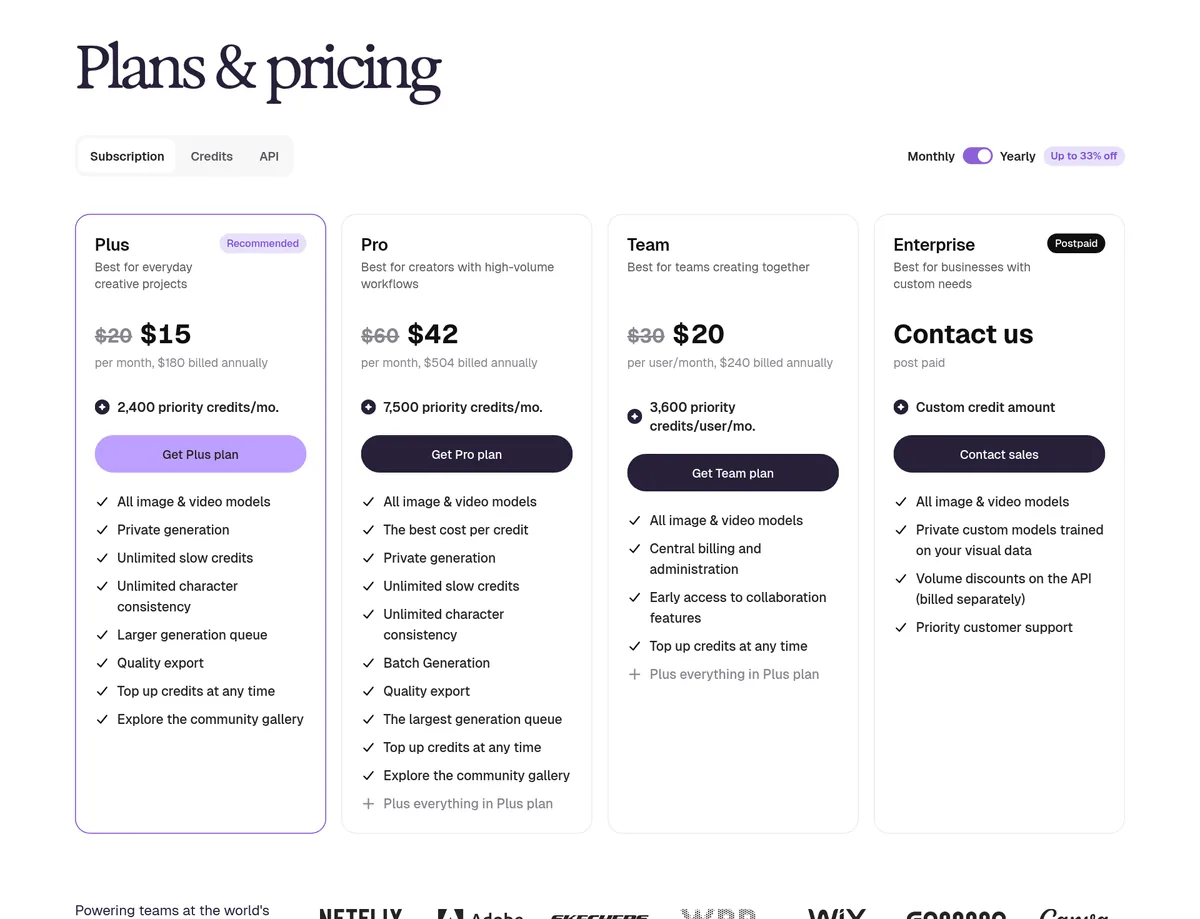
Here is Ideogram's pricing page on October 24, 2026, with yearly billing turned on:
And here is the plans table from Ideogram's own docs, which shows monthly and yearly prices side by side:
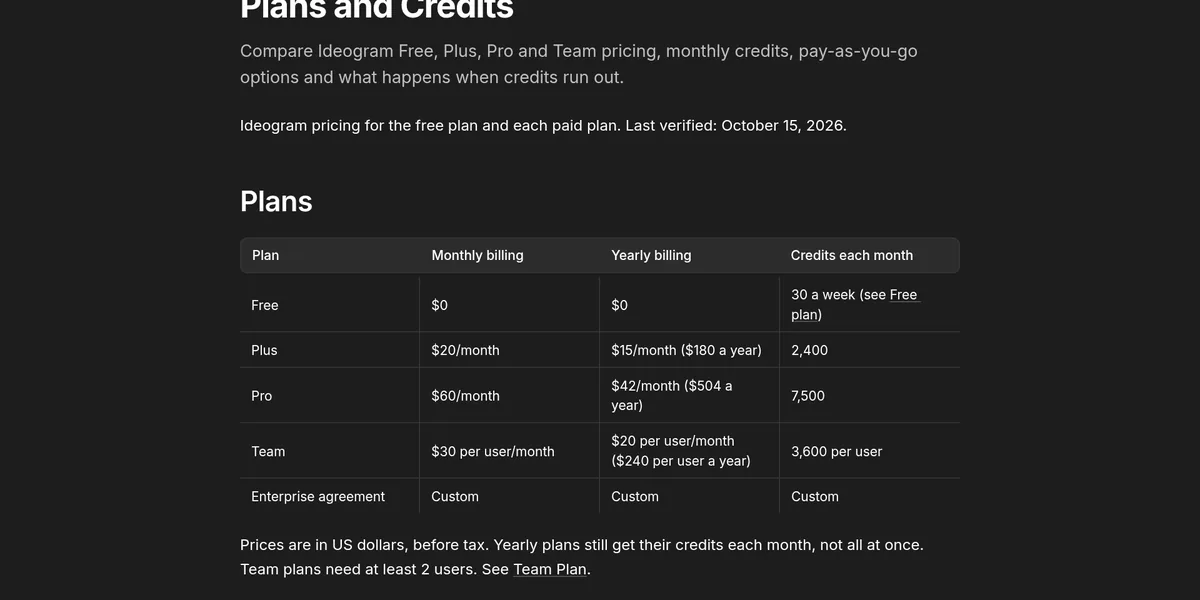
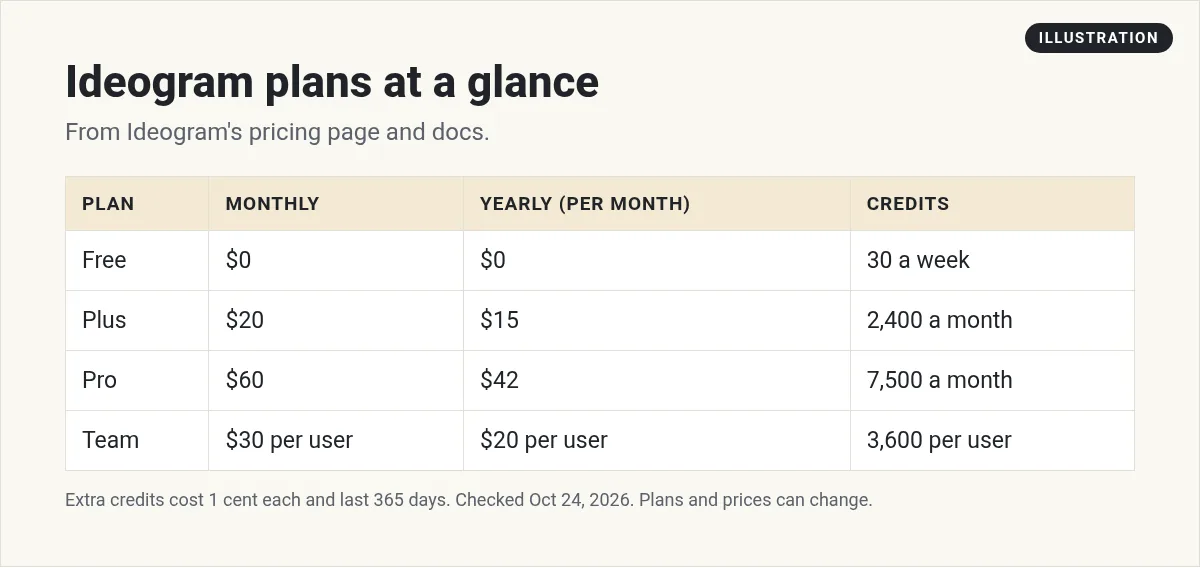
- Free: $0, with 30 credits a week.
- Plus: $20 a month, or $15 a month billed yearly ($180 a year). 2,400 credits a month.
- Pro: $60 a month, or $42 a month billed yearly ($504 a year). 7,500 credits a month.
- Team: $30 per user a month, or $20 per user billed yearly ($240 per user a year). 3,600 credits per user. The docs say Team plans "need at least 2 users."
- Enterprise: custom pricing.
The docs say "Prices are in US dollars, before tax." Yearly plans still get their credits each month, not all at once.
If you see an older Basic plan mentioned online, the docs say "Ideogram no longer sells the Basic plan." People who already have it keep it.
The Free plan: two catches
The Free plan is a good way to test Ideogram. But read these two rules first.
1. How you sign up matters
The docs say: "Free accounts get 30 credits each week if they sign in with Google, Apple or Microsoft." They add that accounts made with an email and password "don't get free credits."
So if you want free credits, sign up with one of those three, not with an email and password.
2. Free images are public
The docs say: "On the free plan, everything you generate is public." Paid plans keep new images private until you publish them.
That matters if you are making something for a client or a launch you do not want seen yet. For that, you need a paid plan.
How Ideogram credits work
Everything costs credits. The docs say "Images, videos, edits, upscales and app runs all cost credits." The cost depends on the model, quality, size, and how many images you make. In most apps, the run button shows the cost before you start.
The pricing page also listed what one image costs on the Ideogram 4.5 model on October 24, 2026: 3 credits at Low, 6 at Medium, and 10 at High. At the pay as you go price of 1 cent per credit, that is about 3 to 10 cents per image.
A few rules worth knowing:
- Monthly credits reset. The docs say "unused monthly credits do not roll over."
- You can buy more. The docs say "One credit costs one US cent." You can buy from $1 to $300 at a time.
- Bought credits last a year. They "expire 365 days after you buy them."
- Plan credits get used first, then any credits you bought.
What happens when you run out
This is a nice perk of the paid plans. On Plus, Pro, and Team, the docs say you can "Keep using Ideogram models in a slower queue, with no limit."
There are limits to that. The slower queue does not cover image edits, upscales, reference images, custom models, or partner models. Those still need credits.
On the Free plan, you wait for next week's 30 credits or buy more.
Which Ideogram plan should you pick?
- Pick Free if you want to test it and do not mind your images being public.
- Pick Plus if you make images every week and want them private. The docs say "Plus includes private generation and quality export."
- Pick Pro if you make images in large batches. The docs say Pro "adds Batch Generation and a larger generation queue."
- Pick Team if two or more people need access with one bill.
Start monthly while you test. If you stay past a couple of months, yearly billing cuts Plus from $20 to $15 a month.
How to use Ideogram, step by step
- Sign up at ideogram.ai with Google, Apple, or Microsoft to get free credits.
- Write your prompt. Say what the image shows, the style, and the colors.
- Put any words in quotes. The FAQ says to "Put the exact words in quotation marks in your prompt."
- Pick a size. Square for feeds, tall for stories, wide for YouTube.
- Generate and compare. Keep the best one.
- Fix small errors. If one word is wrong, edit just that part instead of starting over.
- Download and use it.
A sample prompt
When you type it, put the headline words in quotation marks. That tells Ideogram exactly what text to write.
Tips for clean text and better images
- Keep text short. A few words come out cleaner than a full paragraph.
- Name the font style. Bold, handwritten, or clean and modern.
- Say where the text goes. Top, center, or on a sign.
- Use reference images for characters. The FAQ says to add "one to five clear images of the character" with Ideogram 4.5.
- Fix, do not restart. Small edits save credits.
Can you use Ideogram images commercially?
Ideogram's FAQ answers this carefully. It says the answer depends on Ideogram's Terms of Service and tells you to read them before using images for business. It also says you are responsible for making sure your content does not break laws or other people's rights.
My advice: read the terms for your plan, keep images private on a paid plan if you do client work, and never use AI images to fake a real person or a real result.
Ideogram vs other AI image tools
- Midjourney is another AI image tool. See my Midjourney pricing guide.
- Grok Imagine from xAI does images and short videos with sound, and it is part of the X Subscription plans. See my Grok Imagine guide.
- Ideogram is the one I would try first when the image needs readable words.
Ideogram also has an MCP server. The FAQ says you can connect it to an AI assistant that supports MCP and ask the assistant to make or edit images. If you use tools like Claude or Cursor, that can save time.
For more tools that help with content, see my list of AI tools for affiliate marketing.
Before I pay for Ideogram
Nothing you check here is sent or saved. Download it if you want to keep it.
Want to see how regular people use AI tools to make content and simple offers? I walk through it in my free AI workshop.
Want to make better content with AI?
In my free workshop, I show how regular people use AI tools to create content and build simple online offers.
Join my free AI workshopFree to join. No credit card needed.
Frequently asked questions
Is Ideogram free?
Yes, there is a Free plan with 30 credits a week. You only get those credits if you sign in with Google, Apple, or Microsoft, and free images are public.
How much is Ideogram per month?
On October 24, 2026, Plus was $20 a month, Pro was $60, and Team was $30 per user. Yearly billing cut those to $15, $42, and $20 a month.
Do Ideogram credits roll over?
No. Ideogram's docs say unused monthly credits do not roll over. Credits you buy separately last 365 days.
What happens when I run out of Ideogram credits?
On Plus, Pro, and Team you can keep making images in a slower queue with no limit. Edits, upscales, and reference images still need credits.
Does Ideogram give refunds?
No. Ideogram's FAQ says it does not offer refunds. Cancelling stops future charges.
Are my Ideogram images private?
Not on the Free plan, where everything is public. Paid plans keep new images private until you publish them.
Sources
Checked October 24, 2026. Plans, prices, and rules can change.
