
AI Tools · Pricing
HeyGen lets you make videos with an AI avatar, no camera needed. Here is what each plan costs and how its credits really work.
HeyGen is an AI video tool. You type a script, and an AI avatar presents it, even one that looks and sounds like you. It is a popular way to make content without filming yourself every day.
On October 22, 2026, I went through HeyGen's pricing page for individuals and businesses, with the monthly and yearly toggles, plus its pricing FAQ. Here is what it costs.
Quick answer
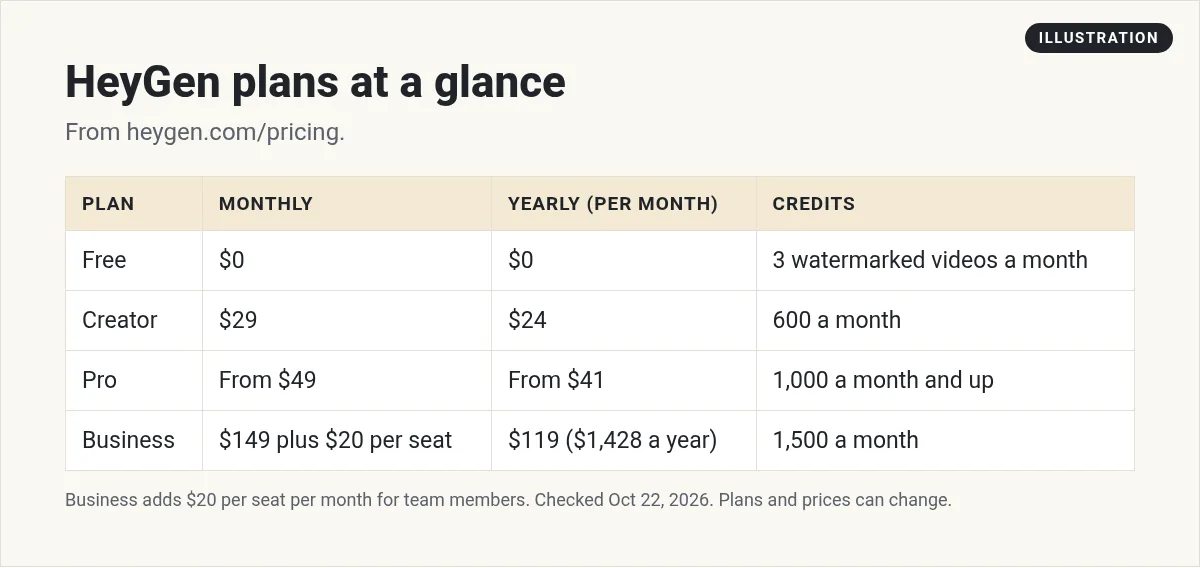
HeyGen has a Free plan with 3 watermarked videos a month. Creator is $29 a month, or $24 a month billed yearly ($288 a year), with 600 credits. Pro starts at $49 a month, or $41 a month billed yearly ($488 a year), with 1,000 credits and 4K export. Business is $149 a month billed monthly, or $119 a month billed yearly ($1,428 a year), plus $20 per seat per month, with 1,500 credits. Enterprise is priced by sales. Checked October 22, 2026.
HeyGen plans and prices
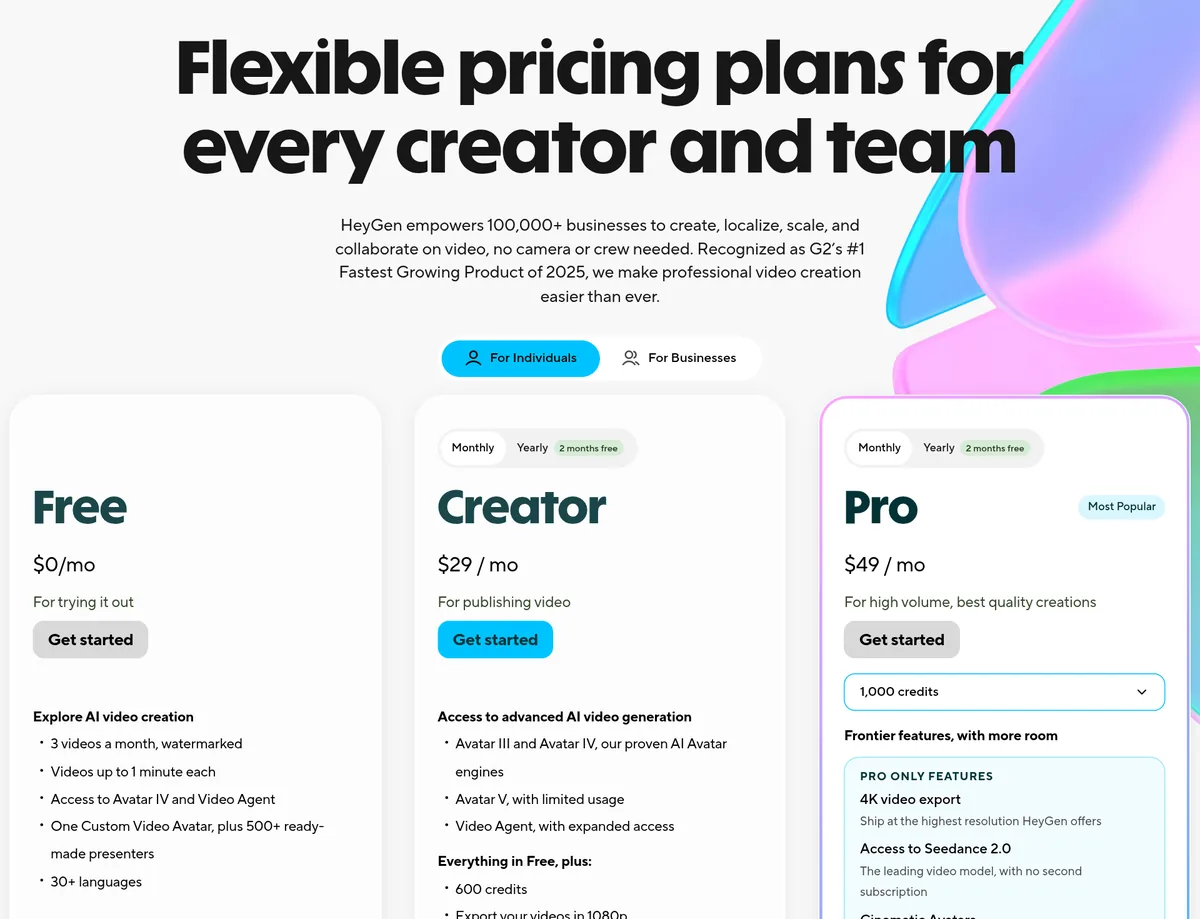
HeyGen's pricing page has two tabs, For Individuals and For Businesses. Here is what each plan costs on October 22, 2026, with the Monthly toggle on:
- Free, $0: 3 videos a month, watermarked, up to 1 minute each. You get one Custom Video Avatar and 500+ ready-made presenters.
- Creator, $29 a month: 600 credits, 1080p export, no HeyGen branding, and a Custom Video Avatar with your own voice and likeness.
- Pro, from $49 a month: 1,000 credits, 4K export, faster processing, and first access to new models.
- Business: $149 a month billed monthly, or $119 a month billed yearly ($1,428 a year), plus $20 per seat per month for extra team members. You get 1,500 credits, videos up to 60 minutes, a shared team workspace, and SAML/SSO.
- Enterprise: contact sales.
Monthly vs yearly
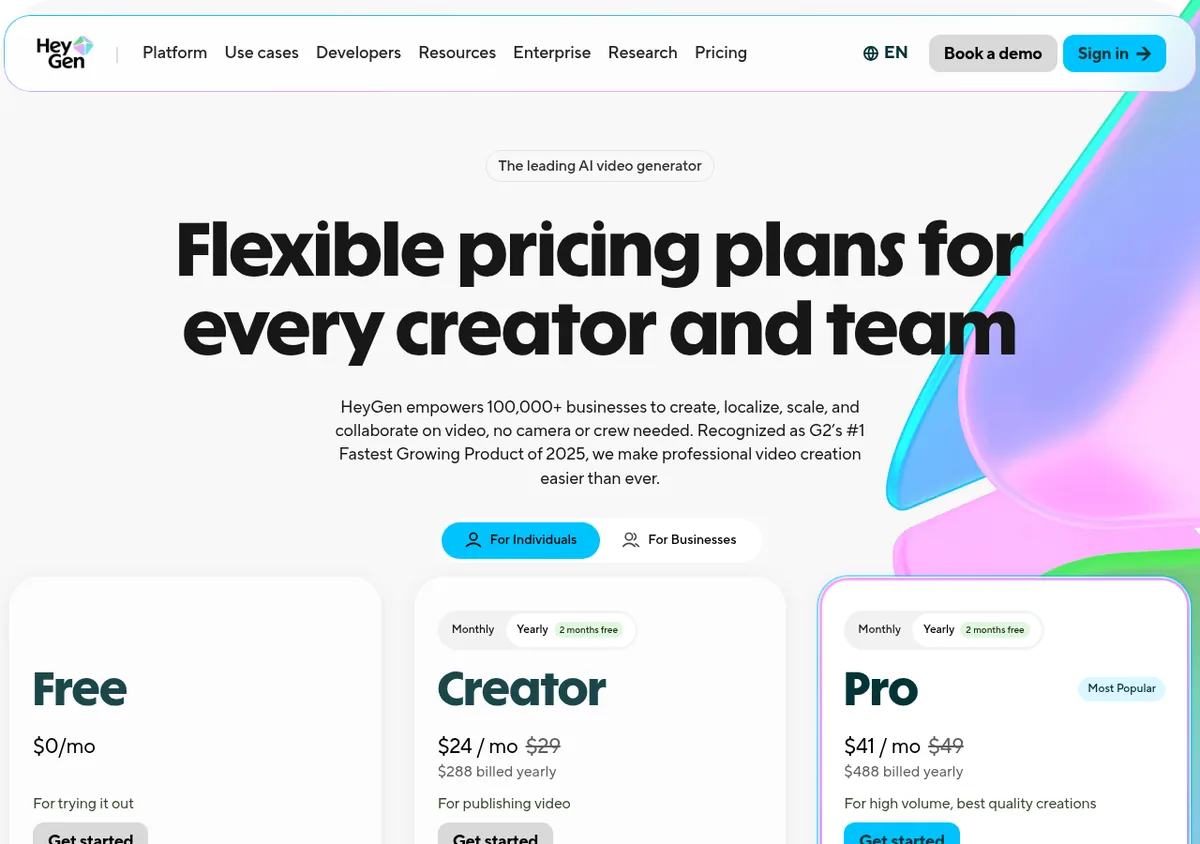
Each paid plan card has its own Monthly and Yearly toggle. Yearly is labeled "2 months free." Here is what the yearly toggle shows:
- Creator: $24 a month, "$288 billed yearly."
- Pro: $41 a month, "$488 billed yearly."
- Business: $119 a month, "$1,428 billed yearly."
Quick math. Creator paid monthly for a year is 12 times $29, or $348. Yearly is $288, so you save $60. Pro paid monthly for a year is 12 times $49, or $588. Yearly is $488, so you save $100. Business paid monthly for a year is 12 times $149, or $1,788. Yearly is $1,428, so you save $360.
Yearly also changes how credits work, which I cover next. On a yearly plan, unused credits keep piling up until your renewal date. On a monthly plan, they only roll over for one extra month. If your video output goes up and down from month to month, that makes yearly even more useful.
What you can make with HeyGen
Before the prices make sense, it helps to know what you are paying for. From the plan cards and comparison table, here is what HeyGen offers:
- Stock avatars: 500+ ready-made presenters on Free, and 700+ on paid plans.
- Your own avatar: a Custom Video Avatar that looks like you. On Creator and up, it can use your own voice.
- Photo avatars: turn a photo into a talking avatar. Free allows up to 3, and paid plans list unlimited.
- Languages: 30+ on Free and 175+ languages and dialects on Creator.
- Templates: 75+ video templates on every plan.
A common use is turning a blog post or a script into a short video with your avatar presenting it. The comparison table also lists PowerPoint and PDF imports, so check which plan includes them before you count on that.
How HeyGen credits work
Credits are the key to HeyGen pricing. The FAQ says, "Credits are HeyGen's single currency for video and asset creation."
Each paid plan gives you a monthly batch of credits. How many credits a video uses depends on the AI model, the length of the video, and how complex it is. So there is no simple "credits per minute" number to plan around. Make a few test videos and watch your balance.
Do credits roll over?
Yes, with limits. From the FAQ:
- On monthly plans, unused credits roll over for one more month.
- On yearly plans, credits pile up until your yearly renewal date.
- If you cancel, credits do not carry over.
How to get more credits
Creator and Pro users can move up to a higher plan or tier. Business users can buy one-time credit packs or turn on auto-reload. The FAQ says upgrades take effect right away, with prorated billing.
Pro is really a ladder of tiers
That "from $49" on Pro matters. The FAQ says, "All Pro tiers include the same features: only the monthly credit allocation changes." The tiers run from 1,000 credits a month at $49 a month up to 100,000 credits a month at $4,300 a month on monthly billing.
So if you make a lot of video, you don't need Business for more credits. You can move up a Pro tier instead. Business is about team features.
What each plan is really for
Free: trying it out
The FAQ says you can try HeyGen "no credit card required." Three short, watermarked videos a month is enough to test the tool. It is not enough to publish real content.
Creator: solo content
Creator is the first plan without HeyGen branding. Your own avatar with your own voice makes it the starting point for most solo creators. If you only need AI voiceovers without video, see my ElevenLabs pricing guide.
Pro: more volume and 4K
Pro adds 4K export, faster processing, and extra AI models. HeyGen lists Seedance 2.0 and Cinematic Avatars as Pro only features.
Business: teams
Business adds a shared workspace, central billing, a brand kit, and SAML/SSO. HeyGen also lists "2x the concurrency of Pro" and five Custom Video Avatars.
What the Free plan includes
The Free plan is more than a demo. The pricing page lists:
- 3 videos a month, watermarked.
- Videos up to 1 minute each.
- Access to Avatar IV and Video Agent.
- One Custom Video Avatar, plus 500+ ready-made presenters.
- 30+ languages.
That is enough to test whether you like how your avatar looks and sounds. Do that before you pay for anything.
Creator vs Pro: the real difference
Most solo creators choose between these two, so here is the plain comparison from the plan cards:
- Price: Creator is $29 a month. Pro starts at $49 a month.
- Credits: Creator has 600 a month. Pro starts at 1,000 and can go much higher.
- Export: Creator exports in 1080p. Pro adds 4K.
- Speed: Pro lists faster video processing.
- Models: Pro adds Seedance 2.0, Cinematic Avatars, VEO 3.1, and Nano Banana.
If you post a few videos a week in 1080p, Creator is likely enough. If you need 4K or you run out of credits on Creator, look at Pro.
Common HeyGen pricing mistakes
- Paying yearly before testing. Credits per video vary, so learn your usage first.
- Buying Business just for credits. Higher Pro tiers add credits without team features.
- Letting credits pile up, then canceling. Unused credits do not carry over after you cancel.
- Forgetting seat costs. On Business, each extra team member is $20 a month.
Switching and canceling
The FAQ says downgrades and cancellations "take effect at the end of your current billing cycle." You keep your plan and credits until then. After that, your account moves to the Free plan, and unused credits do not carry over.
Is HeyGen worth it?
If you want to make videos without filming yourself every time, it can save a lot of hours. That is a big deal for people building content around a business. I cover more ways to do this in affiliate marketing without showing your face and AI tools for affiliate marketing.
Keep two things in mind. First, video uses credits fast, so test before you commit to a yearly plan. Second, if you make a custom avatar of yourself, read HeyGen's terms on how your likeness is used. That is good practice with any AI video tool. If you film yourself and want to edit video by editing the text, see my Descript pricing guide. To cut long videos into short clips, see my OpusClip pricing guide.
My video: My plain English explanation of how affiliate marketing works, the business a lot of people use AI video for. Results vary, so use this post for current HeyGen prices.
Any results mentioned in videos are not typical and are not a promise of income. Your results depend on your work and your market.
Before I pay for HeyGen
Nothing you check here is sent or saved. Download it if you want to keep it.
Want to build an online business with AI?
In my free workshop, I show how regular people use AI tools to create content and build simple online businesses, step by step.
Join my free AI workshopFree to join. No credit card needed.
Frequently asked questions
Is HeyGen free?
Yes. The Free plan includes 3 watermarked videos a month, up to 1 minute each, and no credit card is required.
How much is HeyGen Creator?
Creator is $29 a month, or $24 a month billed yearly ($288 a year), checked October 22, 2026. It includes 600 credits a month.
How much is HeyGen Pro?
Pro starts at $49 a month, or $41 a month billed yearly ($488 a year). Higher Pro tiers add more credits, up to 100,000 credits a month at $4,300 a month on monthly billing.
How much is HeyGen Business?
Business is $149 a month billed monthly, or $119 a month billed yearly ($1,428 a year), plus $20 per seat per month. It includes 1,500 credits and team features like a shared workspace and SAML/SSO.
Do HeyGen credits roll over?
Yes. On monthly plans, unused credits roll over for one more month. On yearly plans, they pile up until renewal. Credits do not carry over after you cancel.
What happens when I cancel HeyGen?
You keep your paid features and credits until the end of your billing cycle. Then your account moves to the Free plan.
Sources
Checked October 22, 2026. Plans, prices, and rules can change.
