
AI Tools · Pricing
Descript lets you edit video by editing text. The price looks simple, but your plan really comes down to two limits: media hours and AI credits. Here is how they work.
Descript is the video and podcast editor where you edit by changing the transcript. Delete a word in the text, and it is gone from the video. It also has an AI co-editor called Underlord.
On October 23, 2026, I went through Descript's pricing page with monthly and annual billing, the full feature table, and its help articles on credits and top ups. Here is what each plan costs and how the limits work.
Quick answer
On October 23, 2026, Descript had a Free plan at $0, plus Hobbyist at $24, Creator at $35, and Business at $65 per person per month on monthly billing. Annual billing cut those to $16, $24, and $50 per person per month. Each plan comes with a monthly amount of media hours and AI credits, and unused amounts do not roll over. Enterprise is custom.
Descript plans and prices
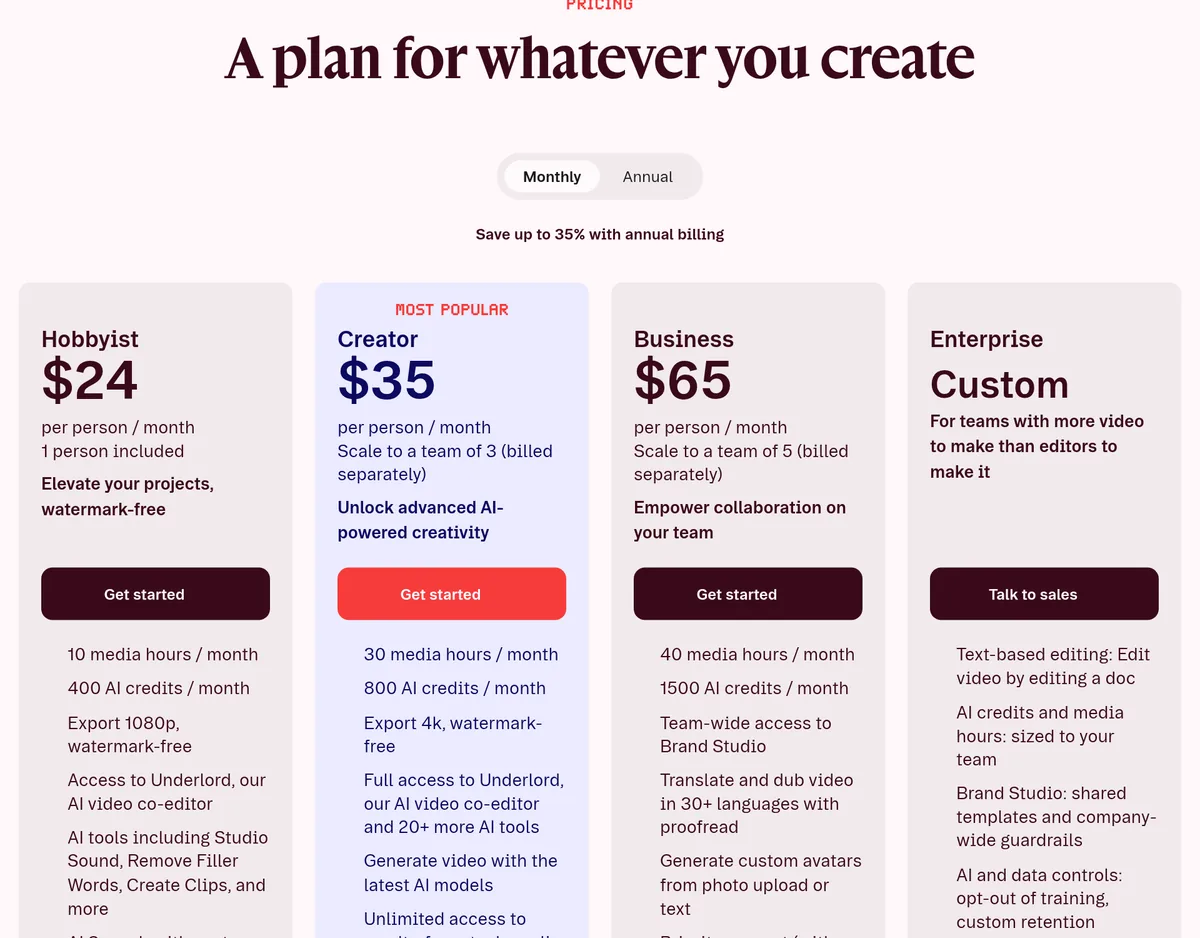
Here is what the pricing page showed with Monthly selected:
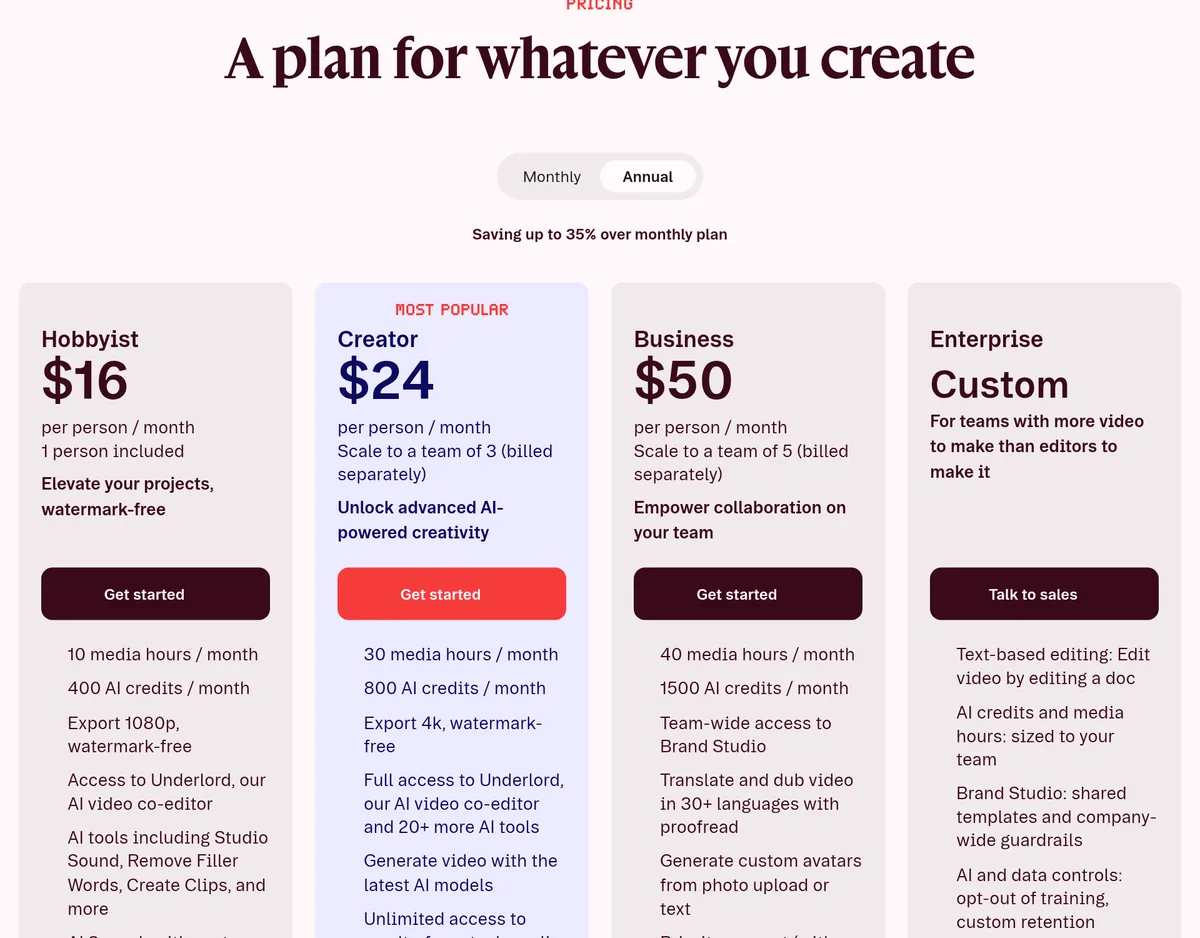
And here is the same page with Annual selected:
Put side by side:
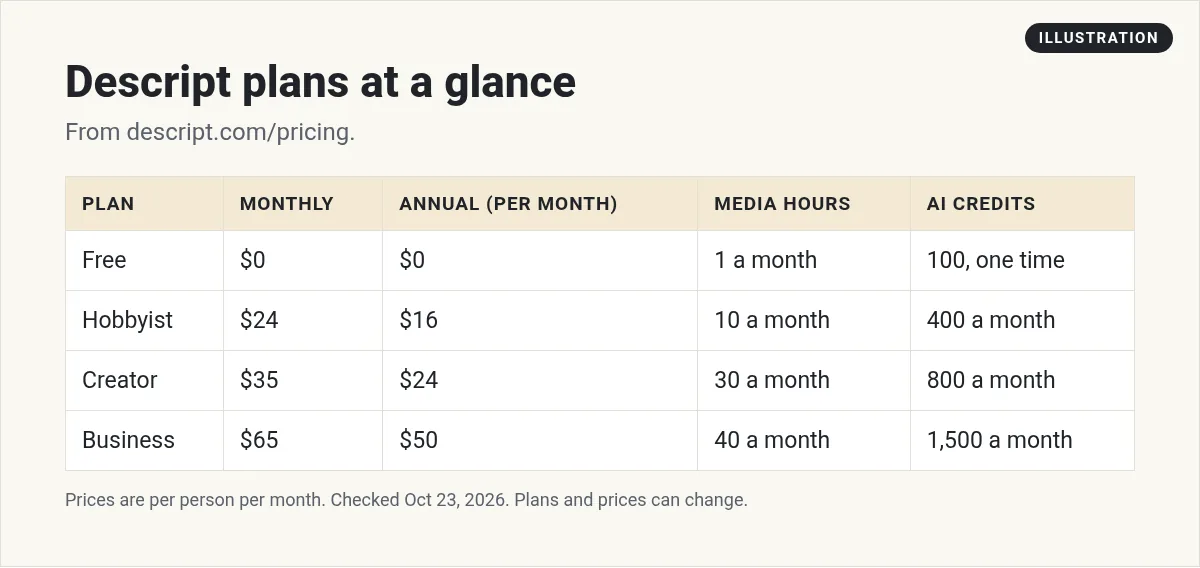
- Free: $0.
- Hobbyist: $24 per person a month, or $16 billed annually.
- Creator: $35 per person a month, or $24 billed annually. Descript marks this one "Most Popular."
- Business: $65 per person a month, or $50 billed annually.
- Enterprise: custom pricing.
The page says you can "Save up to 35% with annual billing." The biggest savings are on Hobbyist, where $16 is about a third less than $24.
The FAQ also says you do not need a credit card to try it. The Free plan "includes everything you need to record, edit and mix audio and video content."
Monthly vs annual: the yearly math
Here is what one person pays in a year, using the prices on the page:
- Hobbyist: $24 x 12 is $288 on monthly billing, versus $16 x 12, or $192, on annual. That is $96 less.
- Creator: $35 x 12 is $420, versus $288 on annual. That is $132 less.
- Business: $65 x 12 is $780, versus $600 on annual. That is $180 less.
Prices are per person. A team of 3 on Creator pays three times as much. If you are not sure you will stick with it, start on monthly for a month or two. Then switch once it is part of your routine.
Discounts for students, teachers, and nonprofits
The FAQ says Descript offers special rates for "students, educators, and non-profits." You apply through a form linked on the pricing page. If you fit one of those groups, it is worth asking before you pay full price.
What each plan includes
Every plan comes with two limits. Descript calls them media hours and AI credits. Here is what each plan gets:
| Plan | Media hours | AI credits | Export |
|---|---|---|---|
| Free | 1 hour a month | 100, one time | 720p |
| Hobbyist | 10 hours a month | 400 a month | 1080p |
| Creator | 30 hours a month | 800 a month | 4K |
| Business | 40 hours a month | 1,500 a month | 4K |
All plans include transcription in 25 languages.
What Creator adds
Creator adds full access to Underlord and "20+ more AI tools," AI video generation, the royalty-free stock media library, and the option to buy top ups. You can also grow to a team of 3, billed separately.
What Business adds
Business adds Brand Studio for the whole team, translation and dubbing "in 30+ languages with proofread," custom avatars, and priority support. You can grow to a team of 5, billed separately.
Media hours and AI credits, explained
This is the part that decides which plan you really need.
Media hours
The help center says media minutes are "the time you use when uploading or recording media in Descript." That includes video, audio, screen recordings, and recording sessions with guests.
One nice detail: a recording session with guests uses your minutes "only for the total length of the session," not once per person.
AI credits
AI credits are used by AI features like Underlord, Studio Sound, Green Screen, Eye Contact, and AI-generated media. Here is the part people miss. The help center says, "Even if you’re just chatting with Underlord and not using a specific AI tool, each message still uses a few AI credits."
So if you plan to lean on Underlord a lot, credits matter more than hours.
They do not roll over
The help center is clear: "Unused Media minutes and AI Credits don’t roll over into the next cycle." Your allowance resets when your plan renews.
Top ups: buying more when you run out
If you run low mid-project, you can buy more without changing your plan. These are called top ups. The rules:
- Top ups "are only available on Creator and Business plans."
- They are shared across everyone on your Drive.
- They "expire 12 months after purchase."
- They are only used after your monthly allowance runs out.
- The help center says "Top Up purchases are non-refundable."
So on Hobbyist, you cannot buy top ups. If you run out, you wait for your reset or upgrade.
Which Descript plan should you pick?
Here is a simple way to choose.
- Free: to test the text-based editing and see if you like it. One hour a month is enough for a few short videos.
- Hobbyist: for one person making a few videos or podcast episodes a month, where 1080p is fine.
- Creator: for people posting every week, who want 4K, stock media, more AI, and the option to buy more when they run out.
- Business: for teams that need shared branding, translation and dubbing, or avatars.
The quick math for hours: add up the raw footage you record or upload each month, not the length of your final videos. A 10 minute video might start as an hour of raw footage. That is what counts.
Mistakes to avoid
- Counting final video length. Raw footage is what uses your hours.
- Forgetting the per person price. Each extra editor adds a full seat.
- Buying top ups too early. They only kick in after your monthly allowance is gone, and they cannot be refunded.
- Chatting with Underlord all day. Every message uses a few credits. Be clear and specific so you need fewer messages.
A simple example
Say you post one 20 minute podcast episode each week, and each one starts as about 45 minutes of recording. That is about 3 hours of media a month. Hobbyist's 10 hours covers it easily.
Now say you also cut 5 short clips from each episode and use Underlord to help. That uses AI credits each time. If you find yourself running low on Hobbyist's 400 credits, Creator gives you 800 and the option to top up.
This is just an example to show how the limits work. Your own use will be different, so check your usage page after a few weeks.
Is Descript worth it?
The page says "More than 6 million creators & teams use Descript." It is popular because text-based editing is fast, especially for talking-head videos and podcasts.
Descript makes sense if you:
- Make videos or podcasts where people talk a lot.
- Want to cut filler words and mistakes fast.
- Want AI help with clips, sound, and edits in one tool.
Look at other options if you:
- Mostly make music videos or heavy visual edits.
- Only edit once in a while. The Free plan may be enough.
- Need AI avatar videos as your main product. A tool built for that may fit better. My HeyGen pricing guide covers one.
- Mostly want to turn long videos into short clips. My OpusClip pricing guide covers a tool for that.
My video: A short look at how I use AI tools to make content faster.
Any results mentioned in videos are not typical and are not a promise of income. Your results depend on your work and your market.
How to cancel
The FAQ says you can cancel from your Descript subscription page. You can also delete your account and wipe your data from Descript's servers. Before you cancel, download any projects you want to keep.
Want to see how people use AI tools like this to make content and build simple online businesses? I walk through it in my free AI workshop.
Want to make content faster with AI?
In my free workshop, I show how regular people use AI tools to create content and build simple online businesses.
Join my free AI workshopFree to join. No credit card needed.
Frequently asked questions
How much does Descript cost?
On October 23, 2026, Descript was $24, $35, and $65 per person per month for Hobbyist, Creator, and Business on monthly billing, or $16, $24, and $50 billed annually. There is also a Free plan.
Is Descript free?
Yes, there is a Free plan at $0 with 1 media hour a month and 100 one-time AI credits. No credit card is needed.
What are Descript AI credits?
AI credits track your use of AI features like Underlord, Studio Sound, and Eye Contact. Even chatting with Underlord uses a few credits per message.
Do Descript credits roll over?
No. Unused media minutes and AI credits do not roll over. Top ups are different: they last up to 12 months from purchase.
Can I buy more Descript credits?
Yes, with top ups, but only on the Creator and Business plans. Top ups are non-refundable.
How do I cancel Descript?
Cancel from your Descript subscription page. You can also delete your account and wipe your data.
Sources
Checked October 23, 2026. Plans, prices, and rules can change.
