
Grok Bot · Small Business
Grok Bot can take real work off a small business owner's plate. Here is where I would start, the first five jobs to hand off, and the rules that keep you in control.
Grok Bot for small business comes down to one question: what work can you hand off this week, and still sleep at night? I run my business with a team of AI agents in Grok Bot, so I get asked this a lot.
I read the official Grok Bot docs on October 28, 2026, and watched the most useful recent videos on it. This is the plan I would give a friend who owns a small business and has never set up an AI agent.
TL;DR
Grok Bot gives each Bot its own cloud computer, so it can use your apps and the web while your laptop is closed. For a small business, start with one Bot and one job you can review, like a daily inbox digest, follow up drafts, or a weekly expense summary. Connect one app, keep sending and payments behind approval, save what works as a skill, and only then put it on a routine. AIM Agent gives you a ready-made business team so you can skip most of the setup.
Why small business owners should care
Most small business owners are the bottleneck. Every email, quote, follow up, and report runs through you. That is the problem Grok Bot is built for.
The official page puts it simply: give tasks to Bots like you would a teammate, and come back when your approval is needed. Each Bot keeps context on how you work, and AI teammates can work in parallel and keep working 24/7.
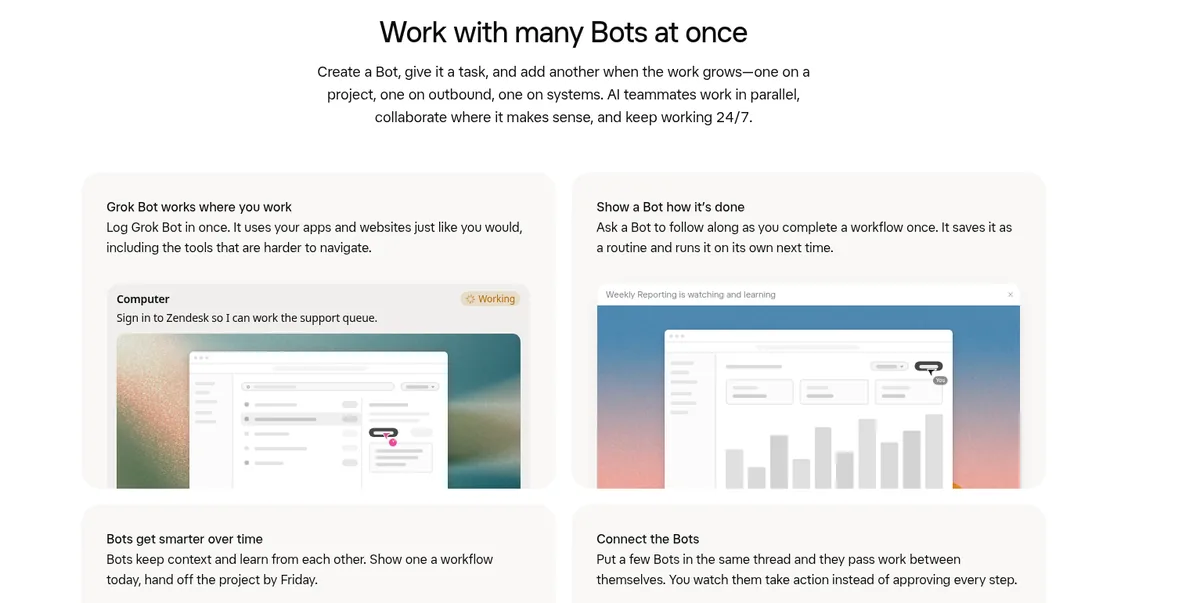
That is a big change from a chatbot. A chatbot answers a question. A Bot owns a job. It has its own computer in the cloud, a browser, files, memory, and the apps you connect. If you want the full picture first, read Grok Bot explained.
The one rule that matters most
The Grok Bot use cases docs say it best: "The best Bot roles own a repeatable outcome, not a loose category of questions."
So do not make a Bot called Marketing Helper. Make a Bot that owns one result, like "a list of five content ideas with sources, every Monday." In one tutorial, the AI Master channel calls this "One bot, one job, one schedule." I agree. A Bot that does eleven things usually does them all badly.
The docs also say every starter prompt should end "at a review point on purpose." The Bot prepares. You approve. That is how you keep control while you learn to trust it.
The first 5 jobs I would hand off
These are my picks for most small businesses. Each one is read and prepare work, so nothing goes out without you.
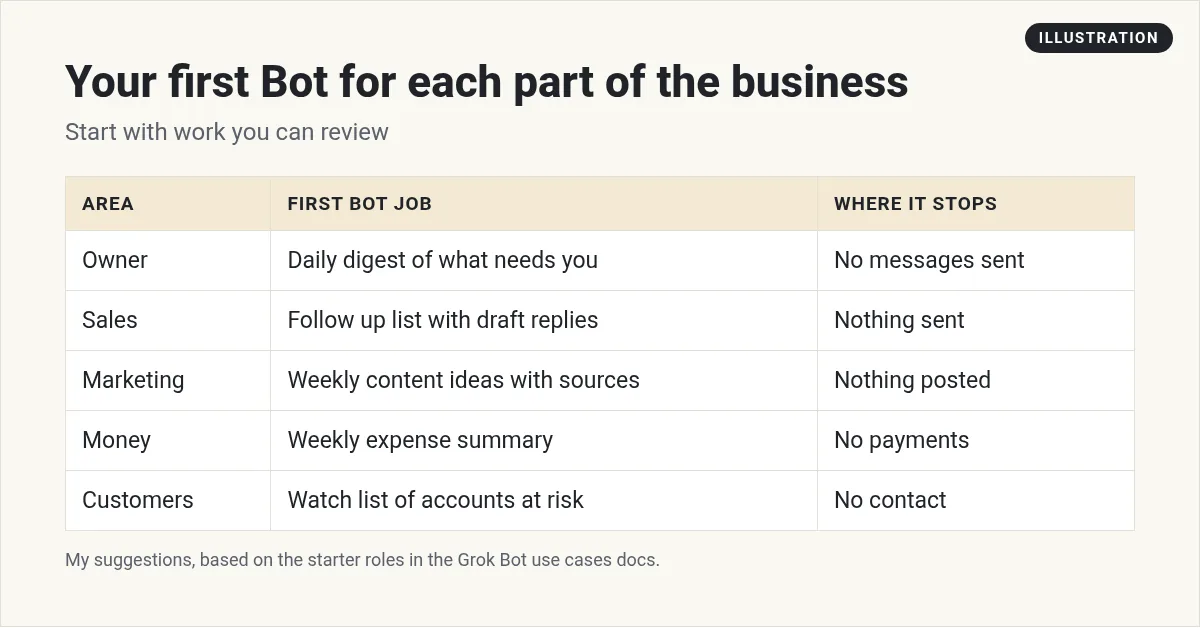
- A daily digest of what needs you. One Bot reads your inbox and calendar each morning and lists what needs a reply, what can wait, and what can be archived. In one video, Matthew Berman shows an email agent that runs every morning and sorts the easy archive emails into one batch first. That is a great first win.
- Follow up drafts. A sales Bot builds a list of people who went quiet, with a short draft reply for each. You read and send. The docs' sales example ends with "Return a review list; do not send or enroll anyone."
- Weekly content ideas. A content Bot finds what people in your market are talking about this week, with links, and suggests three topics. You pick one.
- A weekly expense summary. The docs have an expense manager example that matches receipts, flags missing items, and drafts follow ups, then stops: "do not send messages or change reimbursements."
- Meeting prep. Before each call, the Bot pulls what you know about the person and writes a short prep note. Nat Eliason shows a morning meeting prep routine like this in his Founders School tutorial.
Pick the one that eats the most of your time. Start there. You can see twelve more ideas in Grok Bot use cases.
How to set up your first business Bot
You do not need to code. The setup is mostly talking to the Bot in plain words. Here are the steps I would follow:
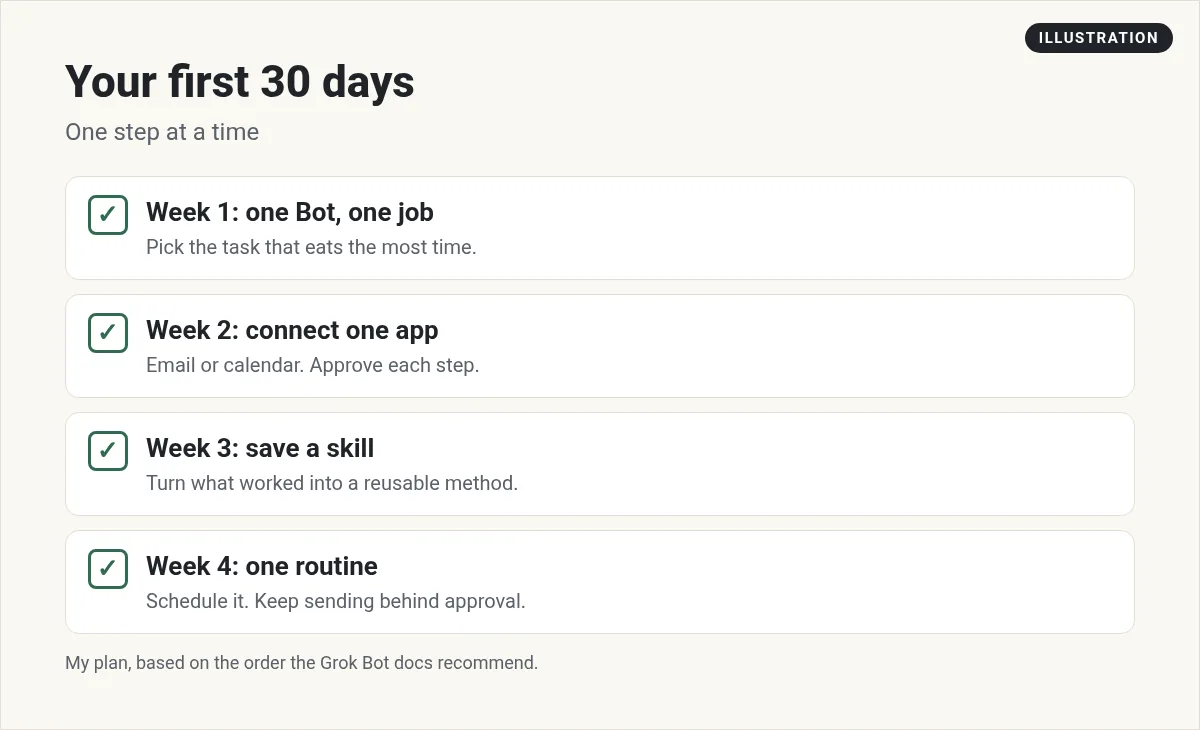
- Install Grok Bot and sign in. The desktop app runs on Mac, Windows, and Linux, and there are phone apps too. My Grok Bot setup guide walks through it.
- Make a new Bot for one job. Choose the + button, then Create a Bot. Give it a clear name like Inbox Digest.
- Tell it about the business. Who you serve, what you sell, how you like to write, and what it must never do.
- Connect one app. Usually email or calendar. The Bot shows a Connect card in chat when it needs one. See Grok Bot connectors.
- Give it the task once, by hand. Say the outcome, the sources, the rules, and where to stop.
- Review and correct it. Tell it what was wrong. Ask it to remember lasting rules.
- Save the method as a skill. Once the output is right, ask it to save the steps so it does the job the same way every time.
- Put it on a routine. Only now schedule it, like every weekday at 7:30 AM.
Here is a starter prompt you can copy. Change the details for your business:
Every weekday morning, read my inbox from the last 24 hours. Sort it into reply today, can wait, and safe to archive. Draft short replies for the reply today group in my style. Do not send or delete anything. Post the list here.
What to keep for yourself
An AI team does not mean you stop running the business. Some jobs should stay with you, at least for now:
- Anything that spends money. Payments, refunds, ad budgets, and purchases.
- Anything that speaks for you in public. Posts, emails to customers, and replies to reviews. Let the Bot draft. You send.
- Hard customer moments. An upset client wants a human.
- Decisions about people. Hiring, firing, and pricing your work.
- Private data you would not hand a new hire. Keep it out until you understand how memory and approvals work.
Grok Bot helps here. The docs say to keep "sending, publishing, purchasing, and production changes behind approval." When a Bot wants to do one of those things, it asks first, and you can approve or deny from your desktop or your phone. I explain how that works in Grok Bot computer use.
From one Bot to a small team
Once your first Bot is reliable, add a second one for a different job. Then a third. That is how I got to about 25 AI agents. I have a Chief of Staff, Heads of Content, Sales, Quality, Traffic, and Finance, plus project agents for things like this blog, my newsletter, and my offers.
The trick is that each Bot keeps its own memory and its own job. Bots can also work together. You can put a few Bots in the same group chat and they pass work between themselves, and the official page says "You watch them take action instead of approving every step."
A Chief of Staff Bot is a great hub. It reads what the other Bots did, and gives you one short update. I wrote a full guide on that in Grok Bot chief of staff.
| Stage | What you have | What you do |
|---|---|---|
| Week 1 | One Bot, one job | Review every result |
| Month 1 | Two or three Bots with skills | Approve sends and changes |
| Month 2 and on | A team with a Chief of Staff | Read one daily update |
From the Matthew Berman channel (not mine): Matthew Berman walks through 11 Grok Bot use cases, including a morning email agent, a calendar agent, browser tasks, and a chief of staff.
Mistakes small businesses make with AI agents
- Starting too big. A Bot that runs the whole business is a Bot you will not trust. Start with one job.
- Automating before it works. The docs say to make a task reliable by hand, save it as a skill, and only then automate it.
- Vague instructions. "Help with marketing" gets you mush. "Five ideas with sources, every Monday" gets you work. My Grok Bot prompts post has examples.
- Too many routines too fast. Every run uses usage. Start daily or weekly. See Grok Bot routines.
- Skipping memory checks. If a Bot learns the wrong rule, it keeps using it. Ask it what it remembers now and then. See Grok Bot memory.
A business team that is ready on day one
The hard part of Grok Bot for a small business is not the app. It is deciding which Bots you need, what each one owns, how they should talk to each other, and writing skills good enough to trust. That can take weeks of trial and error.
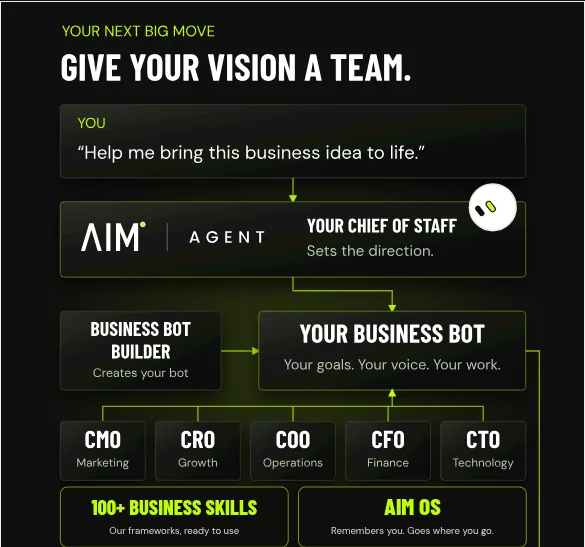
AIM Agent is an AI Chief of Staff for business owners. It comes with an AI C-suite (COO, CMO, CFO, CRO and CTO), a Business Bot Builder and 100+ business skills, and it runs on AIM OS, a private vault that holds your notes and memory. AIM Agent is a ready-made AI business team that works inside Grok Bot, so you skip the setup and get to work.
Here is what you get:
- An AI Chief of Staff that helps you plan and run your business
- An AI C-suite: COO, CMO, CFO, CRO and CTO
- A Business Bot for each business or project. Give it a real task and it brings the work back for you to review
- 100+ business skills for content, offers, research and more
- A step by step setup guide, with email support until your first bot finishes a real task
AIM Agent gives you an AI Chief of Staff and an AI C-suite (COO, CMO, CFO, CRO and CTO), a Business Bot Builder, and 100+ business skills, so your first Bots already know the work. It also comes with a setup guide and email support until your first bot finishes a real task.
Where to go next
If you have never opened Grok Bot, start with the beginner tutorial. If you want a wider look at agents for business, my guide to AI agents for business covers more tools. I also show real AI workflows for business owners in my free MakerAI workshop.
Get a business team in Grok Bot
AIM Agent gives you an AI Chief of Staff, an AI C-suite, a Business Bot Builder, and 100+ business skills, so you can hand off real work sooner.
See AIM AgentFrequently asked questions
Is Grok Bot good for small business?
It can be, if you start with one Bot that owns one repeatable job you can review, like an inbox digest or follow up drafts. Grow from there.
What should my first Grok Bot do?
Pick the job that eats the most of your time and is easy to check, like a daily digest of what needs you. Keep anything that sends or spends behind approval.
Do I need to code to use Grok Bot?
No. You set up Bots, skills, and routines by talking to the Bot in plain words.
Can Grok Bot send emails for my business?
It can draft them, and it can send when you connect your email, but I keep sending behind approval. The docs recommend approvals for sending, publishing, and purchasing.
Does Grok Bot work while my computer is off?
Yes. Each Bot works on its own cloud computer, so routines keep running while your laptop is closed.
How many Bots should a small business have?
Start with one. Add a new Bot only when the first one is reliable. I run about 25, but I built up to that over time.
Is there a faster way to set up a business team?
AIM Agent gives you an AI Chief of Staff, an AI C-suite, a Business Bot Builder, and 100+ business skills that work inside Grok Bot.
Sources
Checked October 28, 2026. Plans, prices, and rules can change.
- Grok Bot product page
- Grok Bot docs: Use cases
- Grok Bot docs: Get started
- Grok Bot docs: Skills and routines
- Matthew Berman: 11 Grok Bot Use Cases That Feel Like Cheating (YouTube)
- Paul J Lipsky: 7 Mind Blowing Use Cases for Grok Bot (YouTube, sponsored)
- Founders School: The ONLY Grok Bot Tutorial You Need (YouTube)
- AIM Agent
