
Grok Bot · Memory
Grok Bot memory is why a Bot gets better the longer you work with it. Here is what it saves, what your Bots share, how to check and fix it, and what should never go in it.
Grok Bot memory is the reason I stopped repeating myself to AI. With a normal chat app, I had to explain my business again in almost every new chat. A Bot keeps what it learns and picks up where we left off.
But memory can also hold old or wrong facts if you never check it. I read the official memory guide on October 28, 2026. Here is how it works and how to stay in control.
TL;DR
Each Grok Bot keeps its own memory of how you like to work, rules you give it, facts about you, and a dated log of its work. A few facts, like your name and time zone, are shared by all your Bots. There is no memory screen for personal Bots, so you ask in chat: What do you remember about me? You can correct or remove a memory the same way. Logins, cards, and addresses go in Vault, not memory. AIM Agent adds AIM OS, a private vault that holds your notes and memory for your business team.
What a Bot remembers
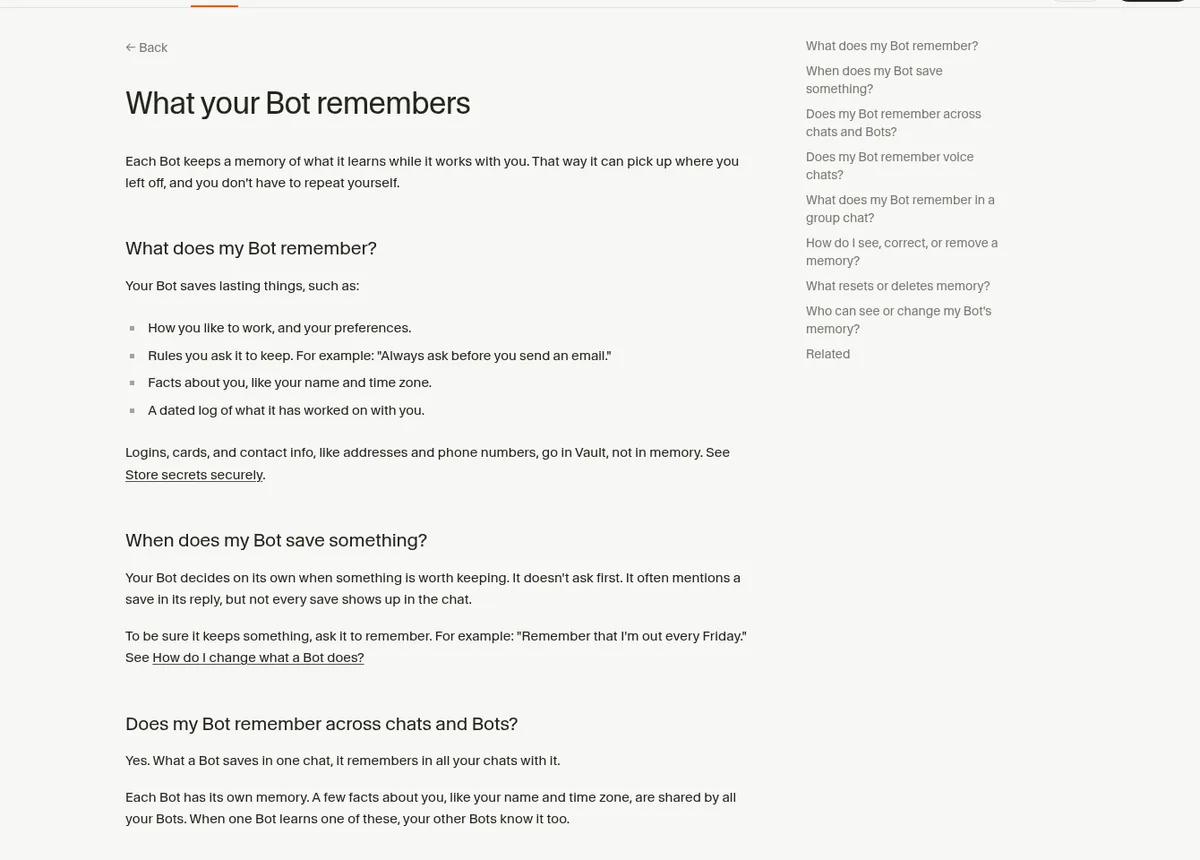
The help center says "Each Bot keeps a memory of what it learns while it works with you." It saves lasting things, like:
- How you like to work, and your preferences.
- Rules you ask it to keep, like "Always ask before you send an email."
- Facts about you, like your name and time zone.
- A dated log of what it has worked on with you.
When a Bot saves something
Here is something many people miss. "Your Bot decides on its own when something is worth keeping. It doesn't ask first." It often mentions a save in its reply, but not always.
So if something matters, say it out loud. The docs' example: "Remember that I'm out every Friday." I do this for every lasting rule.
Each Bot's memory vs what all Bots share
"Each Bot has its own memory." Your content Bot does not know what your money Bot learned. That is a good thing. It keeps each Bot focused on its job.
A few facts are shared. "A few facts about you, like your name and time zone, are shared by all your Bots." When one Bot learns one of these, the others know it too.
Nate Herk shows a nice trick in his concepts video. He asks a Bot to tell him the difference between what all his Bots know about him and what only that Bot knows. It lists both. That is a quick way to see the split.
From the Nate Herk channel (not mine): Nate Herk explains Grok Bot concepts, including the difference between memory every Bot shares and memory one Bot keeps.
How to check, fix, or remove a memory
"Personal Bots don't have a screen that lists their memory." You just ask in chat. These three prompts come from the help center:
| You want to | Say this |
|---|---|
| See it | What do you remember about me? |
| Correct it | That's out of date. I moved to Denver. |
| Remove it | Forget that I'm on the launch team. |
If a shared fact is wrong, tell any Bot the right version. To remove a shared fact completely, ask the Bot that saved it.
A good habit is a quick memory check with each Bot you use a lot, say once a month. It takes two minutes and keeps old facts out of the work.
Lasting rules vs one time instructions
Not everything you say should become memory. The Bots guide splits it into two kinds of messages:
- A lasting rule shapes all future work. The docs' example: "From now on, never send external messages without approval." Ask the Bot to remember these.
- A task is just for right now. The docs' example: "Draft follow-ups for these twelve accounts." No need to save it.
Personal Bots no longer have a settings page for their job. To change what a Bot does, you tell it in chat, and it keeps the lasting rules in its memory. So your memory is also your Bot's job description. Keep it clean and it keeps doing the right work.
What never goes in memory
This part is about safety. The help center says "Logins, cards, and contact info, like addresses and phone numbers, go in Vault, not in memory."
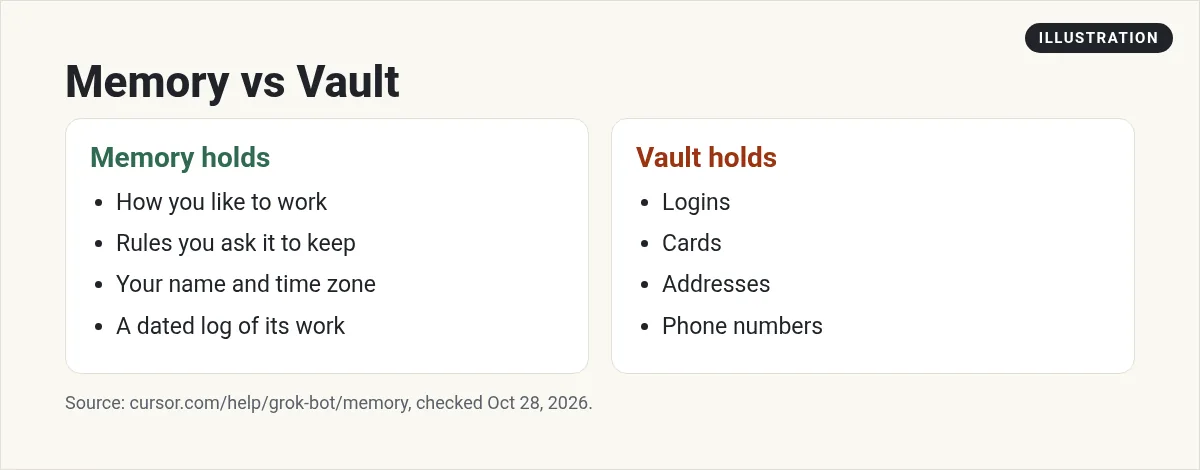
So never paste a password into chat and ask the Bot to remember it. Use Vault, a password manager, or the Secure Form the Bot sends you. I cover that more in Grok Bot setup.
What keeps or deletes memory
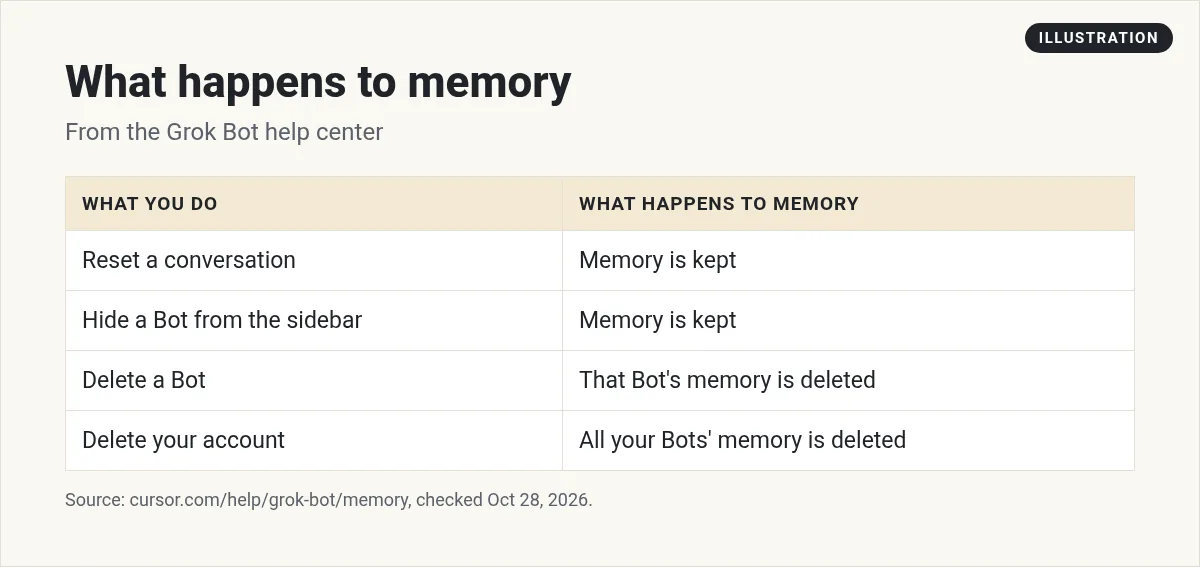
A few details worth knowing:
- Resetting a chat starts the history over, but the Bot keeps its memory, files, routines, and settings.
- Deleting a Bot erases its memory, chats, and routines, including shared facts it saved. It cannot be undone.
- If you want a Bot out of your list but want to keep its memory, choose Hide from sidebar instead.
Memory in group chats and voice
In a group chat, your Bot can use what you told it in private. If something should stay out of the group, tell your Bot. Each Bot in the group keeps its own memory, but "everyone in the group can read what your Bot says."
Voice chats count too. Your Bot can draw on earlier calls, and after you hang up you can ask about the call in chat.
Bring your memory from another AI tool
Moritz suggests this as one of the first things to do. Ask your old AI tool to export what it knows about you into one file. Then drag that file into a Bot chat and ask it to import the memory. Read the file first, and take out anything private you do not want saved.
Shared Bots and team memory
A shared Bot on a team can save things it learns for the whole team, and it tells you when it does. It "doesn't save anything about you personally for the team." A personal Bot's memory is yours, and only you can change it.
A business memory that is ready on day one
Bot memory grows as you work. That is great, but at the start your Bots know nothing about your business. Teaching each one your offers, your voice, and your goals takes a lot of chats.
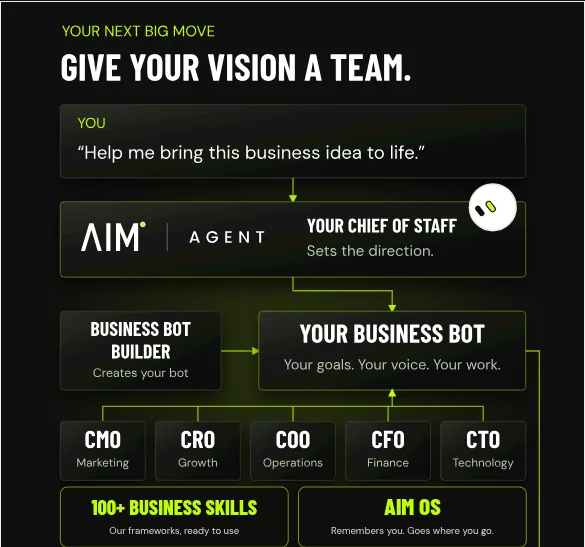
AIM Agent is an AI Chief of Staff for business owners. It comes with an AI C-suite (COO, CMO, CFO, CRO and CTO), a Business Bot Builder and 100+ business skills, and it runs on AIM OS, a private vault that holds your notes and memory. AIM Agent is a ready-made AI business team that works inside Grok Bot, so you skip the setup and get to work.
Here is what you get:
- An AI Chief of Staff that helps you plan and run your business
- An AI C-suite: COO, CMO, CFO, CRO and CTO
- A Business Bot for each business or project. Give it a real task and it brings the work back for you to review
- 100+ business skills for content, offers, research and more
- A step by step setup guide, with email support until your first bot finishes a real task
AIM OS is the private vault where your notes and memory live, so your business team works from the same picture of your business.
Want the full picture? Read Grok Bot explained, then learn how memory pairs with Grok Bot skills. I also show how I keep AI tools on track in my free MakerAI workshop.
Give your AI team a memory of your business
AIM Agent runs on AIM OS, a private vault that holds your notes and memory, with an AI Chief of Staff and an AI C-suite.
See AIM AgentFrequently asked questions
Does Grok Bot remember past chats?
Yes. What a Bot saves in one chat, it remembers in all your chats with it.
Do all my Bots share memory?
No. Each Bot has its own memory. A few facts, like your name and time zone, are shared by all your Bots.
How do I see what my Bot remembers?
Ask it in chat: What do you remember about me? Personal Bots don't have a memory screen.
How do I make a Bot forget something?
Tell it, for example: Forget that I'm on the launch team. To remove a shared fact, ask the Bot that saved it.
Should I save passwords in memory?
No. The docs say logins, cards, addresses, and phone numbers go in Vault, not in memory.
Does resetting a chat erase memory?
No. Resetting keeps the Bot's memory, files, routines, and settings. Deleting the Bot erases its memory.
Does AIM Agent have memory?
AIM Agent runs on AIM OS, a private vault that holds your notes and memory.
Sources
Checked October 28, 2026. Plans, prices, and rules can change.
