
Grok Bot · Email aliases
One Bot address, many aliases. Here is how to use them well.
Grok Bot email aliases let you give every website or job its own address without claiming a new inbox. Your Bot gets one address, and any plus alias on it lands in the same place.
I read the Email section of the official docs on November 9, 2026, and the October 11 and October 14 changelog notes. The rules are short, but a few details matter a lot.
TL;DR
Claim one Bot address. Add a plus word for each use, like name+receipts. Mail lands in one inbox. A routine on an alias runs only for that alias. Keep a sender filter on anything that acts.
What a plus alias is
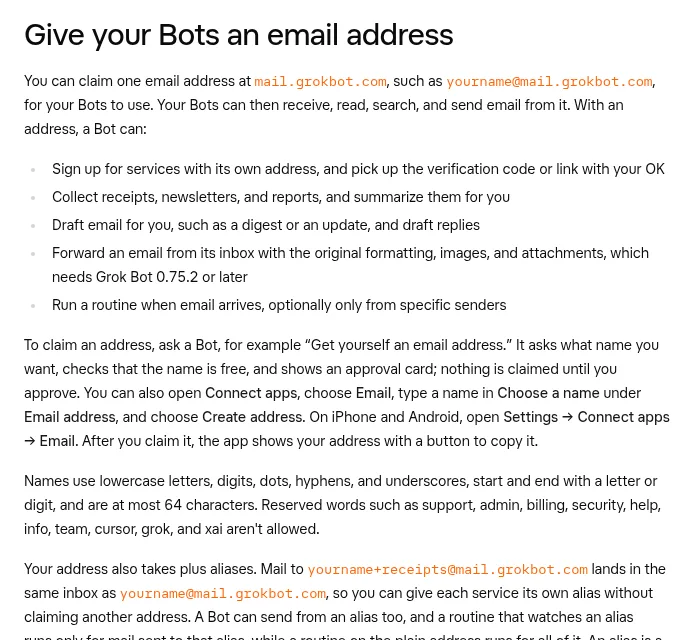
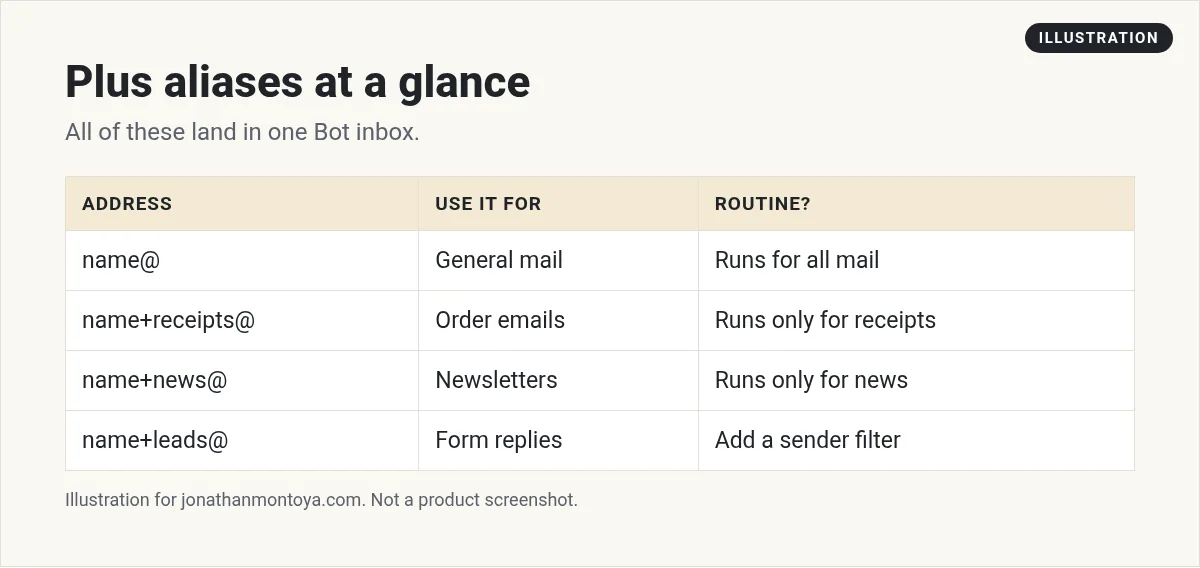
Your Bot can claim one email address at the Grok Bot mail domain, such as [email protected]. The docs say mail sent to yourname+receipts@ lands in the same inbox as yourname@. So you can give each service its own alias without claiming another address.
A Bot can also send from an alias. A routine that watches an alias runs only for mail sent to that alias. A routine on the plain address runs for all of it.
How to claim the address
Ask a Bot something like: get yourself an email address. It asks what name you want, checks that the name is free, and shows an approval card. Nothing is claimed until you approve.
You can also open Connect apps, choose Email, type a name, and choose Create address. Names use lowercase letters, digits, dots, hyphens, and underscores. They start and end with a letter or digit and can be up to 64 characters. Words like support, admin, billing, and help are reserved.
You get one address for good. You cannot rename or delete it, and addresses are never reissued.
From the Snapper AI channel (not mine): A creator shows a Bot with its own inbox.
Five alias ideas that save time
- +receipts for every order confirmation. Ask the Bot for a weekly summary.
- +news for newsletters you want read and summarized.
- +signup for new tools you test, so trial mail stays together.
- +leads for a form on your site, with a routine that drafts a reply.
- +reports for automated reports from other tools.
The docs say a Bot can sign up for services with its own address and pick up the code or link with your OK. It can also collect receipts and newsletters and summarize them.
An alias is a label, not a lock
This is the most important line in the docs. An alias is a label. Anyone can write to it. So if a routine should act only for certain people, keep a sender filter on it.
You can filter by one address, a list of addresses, or a whole domain such as *@example.com. By default, a routine runs only for mail from senders that pass standard email checks. Routines cannot filter by subject.
Also remember how the Bot treats email. It reads mail from other people as information, not as instructions. Each message it reads is marked as from you or from someone else. Instructions inside an email never count as your permission to send or act.
What happens when the Bot sends
When you ask a Bot in chat to send an email, it goes out once Auto-review allows it. If Auto-review needs you, you see an approval card first. Email from a routine, or from any turn you did not start with that request, waits as a draft until you press Send. There is no unattended sending option.
Forwards, and emails with an attachment Auto-review cannot fully read, always wait for your OK. Newsletters and first contact emails go to one person per message and include a one click unsubscribe link. If a message bounces, or someone unsubscribes or marks it as spam, the Bot stops emailing that address.
Limits to know
- Up to 50 recipients per email across To, Cc, and Bcc.
- Up to 10 attachments, 10 MB each, 25 MB total. No executable files.
- Incoming mail can have up to 10 attachments, 10 MB each and 25 MB in total.
- There is no inbox view and no new mail alerts. Ask your Bot what arrived today.
- Mail from the last minute may not show up in a search yet.
From the In Theory Only channel (not mine): A walkthrough of claiming a Bot inbox, with the rules and limits.
Team accounts
On a team plan, agent email is off by default. An admin turns on Agent Email before members can claim an address. If an admin turns it off later, Bots lose their email tools and email routines stop, but mail to existing addresses is still received and kept.
A shared Bot does not have a team address. The address belongs to you, and your Bots use it in your own chats and routines.
A business team inside Grok Bot
Aliases sort the mail. A business team decides what to do with it.
AIM Agent is an AI Chief of Staff for business owners. It comes with an AI C-suite (COO, CMO, CFO, CRO and CTO), a Business Bot Builder and 100+ business skills, and it runs on AIM OS, a private vault that holds your notes and memory. AIM Agent is a ready-made AI business team that works inside Grok Bot, so you skip the setup and get to work.
Here is what you get:
- An AI Chief of Staff that helps you plan and run your business
- An AI C-suite: COO, CMO, CFO, CRO and CTO
- A Business Bot for each business or project. Give it a real task and it brings the work back for you to review
- 100+ business skills for content, offers, research and more
- Step by step setup guides and email support
So your Bots work inside a business system, not a pile of chats.

Want an AI team to help run your business? Meet AIM Agent, an AI Chief of Staff for business owners. I am a co-founder of AIM Agent and have a financial interest in the product.
Get a business team inside Grok Bot
AIM Agent gives you an AI Chief of Staff, an AI C-suite, and 100+ business skills, with step by step setup guides and email support.
See AIM AgentFrequently asked questions
Can I have more than one Bot email address?
No. You get one address. Use plus aliases for extra labels.
Do aliases cost extra?
The docs do not describe a separate charge for aliases. They are labels on your one address.
Can I filter a routine by subject?
No. Routines cannot filter by subject. You can filter by sender.
Is there an inbox I can open?
No. Ask your Bot what arrived. There is no inbox view or new mail alert.
Can anyone email my alias?
Yes. Anyone can write to it, so keep sender filters on routines that act.
Can the Bot send mail by itself?
Not unattended. Mail from a routine waits as a draft until you press Send.
What is AIM Agent?
AIM Agent gives you an AI Chief of Staff, an AI C-suite, and 100+ business skills inside Grok Bot, with step by step setup guides and email support.
Sources
Checked November 9, 2026. Plans, prices, and rules can change.
