
Grok Bot · Legal Ops
Legal Ops is prep, triage, and trackers. Here is how SpaceXSI Legal Ops uses Grok Bot while humans still review every outbound message.
Grok Bot for legal ops is about keeping counsel focused on decisions instead of archaeology. Bots can prep 1:1 agendas, watch legal Slack for stalled questions, refresh Legal Review trackers, and draft updates. Humans still review every outbound message.
I read the x.ai guide Grok Bot for Legal Ops by Kelly Noguchi, dated September 24, 2026, on November 5, 2026. This is not legal advice. It is an operations pattern you can adapt with your own counsel's rules.
TL;DR
Grok Bot can help Legal Ops with counsel 1:1 prep and writeback, Slack triage, Legal Review tracker refresh, contract lifecycle support, deal context pulls, template hygiene, and weekly executive drafts. The Legal Ops guide insists on draft then human send, verified sources, and separate read versus write paths for systems of record.
What Legal Ops actually hands to Bots
Kelly's guide lists real workflows SpaceXSI Legal Ops runs today: counsel 1:1 prep, Slack triage and answer consistency, Legal Review tracker refresh with Slack and deal context, contract workflows, deal and Salesforce context for paper questions, procurement analytics, template hygiene, weekly executive updates, channel routing after Slack migrations, executive dashboard views, and skeptical controls reviews. Humans review every outbound message.
My Grok Bot for legal post is about careful triage for legal work in general. This post follows the Legal Ops guide's specialist workflows.
Counsel 1:1 prep and writeback
Before recurring attorney 1:1s, a Bot reviews Slack, Notion, meeting notes, and trackers, then drafts a focused agenda: open questions, cross channel contradictions, blockers, and wins. After the meeting, it writes decisions and follow ups back to the right Notion pages and trackers. Counsel time stays on decisions, not digging.
Slack triage and the Legal Review tracker
One Bot watches legal and GTM legal traffic for unanswered questions, conflicting guidance, and recurring topics like paper path, BAA coverage, and entity questions. It surfaces those so threads do not stall or contradict.
Another maintains a Legal Review tracker from GTM legal Slack intakes. It classifies open asks, refreshes on a schedule, and enriches Needs Legal rows with attorney ready context: live Slack summaries, Salesforce Opportunity and Primary Quote snapshots, Deal Desk signals, and linked prior guidance. The guide notes that tracker used to run on Cursor automation plus Google Apps Script. Refresh, enrichment, and digests now run in Grok Bot.
Contract lifecycle with confirmation
Grok Bot can look up workflows, statuses, and documents in the contract system, summarize open reviews, and on explicit request help move counsel approved documents from Slack into the right workflow, with preview and confirmation before any write. No silent changes.
More workflows that travel
- Deal context for legal questions. Pull opportunity and account context so advice matches the real deal.
- Procurement analytics. Map tickets, measure cycle times, draft GC ready memos from exports with source verification.
- Template tracker hygiene. Living inventory across Drive, Notion, and Slack candidates so teams stop shipping stale forms.
- Weekly Legal Ops reporting. Draft updates from Slack, Notion, notes, and calendar, plus a reminder so updates go out on time.
- Channel routing. Redirect posts in retired channels to the current intake with a short consistent message.
- Controls reviews. Act as a skeptical reviewer on revenue contracting controls and evidence gaps, citing sources.
Patterns that travel to other legal teams
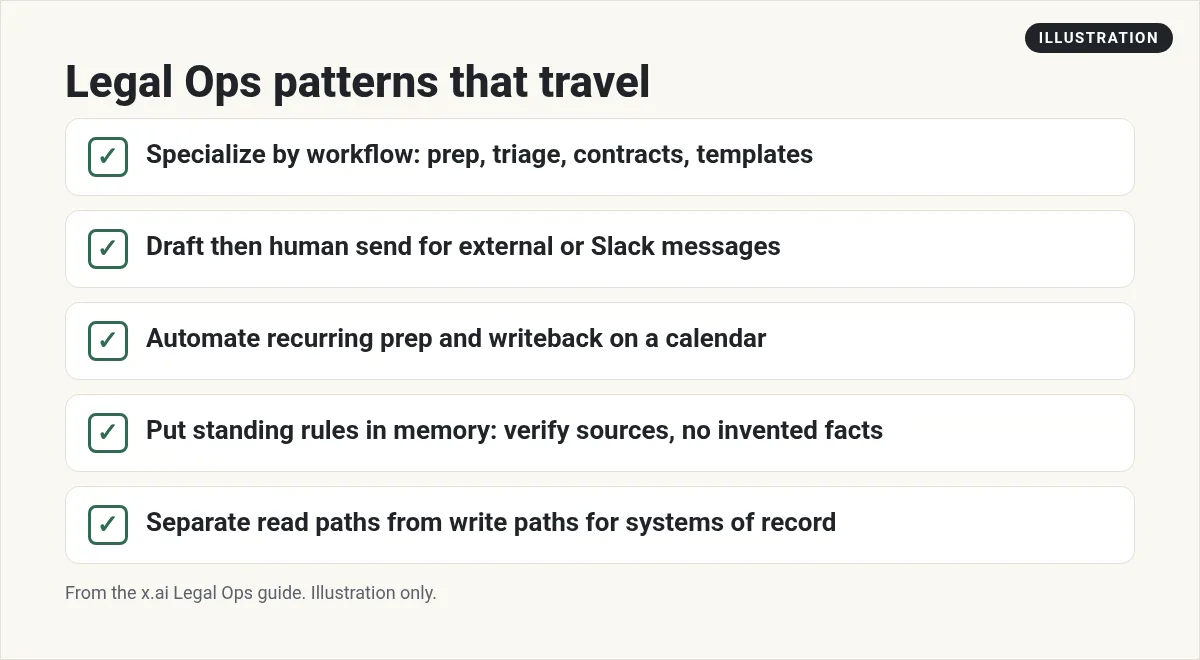
- Specialize agents by workflow: prep, triage, contracts, and templates. Not one mega Bot.
- Prefer draft, then human send, for external or Slack messages.
- Automate recurring preparation and writeback on a calendar. Keep research on demand.
- Put standing rules in memory: verify sources, make no assumptions, use plain language.
- Separate read paths from write paths for systems of record such as contracts and Salesforce.
From the Grok channel (not mine): Official Grok Bot 101 workshop for the teammate and approval model behind these workflows.
A careful first week
- Pick one workflow: counsel prep or Slack triage. Not both on day one.
- Connect only the tools that workflow needs.
- Write standing rules into memory: never invent facts, always draft, never send.
- Run in read only mode for a week. Compare drafts to what counsel would have written.
- Only then allow writeback to Notion trackers, still with preview.
This is operations support, not legal advice. Your counsel sets the rules for what a Bot may touch.
Why Legal Ops moved the tracker into Grok Bot
Kelly lists clear pros of moving off Apps Script and Cursor automation into Grok Bot. All logic lives where the team already chats. Rules and enrichment change without redeploys. Attorney facing enrichment on open Needs Legal rows is richer. One agent can own the refresh, the commercial enrich, and the Monday digest. Formatting stays consistent because prompts and skills are editable in chat.
That is a useful test for any ops team: if your automation is hard to change, a Bot that you edit in plain language may be the better home for the weekly jobs.
Copy and paste prompts to try
Before each counsel 1:1 on my calendar, draft an agenda from Slack, Notion, and our trackers: open questions, contradictions, blockers, and wins. After I paste meeting notes, write decisions back to the Notion pages I name. Never message anyone outside our team.
Watch the legal intake Slack channel for unanswered questions older than four hours, conflicting guidance, and recurring topics. Surface a digest twice a day. Draft replies only. I send.
Standing rules: verify sources, invent no facts, use plain language, draft then human send for every external or Slack message, and never write to the contract system without preview and my confirmation.
If your team still runs Legal Review on spreadsheets and chat search, start by mirroring one existing tracker in a Bot routine before you turn anything off. Keep the old sheet for a week as a check. When the Bot digest matches what counsel already trusted, you can retire the manual refresh with less risk.
Hard limits for legal work
- This is not legal advice and not a substitute for counsel.
- Do not let a Bot send to customers, counterparties, or public channels.
- Keep write access to systems of record behind preview and confirmation.
- If your industry has retention or privilege rules, put those in memory and in the Bot's job description before you connect mail or drive.
My Grok Bot safety post is required reading before you connect anything sensitive.
A business team around Legal Ops
Counsel needs clean prep. Sales and ops need owners too.
AIM Agent is an AI Chief of Staff for business owners. It comes with an AI C-suite (COO, CMO, CFO, CRO and CTO), a Business Bot Builder and 100+ business skills, and it runs on AIM OS, a private vault that holds your notes and memory. AIM Agent is a ready-made AI business team that works inside Grok Bot, so you skip the setup and get to work.
Here is what you get:
- An AI Chief of Staff that helps you plan and run your business
- An AI C-suite: COO, CMO, CFO, CRO and CTO
- A Business Bot for each business or project. Give it a real task and it brings the work back for you to review
- 100+ business skills for content, offers, research and more
- Step by step setup guides and email support
So legal work sits inside a business that stays organized.

Want an AI team to help run your business? Meet AIM Agent, an AI Chief of Staff for business owners. I am a co-founder of AIM Agent and have a financial interest in the product.
Get a business team inside Grok Bot
AIM Agent gives you an AI Chief of Staff, an AI C-suite, and 100+ business skills for the work around your legal ops system.
See AIM AgentFrequently asked questions
Is Grok Bot legal advice?
No. It drafts and organizes. Your counsel reviews and decides.
Will it send Slack or email on its own?
The Legal Ops guide uses draft then human send for outbound messages.
Can it update contract systems?
Only with preview and confirmation before writes, per the guide.
What should Legal Ops automate first?
Counsel 1:1 prep or Slack triage. One workflow, read only at first.
How is this different from for-legal?
For-legal is careful triage for legal work. This post follows Legal Ops specialist workflows from the x.ai guide.
Can it invent policy answers?
Standing rules should forbid invented facts and require sources.
Is there a faster way to get a business team?
AIM Agent gives you an AI Chief of Staff, an AI C-suite, and 100+ business skills inside Grok Bot.
Sources
Checked November 5, 2026. Plans, prices, and rules can change.
