
Grok Bot · Incidents
When something breaks, support tickets pile up fast. The x.ai support team uses two Grok Bots to spot the spike early and answer every affected customer after. Here is how they work.
Grok Bot incident response, as the x.ai support team runs it, uses two Bots. IncidentWatch finds a spike in similar support tickets and alerts the on call engineer. IncidentSweep clears the pile of related tickets after the fix, in one batch that a person approves first.
I read their October 20, 2026 post and the Grok Bot docs on November 2, 2026. Here is how both Bots work and how a smaller team can borrow the idea.
TL;DR
IncidentWatch checks the support queue every five minutes, looking at the last 15 minutes of tickets for a spike around the same problem. If it does not match a known incident, it alerts the on call support engineer with the issue, the ticket count, and examples, and holds the matching tickets. After the fix, a support engineer tells IncidentSweep which tickets to include, which to skip, and the exact message. It shows the batch, waits for approval, then sends in small batches and stops if anything fails. On September 18, it cleared 204 tickets in about 10 minutes.
Why the support queue sees problems first
The post makes a simple point. Customers often notice a problem before your own alerts do. When several people report the same thing at once, that cluster of tickets is an early warning. And after the fix, every one of those customers still needs an answer.
So the x.ai team gave two Bots one job each. That is the post's big lesson: give Bots jobs, not tasks.
IncidentWatch: spot the spike
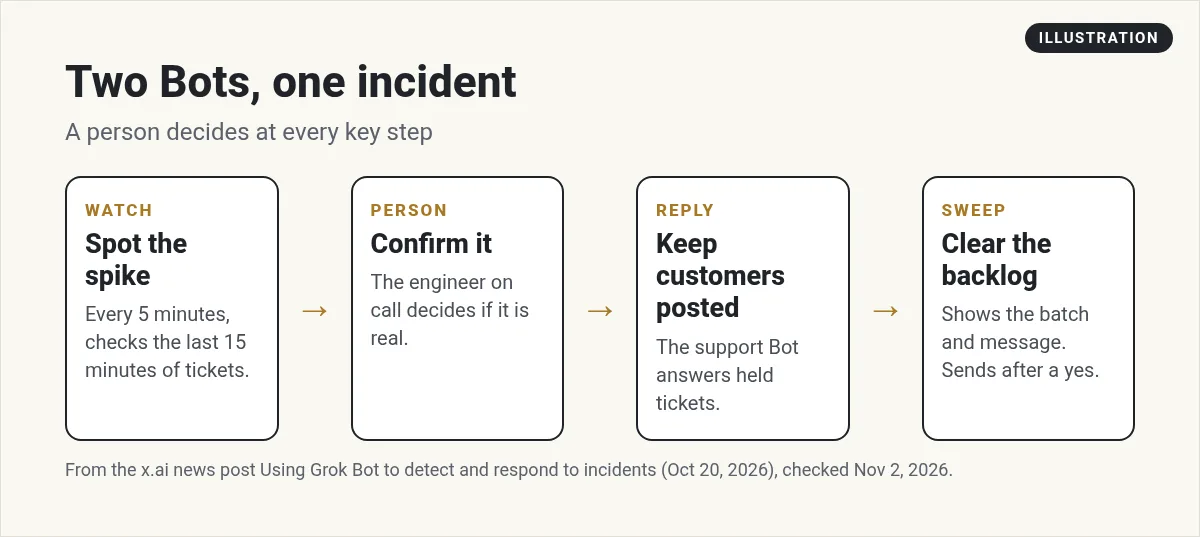
- Every five minutes, it looks at the tickets from the last 15 minutes.
- It looks for a spike around the same problem.
- If it is new, it alerts the support engineer on call with the issue, how many tickets match, and examples.
- It holds matching tickets while the team looks into it.
A person decides if it is a real incident. Once the team confirms it, they post it to the public status page. Then their customer facing Support Bot goes back to the held tickets, checks each against the incident, and replies to the customers whose reports match. It can send updates as things change. My Grok Bot for customer support post covers Support Bot.
IncidentSweep: clear the backlog
After the fix, hundreds of tickets may still be waiting. The post says teams used to pick between two bad options: reply one by one for hours, or send a bulk reply and risk hitting the wrong people. IncidentSweep aims for the control of the first with the speed of the second.
- A support engineer tells it which tickets to look at, which to leave out, and the exact message to send.
- It reviews each ticket and sets aside any it is not sure about.
- It shows the engineer the batch and the exact message. The engineer spot checks and makes changes.
- After approval, it sends in small batches and records each action.
- It never adds tickets after approval. If anything fails, it stops and reports.
During an incident on September 18, IncidentSweep cleared 204 tickets in about 10 minutes, with a support engineer reviewing and approving the batch.
How to build a simple version
You do not need a big support team. Here is a small version for a business with a help desk.
Step 1. Connect your help desk. Open Connect apps and look for your tool. See my Grok Bot connectors guide.
Step 2. Make a Watch Bot. Give it one job and a routine. The help center says a routine can run on a schedule, or when something happens, like a Slack message, an email, a webhook call, or an event from tools such as Sentry or PagerDuty.
Every 15 minutes, check new tickets from the last 30 minutes. If 5 or more describe the same problem, message me in Slack with a one line summary, the count, and 3 example tickets. Do not reply to any customer.
Pick numbers that fit your volume. My Grok Bot routines guide shows how to set the schedule.
Step 3. Make a Sweep Bot. Use it only after a fix, and always through a review.
Find open tickets about the login problem from today. Leave out anything that also mentions billing. Show me the list and this message before sending. Send in groups of 20 after I say yes. Stop if any send fails.
Step 4. Keep approval on. Customer messages should always wait for a person. My Grok Bot safety guide shows how approvals work.
Two videos worth your time
The official Grok Bot 201 workshop shows how to move from one Bot to a team of Bots that work on their own, with skills, routines, and shared Bots.
From the Grok channel (not mine): This is the official workshop from the Grok team, so it shows the product at its best. It is a good base for the routine and shared Bot steps above.
Brock Mesarich walks through the x.ai guides on how their own team uses Grok Bot, including support Bots.
From the Brock Mesarich | AI for Non Techies channel (not mine): Brock links to a web scraping tool he promotes in his description. The walkthrough of the official guides is still useful.
If you are a small business
You may get ten tickets a day, not thousands. The idea still helps. A Watch Bot that notices three people asking about the same broken checkout link can save you a bad afternoon. And a Sweep Bot that drafts the same clear update for each of those people, which you approve once, saves you from writing it again and again. Start with the Watch Bot. It only reads and alerts, so it is the safest place to begin. Add the Sweep Bot once you trust what the Watch Bot finds.
Watch outs
- False alarms. Start with a high number of matching tickets and lower it over time.
- The wrong customers. Always check the batch. One wrong message can cause a new problem.
- Private data. Tickets hold customer details. Keep the Bot's notes inside your company.
- People decide. A Bot can say something looks like an incident. A person calls it.
Get the whole team, not just the alarm
Incident Bots work best inside a team that already knows your customers, your products, and your voice.
AIM Agent is an AI Chief of Staff for business owners. It comes with an AI C-suite (COO, CMO, CFO, CRO and CTO), a Business Bot Builder and 100+ business skills, and it runs on AIM OS, a private vault that holds your notes and memory. AIM Agent is a ready-made AI business team that works inside Grok Bot, so you skip the setup and get to work.
Here is what you get:
- An AI Chief of Staff that helps you plan and run your business
- An AI C-suite: COO, CMO, CFO, CRO and CTO
- A Business Bot for each business or project. Give it a real task and it brings the work back for you to review
- 100+ business skills for content, offers, research and more
- Step by step setup guides and email support
So when something breaks, your Bots already know who to tell and what to say.

Want an AI team to help run your business? Meet AIM Agent, an AI Chief of Staff for business owners. I am a co-founder of AIM Agent and have a financial interest in the product.
Get a team ready for the busy days
AIM Agent gives you an AI Chief of Staff, an AI C-suite, and 100+ business skills, so your support and operations work has owners from day one.
See AIM AgentFrequently asked questions
What is Grok Bot IncidentWatch?
A Bot the x.ai support team uses to check tickets every five minutes for a spike around the same problem and alert the on call engineer.
What is IncidentSweep?
A Bot that clears related tickets after a fix, in a batch a support engineer reviews and approves first.
Can I copy these Bots?
The post does not offer them as copies. You can build simple versions with a help desk connection, a routine, and approvals.
Does the Bot decide if something is an incident?
No. In the x.ai setup, a support engineer decides and works with engineering.
Can a routine start from a PagerDuty or Sentry alert?
The help center lists PagerDuty and Sentry events among the things that can start a routine.
How fast was IncidentSweep?
The post says it cleared 204 tickets in about 10 minutes on September 18, with an engineer approving.
Is there a faster way to get a Bot team for my business?
AIM Agent gives you an AI Chief of Staff, an AI C-suite, and 100+ business skills, so you start with a team built for business work.
Sources
Checked November 2, 2026. Plans, prices, and rules can change.
