
Grok Bot · Secure Forms
Your Bot can sign in for you without ever seeing your password. Here is how.
Grok Bot secure forms are the pop up forms your Bot uses when a website needs a password, a card, or another secret. You type the secret. It goes straight into the page. The Bot never sees it.
I read the docs on Vault, approvals, and the computer, plus the changelog, on November 9, 2026. This guide explains the order your Bot tries, what the form looks like, and what to do when a form is not enough.
TL;DR
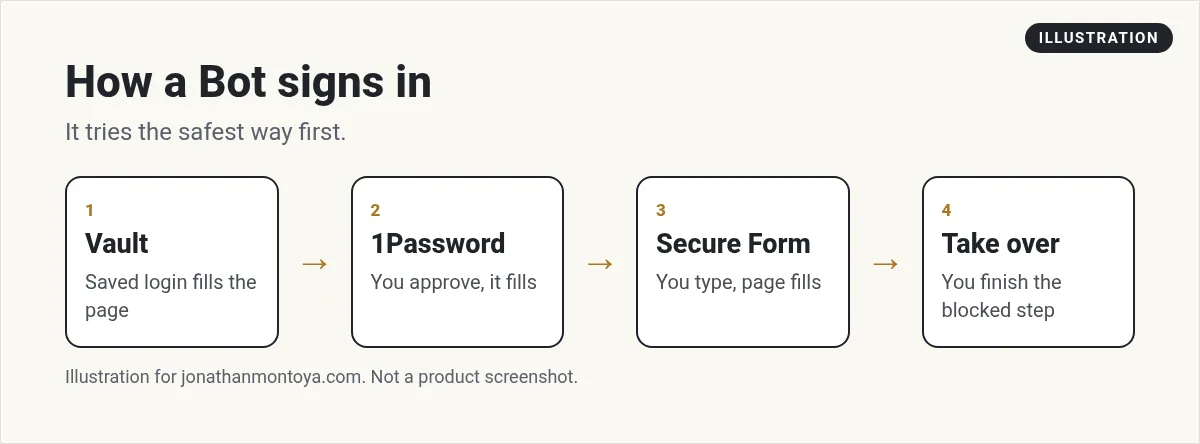
A Bot signs in using Vault first, then a password manager like 1Password, then a Secure Form. The values go into the page and are not shown to the model. Never paste a password into normal chat.
The order your Bot tries
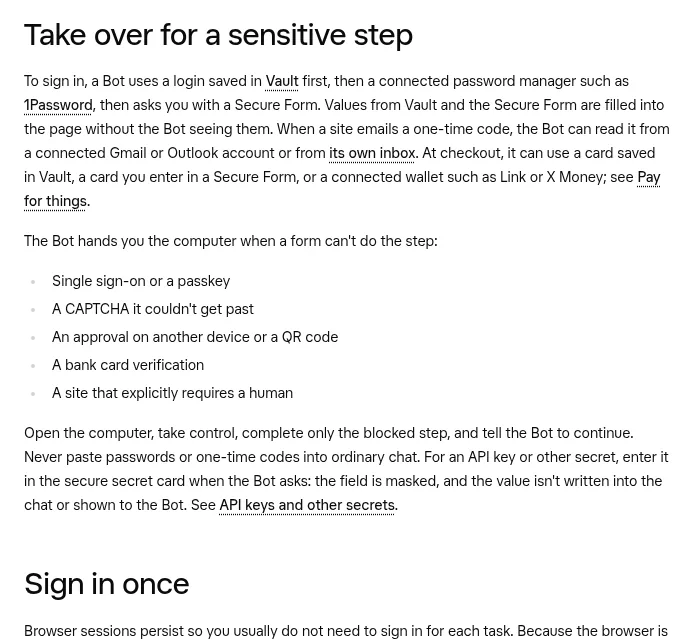
The docs say a Bot signs in with a login saved in Vault first. Next it tries a connected password manager such as 1Password. If neither has the login, it asks you with a Secure Form. Values from Vault and Secure Forms are filled into the page without the Bot seeing them.
When a site emails a one time code, the Bot can read it from a connected Gmail or Outlook account or from its own inbox. At checkout, it can use a card saved in Vault, a card you enter in a Secure Form, or a connected wallet.
What a Secure Form looks like
The form names the site it fills. The docs give this kind of wording: never shown to your Bot, filled directly to the site. After it fills, the form says the secret values were never shown to your Bot. If it says it could not fill the page, the page may have moved first. The values still were not shown to the Bot, and you can submit a new form if the Bot asks again.
If a form for a login, card, or contact has the checkbox Securely save to Bot's vault, check it to keep the value in Vault. Leave it unchecked to use the value for that chat only.
From the Execute Automation channel (not mine): A walkthrough on safer logins for AI agents using 1Password.
Recent improvements
The changelog shows Secure Forms getting better all fall.
- Forms can arrive with known fields already filled in, and you can edit them before you submit.
- Bots ask for logins and other multi field details on one Secure Form, not a card that holds one value.
- Secure Form fills fields on more websites, including inside embedded frames from other sites.
- Checkout card fields get a Secure Form instead of a screen handoff.
- A form that only asks for a sign in code arrives without extra explanation.
- Address fields suggest streets as you type, and a ZIP code fills in the city and state.
When a form is not enough
Some steps need you, not a form. The docs list them.
- Single sign on or a passkey
- A CAPTCHA the Bot could not get past
- An approval on another device, or a QR code
- A bank card check
- A site that says a human is required
In those cases the Bot hands you its computer. Choose Take over on the request, or open the computer and choose Take control. Do only the blocked step. Then choose I'm done and tell the Bot to continue.
Never paste secrets into chat
This rule shows up again and again in the docs. Do not send a password, one time code, or API key in ordinary chat. For an API key or another secret, use the secure secret card when the Bot asks. The field is masked, left out of the transcript, and not shown to the model.
If you already pasted a password into chat, the Bot will use it instead of refusing. That is why the habit matters. Change that password after.
Cards and payments
A card saved in Vault fills in at checkout without a separate approval each time. If you want to approve every payment, do not save the card. Leave the save box unchecked in the Secure Form, or remove the card in Settings and Vault.
Also check your pay setting. The changelog says Vault has a Payments tab where you pick the method Bots use first, and you still approve every purchase.
From the Zinho Automates channel (not mine): A creator covers seven big Grok Bot updates.
Any results mentioned in videos are not typical and are not a promise of income. Your results depend on your work and your market.
Security keys
If you sign in with a hardware key, the Bot's browser can use a key plugged into your desktop while Use hardware security keys is on under Settings, General, Security Key. It is on by default on macOS and Windows and not yet supported on Linux. Every use asks you to approve it first.
A business team inside Grok Bot
Sign in is just the door. The work inside is what pays off.
AIM Agent is an AI Chief of Staff for business owners. It comes with an AI C-suite (COO, CMO, CFO, CRO and CTO), a Business Bot Builder and 100+ business skills, and it runs on AIM OS, a private vault that holds your notes and memory. AIM Agent is a ready-made AI business team that works inside Grok Bot, so you skip the setup and get to work.
Here is what you get:
- An AI Chief of Staff that helps you plan and run your business
- An AI C-suite: COO, CMO, CFO, CRO and CTO
- A Business Bot for each business or project. Give it a real task and it brings the work back for you to review
- 100+ business skills for content, offers, research and more
- Step by step setup guides and email support
So your Bots work inside a business system, not a pile of chats.

Want an AI team to help run your business? Meet AIM Agent, an AI Chief of Staff for business owners. I am a co-founder of AIM Agent and have a financial interest in the product.
Get a business team inside Grok Bot
AIM Agent gives you an AI Chief of Staff, an AI C-suite, and 100+ business skills, with step by step setup guides and email support.
See AIM AgentFrequently asked questions
Does my Bot see my password?
No. Values from Vault and Secure Forms are filled into the page and are not shown to the model.
What is the sign in order?
Vault first, then a connected password manager, then a Secure Form.
What if the site needs a CAPTCHA?
The Bot hands you the computer. Complete only that step, then tell the Bot to continue.
Should I save my card in Vault?
Only if you are fine with it filling at checkout without a new approval each time.
Can I paste an API key in chat?
No. Use the secure secret card when the Bot asks.
Does it work with 1Password?
Yes. You approve each login in 1Password, and 1Password fills it in.
What is AIM Agent?
AIM Agent gives you an AI Chief of Staff, an AI C-suite, and 100+ business skills inside Grok Bot, with step by step setup guides and email support.
Sources
Checked November 9, 2026. Plans, prices, and rules can change.
