
Creator Tools · Platforms
Ko-fi lets fans tip you, join a membership, or buy from your shop. Here is when it charges 0%, when it charges 5%, and whether Ko-fi Gold is worth it.
Ko-fi is a free page where fans can support you. They can send a one-time tip, pay monthly, or buy something you made. It is simple to set up, and there is no monthly bill.
The part to read closely is the fee. Sometimes it is 0%. Sometimes it is 5%. I read Ko-fi's help center on October 27, 2026, to sort it out. Here is the plain version.
Quick answer
Ko-fi is a creator page for tips, memberships, commissions, and shop sales. It has no monthly fee. On the Free option, one-off tips cost 0% and everything else has a 5% service fee. On the Standard option, everything has a 5% fee, and you get extra perks. Ko-fi Gold costs $12 a month for new users and gives you a 0% service fee. PayPal or Stripe fees apply on top, usually around 3% + $0.30.
What Ko-fi is
Ko-fi's homepage says it "helps creators make an income from your biggest fans." You can "accept tips, set up memberships, take requests and sell your work," all from one page.
The name comes from coffee. A tip is shown as buying you a coffee. You can change that word on some plans, which I cover below.
Ko-fi is used by many kinds of creators. Its homepage lists streamers, artists, writers, crafters, podcasters, video creators, cosplayers, musicians, and developers.
How Ko-fi works
The homepage sums it up: "Create a free account, connect your own payment method (you get paid directly on Ko-fi), share it with your fans, and start earning in just a few minutes!"
Here are the main ways you can earn on Ko-fi:
- Tips. A one-time thank you from a fan.
- Monthly tips. A fan pays the same amount each month.
- Memberships. Tiers with perks, like posts only members see.
- Commissions. Custom work that fans request and pay for.
- Shop. Digital files or physical items you sell.
- Goals. Crowdfunding toward a target, like new gear.
The sign-up page says "You must be 18 or over to use Ko-fi."
Ko-fi fees: 0% vs 5%
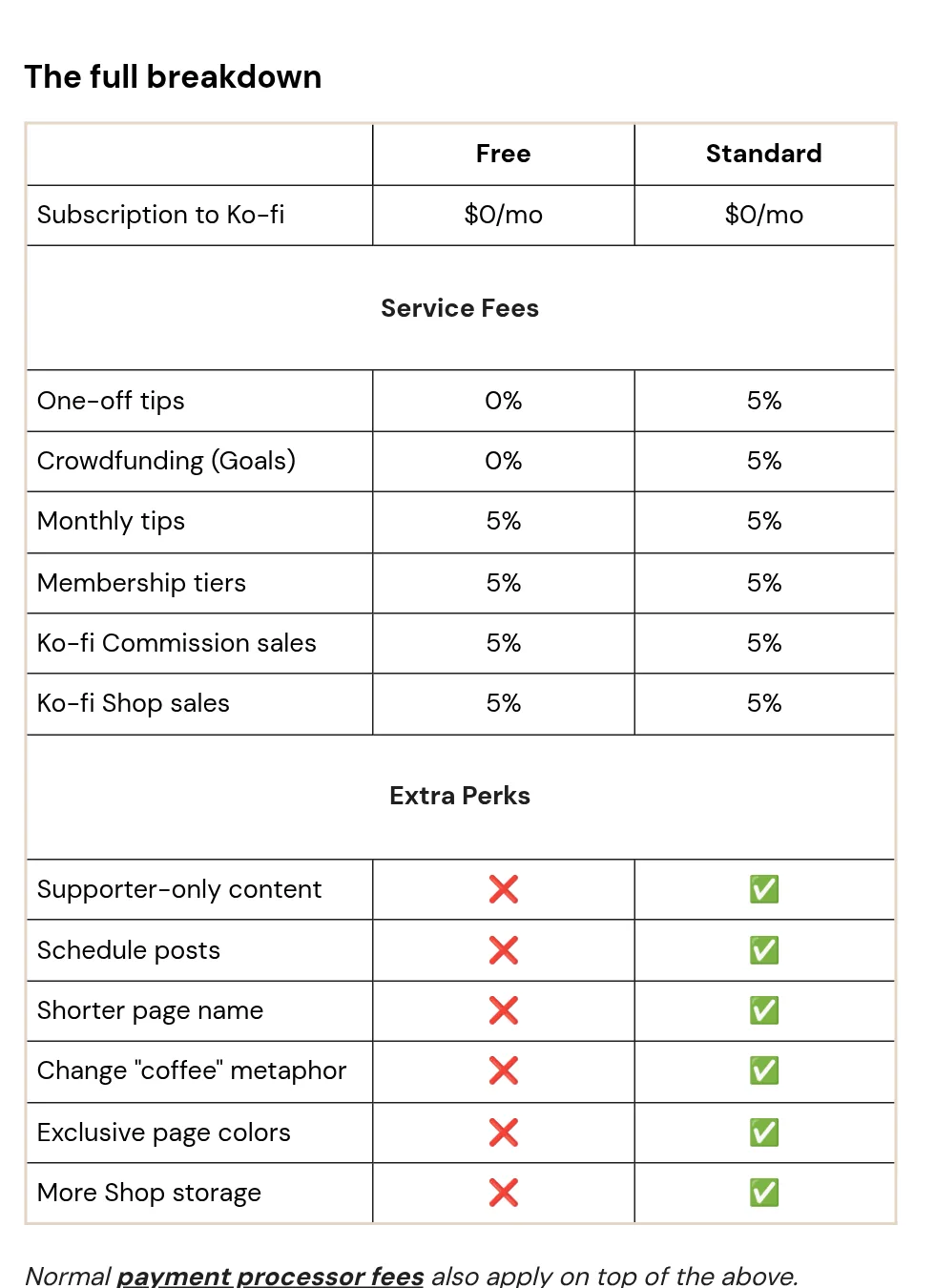
Ko-fi's fee article says Ko-fi has "two options, both free to join, with no monthly cost either way." Here is how they differ.
Ko-fi Free
The article says: "Pay 0% on one-time tips. A flat 5% service fee applies to anything else, such as shop items, memberships, monthly tips, and commissions." Goals are also 0% on Free.
Standard
The article says Standard has "No monthly cost, but a flat 5% fee applies to one-time tips, shop, commissions, monthly tips and memberships too." In return, you get perks. The table lists supporter-only content, scheduled posts, a shorter page name, a custom "coffee" word, page colors, and more shop storage.
One thing to watch: new accounts start on Standard. The article says "New creators now start with all of Ko-fi unlocked from day one." You can switch it off in Settings, then Payment. Some help pages call this mode Contributor. It is the same 5% option.
Payment processor fees
Ko-fi's fee is not the only one. Ko-fi says "Your payment processor's usual fees still apply on top (typically around 3% + $0.30)." That fee goes to PayPal or Stripe, not Ko-fi.
A quick example
Here is my math for a $10 shop sale, using Ko-fi's "around 3% + $0.30" estimate. Ko-fi's 5% is $0.50. The processor fee is about $0.60. So you keep about $8.90. For a $10 one-off tip on Free, there is no Ko-fi fee, so you keep about $9.40. Your real processor fee depends on your account and country.
Ko-fi Gold: is it worth it?
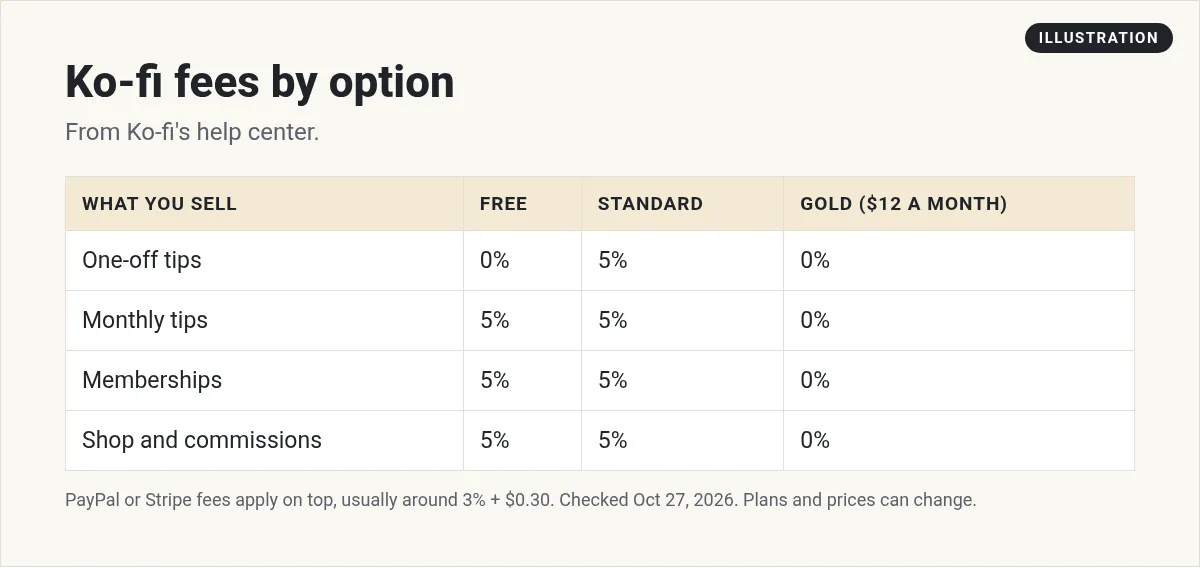
Ko-fi Gold is a monthly plan. The Gold help article says "Ko-fi Gold is now available for $12/month for new users." In return, you get "0% service fees on all payment options." You also get the perks, like supporter-only content and a custom page color.
The article also says annual Gold plans are gone: new creators can sign up "only on a monthly plan."
So when does Gold pay off? Here is my math. A 5% fee on $240 is $12, the same as one month of Gold. If your 5% sales are under $240 in a month, Free or Standard costs less. If they are over $240, Gold costs less.
There are two catches from the help center:
- Memberships that started before you joined Gold keep the 5% fee. The fee article says "You'll keep paying the 5% platform fee on all memberships taken prior to switching to Gold."
- If you already have the 5% mode on, you must turn it off yourself after you join Gold. Otherwise you could pay both.
If you cancel Gold, you keep its perks until the end of your billing cycle. Then Ko-fi moves you to the 5% mode so you do not lose features.
How you get paid on Ko-fi
This is one of the best parts of Ko-fi. The homepage says "You get paid directly and instantly into your own PayPal or Stripe account. Ko-fi never processes or holds funds, so no waiting around for payouts."
That means there is no Ko-fi payout schedule or minimum to wait for. The money lands in your PayPal or Stripe account. From there, it follows your PayPal or Stripe rules for moving money to your bank.
Fans can pay with "PayPal, Cards, Apple Pay, Google Pay, Venmo, CashApp and loads of local payment methods," per the homepage.
Ko-fi also gives a tip about currency. Set your Ko-fi currency to match the one most fans pay in. That helps you avoid conversion fees.
How to set up Ko-fi the simple way
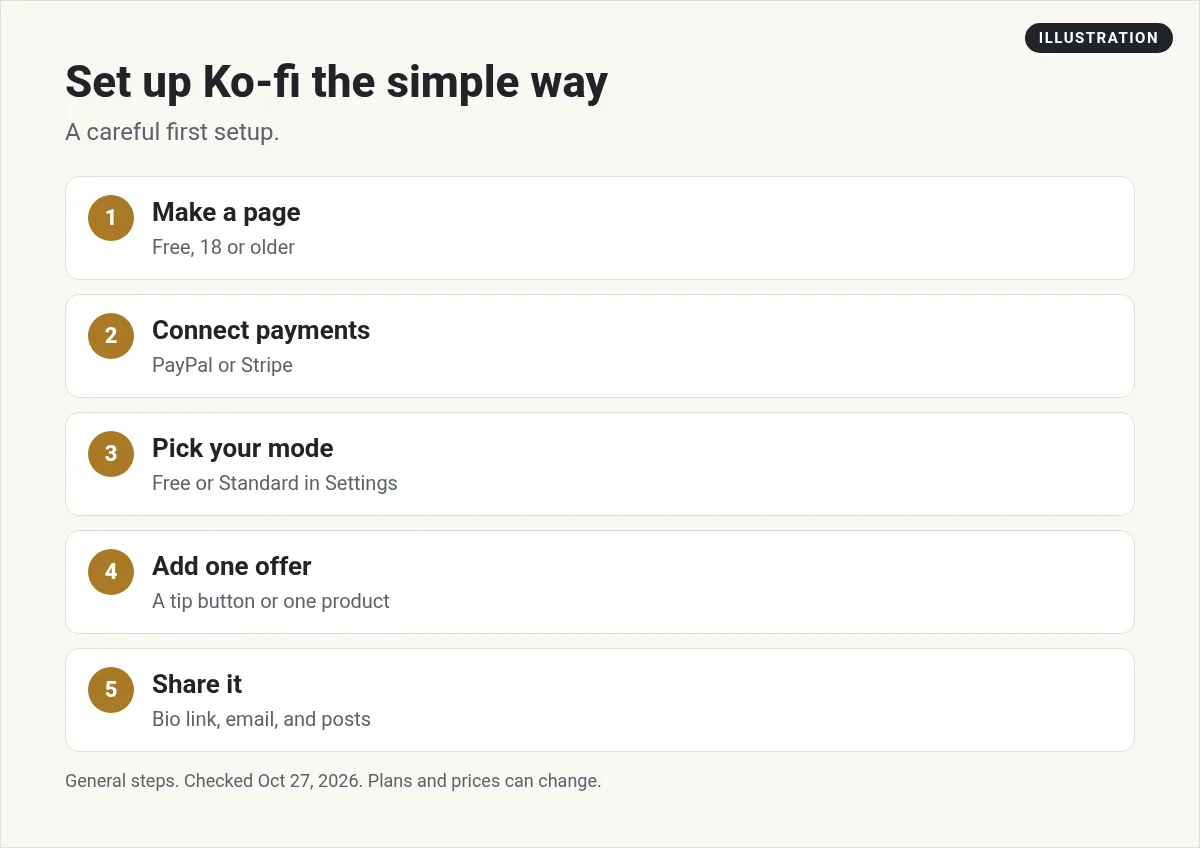
- Make your page. Sign up free. Add a clear photo and one line about what you make.
- Connect payments. Link PayPal, Stripe, or both. You cannot get paid until you do.
- Pick your mode. If you mostly want tips, consider Free so tips cost 0%. If you want members-only posts, keep Standard.
- Add one offer. Start with a tip button and one small product. You can add more later.
- Share your link. Put it in your bio, your videos, and your email. Ko-fi also has buttons and widgets for your site.
Keep your offer clear. A line like Buy me a coffee to support new videos tells fans exactly what their tip does.
Ko-fi vs Buy Me a Coffee
Here is how Ko-fi compares to Buy Me a Coffee. They look alike, but the fees work in a different way.
- Platform fee. Buy Me a Coffee says "we only apply a 5% platform fee per transaction." Ko-fi can be 0% on one-off tips if you use the Free option.
- Monthly plan. Ko-fi offers Gold at $12 a month for 0% service fees. Buy Me a Coffee's FAQ says "We don't charge a monthly fee."
- How you get paid. Ko-fi pays straight to your own PayPal or Stripe. Buy Me a Coffee says that once you reach your first $10, its team reviews your account, then sends funds to your Stripe account.
If most of your support comes from one-off tips, Ko-fi Free can cost less. If you mostly sell memberships, the two are closer, so compare the full fees.
Who Ko-fi is good for
Ko-fi is a good fit if you already have a few fans and want a simple way for them to pay you. It works well for tips, small digital products, and simple memberships.
If you want to sell bigger digital products, like full courses, you may want a tool built for that. See my guides to Stan Store and Skool pricing. For ideas on what to sell, see digital products to sell.
Before you launch your Ko-fi page
Nothing you check here is sent or saved. Download it if you want to keep it.
Meet AIM Agent
AIM Agent is an AI Chief of Staff for business owners. You give it a real task, and it brings the work back for you to review. You stay the one who approves.
Meet AIM AgentI am a co-founder of AIM Agent and have a financial interest in the product.
Frequently asked questions
What is Ko-fi?
Ko-fi is a free creator page where fans can send tips, join memberships, request commissions, and buy from your shop. You get paid into your own PayPal or Stripe account.
Does Ko-fi take a fee?
It depends on the option. On Ko-fi Free, one-off tips are 0% and other sales have a 5% service fee. On Standard, everything has a 5% fee. Ko-fi Gold is $12 a month for new users with a 0% service fee. PayPal or Stripe fees apply on top.
How much is Ko-fi Gold?
Ko-fi's help center says Gold is $12 a month for new users. Annual Gold plans are no longer available.
How do you get paid on Ko-fi?
Ko-fi says you get paid directly and instantly into your own PayPal or Stripe account. Ko-fi never processes or holds funds.
Is Ko-fi free to use?
Yes. There is no monthly cost on Free or Standard. Ko-fi earns a service fee on some payments instead.
How old do you have to be to use Ko-fi?
Ko-fi's sign-up form says you must be 18 or over.
Sources
Checked October 27, 2026. Plans, prices, and rules can change.
