
Creator Tools · Platforms
Buy Me a Coffee gives fans a simple way to tip you, join a membership, or buy from your shop. Here is what it takes from each payment and when the money reaches your bank.
Buy Me a Coffee is a free page where fans can support your work. They can send a small one-time payment, join a membership, or buy something from your shop. There is no monthly fee.
The fees are simple, but there is more than one. I read the Buy Me a Coffee help center on October 27, 2026. Here is what it takes, what you keep, and how you get paid.
Quick answer
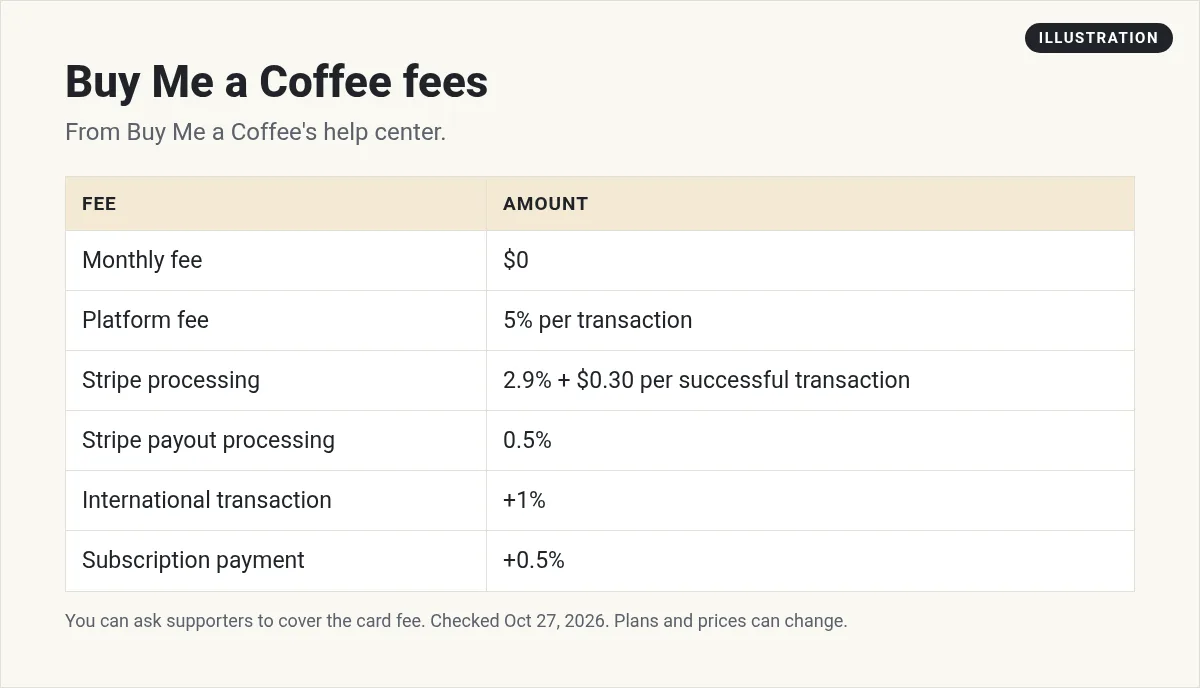
Buy Me a Coffee is a creator page for one-time support, memberships, and a shop. It has no monthly fee and takes a 5% platform fee per transaction. Stripe also charges 2.9% + $0.30 per payment and a 0.5% payout fee, plus 1% for international payments and 0.5% for subscriptions. Once your account reaches $10, it is reviewed, then payouts go to your Stripe account every Wednesday.
What Buy Me a Coffee is
The help center says "Buy Me a Coffee is a platform that helps creators earn support, share their work, and build community around what they do."
A "coffee" is just a small payment. The help center says "You set your coffee price (the default is $5), and supporters can choose to pay more if they'd like." Fans do not need an account to send one. The help center says "One-time support can be sent without creating an account."
The homepage sums it up: "Accept support. Start a membership. Setup a shop."
What you can offer
- One-time support. A tip with an optional message.
- Memberships. Monthly or yearly tiers with perks. The help center says you can "Create unlimited membership tiers with custom perks." You can only have one lifetime tier per account.
- Shop. Sell "digital products like eBooks, music, templates, courses, or artwork, or physical items like prints, stickers, or merchandise." There are "no setup or listing fees."
- Posts and messages. Share updates that are public, for supporters, or for members only.
- Stream alerts. Show an alert on screen when someone supports you during a live stream.
Fans can pay with "all major credit and debit cards, Apple Pay, Google Pay, and Cash App in supported regions," per the help center.
More on memberships
Memberships are where steady support comes from. The help center says each tier "can have its own name, pricing, description, image, and set of rewards." You can offer monthly or yearly billing. You can also set member limits, and create discount codes or free trials.
You stay in control. The help center says you "can edit, pause, unpublish, or delete any tier at any time."
Buy Me a Coffee fees
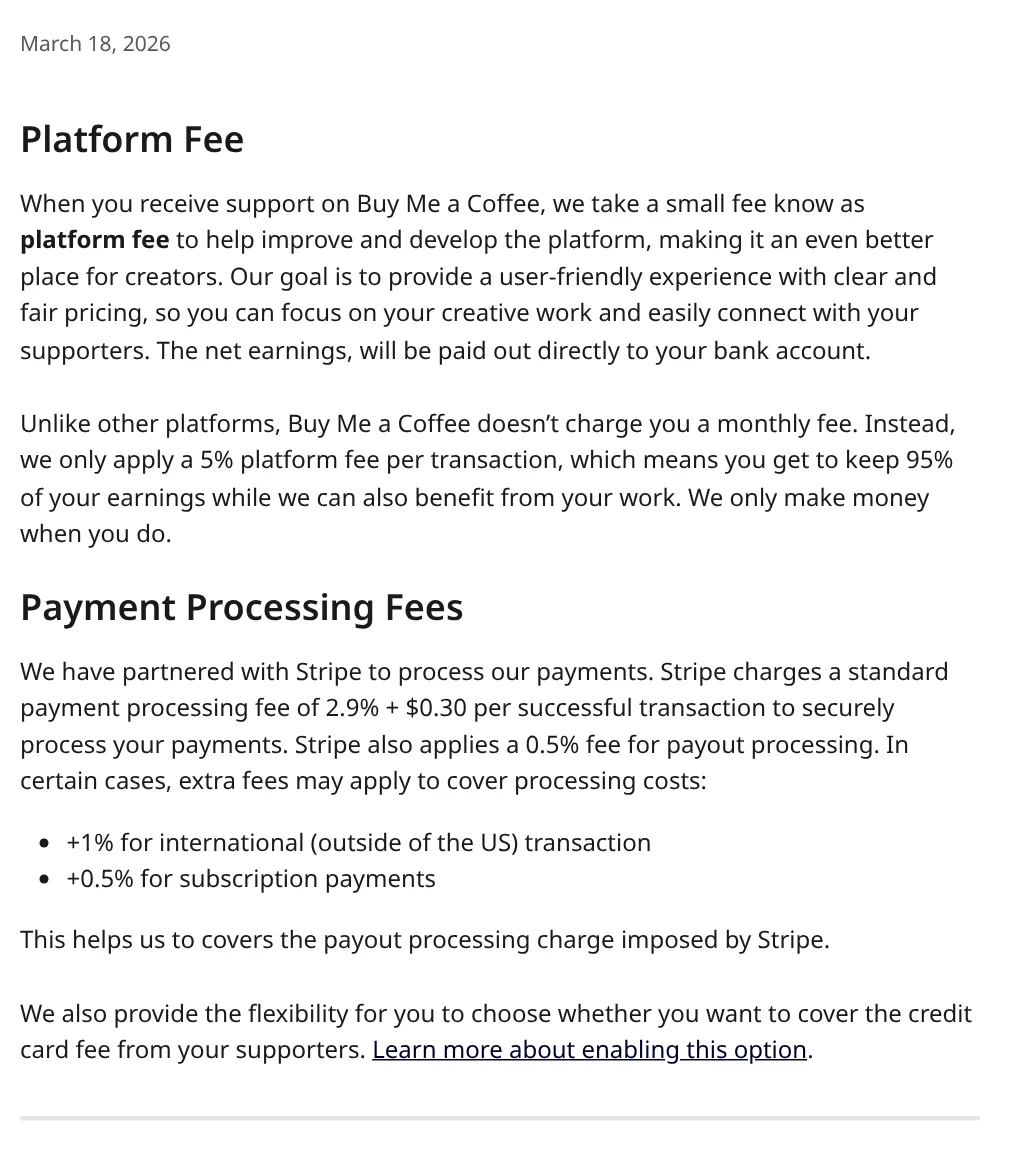
There are two kinds of fees. One goes to Buy Me a Coffee. The other goes to Stripe, which processes the payments.
The platform fee
The fees article says "Buy Me a Coffee doesn't charge you a monthly fee. Instead, we only apply a 5% platform fee per transaction." The FAQ adds that "creators keep 95% of the earnings."
Stripe fees
The same article lists Stripe's part:
- "2.9% + $0.30 per successful transaction"
- "0.5% fee for payout processing"
- "+1% for international (outside of the US) transaction"
- "+0.5% for subscription payments"
So "keep 95%" is before Stripe fees. Your real take is lower.
There is one way to lower it. The article says you can "choose whether you want to cover the credit card fee from your supporters." The help center also says you can "absorb this fee or pass it to supporters."
What you keep from a $5 coffee
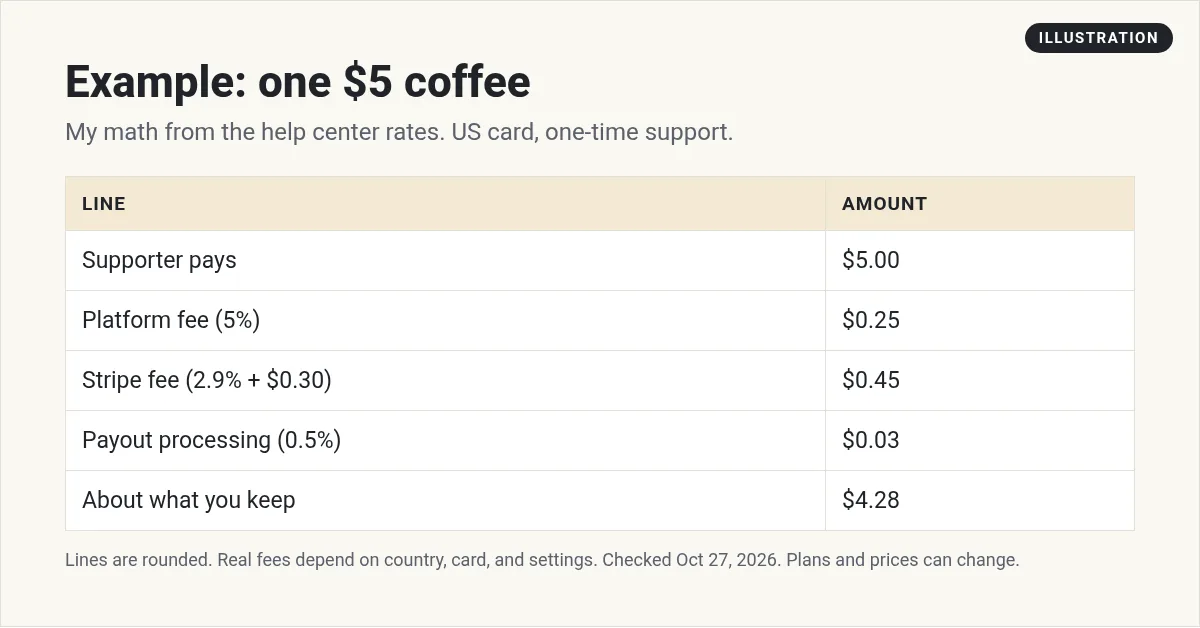
Here is my math for one $5 coffee from a US fan, using the rates above:
- Platform fee: 5% of $5 is $0.25.
- Stripe fee: 2.9% of $5 is $0.145, plus $0.30, so about $0.45.
- Payout processing: 0.5% of $5 is about $0.03.
That is about $0.72 in fees, so you keep about $4.28. The $0.30 part is the same on every payment. So on small tips, it takes a bigger share. If you raise your coffee price, a smaller share goes to fees.
How you get paid
Buy Me a Coffee pays through Stripe. The help center says "Once your account reaches $10, we'll review it. After approval, payouts are transferred to your Stripe account every Wednesday."
From Stripe, the money goes to your bank. The help center says this happens "based on your country's processing time, usually 2-7 business days."
The FAQ explains the review. It says "Our moderation team will review your account to ensure it doesn't violate our policy by sharing any restricted content."
The help center says Buy Me a Coffee is "Supported in 110+ countries." Check that yours is on the list before you set up.
Things to know before you start
- You own your list. The help center says "We don't email your supporters. You can export their contact information anytime you want."
- No ads on your page. It says "We'll never show ads on your page or sell your data."
- You can change the coffee. You can "Customize colors, your "coffee" emoji and text, button labels, and more" from your settings. So if coffee does not fit your brand, pick something else.
- Fans can follow for free. Followers get notified about your public posts, and can support you later.
How to set up your page
- Sign up and pick your page name. Use the name fans already know you by.
- Write a short bio. Say what you make and what support helps you do.
- Set your coffee price. The default is $5. Think about the $0.30 fixed fee when you choose.
- Connect Stripe. You need it to get paid.
- Add one more offer if you want. The help center suggests "starting with one membership level and adding more as your community grows."
- Share your link. The help center lists places like video descriptions, email footers, and link-in-bio tools. You can also add a button to your site.
Keep your ask clear. Tell fans exactly what their support pays for, like new videos or a new tool.
Buy Me a Coffee vs Ko-fi
These two get compared a lot. Here is how the fees differ, based on each one's help center on October 27, 2026:
- Buy Me a Coffee: 5% platform fee on payments, with no monthly fee.
- Ko-fi Free: 0% on one-off tips and 5% on other sales, with no monthly fee.
- Ko-fi Gold: $12 a month for new users, with 0% service fees.
Payouts work in a different way too. Ko-fi says you get paid "directly and instantly into your own PayPal or Stripe account." Buy Me a Coffee reviews your account at $10, then pays to Stripe on Wednesdays.
Both charge processor fees on top. If most of your support is one-off tips, compare the full math for your own numbers before you pick.
Who Buy Me a Coffee is good for
Buy Me a Coffee fits best if you already share free work, like videos, a podcast, a newsletter, or open source code. It gives fans who like that work an easy way to say thanks.
It also works as a first step. The help center says you can "Start with just one-time support and add memberships or a shop later." That lets you test what fans want before you build a bigger offer.
If you plan to sell a full course or high-priced program, a tool built for that may fit better.
Want to sell bigger products? See my guides to Stan Store and digital products to sell.
Before you launch your Buy Me a Coffee page
Nothing you check here is sent or saved. Download it if you want to keep it.
Meet AIM Agent
AIM Agent is an AI Chief of Staff for business owners. You give it a real task, and it brings the work back for you to review. You stay the one who approves.
Meet AIM AgentI am a co-founder of AIM Agent and have a financial interest in the product.
Frequently asked questions
What is Buy Me a Coffee?
Buy Me a Coffee is a platform where creators get one-time support, run memberships, and sell from a shop. Fans can send a coffee without making an account.
How much does Buy Me a Coffee take?
It takes a 5% platform fee per transaction, with no monthly fee. Stripe also charges 2.9% + $0.30 per payment and a 0.5% payout fee, plus 1% for international payments and 0.5% for subscriptions.
How much is one coffee?
You set the price. The help center says the default is $5, and supporters can choose to pay more.
How does Buy Me a Coffee pay you?
Once your account reaches $10, it is reviewed. After approval, payouts go to your Stripe account every Wednesday. Stripe then sends funds to your bank, usually in 2-7 business days.
Can supporters pay the card fee?
Yes. Buy Me a Coffee says you can choose to absorb the credit card fee or pass it to supporters.
Is Buy Me a Coffee free?
Yes, there is no monthly fee. Buy Me a Coffee earns its 5% platform fee only when you get paid.
Sources
Checked October 27, 2026. Plans, prices, and rules can change.
