
Overskill · Sign-in
Login is the part of an app that breaks trust fastest when it goes wrong. Here is how Overskill handles it for you, and the six checks to run before you invite anyone.
If people can't sign in to your app, nothing else matters. They leave, and most of them do not come back. The good news is that in Overskill (I earn a commission if you buy through this link), you do not build login yourself. It is built in.
But "built in" does not mean "nothing to check." This guide explains how Overskill sign-in works, what your users see, how to add Google sign-in, and the tests to run before your first real user shows up. All of it is from Overskill's help center, checked on October 17, 2026.
Quick answer
Overskill apps use built-in sign-in with a shared Overskill account. Your users get a real email and password with password reset, and you can add Google and GitHub sign-in with one prompt. Signing in is free for your users. Before launch, test with two fake users, check that private pages stay private, and remind first-time users to tap Sign Up, not Log In.
How sign-in works in an Overskill app
Here is the simple version. When someone clicks Sign up or Log in on your app, Overskill's help center says they go to a secure Overskill sign-in screen, enter their details, and get sent right back into your app, signed in.
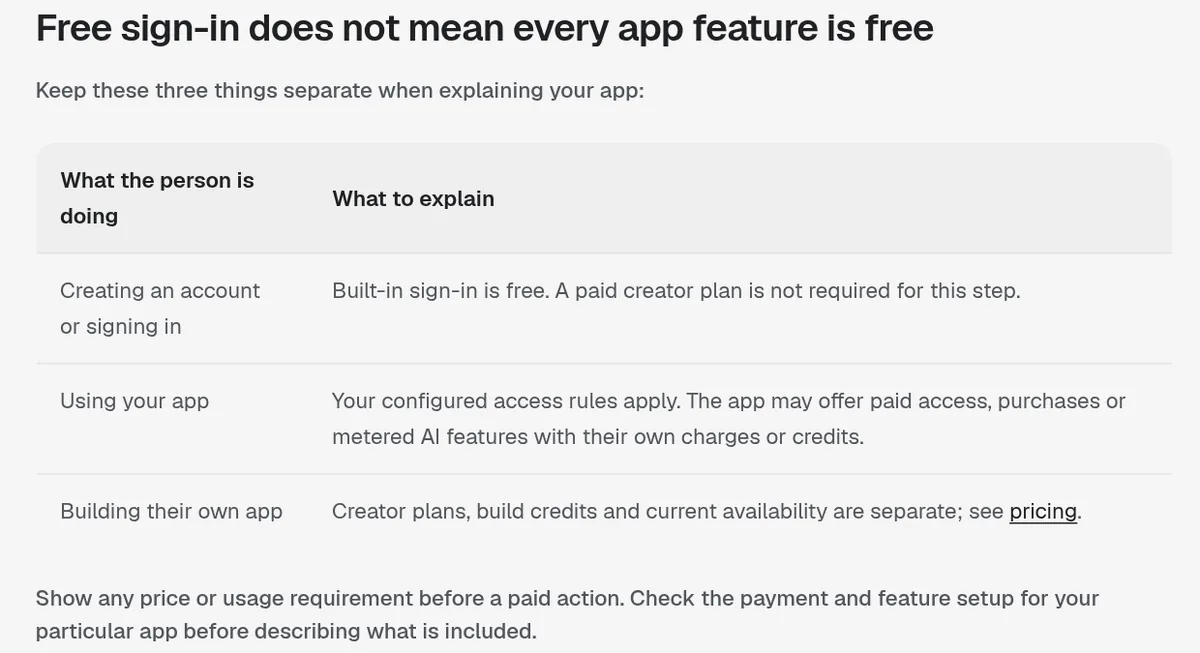
Three things are worth knowing:
- It is a shared account. Overskill says apps using built-in sign-in use a shared Overskill account, with access recorded separately for each app. A person who already has one can reuse it.
- It is free for your users. Overskill says creating an account and signing in are free. Your users do not need a paid creator plan just to sign in.
- Signing in is not the same as access. Overskill says signing in identifies the person. It does not give them every page, role, or record. You still decide who sees what.
That last point is the one I want you to remember. Login answers "who is this?" Your access rules answer "what can they see?"
Do your users get a real password?
Yes. Overskill's help article "Do my users get a real username and password?" says every app supports real email and password accounts. Overskill hosts the password part, so your users get:
- A real account with email and password
- Password reset by email link
- Password strength rules and secure storage
Why not put a password box right inside your own app's code? Overskill's answer is that storing passwords safely is easy to get wrong, and getting it wrong is how accounts get hacked. So it handles that part in one place for every app. I think that is the right call for first-time builders.
Adding Google or GitHub sign-in
Most people would rather click "Sign in with Google" than make a new password. Overskill makes this one prompt.
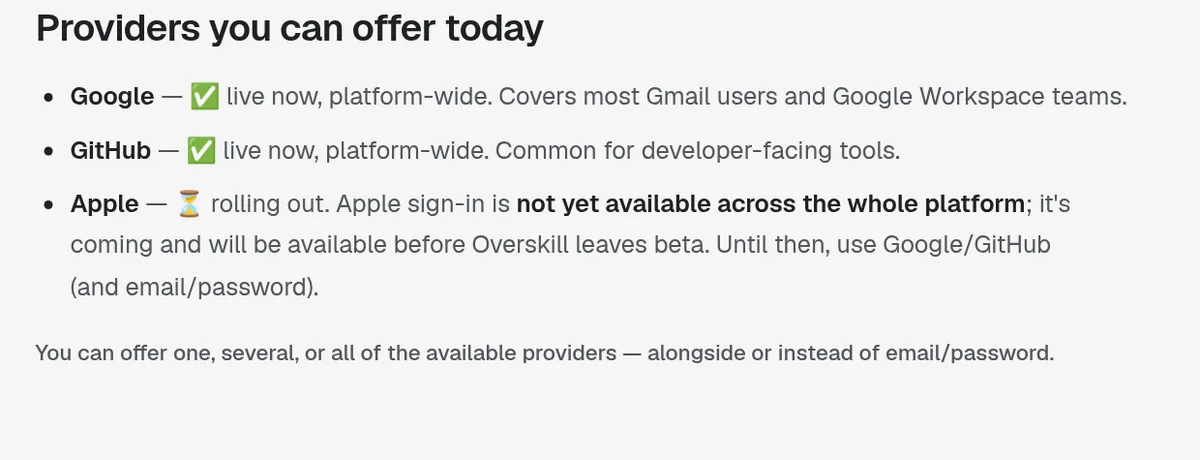
| Provider | Status on October 17, 2026 |
|---|---|
| Live now, platform-wide | |
| GitHub | Live now, platform-wide |
| Apple | Rolling out, not yet available across the platform |
| Email and password | Always available |
From Overskill's help article "Adding social login (Google, Apple, GitHub)," checked October 17, 2026.
To add it, ask in the editor: "Add Google and GitHub sign-in. Keep email/password as an option too." Overskill says it takes about 30 seconds.
A few details from that article:
- No setup on your side. You do not register a developer account or paste in any keys.
- No per-app switch. If a provider is live on the platform, your app can use it. If it is not live yet, support cannot turn it on just for you.
- What you get: the user's email, name, and in some cases a profile photo. Nothing else.
One small catch. Another Overskill article mentions Apple as an option. The social login article is clear that Apple is still rolling out. So do not promise "Sign in with Apple" on your sales page yet.
The prompt to set it up
Overskill's help center gives a prompt you can paste into your app's chat. Here it is, word for word:
"Add sign-up, sign-in and sign-out using Overskill's built-in sign-in. Keep Home public. Require sign-in for Dashboard and Settings. Each ordinary user should read and change only their own private records; describe any staff access separately. Use the sign-in methods available for this app and handle email confirmation, recovery and an expired session clearly. If something is unavailable or needs manual setup, tell me instead of claiming it is complete."
Swap in your own page names. Then review the preview, and publish before you expect the live app to use the changes.
Test it before you invite anyone
This is the step most people skip. Overskill's help center says to use fictional records and two test users who are not you, the app's creator. Here are the checks it lists:
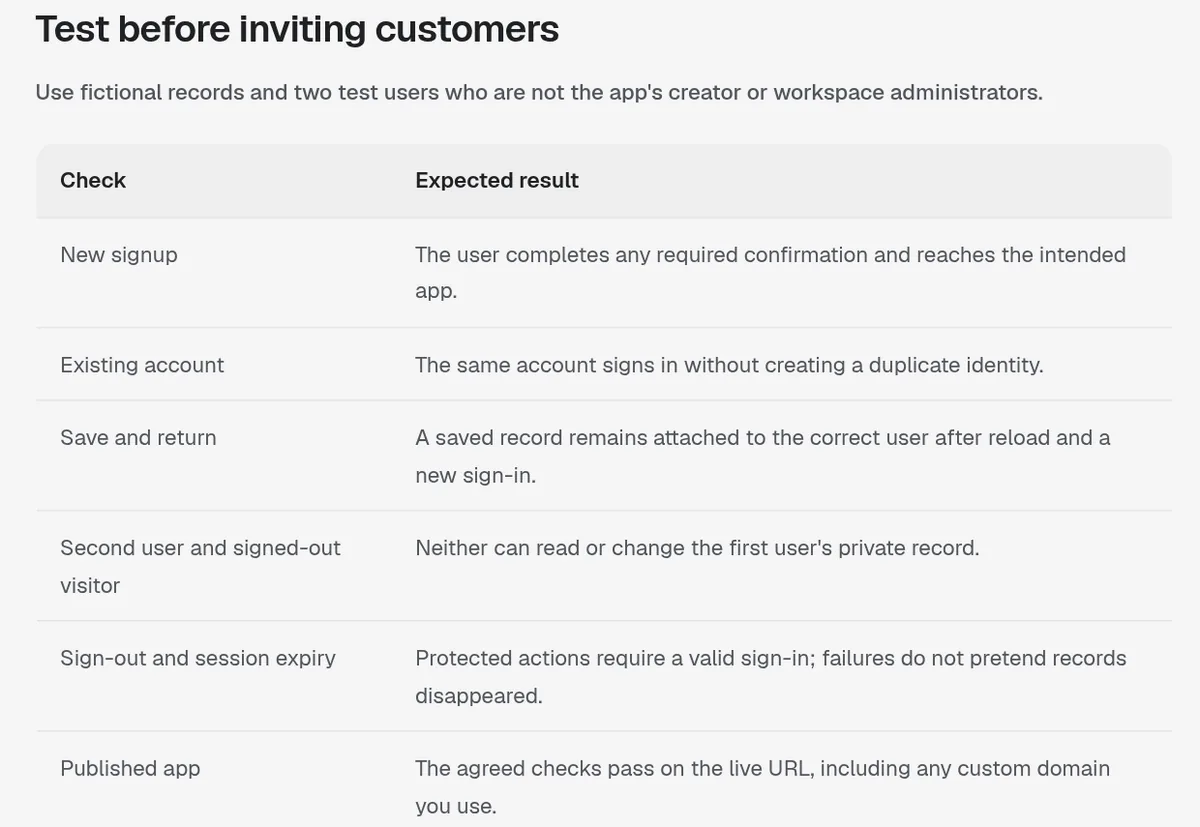
| Check | What should happen |
|---|---|
| New signup | The user finishes any confirmation and reaches the app. |
| Existing account | The same account signs in without making a duplicate. |
| Save and return | A saved record stays with the right user after reload and a new sign-in. |
| Second user and signed-out visitor | Neither can read or change the first user's private record. |
| Sign-out and session expiry | Protected actions need a valid sign-in. Failures do not pretend records vanished. |
| Published app | The checks pass on the live link, including your custom domain. |
Adapted from Overskill's help article "How your app's users sign up," checked October 17, 2026.
Common sign-in problems and fixes
| Problem | Most likely cause | Fix |
|---|---|---|
| Users get a 401 error | They tapped Log In before they ever signed up | Tell first-time users to tap Sign Up. Check the editor sidebar, then Users, to see who has signed up. |
| "redirect_uri_mismatch" or a login loop | You just renamed your app | Wait a few minutes, or re-publish your app. If it still fails, reconnect in Integrations. |
| Invited person cannot get access | They signed in with a different email | They must sign in with the same email you invited. |
| Sign-in broke right after a domain change | DNS is still updating | Wait 5 to 10 minutes and check Domains for anything amber or red. |
| User swears they signed up | They used another email | Have them use Forgot password. |
From Overskill's help articles on 401 errors, sign-in problems, and real passwords, checked October 17, 2026.
On the rename problem, Overskill adds that you do not need to set up a redirect address in a Google developer console. If you see that advice somewhere, it does not apply to Overskill apps.
What to tell your first users
Because the 401 error is so common, I would put one line in the message you send with your app link:
"First time here? Tap Sign Up, not Log In."
That one line can save you a pile of "your app is broken" replies. I have learned this the hard way over years of launching products. The tech is rarely the problem. Clear instructions are.
If you want to charge for access after people sign in, my guide on building an app with Overskill covers the next steps. New to the builder? Start with my Overskill tutorial for beginners.
Looking for how you, the builder, sign in to Overskill itself? That is a different thing. See Overskill login help.
Sign-in launch checklist
Nothing you check here is sent or saved. Download it if you want to keep it.
Meet AIM Agent
AIM Agent is an AI Chief of Staff for business owners. You give it a real task, and it brings the work back for you to review. You stay the one who approves.
Meet AIM AgentI am a co-founder of AIM Agent and have a financial interest in the product.
Need Overskill first? Start with Overskill (I earn a commission if you buy through this link.)
Frequently asked questions
Do my users need an Overskill account?
Yes, if your app uses Overskill's built-in sign-in. Overskill says users create or reuse a shared Overskill account. Creating it and signing in are free, and they do not need a paid creator plan.
Do Overskill app users get a real password?
Yes. Overskill says every app supports real email and password accounts, with password reset and secure storage handled by Overskill.
Can I add Google sign-in to my Overskill app?
Yes. Google and GitHub sign-in are live platform-wide. Ask the editor to add them. Apple sign-in was still rolling out on October 17, 2026.
Why do my users get a 401 error in my Overskill app?
Overskill says it is almost always because they tried to log in before signing up. Tell first-time users to tap Sign Up, then check the Users list in the editor sidebar.
How do I fix redirect_uri_mismatch in Overskill?
Overskill says it usually happens right after you rename your app and clears up on its own. Re-publish your app to fix it right away, or reconnect the connection in Integrations.
Does signing in give users access to everything in my app?
No. Overskill says signing in identifies the person. You still set which pages, roles, and records each user can see, and you should test those rules.
Sources
Checked October 17, 2026. Plans, prices, and rules can change. Links to overskill.com carry my referral code. I earn a commission if you buy through those links.
