
Overskill basics
Yes, you can build a real web app in Overskill without writing code. You still have to think clearly, test like a customer, and know where the limits are. Here is the honest version.
Disclosure: Some links in this post are affiliate links. I earn a commission if you buy through this link. It does not change the price you pay. MakerAI is my own company.
Quick answer
Yes. Overskill (I earn a commission if you buy through this link.) lets you describe an app in plain English, and its AI builds the pages, the database, and sign-in for you. Overskill says it is designed for people who want to build without writing code. The limits: it makes web apps that install from the browser, App Store publishing is still waitlist only, and you must test every step yourself before real customers use it.
How Overskill builds apps without code
Most people hear "build an app" and picture a screen full of code. That is not how Overskill works. You type what you want, the way you would explain it to a friend. The AI writes the code behind the scenes.
Overskill sums up its own process in three words on its How it works page: describe, generate, ship.
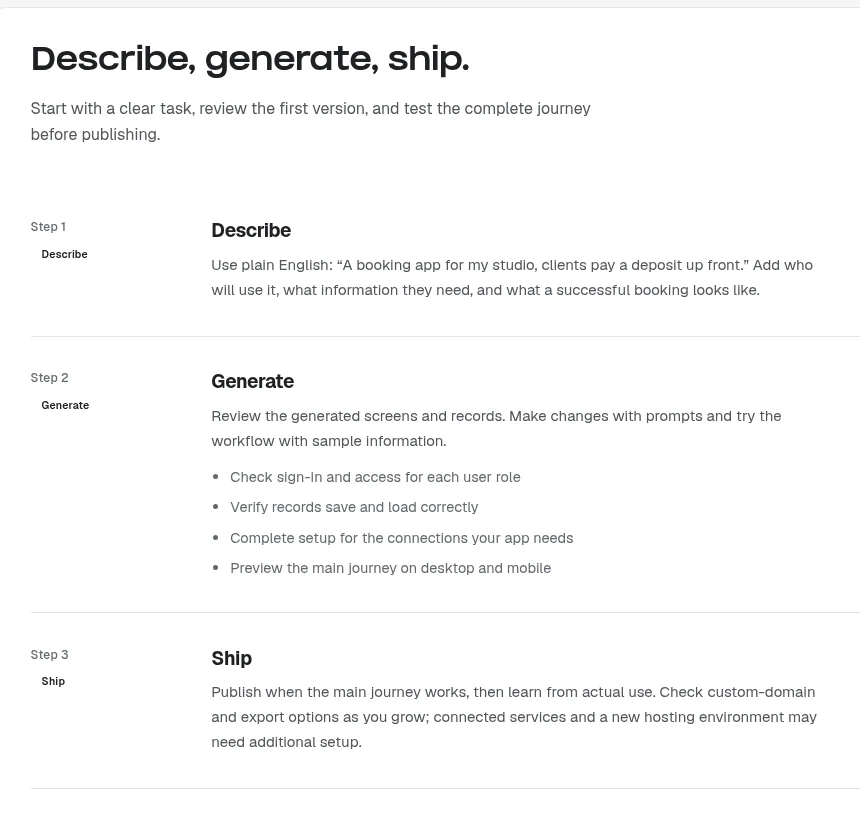
| Step | What you do | What Overskill does |
|---|---|---|
| 1. Describe | Explain who the app is for and what they need to do | Reads your plain English request |
| 2. Generate | Click around the preview with sample data | Builds screens, saved records, and sign-in |
| 3. Ship | Check the main path on desktop and phone | Publishes your app to a live web address |
Based on the official How it works page, checked Oct 16, 2026.
Their own example for step one is simple: "A booking app for my studio, clients pay a deposit up front." That one sentence names the user, the job, and the money step. That is a good model for your first prompt.
In the help center, the "Build your first app in 3 minutes" guide says a first build usually takes 30 to 90 seconds. When you hit Publish, your app gets an address like your-recipes.overskill.app that anyone can open.
What you can build in Overskill with no code
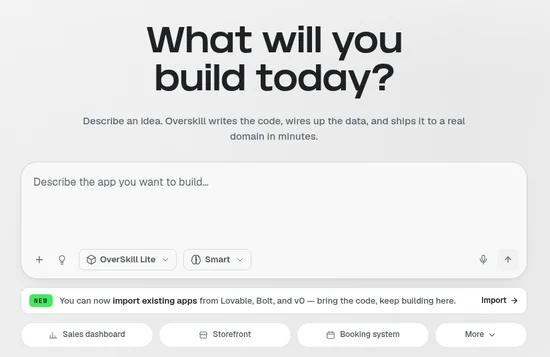
Overskill is not just a page builder. The help center lists the parts that come built in, so you do not have to wire them up yourself.
| Built-in part | What it means for you |
|---|---|
| Database | Your app can save and load real records, like bookings or orders |
| User sign-in | Your users can create an account and sign in, and you can add Google, Apple, or GitHub sign-in |
| File storage | People can upload photos and files |
| Scheduled jobs | Tasks can run on a timer, like a daily summary email |
| Your app can send emails (free apps on the default sender are limited to 100 a day) | |
| Hosting | Your app goes live on an overskill.app address, or your own domain |
From Overskill help articles, checked Oct 16, 2026.
The help center gives starter ideas like a booking app for a fitness studio, an inventory dashboard, a membership app with paid content, a directory with saved favorites, and a meal planner with a grocery list.
There are also 245+ pre-built templates you can start from at no extra cost. If you want more ideas, read my list of AI app ideas.
The honest limits of building without code
I like tools that tell you the truth. Overskill has a help article called "What the AI can and can't do." Here is my plain summary of it.
| Good fit | Harder fit |
|---|---|
| Building an app from a clear description | Exact copies of another website |
| Adding pages, forms, and buttons | Rare or very custom screen designs |
| Connecting tools like Slack, Stripe, and Gmail | Crunching millions of records or video editing |
| Fixing its own mistakes when you tell it | Complex live teamwork apps like Figma |
| Writing button text and headings | Reading the source code of your old app |
Source: Overskill help, "What the AI can and can't do," checked Oct 16, 2026.
Phone apps: browser install now, App Store later
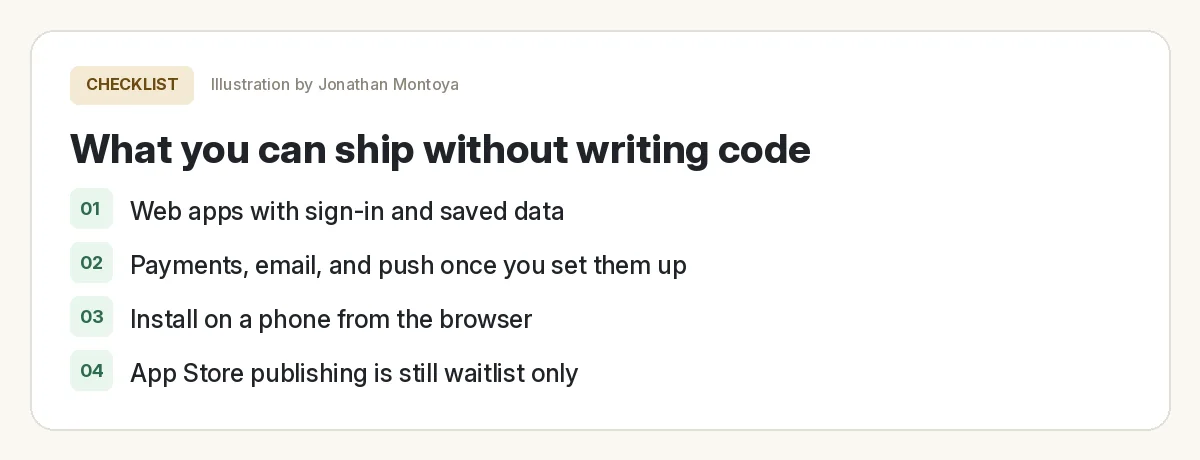
This is the big one people get wrong. Every Overskill app can be installed on a phone from the browser. It gets a home screen icon and opens full screen like a normal app.
But publishing to the Apple App Store or Google Play is not open yet. The App Store FAQ says it is "Not available yet" and "waitlist only," on any plan. Do not plan a launch around it.
Your first no-code build, step by step
Here is the path I would follow. If you want more detail with screens, see my Overskill tutorial for beginners.
- Pick one job. Not five. One task a real person does over and over.
- Write who, what, and save. Who uses it, what they need to do, and what the app must remember.
- Paste your prompt into the new app box and send it.
- Test like a customer. Sign up, add a record, refresh, and check it is still there.
- Ask for one change at a time. Small, clear requests cost fewer credits and break less.
- Check it on your phone. Then publish and test the live address too.
No-code build check before you share
Nothing you check here is sent or saved. Download it if you want to keep it.
A starter prompt you can copy
Swap in your own business. Keep the shape.
What it costs to try Overskill
Overskill is in invite-only beta right now. The join page says new accounts get 500 credits to start. There is no free plan after that. Prices below are from the live pricing page, checked Oct 16, 2026. For the full breakdown, read my Overskill pricing guide.
| Plan | Monthly | Billed yearly | Credits per month |
|---|---|---|---|
| Starter | $25 | $250 a year ($20.83 a month) | 2,500 |
| Studio | $99 | $989 a year ($82.42 a month) | 12,000 |
Prices checked Oct 16, 2026 on overskill.com/pricing.
The pricing FAQ says a typical change uses about 400 to 1,500 credits, and most are around 700. A fresh build of a whole new app uses about 2,000 to 8,000. So the 500 starter credits are enough to look around, not to finish a big app.
The skill you still need (it is not code)
No code does not mean no thinking. The AI does the typing. You do the deciding. The people who win with these tools are clear about the problem they solve.
I left electrical engineering in March 2020. Even with that background, I do not want to hand-write code anymore. In this video I show the "vibe coding" way I build software by talking to AI. It is not an Overskill tutorial, but the thinking is the same.
My video: How I build software by describing it to AI, with no hand-written code.
Any results mentioned in videos are not typical and are not a promise of income. Your results depend on your work and your market.
If you want to see Overskill itself on screen, the ClickFunnels team did a long intro session.
From the ClickFunnels channel (not mine): An intro to building apps in Overskill without code.
Want to compare tools first? See what Overskill is and my guide on how to build an app with no coding experience.
Want help picking what to build?
In my free AI workshop, I show how I think about app ideas, who to build for, and how to use AI tools without getting lost. Bring your idea.
Join my free AI workshopMakerAI is my company. The workshop is free. No income promises, just the process.
Ready to try it yourself?
Start with one small app and one clear job. Test it like a customer before you share it.
Try OverskillI earn a commission if you buy through this link. Overskill is in invite-only beta, so you may need an invite code or a waitlist spot. Check the live pricing page before you buy.
Frequently asked questions
Can Overskill really build apps without coding?
Yes. You describe the app in plain English and Overskill builds the pages, database, and sign-in. Overskill says it is designed for people who want to build without writing code. You still test and decide what is ready.
Can Overskill put my app in the App Store?
Not yet. Overskill's App Store FAQ says publishing to the App Store or Google Play is not available yet and is waitlist only. Today, people install your app from the browser to their home screen.
How long does a first Overskill build take?
Overskill's help center says a first build usually takes 30 to 90 seconds. Testing and fixing it takes longer, and that part matters most.
Is Overskill free?
There is no free plan. The join page says new accounts get 500 credits to start. Paid plans were $25 a month (Starter) and $99 a month (Studio) when checked on Oct 16, 2026.
What can't Overskill build well?
Its help center says it struggles with pixel-perfect copies of other sites, heavy data processing like video editing, and complex live teamwork apps. It also cannot read the source code of your old app.
Do I need to know how to code to fix problems?
No. You tell the AI what is wrong in plain English. Overskill says telling it usually fixes it. Clear, specific requests work best.
Sources
All checked October 16, 2026. Overskill is in beta and changes often, so plans, features, and rules can change. Links to overskill.com below include my affiliate code. I earn a commission if you buy through this link.
- Overskill: How it works
- Overskill pricing
- Overskill join page (invite-only beta)
- Help: What is Overskill?
- Help: Build your first app in 3 minutes
- Help: What the AI can and can't do
- Help: App Store publishing FAQ
- Help: Installing your app on iPhone and Android
- Help: Let Overskill handle the plumbing
- Help: Adding social login
- Help: Sending emails from your app
- Help: Starting from a pre-built app template
- YouTube: The "Vibe Coding" Method (Jonathan Montoya)
- YouTube: Intro to Overskill, Coaching Corner #042 (ClickFunnels)
