
Website Builders · Pricing
Squarespace has four plans, and the price depends on whether you pay yearly or monthly. Here is every price, the selling fees on each plan, and how to choose.
Squarespace is a website builder known for clean templates. It includes hosting, and every paid plan can sell products or services. There is no free plan, but there is a free trial.
The pricing page opens on "Pay annually," which shows the lower prices. Paying monthly costs more. I checked both views on October 27, 2026. Here is the full picture, including the selling fees.
Quick answer
Squarespace has four plans. Paid annually, they are $19 a month for Basic, $29 for Core, $49 for Plus, and $99 for Advanced. Paid monthly, they are $25, $39, $65, and $139. Basic has a 2% online store transaction fee. Core and up have no fees on online store transactions. Card rates start at 2.9% + $0.30 and drop to 2.5% + $0.30 on Advanced. Every site starts with a 14-day free trial, and annual plans include a free custom domain for one year.
Squarespace plans and prices
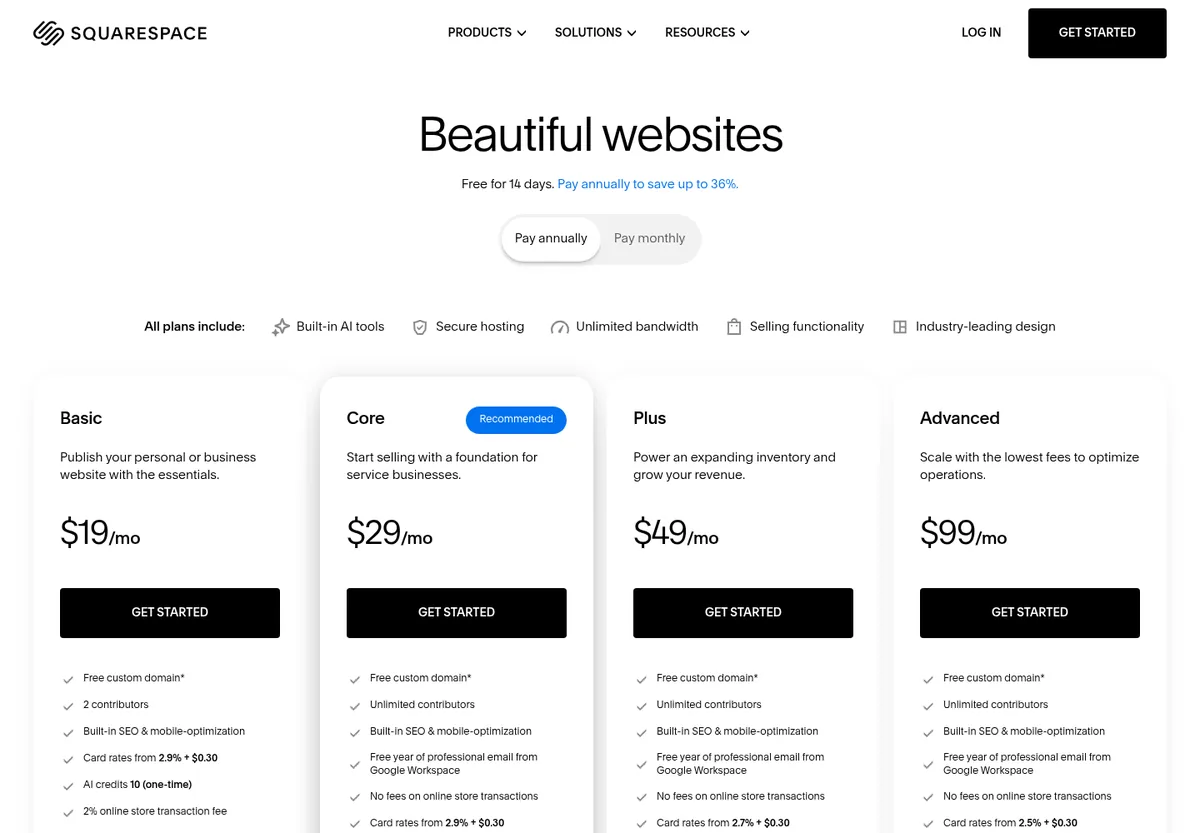
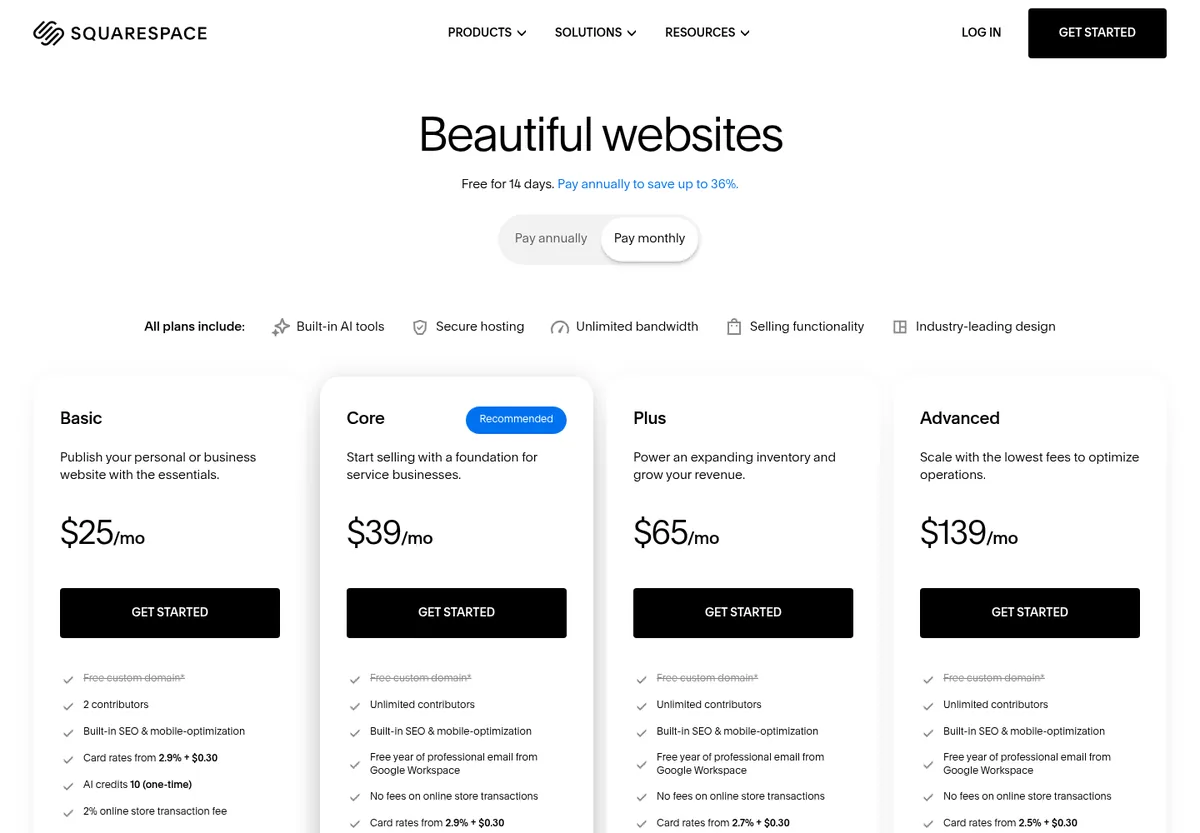
The pricing page says "Free for 14 days. Pay annually to save up to 36%." It has a switch for "Pay annually" and "Pay monthly." It opens on annual.
Paid annually
- Basic: $19 a month
- Core: $29 a month (marked Recommended)
- Plus: $49 a month
- Advanced: $99 a month
Paid monthly
- Basic: $25 a month
- Core: $39 a month
- Plus: $65 a month
- Advanced: $139 a month
The annual prices are shown per month, but you pay for the full year. My math: Basic is $228 a year, Core is $348, Plus is $588, and Advanced is $1,188.
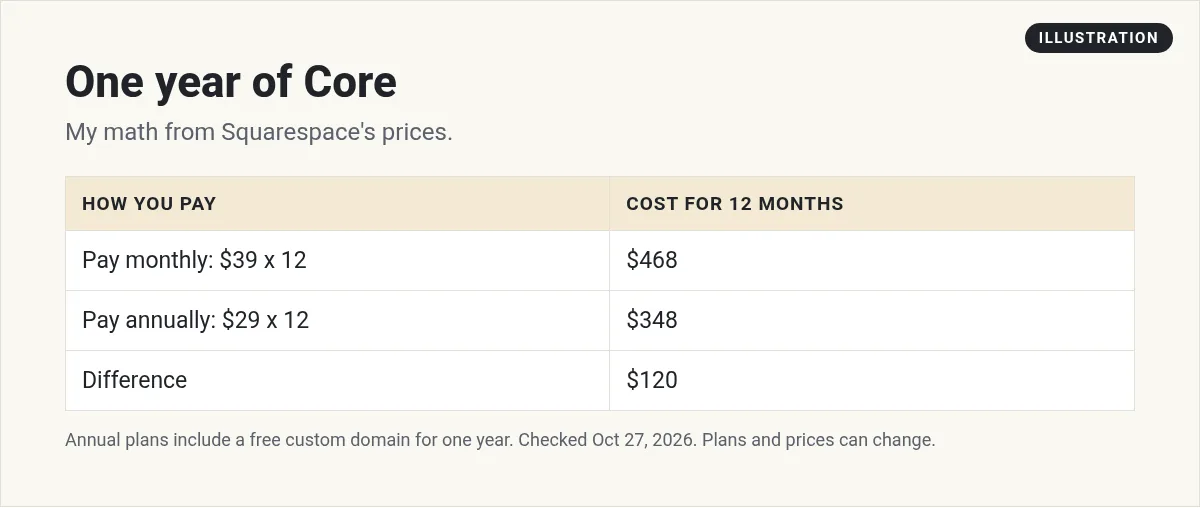
Here is the gap on Core. Paying monthly for a year is $39 x 12 = $468. Paying annually is $348. That is $120 more for monthly.
What every plan includes
The pricing page says "All plans include" these five things:
- Built-in AI tools
- Secure hosting
- Unlimited bandwidth
- Selling functionality
- Industry-leading design
Every plan also lists a "Free custom domain" with a note. The FAQ explains it: "If you purchase an annual plan, you'll receive a free custom domain for one year." So on monthly billing, you pay for the domain yourself.
Selling fees on each plan
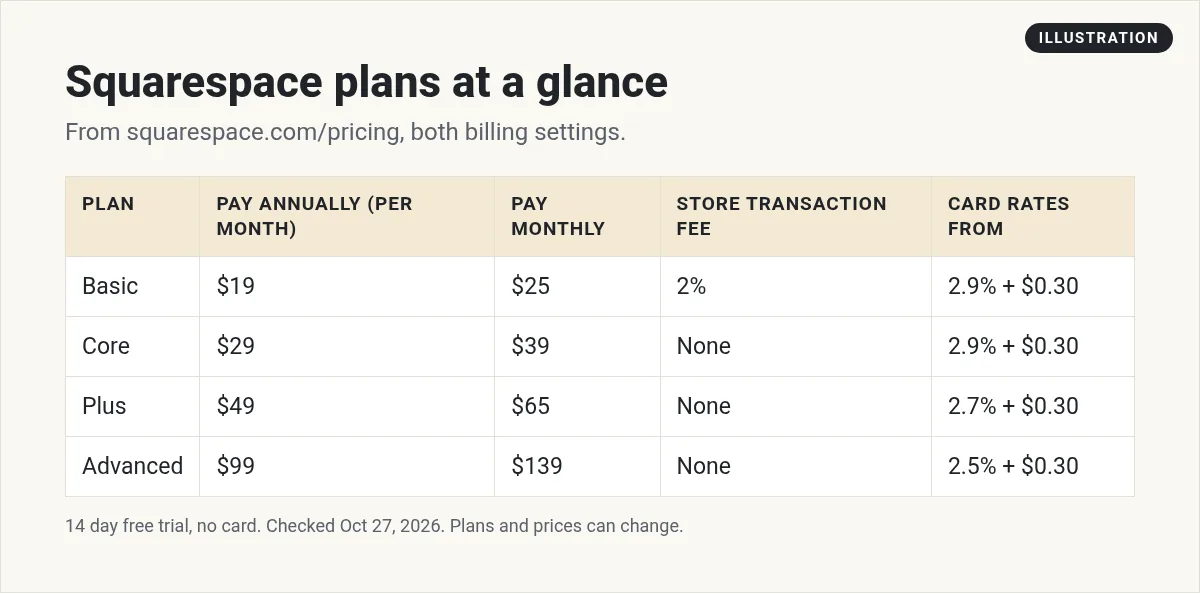
This is where the plans really differ. There are two kinds of fees when you sell: a Squarespace transaction fee and the card rate.
Online store transaction fees
- Basic: "2% online store transaction fee"
- Core, Plus, and Advanced: "No fees on online store transactions"
Card rates
- Basic and Core: "Card rates from 2.9% + $0.30"
- Plus: "Card rates from 2.7% + $0.30"
- Advanced: "Card rates from 2.5% + $0.30"
Digital content and memberships
The pricing page did not look the same every time I loaded it. One version listed only that Advanced has "No fees on digital content and memberships transactions." Another version listed a fee for each plan: 7% on Basic, 5% on Core, 1% on Plus, and 0% on Advanced. The plan prices were the same in both versions. If you plan to sell courses or memberships, check the fee on the page you see before you buy.
When Core beats Basic
Here is my math. Paid annually, Core costs $10 a month more than Basic. Basic's 2% store fee on $500 in monthly store sales is $10. So if you sell more than about $500 a month in your online store, Core costs less than Basic. Card rates are the same on both.
What each plan adds
Basic
The page says Basic is to "Publish your personal or business website with the essentials." It includes 2 contributors, built-in SEO, and 10 AI credits (one-time).
Core
Core is to "Start selling with a foundation for service businesses." It adds unlimited contributors, a "Free year of professional email from Google Workspace," 20 AI credits a month, advanced discount and lead capture tools, and automated taxes and shipping.
Plus
Plus is to "Power an expanding inventory and grow your revenue." It adds lower card rates, 40 AI credits a month, and a "Reserved cart & countdown timer."
Advanced
Advanced is to "Scale with the lowest fees to optimize operations." It adds the lowest card rates, 120 AI credits a month, and "High-traffic checkout."
What your first year might cost
Here are two simple examples, using my math on the listed prices and fees. Card fees come on top in both.
Scenario 1: a site with no store sales
Say you only need a site with a contact form, and you sell nothing through the store. Basic paid annually is $228 for the year. The 2% store fee does not apply, since there are no store sales. The annual plan also includes a free custom domain for the first year.
Scenario 2: a small store
Say your store sells $1,000 a month through its online store. On Basic, the 2% store fee is $20 a month, or $240 a year, on top of $228. That is $468. On Core paid annually, there is no store fee, so the year costs $348. In this scenario, Core saves $120 and adds Google Workspace email for a year.
These are made-up scenarios, not real customers. Your numbers depend on what you sell and how you get paid.
How to start on Squarespace
- Start the free trial. No credit card is needed, and you get 14 days.
- Pick a template. Choose one close to the look you want. It is easier than changing a lot later.
- Write your pages. Start with Home, About, and one page for what you offer. Use the built-in AI tools for a first draft, then edit it in your own words.
- Add your selling tools. Set up products, services, or booking if you need them.
- Choose a plan. Use the fee math above. Pick annual if you are sure, so you get the free domain for a year.
Free trial, changes, and canceling
- No free plan. The FAQ says "Squarespace doesn't offer a free plan," but every site starts with a free trial.
- 14-day trial. The FAQ says "Every Squarespace website starts with a 14-day free trial." The page also says "No credit card required. Cancel anytime."
- Changing plans. The FAQ says "You can upgrade, downgrade, or cancel your plan at any time." It adds that "Changes take effect at the end of your current billing cycle."
- Hosting. The FAQ says "All Squarespace plans include our fully-managed cloud hosting."
Because changes take effect at the end of your billing cycle, be careful with annual plans. If you pay for a year and then downgrade, the change waits until that year ends.
Is Squarespace worth the price?
It depends on what you need. You get hosting, templates, selling tools, and AI tools in one place, so you do not have to connect a lot of separate apps. The trade-off is that there is no free plan, and the fees on Basic can add up once you sell. If you want a polished site and plan to sell, Core is usually the plan to look at first, based on the math above. If you only need a simple page, try a cheaper tool before you commit.
Which Squarespace plan should you pick?
- A simple site with little or no selling? Basic.
- A service business, or a store selling about $500 a month or more? Core. No store fee, plus Google Workspace email for a year.
- A growing store with lots of card sales? Plus, for the lower card rate.
- High volume? Advanced, for the lowest card rate.
My tip: use the 14-day trial to build the site first. Then pick the plan once you know what you will sell. If you only need one page, a cheaper tool like Carrd may be enough. See my guide to AI website builders and what a website costs to build with AI.
Before you pay for Squarespace
Nothing you check here is sent or saved. Download it if you want to keep it.
Meet AIM Agent
AIM Agent is an AI Chief of Staff for business owners. You give it a real task, and it brings the work back for you to review. You stay the one who approves.
Meet AIM AgentI am a co-founder of AIM Agent and have a financial interest in the product.
Frequently asked questions
How much does Squarespace cost?
Paid annually, Squarespace is $19 a month for Basic, $29 for Core, $49 for Plus, and $99 for Advanced. Paid monthly, it is $25, $39, $65, and $139.
Is there a free Squarespace plan?
No. Squarespace says it doesn't offer a free plan, but every site starts with a 14-day free trial with no credit card required.
Does Squarespace charge transaction fees?
Basic has a 2% online store transaction fee. Core, Plus, and Advanced have no fees on online store transactions. Card rates start at 2.9% + $0.30 and go down to 2.5% + $0.30 on Advanced.
Does Squarespace include a free domain?
Yes, with an annual plan. Squarespace says you get a free custom domain for one year when you buy an annual plan.
Can I cancel Squarespace anytime?
Yes. Squarespace says you can upgrade, downgrade, or cancel at any time. Changes take effect at the end of your current billing cycle.
How much do you save paying Squarespace annually?
Squarespace says you can save up to 36% by paying annually. For example, Core is $348 a year paid annually or $468 a year paid monthly.
Sources
Checked October 27, 2026. Plans, prices, and rules can change.
