

Build with AI · Pricing
If you build apps with AI, there is a good chance Supabase is your database. Here is what it costs, from the free plan to your first real bill.
Supabase is the database and login system behind a lot of apps built with AI tools. The free plan is generous. But once your app is real, the bill has a few moving parts that are easy to miss.
On October 22, 2026, I went through Supabase's pricing page, its compute table, and its billing docs. Here is what each plan costs and how to estimate your own bill.
Quick answer
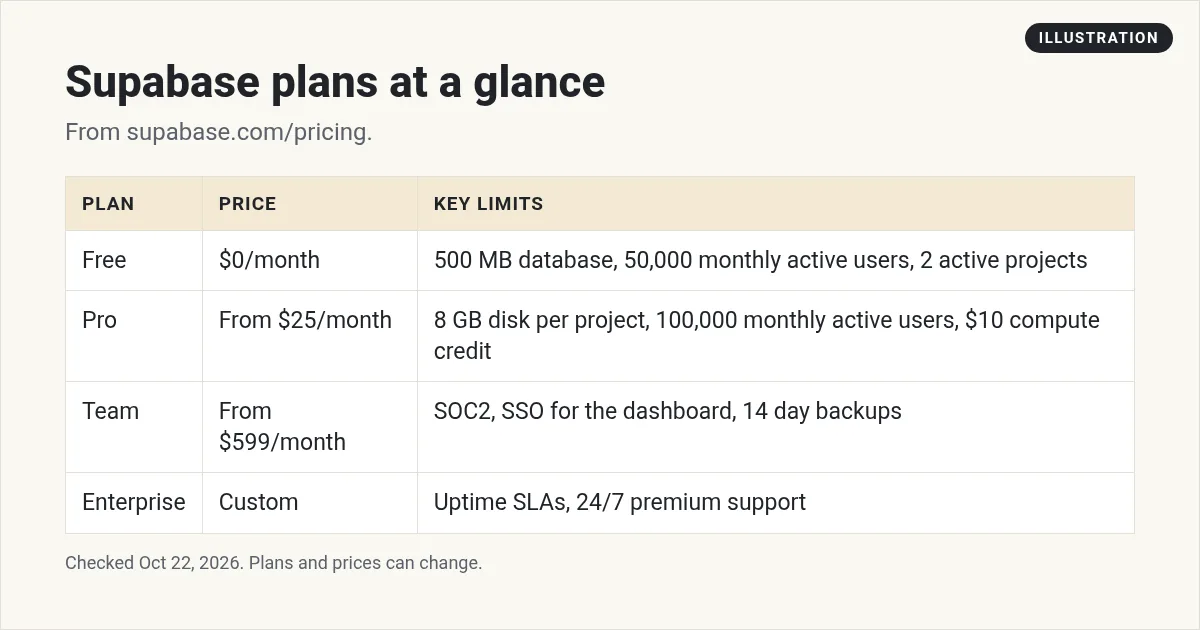
Supabase has a Free plan at $0 with a 500 MB database, 50,000 monthly active users, and 2 active projects. Pro starts at $25 a month and includes your first project, 100,000 monthly active users, and 8 GB of disk per project. Team starts at $599 a month. Enterprise is custom. Paid plans include $10 a month in compute credits, enough for one Micro instance. Extra projects start at $10 a month. Checked October 22, 2026.
What you are paying for
If you are new to Supabase, the pricing page uses a few words that are worth knowing first:
- Database: where your app's data lives, like users, orders, and posts. Supabase uses Postgres, a popular database.
- Monthly active users: the people who log in to your app in a month. Supabase handles logins for you.
- File storage: space for files like photos and PDFs that your users upload.
- Egress: data that leaves Supabase, like when your app loads a page of data or a user downloads a file.
- Compute: the size of the server that runs your database. Bigger servers handle more traffic and cost more.
Most of these have a free amount on every plan. You only pay extra when you go past it.
Supabase plans at a glance
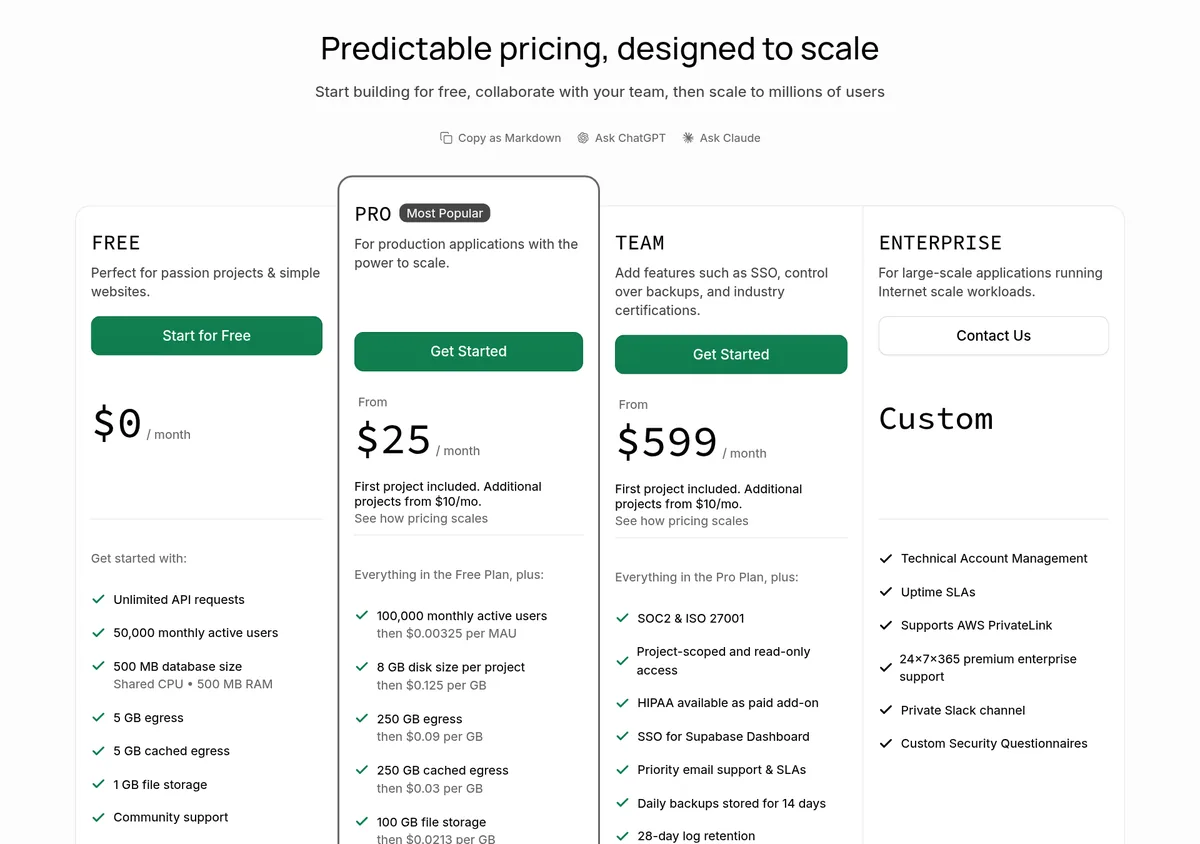
Here is what each plan costs on October 22, 2026:
- Free, $0 a month: 500 MB database, 50,000 monthly active users, 5 GB egress, 1 GB file storage, and community support.
- Pro, from $25 a month: your first project, 100,000 monthly active users, 8 GB disk per project, 250 GB egress, 100 GB file storage, email support, and daily backups kept for 7 days.
- Team, from $599 a month: everything in Pro, plus SOC2 and ISO 27001, SSO for the Supabase dashboard, priority support, and backups kept for 14 days.
- Enterprise, custom: uptime SLAs, round the clock premium support, and a private Slack channel.
What the free plan really gives you
The free plan is great for learning and side projects. But read the small print under it: "Free projects are paused after 1 week of inactivity. Limit of 2 active projects."
That pause is the big one. If nobody uses your app for a week, it goes to sleep. That is fine for a test. It is not fine for an app real customers use.
The two project limit also counts across your whole account. Supabase's billing docs say the limit "applies across all organizations where you are an Owner or Administrator."
Pro: why $25 is a starting price
Pro says "From $25 / month." Your real bill can be higher because of three things.
1. Usage over the included amounts
Pro includes a lot, but each item has a price after that. From the pricing page:
- Monthly active users: 100,000, then $0.00325 per user.
- Disk: 8 GB per project, then $0.125 per GB.
- Egress: 250 GB, then $0.09 per GB.
- File storage: 100 GB, then $0.0213 per GB.
2. Extra projects
The first project is included. The page says, "Additional projects from $10/mo." Each project runs its own database, so each one adds compute cost.
3. Compute size
This is the part most people miss. Every project gets its own Postgres database on its own server, and you pay for the size of that server. More on that next.
How Supabase compute pricing works
The pricing page says, "Paid plans include $10/mo in compute credits, enough to cover one Micro instance." So your first small project costs nothing extra.
Here are the first few compute sizes and what they cost each month:
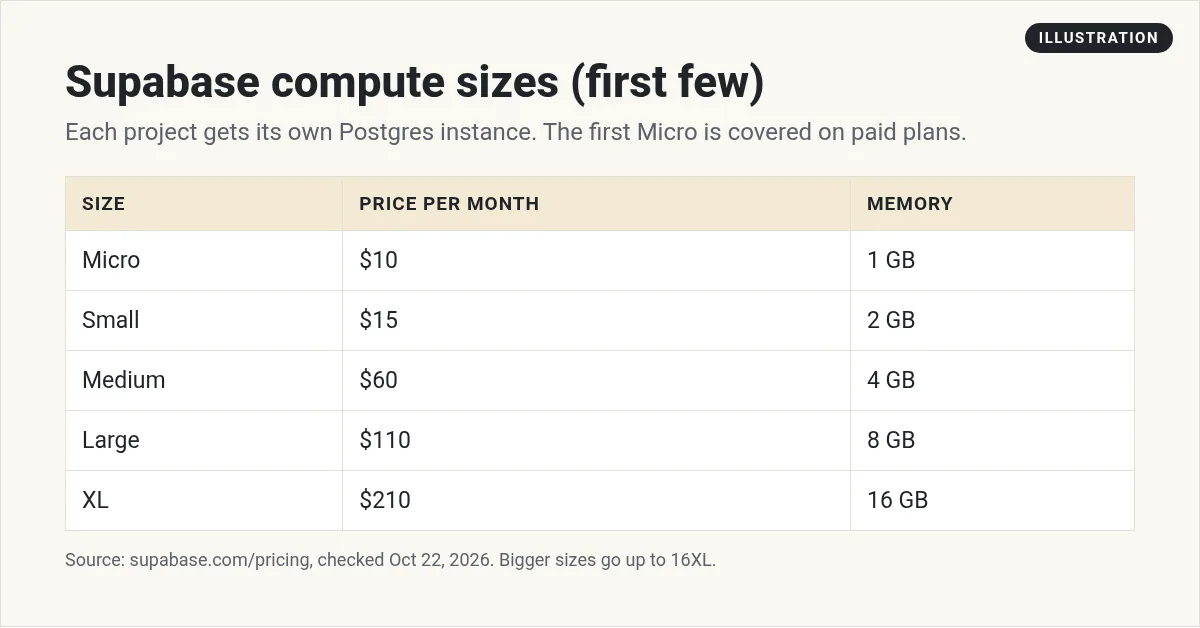
The sizes keep going up to 16XL at $3,730 a month. Most beginners will never need that. Supabase also says compute is "billed hourly and you can scale up or down at any time."
Quick math examples
- One app on Micro: $25 for Pro. The $10 Micro is covered by the $10 credit. Total: $25.
- One app on Small: $25 for Pro, plus $15 for Small, minus the $10 credit. Total: $30.
- Two apps on Micro: $25 for Pro, plus $20 for two Micros, minus the $10 credit. Total: $35.
These leave out usage over the included amounts and add-ons. The pricing page has a calculator that does this math for you.
The spend cap: your safety net
Worried about a surprise bill? Pro has a spend cap. The page says, "The Pro Plan has a spend cap enabled by default to keep costs under control."
With the cap on, you stay inside your plan's included amounts. If your app grows past them, you can switch the cap off and pay for the extra. I would leave it on until you know your numbers.
Add-ons that cost extra
A few extras are not part of the base price:
- Custom domain: a flat $10 a month to use your own domain for your Supabase project.
- Point in Time Recovery: starts at $100 a month. It lets you roll back to any second.
- Log Drains: $60 per drain, per project.
- HIPAA: a paid add-on on Team.
One plan per organization
Supabase bills by organization. Its docs say, "Different plans cannot be mixed within a single organization." So if you want one free test project and one paid app, put them in two separate organizations.
The good news: on a paid plan, the docs say "no projects in your Pro Plan organization will be paused."
When to move from Free to Pro
Here is how I would decide. Stay on Free while you are learning, building, and testing with a few friends. Move to Pro when any of these is true:
- Real customers or users depend on your app.
- Your app might sit unused for a week, and a pause would hurt.
- You need more than 2 active projects.
- Your database is close to the 500 MB limit.
- You want daily backups. Pro keeps them for 7 days.
For most small apps, Pro at $25 a month with one Micro instance is all you need for a long time.
Common Supabase billing mistakes
- Forgetting each project costs compute. The $10 credit covers one Micro, not every project.
- Turning off the spend cap too early. Leave it on until you understand your usage.
- Picking a big compute size just in case. You can scale up at any time, so start small.
- Mixing test and live projects. One organization means one plan, so a test project on Pro costs money too.
- Leaving a live app on Free. A pause after a quiet week can take your app offline.
Is Supabase worth it?
For most people building apps with AI, yes. You get a real Postgres database, user logins, and file storage in one place. Many AI app builders connect to it. I compare app builders in the best no-code app builders and their prices in Lovable pricing and Replit pricing. For a head to head, see Bolt vs Lovable.
If you want an app builder that handles the setup for you, I use Overskill (I earn a commission if you buy through this link).
My video: My honest take on Cursor, Lovable, and Bolt. Tools and prices have changed since I recorded it, so use this post for current Supabase prices.
Any results mentioned in videos are not typical and are not a promise of income. Your results depend on your work and your market.
Before I pay for Supabase
Nothing you check here is sent or saved. Download it if you want to keep it.
Want to build your first app with AI?
In my free workshop, I show how regular people pick a simple app idea and build it with AI tools, step by step.
Join my free AI workshopFree to join. No credit card needed.
Frequently asked questions
Is Supabase free?
Yes. The Free plan is $0 a month with a 500 MB database and 50,000 monthly active users. Free projects pause after 1 week of inactivity, and you get 2 active projects.
How much is Supabase Pro?
Pro starts at $25 a month, checked October 22, 2026. It includes your first project and $10 a month in compute credits, enough for one Micro instance.
How much does an extra Supabase project cost?
Supabase says additional projects start at $10 a month. Each project runs its own database, so bigger compute sizes cost more.
What is the Supabase spend cap?
It is a setting on Pro that is on by default. It keeps you inside your plan's included amounts. You can switch it off to pay for extra usage.
Will Supabase pause my project?
Free projects are paused after 1 week of inactivity. Supabase says projects in a Pro Plan organization are not paused.
How much is Supabase Team?
Team starts at $599 a month. It adds SOC2 and ISO 27001, SSO for the dashboard, and backups kept for 14 days.
Sources
Checked October 22, 2026. Plans, prices, and rules can change.
