
Build with AI · Pricing
Replit has a free plan and two paid plans. The monthly price is only part of the cost, because Agent work and published apps use credits. Here is how it all fits together.
Replit is one of the easiest ways to build an app with AI in your browser. But its pricing confuses a lot of people, because you pay a plan price and you use credits.
I checked Replit's pricing page and its billing docs on October 21, 2026. Here is what each plan costs, what you get, and how to avoid a surprise bill. Want my take on the tool itself? Read my Replit review.
Quick answer
Replit has three main plans, checked October 21, 2026. Starter is free, with daily Agent credits and 1 published app that goes down after 30 days. Core is $20 a month, or $18 a month billed yearly, with up to 5 builders and unlimited published apps. Pro starts at $100 a month, or $90 a month billed yearly, with up to 15 builders and up to 10 tasks at once. Enterprise is custom. On top of the plan, Agent work in paid modes and things like databases use credits. Core and Pro include monthly credits, and you can set budgets and alerts.
Replit plans at a glance
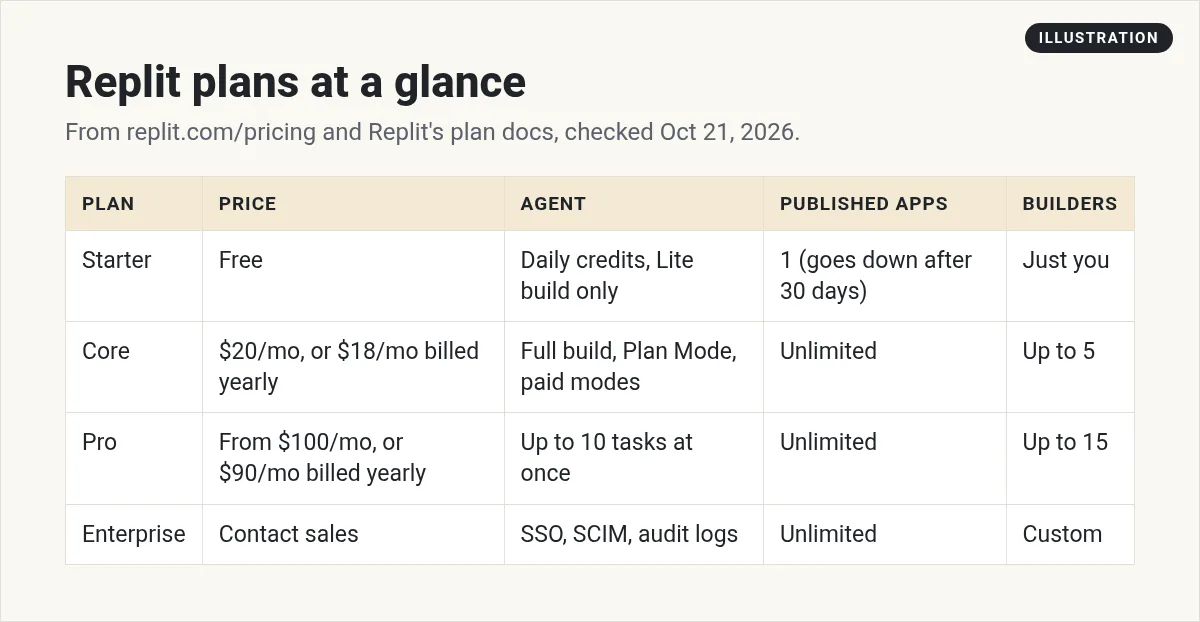
The same table in text. Prices are from replit.com/pricing and features from Replit's docs, checked October 21, 2026. Prices may not include tax.
- Starter: free. Daily Agent credits, Lite build only, and 1 published app that goes down after 30 days. Just you.
- Core: $20 a month, or $18 a month billed yearly. Full build, Plan Mode, and paid Agent modes. Unlimited published apps. Up to 5 builders.
- Pro: $100 a month, or $90 a month billed yearly. Up to 10 tasks at once. Unlimited published apps. Up to 15 builders.
- Enterprise: contact sales. Adds things like SSO, SCIM, and audit logs.
Starter: the free plan
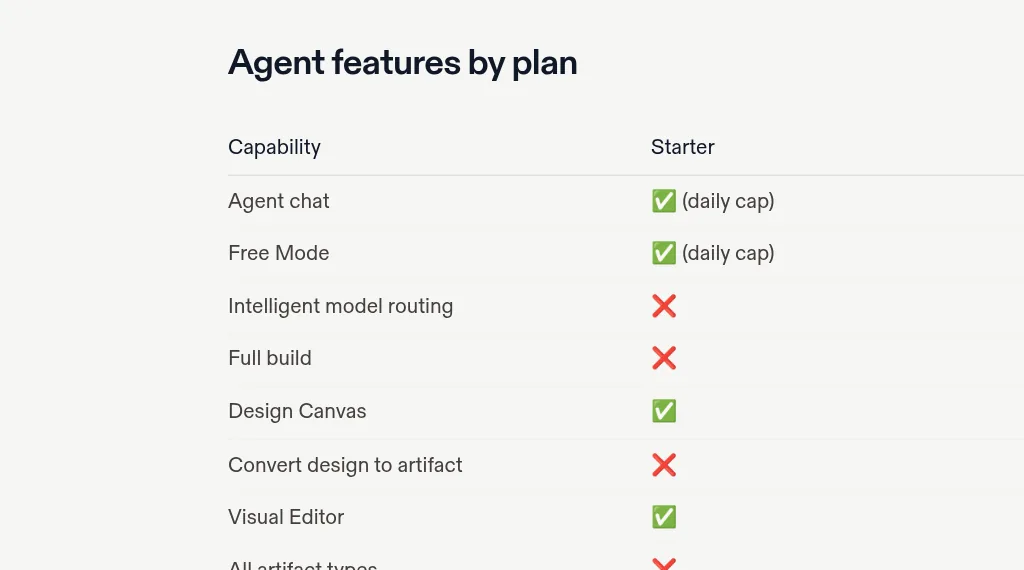
Starter lets you try Replit Agent at no cost. Replit's docs say you get:
- Daily credits for Agent, up to a monthly cap. They reset every day.
- Monthly credits for cloud use, like databases, storage, and publishing.
- Lite build, a faster mode for quick edits and small changes.
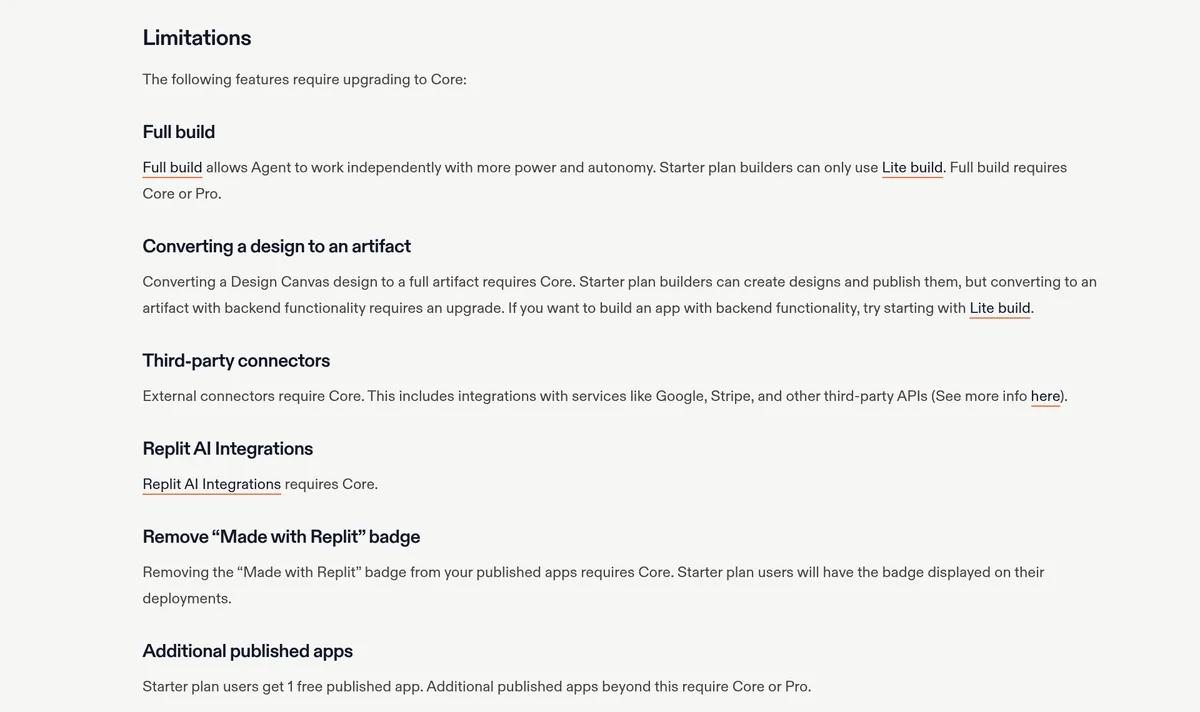
- One free published app. The link goes down after 30 days and shows a Made with Replit badge.
The docs list several things that need Core: Full build, turning a design into a full app, third-party connectors like Google and Stripe, Replit AI Integrations, removing the badge, more published apps, and Plan Mode.
Core: for most solo builders
Core is the plan most people building their own app will want. On the pricing page, Core listed:
- Up to 30 hours of chat on Free Mode.
- Up to 60 projects on Free Mode.
- $20 toward more powerful models.
- Unlimited workspaces.
The docs add Full build, Plan Mode, connectors, the Visual Editor, all app types, and one background task at a time. You can invite up to 5 builders with no separate team plan.
Pro: for teams and heavy use
Pro is for people who have outgrown Core. The pricing page listed more Free Mode use and $100 toward the most powerful models. The docs list:
- Up to 10 tasks at once, instead of 1 on Core.
- Up to 15 builders sharing one pool of credits.
- Credit rollover: unused credits roll over for two months.
- Priority support from a support engineer on business days.
- Database recovery back to 28 days, instead of 7.
On the pricing page, Pro starts at $100 a month ($90 a month billed yearly). Bigger credit tiers go up to $2,050 a month billed monthly, or $2,000 a month billed yearly, checked October 21, 2026. The docs say bigger tiers come with discounts.
What teams pay
Good news for small teams: Replit does not charge per person on these plans. The Core docs say you can invite up to 5 builders to your workspace with no separate team subscription. The Pro docs say up to 15 builders share pooled credits, with no per-user fees and budget controls for the group.
So a team of three can share one Core plan. Just remember that everyone draws from the same credits, so set a budget that covers the whole team.
How credits and Agent charges work
This is the part that surprises people. Replit's AI billing docs say AI features use usage-based billing. Here is the simple version:
- Free Mode covers everyday Agent work at no extra cost for Core and Pro, within an allowance.
- Paid modes called Power and Max cost credits. Replit says it asks you to confirm before a paid action starts.
- Effort-based pricing. In Build Mode, Agent bills one checkpoint per request. Small fixes usually cost less than big builds.
- Outside AI services. When Agent uses tools like Claude, ChatGPT, or Gemini behind the scenes, you pay the provider's public API rate from your credits.
- Cloud services like published apps, storage, and databases also use credits.
The docs also note that Plan Mode can use billable reasoning on the paid path, even when it does not change code.
How to keep your Replit bill under control
Replit has budget tools built in. Use them from day one:
- Set a budget limit. The docs describe hard caps to stop surprise charges.
- Turn on usage alerts so you get an email at amounts you pick.
- Check the usage dashboard. Replit says data can take up to 30 minutes to show up.
- Start in Free Mode. Switch to a paid mode only when you need more power.
- Keep requests small. Small, clear asks tend to cost less than one giant request.
Monthly vs yearly: the simple math
Using the prices I saw on October 21, 2026, here is what a full year costs each way. This is plan price only. Extra credits and tax are not included.
- Core monthly: $20 times 12 months is $240 a year.
- Core yearly: $18 times 12 months is $216 a year. That is $24 less.
- Pro monthly: $100 times 12 months is $1,200 a year.
- Pro yearly: $90 times 12 months is $1,080 a year. That is $120 less.
Yearly saves a bit, but you commit for the full year. If you are still testing, monthly gives you room to change your mind.
Common Replit pricing mistakes
- Thinking the plan price is the whole cost. Paid Agent work and cloud services can add to it.
- Using Max mode for tiny fixes. Save the stronger modes for bigger jobs.
- Forgetting the free app goes down. On Starter, your one published app goes down after 30 days.
- Skipping alerts. Without them, you may not notice spend until the bill comes.
- Paying for Pro too early. Unless you have a team over 5 or need many tasks at once, Core is usually enough to start.
Which Replit plan should you pick?
- Pick Starter if you just want to try Agent and build a quick demo.
- Pick Core if you want to publish real apps, connect tools like Stripe, or remove the badge.
- Pick Pro if you work with a team of more than 5, or need many tasks running at once.
- Talk to sales if your company needs SSO and other security controls.
How Replit compares on price
Most AI app builders now mix a plan price with credits or usage, so compare what you get, not just the sticker price. For other tools, see my guides to Lovable pricing and Base44 pricing, or my roundup of Replit alternatives.
My tips before you upgrade
- Build something small on Starter first. See how you like working with Agent.
- Write down what you need. A custom domain, Stripe, a team, or just a demo?
- Pick monthly to start. Switch to yearly only once you know you will stay.
- Set your budget the same day you upgrade.
Before I pay for Replit
Nothing you check here is sent or saved. Download it if you want to keep it.
Want to build your first app with AI?
In my free workshop, I show how regular people use AI tools to build simple apps, step by step.
Join my free AI workshopFree to join. No credit card needed.
Frequently asked questions
Is Replit free?
Yes. The Starter plan is free, with daily Agent credits and 1 published app that goes down after 30 days. Checked October 21, 2026.
How much is Replit Core?
On October 21, 2026, the pricing page showed Core at $20 a month, or $18 a month billed annually. Prices may not include tax.
How much is Replit Pro?
On October 21, 2026, the pricing page showed Pro starting at $100 a month, or $90 a month billed annually, with bigger credit tiers up to $2,050 a month.
Does Replit Agent cost extra?
Free Mode covers everyday work within an allowance on Core and Pro. Paid modes use credits, and Replit asks you to confirm before a paid action starts.
What does Replit Core add over Starter?
Full build, Plan Mode, connectors, Replit AI Integrations, unlimited published apps, badge removal, and up to 5 builders.
How do I avoid a surprise Replit bill?
Set a budget limit and usage alerts in your billing settings, start in Free Mode, and keep your requests small.
Sources
Checked October 21, 2026. Plans, prices, and rules can change.
