
Business Tools · Pricing
Teachable is a platform for selling online courses. It has no free plan, but it has a trial. Here is what each plan costs and where the fees hide.
If you want to sell an online course, Teachable is one option you may look at. Before you sign up, you want to know what it really costs.
I checked Teachable's pricing page on October 24, 2026. Here is each plan, the transaction fees, and how to pick.
Quick answer
On October 24, 2026, Teachable had four plans. Billed yearly, Starter was $29 a month with a 7.5% transaction fee, Builder was $69 a month, and Growth was $139 a month, both with 0% transaction fees when you use Teachable Payments. Custom pricing is by sales call. There is no free plan, but there is a 7-day free trial.
Teachable plans at a glance
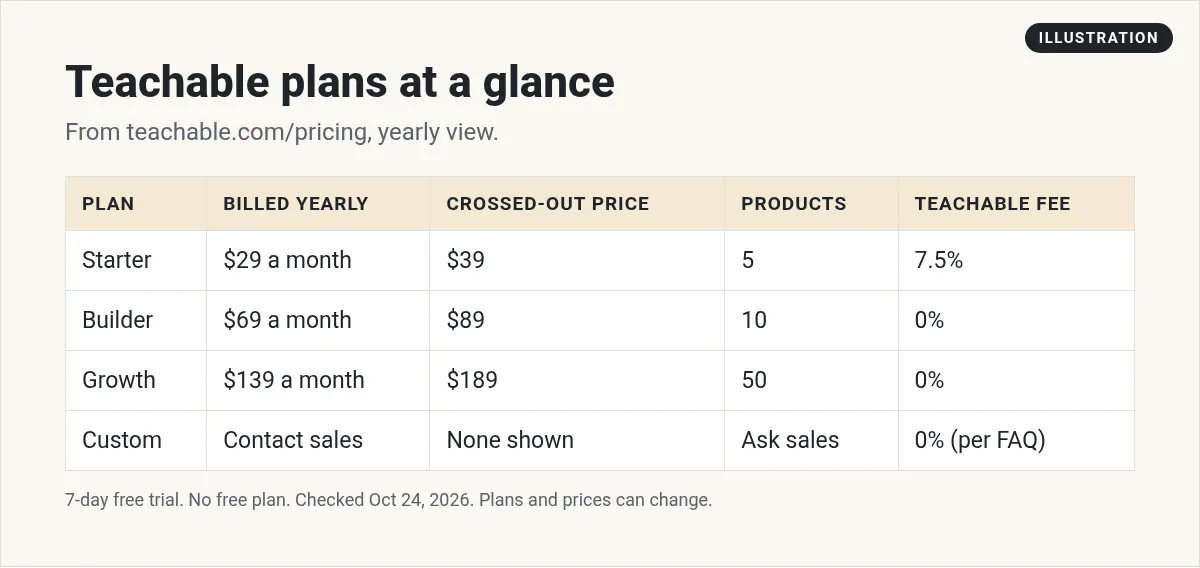
These are the prices Teachable showed in its yearly view. Each yearly price had a higher price crossed out next to it. Teachable's FAQ says "Annual billing saves you 22% compared to paying month-to-month."
I could not capture the monthly view on the day I checked, so I am not listing exact monthly prices. Use the Monthly and Yearly toggle on the live page to see them.
Starter
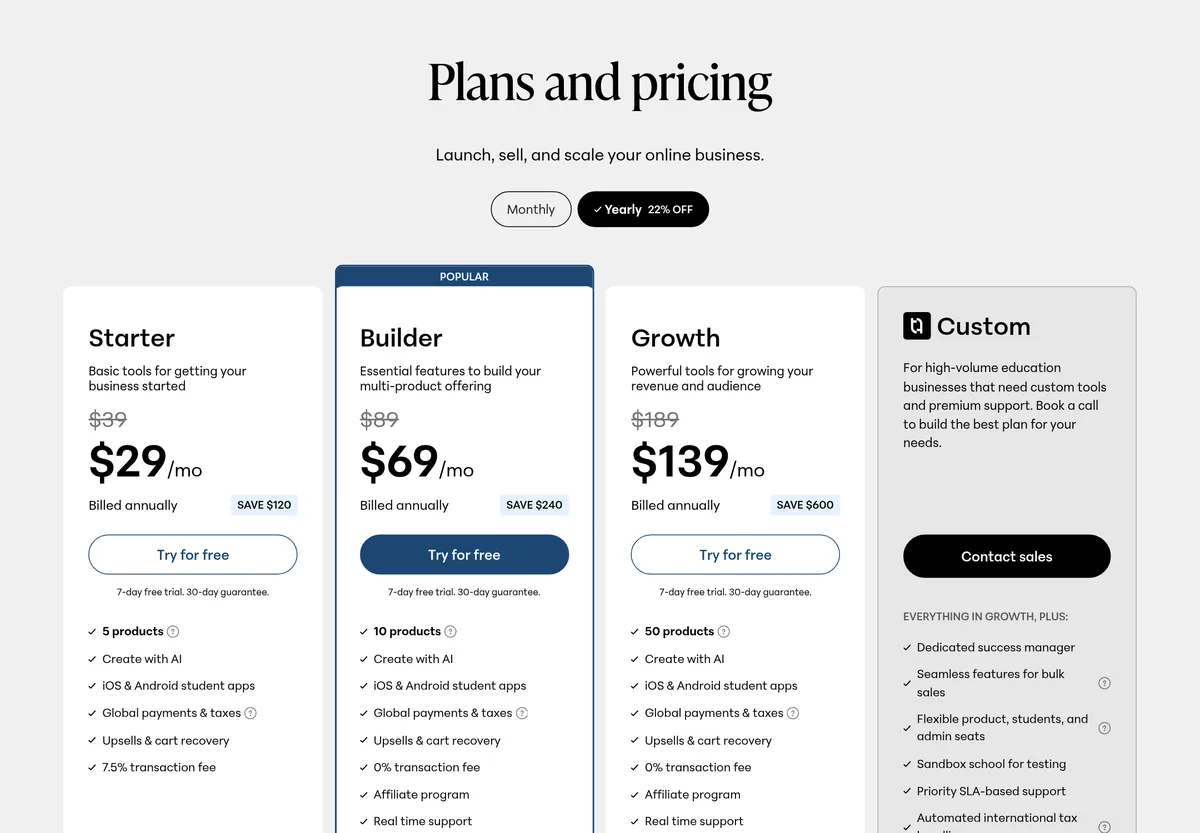
Price: $29 a month, billed annually. The page shows $39 crossed out.
Limits: 5 products and 1 admin-level user.
Fee: a 7.5% transaction fee on sales.
Includes: Create with AI, iOS and Android student apps, global payments and taxes, and upsells and cart recovery.
Good for: testing your first course before you have steady sales.
Builder
Price: $69 a month, billed annually. The page shows $89 crossed out.
Limits: 10 products and 1 admin-level user.
Fee: 0% transaction fee when you use Teachable Payments.
Adds: an affiliate program and real time support.
Good for: creators with a few products who are making steady sales.
Growth
Price: $139 a month, billed annually. The page shows $189 crossed out.
Limits: 50 products and 5 admin-level users.
Fee: 0% transaction fee when you use Teachable Payments.
Adds: course certificates, removing Teachable branding, imported students, custom admin permissions, and free subtitles and translations.
Good for: a course business with a team and a bigger catalog.
Custom
Price: contact sales. The FAQ says Custom also has 0% transaction fees when you use Teachable Payments.
It adds a dedicated success manager, features for bulk sales, a sandbox school for testing, priority SLA-based support, white glove onboarding, and migration assistance. It is for large education businesses.
What a year costs up front
Yearly billing means you pay for the whole year at once. Here is the simple math from the yearly prices:
- Starter: $29 x 12 = $348 for the year. The card says you save $120.
- Builder: $69 x 12 = $828 for the year. The card says you save $240.
- Growth: $139 x 12 = $1,668 for the year. The card says you save $600.
Taxes and fees can be added on top. If paying for a year at once is hard, look at the monthly option on the live page. It costs more per month, but it is less up front.
Limits that matter
Teachable's compare table showed these limits on Starter, Builder, and Growth:
- Students: unlimited students enrolled through Teachable checkout.
- Video storage: up to 1TB.
- Products: 5 on Starter, 10 on Builder, and 50 on Growth.
- Admin users: 1 on Starter and Builder, 5 on Growth.
So what counts as a product? Teachable's FAQ says a published product is any course, coaching offering, or digital download you make live. Each one counts as 1 product, no matter how many videos or files it has. A course with 30 videos and 5 quizzes is still 1 product.
That means each of Starter's 5 products can hold a full course. Plan your offers before you pick a plan.
Transaction fees, explained
This is the part to read twice. Teachable's FAQ says: "Only on the Starter plan, which has a 7.5% transaction fee." It says Builder, Growth, and Custom have 0% transaction fees when you use Teachable Payments.
The FAQ also says "Standard payment processing fees may still apply." So even at 0%, card processing costs something.
Here is the simple math. If you sell $1,000 of courses in a month on Starter, the 7.5% fee is $75. Add that to the $29 plan price. If your sales grow, Builder at $69 with no Teachable fee may cost less overall. This is just math, not a promise of sales.
Is there a free plan?
No. Teachable's FAQ says it "is a paid service that includes a 7-day free trial." The plan cards also say "7-day free trial."
Teachable also says you can request a refund within your first 30 days. Read the terms on the live page before you count on it.
Plans renew each billing cycle until you cancel. The page says you can cancel at any time, and the cancellation takes effect at the end of the current billing cycle.
Can you change plans later?
Yes. Teachable's FAQ says you can change your plan at any time from your school's admin. You are charged the new plan amount at your next billing date.
This is good news for beginners. You can start on Starter, and move up to Builder once the 7.5% fee costs more than the price gap. You do not have to guess right on day one.
All prices on the page are in US dollars. Teachable says students can pay in their local currency.
Which plan should you pick?
- One course, just starting? Starter is the lowest price. Watch the 7.5% fee.
- Making regular sales or want affiliates? Builder removes the Teachable fee and adds an affiliate program.
- Need a team or more products? Growth gives 5 admin users and 50 products.
- Large company? Talk to sales about Custom.
Before you choose, guess your monthly sales and do the fee math for Starter and Builder. The answer is often clear once you see real numbers.
How Teachable compares
Teachable focuses on courses and digital products. If you want a community at the center, look at Skool. If you want courses plus website, email, and funnels in one place, look at Kajabi or GoHighLevel. Here are my guides:
Each one charges in its own way. Some use a flat monthly price. Some add a percentage on each sale. Compare the total, not just the sticker price.
Who Teachable fits, and who it does not
It fits you if your business is mainly courses or digital products, and you want a clean place for students to learn with apps on their phones.
It may not fit you if your main goal is a busy community where members talk every day. A community-first tool may feel better. It may also not fit if you want your whole marketing system, like funnels and follow-up texts, in the same account.
There is no wrong answer. Pick the tool that matches what you sell today.
Tips before you pay
- Use the free trial to build one lesson. See if the editor feels easy.
- Test checkout. Look at what students see when they buy.
- Check the billing basis. The prices above are billed yearly.
- Count your products. Starter allows 5 and Builder allows 10.
- Plan for growth. Moving plans later is easier than moving platforms.
Use AI to build your course faster
Teachable lists Create with AI on every paid plan. You can also use tools like ChatGPT or Claude to outline lessons, write scripts, and draft quizzes. Then you edit and record. I show how I use AI to build products in my free workshop.
Mistakes to avoid
- Reading the yearly price as a monthly bill. $29 a month is billed annually.
- Forgetting the Starter fee. 7.5% adds up as sales grow.
- Ignoring processing fees. They can apply on every plan.
- Buying more than you need. Start small, then upgrade.
Before you pay for Teachable
Nothing you check here is sent or saved. Download it if you want to keep it.
Build your course faster with AI
Want to see how I use AI to plan, write, and launch digital products? Join my free AI workshop. I show each step.
Join my free AI workshopFree to join. No credit card needed.
Frequently asked questions
How much does Teachable cost?
On October 24, 2026, billed yearly, Starter was $29 a month, Builder was $69 a month, and Growth was $139 a month. Custom is priced by sales.
Does Teachable have a free plan?
No. Teachable says it is a paid service with a 7-day free trial.
What is Teachable's transaction fee?
Starter has a 7.5% transaction fee. Builder, Growth, and Custom have 0% when you use Teachable Payments. Payment processing fees may still apply.
Can I pay Teachable monthly?
Yes. Teachable's FAQ says you can use the Monthly and Yearly toggle, and that annual billing saves 22% compared to monthly.
Can I cancel Teachable any time?
Yes. Teachable says you can cancel at any time, and it takes effect at the end of the current billing cycle.
Which Teachable plan is best for beginners?
Starter has the lowest price, but it has a 7.5% fee. If you expect steady sales, compare it with Builder, which has no Teachable fee.
Sources
Checked October 24, 2026. Plans, prices, and rules can change.
