
Business Tools · Comparison
Skool is simple on purpose. If you need more, or want different fees, here are four alternatives and what each one costs.
Skool is a simple place to run a community and a course. I like it, and I wrote a full Skool review. But simple is not right for everyone.
Maybe you want your own website and email in the same place. Maybe you want lower fees. On October 24, 2026, I checked the pricing pages for Skool and four alternatives. Here is how they compare.
Quick answer
Skool alternatives include Circle, Mighty Networks, Kajabi, and GoHighLevel. On October 24, 2026, Circle Professional was $89 a month billed yearly, Mighty Networks Launch was $79 a month billed yearly with a 2% transaction fee, Kajabi Basic was $143 a month billed yearly. GoHighLevel Starter was $97 a month billed monthly, with courses and communities included. Skool Hobby was $9 a month billed monthly, with a 10% transaction fee.
First, what Skool costs
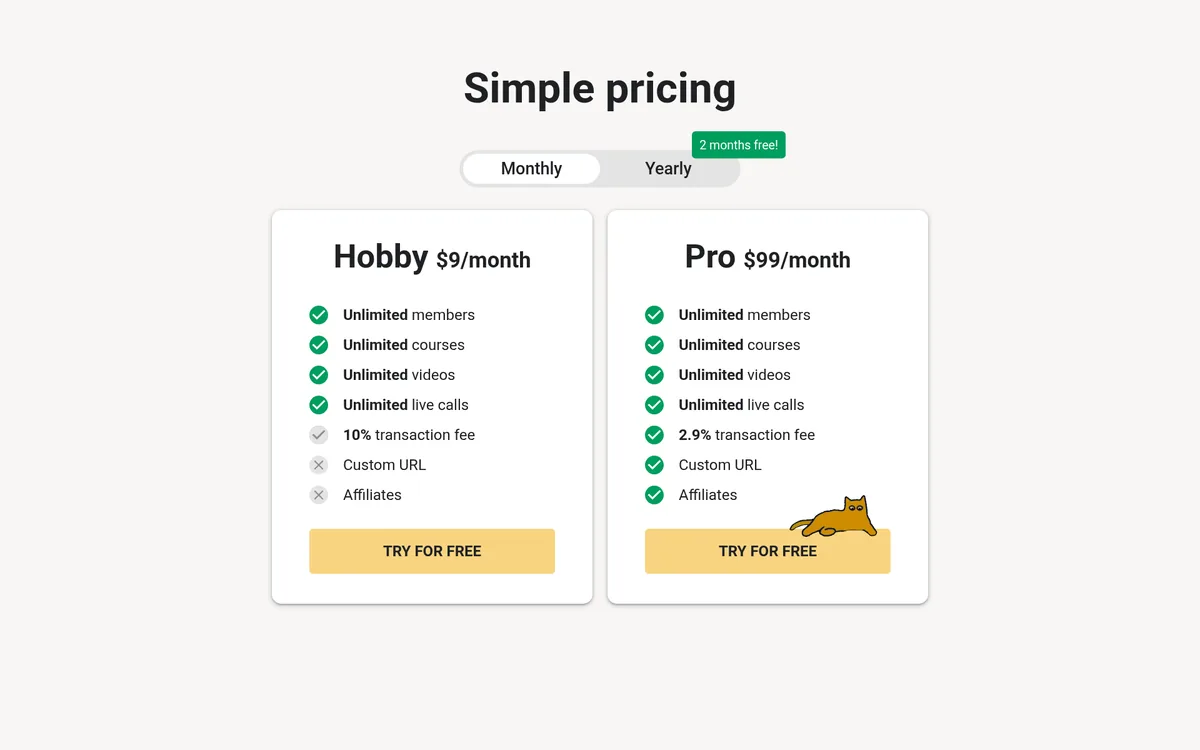
Skool has two plans. Paid monthly, they were:
- Hobby: $9 a month, with a 10% transaction fee.
- Pro: $99 a month, with a 2.9% transaction fee. Pro adds a custom URL and affiliates.
Both include unlimited members, courses, videos, and live calls. Skool's yearly option says "2 months free!" and shows Hobby at $7.50 a month and Pro at $82 a month.
That 10% fee on Hobby is one reason to look around. If you sell a $50 a month membership, Skool keeps $5 of each payment on Hobby. For the full breakdown, see my Skool pricing guide.
Why people look for a Skool alternative
Skool keeps things simple on purpose. That is its strength. But it also means some things are not there. Here are the reasons I hear:
- Fees. The 10% fee on Hobby feels high once you have paying members.
- Branding. Some people want the community to look like their own brand.
- Marketing tools. Skool is not built to be your full website, funnel, and email system.
- Course options. Some creators want quizzes, cohorts, or more course settings. If courses come first for you, see my Teachable pricing guide.
If none of these bother you, you may not need to switch. Moving a community takes real work. Be sure the new tool solves a problem you actually have.
The alternatives side by side
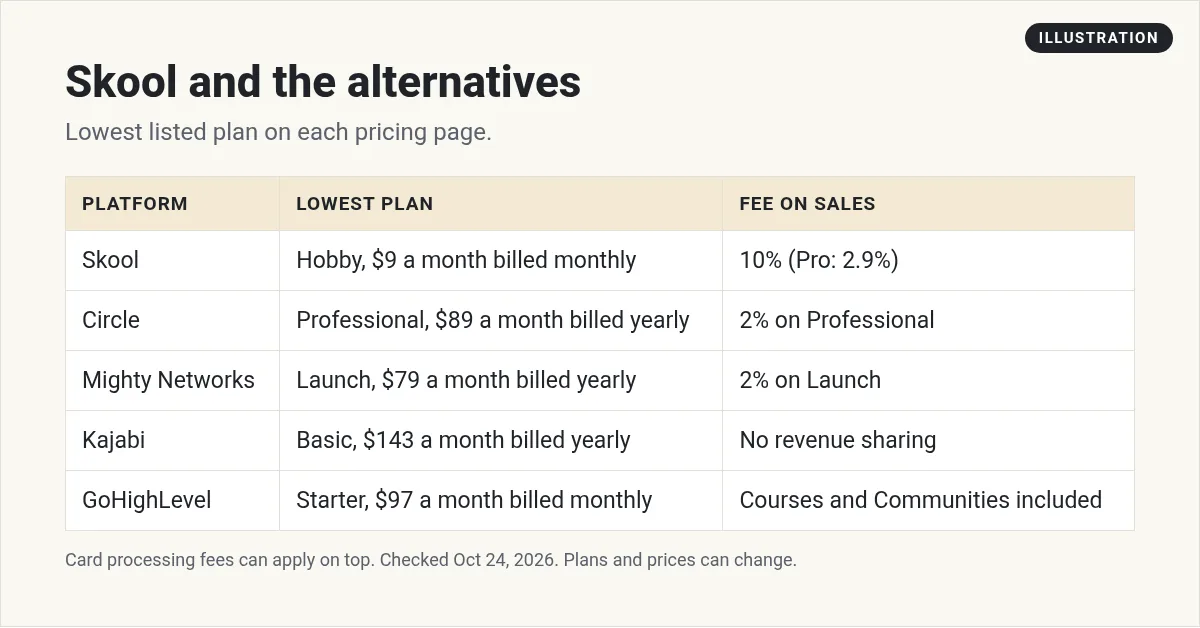
Prices are from each company's pricing page on October 24, 2026. Note the billing basis. Circle, Mighty Networks, and Kajabi show yearly billing. Skool and GoHighLevel show monthly prices. Card processing fees can apply on top of any platform fee.
1. Circle
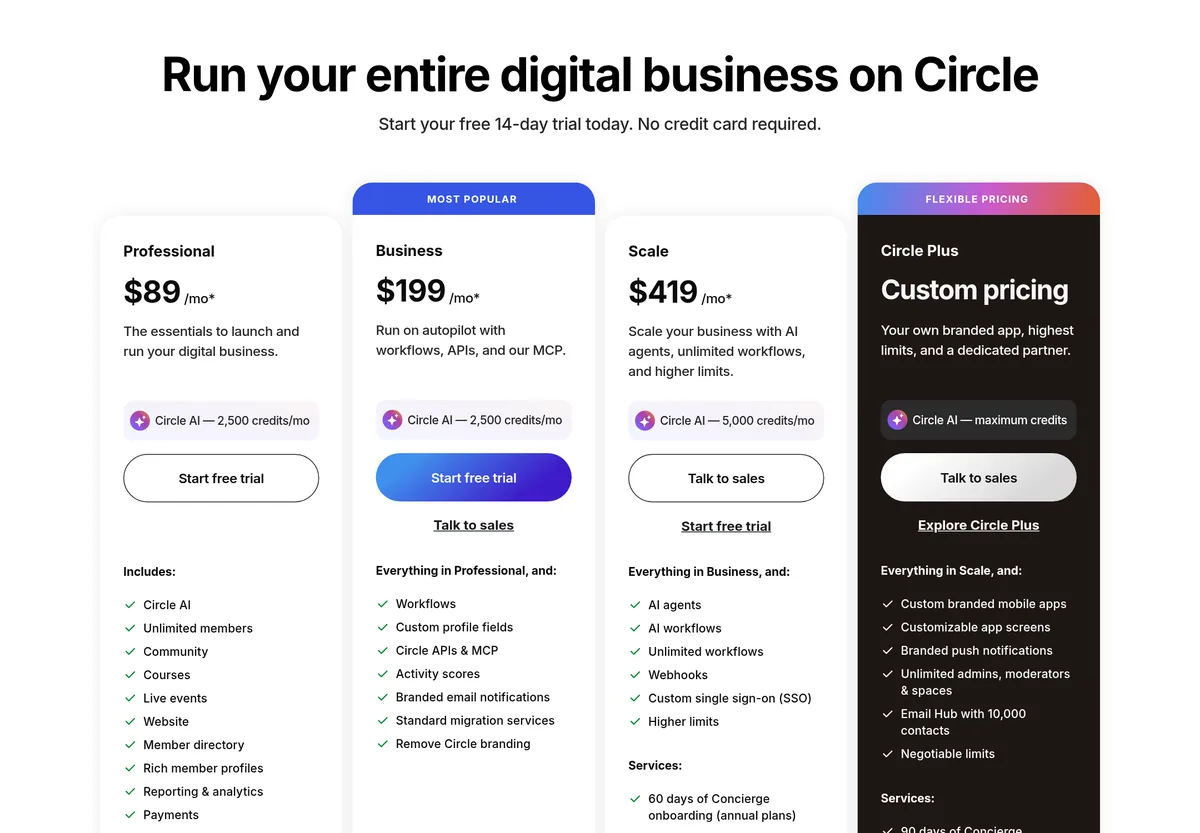
Price: Professional is $89 a month. Business is $199, and Scale is $419. Circle notes prices are "based on annual billing." There is a 14-day free trial, and Circle says "No credit card required."
What you get: the Professional plan lists community, courses, live events, a website, payments, a custom domain, and iOS, Android, and desktop apps. It also lists Circle AI with 2,500 credits a month.
Fees: Circle's plan comparison table lists transaction fees of 2% on Professional, 1% on Business and Scale, and 0.5% on Circle Plus. Circle says this is in addition to the standard Stripe processing fee.
Good fit if: you want a community that looks like your own brand, with apps on every device.
2. Mighty Networks
Price: billed yearly, Launch is $79 a month, Scale is $179, and Growth is $354. Billed monthly, they were $95, $215, and $425.
Fees: the page lists transaction fees of 2% on Launch, 1% on Scale, and 0.5% on Growth.
What you get: Launch lists an AI Cohost, community, courses, and basic automations. Scale adds more automations, APIs, and third-party integrations.
Good fit if: you want a community and courses with built-in automations, and you are fine with a small fee per sale.
Mighty's page shows member revenue examples. I am not repeating them here, because your results depend on your offer and your audience.
3. Kajabi
Price: Basic is $143 a month billed yearly, or $179 billed monthly. Growth is $199 a month billed yearly, or $249 monthly. There is a 14-day free trial.
Fees: Kajabi says it "does not take a revenue share as a platform." Card processing fees still apply when you get paid.
What you get: Basic lists courses, coaching, and memberships, your own website, a private community, unlimited emails, landing pages, funnels, and built-in checkout. It includes 2,500 contacts.
Good fit if: you want courses, website, email, and payments in one place and you are ready for a bigger monthly bill. See my Kajabi pricing guide for every plan.
4. GoHighLevel
Price: Starter is $97 a month. GoHighLevel says it "operates on a month-to-month basis" with no long-term contracts. There is a 14-day free trial.
What you get: the pricing page lists Courses and Communities among its core features, along with a website and funnel builder, CRM and pipelines, email and SMS marketing, and booking calendars. It notes usage-based charges apply to some features, like email and SMS. It is more of a full business system than a community app.
Good fit if: you want your community, courses, funnels, and follow-up email all in one account. I use it in my own business. My What is GoHighLevel? guide explains it from scratch, and my GoHighLevel pricing guide covers each plan.
Some people use Skool and GoHighLevel together. I show how in my Skool and HighLevel setup.
How to choose
Start with what you sell and how much.
- Just starting, small community? Skool Hobby has the lowest entry price of the five. Watch the 10% fee as you grow.
- Want a branded app? Look at Circle.
- Want a percentage fee lower than Skool Hobby? Mighty Networks lists 2% on Launch and Circle lists 2% on Professional. Kajabi lists no revenue share.
- Want everything in one system? Look at Kajabi or GoHighLevel.
Do the fee math first
A flat monthly price is easy to compare. Transaction fees are not. Here is a quick way to check:
- Guess your monthly sales through the platform.
- Multiply by the platform's transaction fee.
- Add the monthly plan price.
- Do this for each option. Then compare totals.
For example, with $1,000 a month in sales, a 10% fee is $100 and a 2% fee is $20. That is before card processing, which can apply on any platform. This is just math, not a promise of sales.
What to test on a free trial
A free trial is only useful if you test the right things. Here is what I would do in the first few days:
- Build one short course. Upload two or three lessons. See how long it takes.
- Join as a member. Use a second email. Look at it on your phone. Is it easy to find things?
- Post in the community. Reply, react, and check the notifications.
- Run a test payment. See what the checkout looks like and which fees show up.
- Check support. Ask one question and see how fast you get an answer.
Write down what felt easy and what felt hard. After two or three trials, the right choice is usually clear. If two tools feel the same, pick the one with the simpler bill.
Switching from Skool
- Tell your members early. Give them a date and a simple guide.
- Move your courses first. Then open the new community.
- Plan payments. Moving paid members can be tricky. Circle lists payments migrations "if eligible" on Professional, and Mighty Networks lists migration services on Growth. Ask before you switch.
- Run both for a short time. Close the old one only when people have moved.
Mistakes to avoid
- Comparing yearly and monthly prices as if they match. Check the billing basis.
- Ignoring transaction fees. They add up as you grow.
- Switching for features you will not use. More tools mean more setup.
- Trusting income examples. Pricing pages may show revenue stories. Your results will differ.
Before you leave Skool
Nothing you check here is sent or saved. Download it if you want to keep it.
Want your community, courses, and funnels in one place?
GoHighLevel lists Courses and Communities among its core features, plus funnels, a CRM, and email. Start with the free trial and build one small thing first.
Try GoHighLevel free for 14 daysI earn a commission if you buy through this link. Plans and features can change, so check the live pricing page before you buy.
Want to see how I set up my business with AI? Join my free AI workshop.
Frequently asked questions
What is a good alternative to Skool?
It depends on your needs. Circle fits branded community apps, Mighty Networks fits communities with automations, and Kajabi and GoHighLevel fit people who want courses, website, and email in one place.
Is Circle cheaper than Skool?
No, not at entry level. Circle Professional was $89 a month billed yearly. Skool Hobby was $9 a month billed monthly, but with a 10% transaction fee.
Which Skool alternative has no transaction fee?
Kajabi says it does not take a revenue share as a platform. Circle lists a 2% transaction fee on Professional. Card processing fees can still apply.
Does GoHighLevel have communities?
Yes. GoHighLevel's pricing page lists Courses and Communities as features. Starter was $97 a month billed monthly.
Do these alternatives have free trials?
Circle, Kajabi, and GoHighLevel listed 14-day free trials. Mighty Networks also offers a free trial. Check which plan it applies to.
Can I move my Skool members to another platform?
Yes, but plan it. Moving paid members can be tricky, so ask the new platform about migration help before you switch.
Sources
Checked October 24, 2026. Plans, prices, and rules can change.
