
Digital Products · Platforms
Whop lets you sell courses, communities, and software with a checkout link. Here is the base fee, the extras that can stack on top, and how payouts and affiliates work.
Whop is a place to sell digital things like courses, private communities, and software access. You can host the product on Whop, or just use it for checkout. There is no monthly fee to start.
The base fee is simple. But Whop has a lot of add-ons, and some of them add to the cost. I read Whop's pricing page and its help docs on October 27, 2026. Here is what you will actually pay.
Quick answer
Whop is a platform for selling digital products, memberships, and communities. Its pricing page says it is pay-as-you-go with no setup fees and no monthly costs. Domestic card sales cost 2.7% + $0.30. International cards add 1.5%, and currency conversion adds 1%. Optional tools like billing and tax can raise it to 6% + $0.30 when all are on. Payouts cost from $2.50 for next-day ACH, and marketplace affiliates get a default 30% commission.
What Whop is
Whop's help docs give you two ways to use it when you sign up at whop.com/sell:
- Build and sell digital products on Whop. The docs say this is for "building, hosting, and selling your digital products and accepting payments."
- Use Whop for payment processing only. This is for when you want "to process payments and create checkout links only" and deliver the product somewhere else.
So Whop can be your whole store, or just your checkout. You add "apps" to a whop to build what members get, like a course, a chat, or file downloads.
A banner on its pricing page says "Whop announces $200M Series D led by Sequoia, pushing valuation to $5.1B." That does not change your fees, but it tells you the company is well funded.
What Whop costs
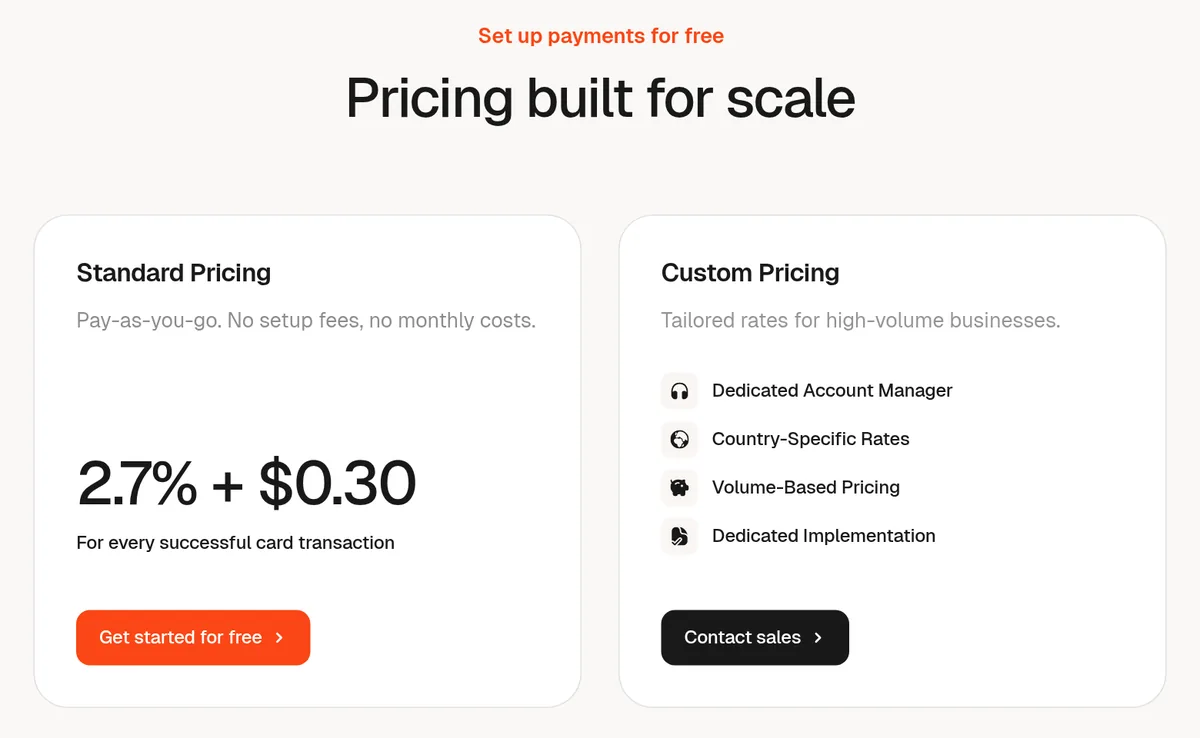
Whop's pricing page says "Pay-as-you-go. No setup fees, no monthly costs." Here are the main payment fees it lists:
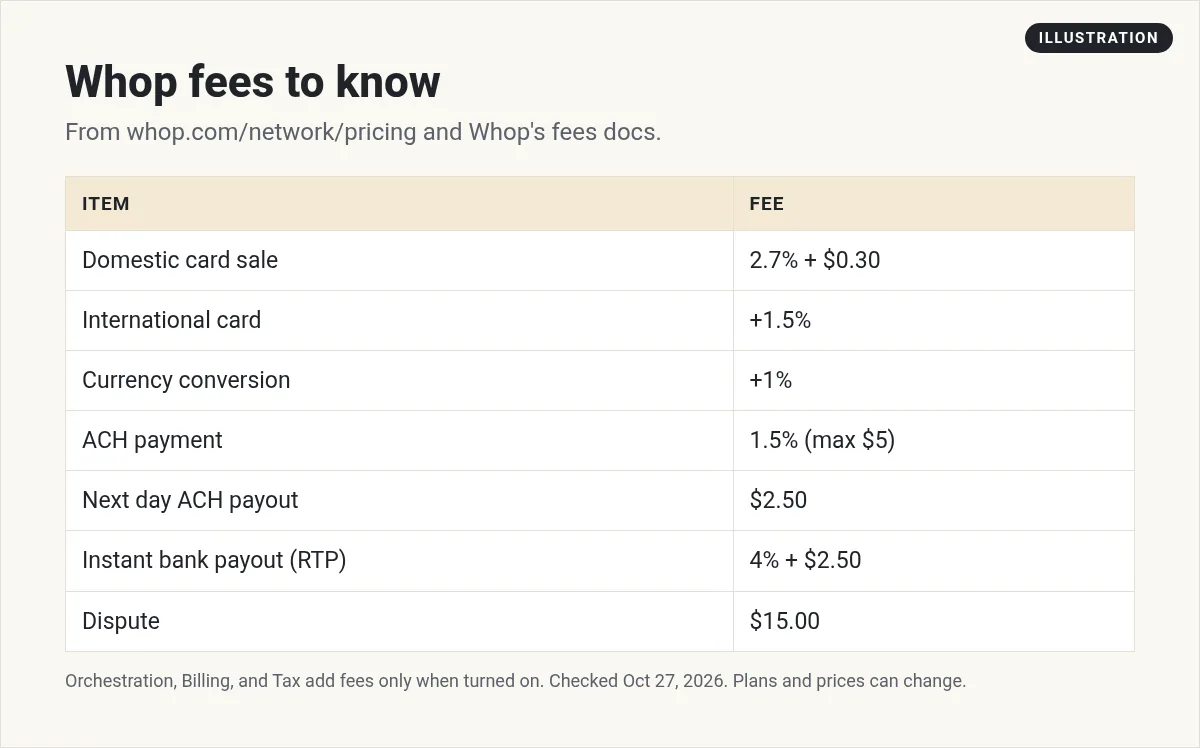
- Cards and wallets: 2.7% + $0.30 per successful sale with a domestic card.
- International cards: add 1.5%.
- Currency conversion: add 1% if it applies.
- ACH bank payments (US): 1.5%, with a $5 max.
- Financing (like Klarna or Afterpay): 15% per sale, or 20% for ClarityPay No Interest.
Whop also has a Custom Pricing option for big sellers. The page calls it "Tailored rates for high-volume businesses."
The add-on fees that stack
This is the part to read twice. Whop has three optional tools that each add a fee "when enabled":
- Orchestration: 0.8% per sale. It routes payments through more than one provider.
- Billing: 0.5% per sale. It handles invoices and retries.
- Tax and remittance: 2% per sale, when tax is collected.
Whop says these "stack on top of the base processing fee." With every one turned on, the page lists "Everything enabled, tax collected" at 6% + $0.30. So check which tools are on in your account.
Fraud and dispute fees
Whop lists small fees per event:
- 3D Secure card check: $0.03 per transaction
- Radar fraud check: $0.07 per transaction
- Dispute (chargeback): $15.00 per dispute
- Early dispute alert (RDR): $29.00 per alert
A quick example
Here is my math for a $50 course paid with a US card. The base fee is 2.7% of $50, which is $1.35, plus $0.30. That is $1.65, so you keep $48.35. If every add-on is on and tax is collected, the fee is 6% + $0.30, which is $3.30. Then you keep $46.70. An international card adds 1.5%, or $0.75 more.
How you get paid
To withdraw, you first set up Whop Payments. The docs say to pick your country, then "Complete the KYC setup," which means you "fill in your details, link your bank, and upload ID."
After that, you choose a schedule. The docs list "instant, daily, or weekly, depending on your account." You can also get payouts to PayPal and Coinbase Commerce. The docs also list a $10 minimum withdrawal, where it applies.
You can see your balance in your Dashboard under Balances. It shows what you can withdraw now, what is still pending, and the date the pending money will be ready.
Money is not always ready the same day. The docs say "when a customer pays, it can take a couple of days for the money to reach your account."
Fast payouts cost more. Here is what the pricing page lists per payout:
- Next day ACH to a US bank: $2.50
- Instant bank deposit (RTP): 4% + $2.50
- Crypto: 5% + $1.00
- Venmo (US only): 5% + $2.50
- Bank wire: $23.00
- International local banks: varies by country
My tip: if you do not need the cash today, pick the cheaper payout. On a $500 payout, my math says instant RTP costs $22.50, while next day ACH costs $2.50.
How to set up your first whop
Whop's "Launch Your Business" guide keeps the start short. Here are the steps it lists, plus my notes:
- Go to whop.com/sell. Select Start selling and make your account.
- Choose how you will use Whop. Pick build and sell on Whop, or payment processing only. If your course already lives somewhere else, the second option keeps things simple.
- Name your business. The guide says "You can always change this later." So do not get stuck here.
- Add apps. This is where you add what members get, like a course, a chat, or files.
- Set up pricing. Pick a one-time price or a monthly plan, and what members get when they join.
- Set up payouts. Finish KYC now, so your first sale does not get stuck.
Before you go live, check two settings. First, look at which add-ons are on, since they change your fee. Second, look at your affiliate rate, since the 30% default applies to marketplace sales.
Start with one small offer. A short course or a simple paid community is easier to launch than a big bundle. You can add more later once you see what sells.
How Whop affiliates work
Whop has affiliates built in, and this matters for sellers. The docs say "Global affiliates promote your product across the Whop marketplace at a default 30% commission." It is on by default after you list a product, and it works "without extra setup."
That can bring you new buyers. But it also means 30% of those sales can go to the affiliate. You can change the rate per product in the Affiliates section under Marketing.
If you want to be the affiliate, Whop has a marketplace for that too. The docs say "There is a 30-day waiting period between when a referred customer makes their purchase and when the affiliate receives their commission." If the sale is refunded or disputed, the commission goes back to the seller.
New to affiliate links? My guide to what an affiliate link is covers the basics.
Is Whop right for you?
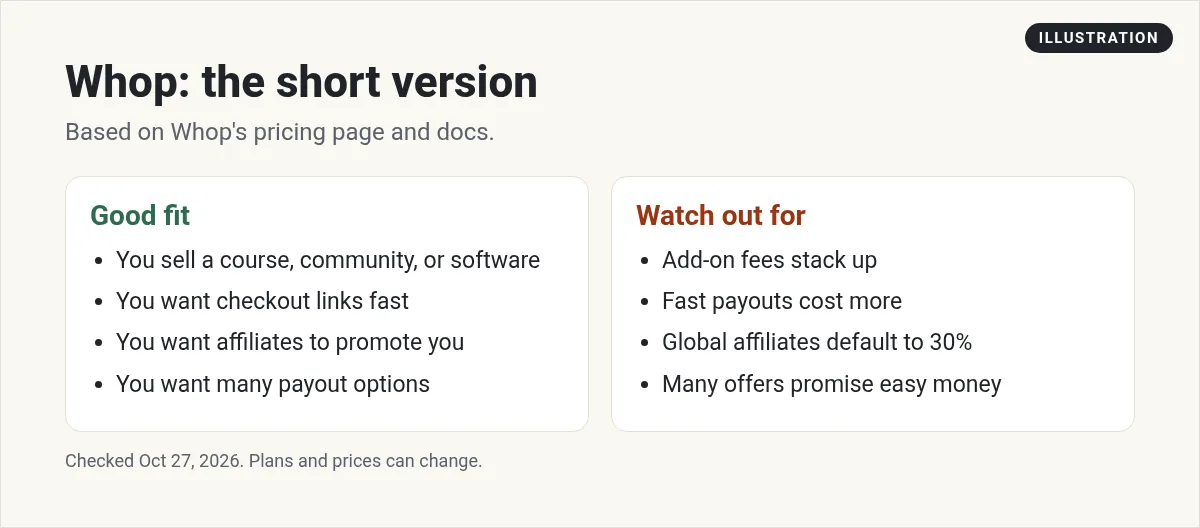
Whop can be a good fit if you sell a course, a paid community, or software access and want a fast checkout. It also helps if you want affiliates to promote you.
Watch out for three things:
- Add-on fees that stack on top of the base fee
- Fast payouts that cost a lot more than slow ones
- The 30% default affiliate rate on marketplace sales
If you browse the Whop marketplace as a buyer, judge each offer on its own. Skip any offer that promises easy money.
Want to compare? See my guides to Stripe fees, Skool pricing, and Kajabi pricing.
Before you sell on Whop
Nothing you check here is sent or saved. Download it if you want to keep it.
Meet AIM Agent
AIM Agent is an AI Chief of Staff for business owners. You give it a real task, and it brings the work back for you to review. You stay the one who approves.
Meet AIM AgentI am a co-founder of AIM Agent and have a financial interest in the product.
Frequently asked questions
What is Whop?
Whop is a platform for selling digital products, memberships, communities, and software. You can host your product on Whop or use it only for payment processing and checkout links.
How much does Whop charge?
Whop's pricing page lists 2.7% + $0.30 per domestic card sale, with no setup fees and no monthly costs. International cards add 1.5%, and currency conversion adds 1%.
Does Whop have hidden fees?
Whop lists all its fees, but some are optional add-ons that stack. Orchestration is 0.8%, billing is 0.5%, and tax is 2% when enabled. With all on and tax collected, the total is 6% + $0.30.
How do Whop payouts work?
You set up Whop Payments and complete KYC. Then you choose instant, daily, or weekly payouts, depending on your account. Next day ACH costs $2.50 per payout, and instant bank deposit costs 4% + $2.50.
What is the Whop affiliate commission?
Whop's docs say global affiliates can promote your product on the Whop marketplace for a default 30% commission. Sellers can change the rate per product.
How long do Whop affiliates wait to get paid?
Whop's docs say there is a 30-day waiting period between the customer's purchase and the affiliate's commission.
Sources
Checked October 27, 2026. Plans, prices, and rules can change.
