
Start a GoHighLevel AI agency with one client and one job. Build a website bot for common questions (FAQs). Set it up in the client's sub-account, their own workspace in HighLevel. Test it first, then let staff check its drafts in Suggestive mode. At the end, show the client which drafts they sent, which they had to fix, and what the AI cost. Use that review to decide if the bot should stay in draft mode, change, or stop.
Disclosure: I earn a commission if you buy HighLevel through my links, at no extra cost to you. I am not HighLevel and do not speak for it.
Key takeaways
- Start with one chat channel and answers the client has checked.
- Use Suggestive mode so staff decide what to send.
- Track which drafts staff send, edit or skip. Show the client account's AI costs on their own.
- Compare pay per use with AI Employee after you see what the client uses.
- Pick one jobChoose one client and one website chat channel. Have the client sign off on a short list of answers.
- Build the botOpen AI Agents, then Conversation AI, in the client sub-account. Put the approved answers in the bot prompt. Save the bot and confirm it is Off.
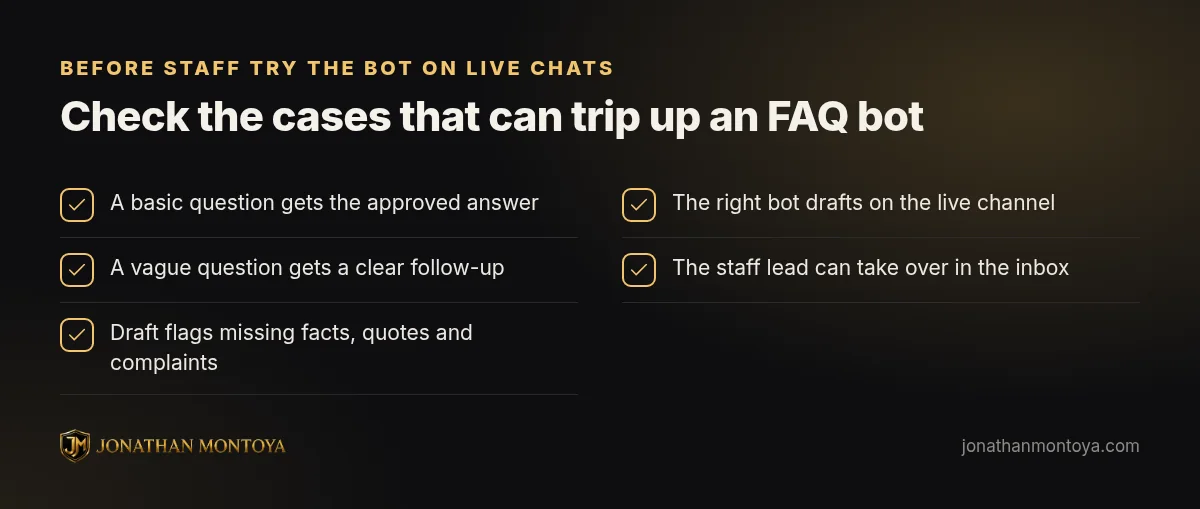
- Test the repliesUse Test your agent to check known and vague questions. Make sure the draft flags cases staff need to handle.
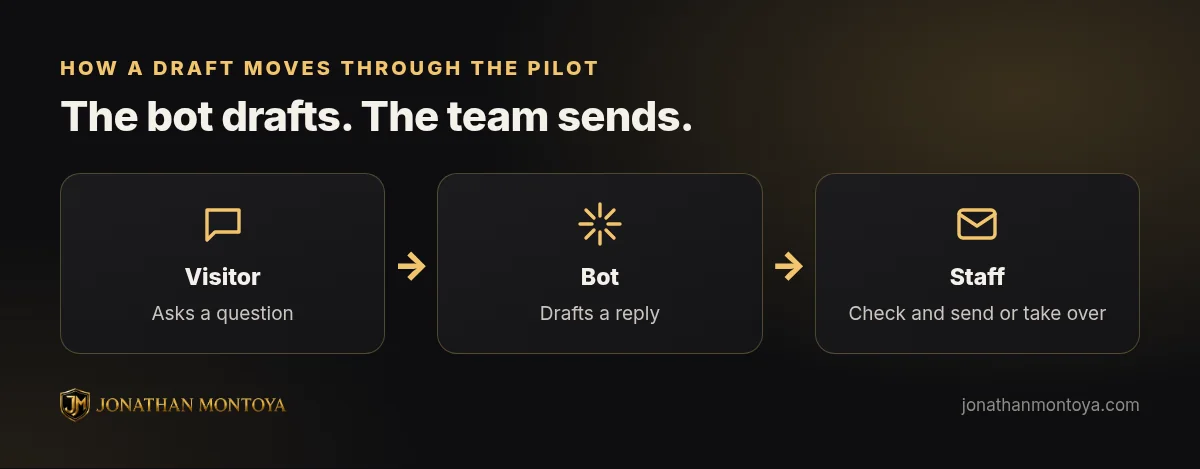
- Run in Suggestive modeCheck the primary bot and channel before you switch. Then send a test chat on that channel. Have staff check drafts and take over flagged chats in the inbox.
- Review the pilotShow the client the draft tally and the AI usage and charges for their account. Agree on what to do next.
What should a GoHighLevel AI agency pilot do?
Pick a business with a website chat inbox the team already checks. Ask the owner to pull a few recent chats. Look for questions that come up again and again and have a short, clear answer. A bike shop might get asked when its repair desk opens, whether it takes walk-ins, and what to bring when dropping off a bike.
Write down the approved answer to each question. Ask the shop owner to check the list and name the person who can update it. Keep one copy that the team can find. If the shop changes its hours or stops taking walk-ins, that person should tell you and check the new answer before the bot uses it.
Agree on where the draft should stop. A repair quote depends on the bike and the work it needs. Staff should handle that. The same goes for refund requests, complaints and any promise about when a bike will be ready. For the pilot, leave booking and follow-up out of scope. Name the person who will take those chats.
Write a short plan the owner can sign off on
Put the chat channel, the approved topics and the staff lead on one page. Ask the owner what a good draft looks like. For the bike shop, that might mean the draft gives the right hours, uses plain words and leaves repair advice to the team. Pick a date to review the work together. Ask the owner to bring any chat they felt the bot got wrong.
Use the GoHighLevel agency guide for the wider setup. If you are still choosing a service, see what to sell with GoHighLevel and how to shape an AI automation agency offer.
Set up Conversation AI in one client sub-account
Open the client's sub-account and go to AI Agents, then Conversation AI. Create a Prompt Based Bot. This lets you write the rules for the replies. Pick the website chat channel you agreed on with the client. HighLevel lists both Chat Widget/SMS Chat and Live Chat among its supported channels. Check which one the client uses.
Put the client's short list of approved answers in the bot prompt. Add a few rules for how it should reply. Give it the name of the business and the tone the owner wants. Keep the rules close to the task. Check the current primary bot and its channels. HighLevel uses one primary bot for general inbound chats on the channels it handles. Keep the current bot's other channels intact. If the pilot needs a change that would disrupt those channels, leave the pilot bot Off.
Save the bot, then check its status. Confirm the saved bot is Off before you try drafts in the test panel. See the Conversation AI guide for more setup detail and the GoHighLevel AI guide for the wider set of tools.
Test the bot, then turn on Suggestive mode
Open Test your agent in the bot editor. Try questions in the words a visitor might use. For shop hours, test both “When do you open?” and “Can I drop my bike off before work?” Read the full reply. Check that a correct fact comes with a clear next step, if one is needed.
Try a question the answer list leaves open. Ask about a holiday or a special repair. The draft should flag that staff need to help. Then ask two things in one chat, such as when the shop opens and how much a repair will cost. Look for the approved answer to the first part and a flag for staff on the second. Fix the rules and try the same cases again.
Agree with the owner before launch on which errors call for a pause. For example, if a draft gives the wrong shop hours or offers a price the client never approved, pause the bot and fix the cause. Test that case again before staff go back to using drafts.
Before you switch modes, confirm that the pilot bot is primary and the agreed channel is selected. If you cannot set this up without disrupting other channels, keep the pilot Off. Once the channel and staff are ready, switch to Suggestive. HighLevel says this mode drafts replies for staff to review and send by hand. Ask staff to check the facts and tone before they send. Have the named staff member take over flagged chats in the inbox and write the reply. Leave Auto-Pilot off.
Send a test message through the live website chat channel. Use an approved question with a reply you can spot. In the inbox, check that the pilot bot drafts the expected reply and staff can review it. If it fails, turn the pilot bot Off and check which bot is primary and which channels are selected before you retry.
Show the client what happened
Keep a shared tally that the client can read. Use one row for each draft you sample. Add the question type, what staff did with the draft, and a short note on why. Leave out customer details the owner does not need for this review. Agree on which chats to count before you start. Show the total number of drafts you sampled.
| What to count | How to log it | What to show the client |
|---|---|---|
| Sent as written | Staff sent the draft as it was. | Which common questions got a clean answer. |
| Sent with edits | Staff changed the draft. Note if it was a fact or a tone fix. | Which answers or rules need work. |
| Skipped | Staff wrote their own reply or passed the chat to the right person. | Which requests still need a person. |
Here is a sample tally for a made-up bike shop. Staff sampled three drafts.
| Question type | Draft outcome | Why |
|---|---|---|
| Shop hours | Sent as written | Gave the approved hours. |
| Drop-off rules | Sent with edits | Staff added which door to use. |
| Repair quote | Skipped | The draft flagged it. The staff lead took over. |
Keep test chats out of the live draft tally. For billing, have an agency admin open AI Suite at the agency level. Start with the pilot dates and the client's location. Narrow the view to Conversation AI and check the transaction details. Share only that client's figures.
List the AI plan fee, any included responses used and any pay-per-use charges on their own lines. If the records mix other chats or tests with pilot traffic, label the figures as account or product usage for the period.
Bring one draft that worked, one staff edit and one chat that needed a person. Put them next to the tally. A draft that missed a fact matters even if many other drafts went out as written. Ask the owner which edits they would want fixed before the next round.
Read the tally with the client
Say most edits were about how to drop off a bike. Read those chats together. Did the bot miss a shop rule, or did the shop give you an answer that was too broad? If staff had to ask which store the visitor meant, add that as a test case. If most chats were about repair quotes, the team may have picked a topic with too few FAQ chats to judge.
What does a HighLevel AI pilot cost?
Budget for the HighLevel agency plan and the AI used in the client sub-account. HighLevel lists its agency Starter plan at $97 per month with three sub-accounts. The AI Employee plans below apply per sub-account. Before the first live chat, record the selected model, the billing mode and whether Extra Usage is on. For the model's input and output rates, see the Conversation AI rate table in the HighLevel AI Product Pricing source below.
| AI billing option | Price in USD | Conversation AI coverage |
|---|---|---|
| Pay per use | No monthly AI plan fee | Pay for the text the model reads and writes. Rates vary by model. |
| AI Employee Starter | $20 per month | Founder agencies only. Conversation AI is billed by use. |
| AI Employee Growth | $50 per month | Includes 1,000 agent responses per month. |
| AI Employee Unlimited | $97 per month | Unlimited Conversation AI, subject to fair use. |
For a small pilot, my take is to start by looking at pay per use. HighLevel measures text in chunks called tokens. The text the model reads and the reply it writes count toward the bill. A chat with more back and forth can cost more than a short chat, so a chat count alone will give you an incomplete view of cost.
When an included limit is reached, HighLevel pauses extra use by default. If you turn on Extra Usage in AI Suite for a supported tool, the extra use bills at pay-per-use rates. Check who can make that choice and who pays if you turn it on. If you later add texts or calls, HighLevel bills those separately. See the guides to AI Employee and GoHighLevel usage fees for more detail.
Want to try the bot setup? My HighLevel link shows a 30-day free trial for new HighLevel customers on HighLevel's own offer page (checked Nov 18, 2026). HighLevel's standard pricing page lists 14 days. Usage fees can apply during the trial.
Start HighLevelPackage the pilot and choose the next step
Keep the offer easy to read. A flat setup fee can cover the approved answer list, bot setup, test cases and the client review. If the client wants help after the pilot, a separate monthly service can cover answer updates and draft checks. You can list AI use on its own line on your agency invoice. State who pays it. HighLevel's automatic AI Employee rebilling requires the $497 per month agency plan and the right settings in Agency settings. Put any new channel or task in a new scope.
At handoff, show the staff lead where the bot mode is set and how to pause it. Have that person run a test with you. Then agree on who will check changes to shop hours or policies. If you plan to run the same pilot for another client, reuse the test questions and scorecard format. Get a fresh set of facts and a new sign-off from that owner.
- Keep staff review. If the drafts are sound and staff want to keep using them, stay in Suggestive mode. Give the owner a copy of the rules, the answer list and the tally.
- Fix a clear gap. If staff keep fixing the same answer, ask the owner for the right rule. Change it, repeat the test and check how staff handle the next set of drafts.
- Pause the pilot. If staff keep finding wrong facts or the client has no one to own the inbox, pause the bot and tell the owner what would need to change.
If the client asks for Auto-Pilot, agree on which questions it can answer on its own. If you set up a human handover action, test it in a separate Auto-Pilot check before you use it on live chats. Treat a new tool as a fresh decision too. Look at GoHighLevel Managed Agents if the client asks about work beyond chat, or SaaS Mode if you plan to sell software plans.
Build your first AI service offer
Start with one client problem. Give the owner a clear way to judge the work.
See the free programStart HighLevelFreedom Launch Accelerator is my own free program. I earn a commission if you buy HighLevel through my link, at no extra cost to you. My HighLevel link shows a 30-day free trial for new HighLevel customers on HighLevel's own offer page (checked Nov 18, 2026). HighLevel's standard pricing page lists 14 days. Usage fees can apply during the trial. Your results depend on your own work.
FAQ
Can I start a GoHighLevel AI agency with one client?
Yes. Run the pilot in one client sub-account. Pick one task, like drafting answers to common website chat questions. HighLevel lists three sub-accounts on its Agency Starter plan. AI usage is a separate cost to check.
Do I need AI Employee to use Conversation AI?
No. HighLevel offers pay per use for supported AI tools. An eligible sub-account can also use AI Employee Growth or Unlimited. AI Employee Starter has no included Conversation AI replies.
What is the difference between Suggestive and Auto-Pilot?
Suggestive gives staff a draft to check and send by hand. Auto-Pilot sends replies on its own based on the bot settings. Start with staff review so you can see where the draft needs work.
Can a HighLevel FAQ bot hand a chat to a person?
In Suggestive mode, ask the bot to flag cases in its draft. The named staff member takes over in the inbox. If you later use a human handover action in Auto-Pilot, set it up and test it on its own.
Does Conversation AI charge a flat rate per chat?
On pay per use, HighLevel bills for chunks of text called tokens. It counts the text the model reads and the text it writes. Your model and the amount of text it handles affect the bill.
Do I need SaaS Mode to run the pilot?
No. Set up the bot in the client sub-account. SaaS Mode is for selling software plans and setting up client accounts through those sales.
Should I start with chat or Voice AI?
For this pilot, start with website chat. You can read each draft and compare it with the client's approved answer. If the main problem is phone calls, scope a separate Voice AI pilot and account for phone charges as well as AI charges.
Sources, checked Nov 18, 2026
Affiliate disclosure: I earn a commission if you buy HighLevel through my links, at no extra cost to you. Freedom Launch Accelerator and the GHL Clone are my own programs. HighLevel is a trademark of HighLevel, Inc. This site is not run by or affiliated with HighLevel.
