

The best GoHighLevel offers fix one clear problem. Start with missed-call texts for a shop that gets jobs by phone. If leads go cold after they fill out a form, sell follow-up and booking. You can also sell review requests, websites, AI chat, or an AI receptionist. Charge for the setup, add a monthly fee if you do ongoing work, and agree on who pays for usage.

Disclosure: I earn a commission if you buy HighLevel through my links, at no extra cost to you. I am not HighLevel and do not speak for it.
Key takeaways
- Pick an offer based on where the client loses track of calls, texts, or web leads.
- Use a setup fee for the build and a monthly retainer for work you can name.
- Put texts, calls, email, and paid AI in your scope so the client knows who pays.
- Test the handoff to a real person before you turn on any live flow.
Six GoHighLevel offers you can sell
If you are stuck on what to sell with GoHighLevel, ask how the client gets new jobs now. A shop that gets calls has a different need from one that gets most leads from a form. Use this menu to match the job to the tool. The fees in the last column are ways to bill for your work.
| Offer | What you set up in HighLevel | HighLevel feature | What the client pays for |
|---|---|---|---|
| Missed-call follow-up | Write a text for missed calls. Test repeat calls and agree on who takes replies. | Missed Call Text Back or Workflows | Setup fee. Monthly retainer if you check or tune the flow. Include phone and text use or bill it separately. |
| Lead follow-up and booking | Connect a form to a follow-up flow. Set up a calendar and a place to track each lead. | Forms, Workflows, Calendars, and CRM pipelines | Setup fee plus a monthly retainer for checks and edits. Include text or email use or bill it separately. |
| Review requests | Send a review link by text or email at the point you agree on with the client. | Send Review Request workflow action | Setup fee plus a monthly retainer if you manage the flow. Include text or email use or bill it separately. |
| Website or landing page | Build a site or a single page with a form or booking link. Check where each lead goes. | Website & Funnel Builder or AI Studio | Setup fee for the build. Monthly retainer if you handle edits. Agree on who pays for the domain, paid AI Studio use, and hosting. |
| AI chat and booking | Train a bot on common questions. Set up lead capture, booking, or a handoff to staff. | Conversation AI | Setup fee plus a monthly retainer for bot checks and updates. State how you will cover AI and message use. |
| AI receptionist | Set up AI for a defined set of calls. Test the script and agree on a backup for calls outside its scope. | Voice AI | Setup fee plus a monthly retainer for call checks and script edits. Spell out AI and phone use as separate costs. |
Start with missed calls if the phone drives the work
Picture a roofer on a job when a new caller rings. Your demo can show a text that asks what kind of work the caller needs. Then show who reads the reply and how that person takes over. The job you sell is a clear path from a missed call to a reply the team can act on.
HighLevel says its built-in feature can send a text for each missed call. If someone calls twice, they can get two texts. If that is a poor fit, HighLevel points to a workflow recipe you can adapt. Check that the account has a number that can send texts. HighLevel respects contact preferences and Do Not Disturb settings. Test a missed call and a repeat call before you go live.
Show how a web lead books a slot
Send a test quote request through the form. Show where the lead lands in the CRM pipeline. Have the follow-up flow send a link to the calendar, then book a test slot. Ask the client who checks replies and who takes over if a reply sits unanswered.
Pick the right moment to ask for a review
Ask the owner how the team marks a job as done. Use that step to plan when to send the review link. Use the Send Review Request workflow action to send the link by text or email. Enable review requests in the sub-account. For a Google review link, connect the right Google Business Profile first. You can also use a third-party review link. In your demo, show the owner the message and open the link. If the owner also wants help with replies, list that as its own task in the quote.
Sell a website that gives visitors a next step
For a website offer, agree on one main action. Say you build a page for a roofer. The page can ask people to request a quote. Show the owner where that form goes and who sees it. Ask the owner to sign off on the copy, photos, and service area before you publish. Put the number of pages and the edits you cover in the quote.
Use the standard builder or draft the site from a prompt in AI Studio. Connect the form or calendar to the client's account, then send a test entry or book a test slot. AI Studio sites publish from AI Studio. Agree on who will make edits later. Agency users get AI Studio access subject to fair use. Sub-account users can use an AI Employee plan or pay per use. Paid hosting tiers are billed separately. Put who pays for AI Studio use and hosting in the quote. See the AI Studio guide for the build steps.
Give AI one job at a time
Use chat when the issue is inbound messages. Start with a small set of approved answers and try Suggestive mode, where staff can review replies before they send them. For calls, start with one use case, such as taking details from new callers. Write down which requests should go to staff. See how to set up Conversation AI or sell an AI receptionist.
How to pick a niche and write your offer
Pick a group of clients who need much the same setup. Access matters. Start with a trade where you can ask owners how work comes in. If a roofer tells you most calls get picked up, ask what happens to web leads before you pitch missed-call texts.
- Pick a trade or type of shopStart where you can talk to a few owners. Ask how people reach them and what their team does next.
- Find one step that breaksAsk an owner to walk you through a real call or web lead. Find the point where the team lost track of it.
- Build a short demoUse sample details. Play the part of the caller or site visitor, then show the owner what their team would see and do.
- Write the offer in one lineName the client, the work you will do, and who owns the next step. Use that line to set the scope of your quote.
HighLevel's Prospecting tool can help you spot items to ask about, such as missing listings. Ask the owner, “Do customers look for your shop on this site?” My guide to finding GoHighLevel clients walks through that process.
How to package your GoHighLevel offer and bill for usage
Write your tiers around the work you take on. Here is a sample menu for a shop that wants help with calls. Starter, Core, and Plus are names for your service packages.
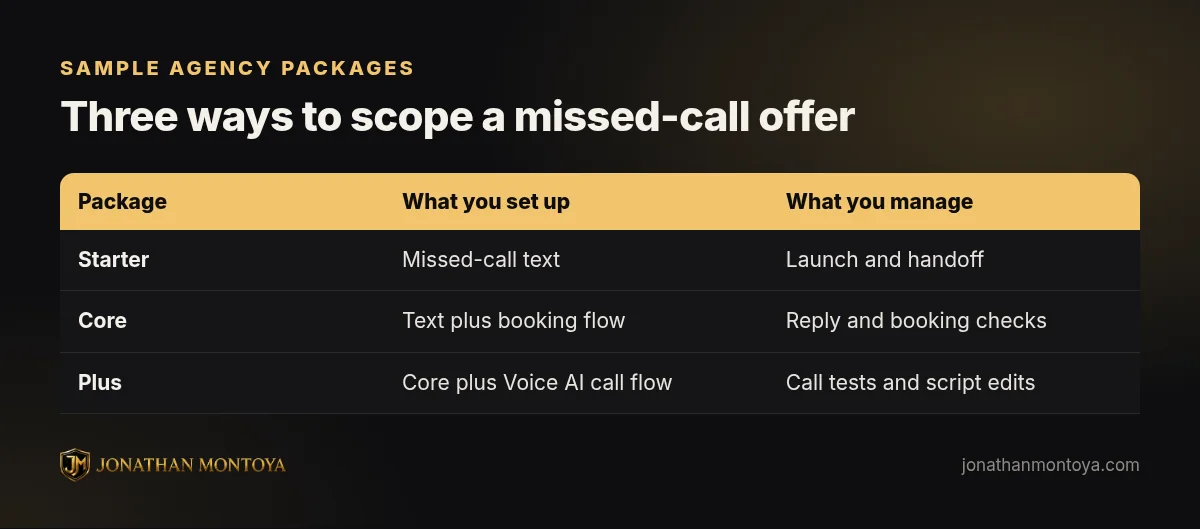
Starter. Use a setup fee for the build and handoff. Show the client where replies go.
Core. Use a monthly retainer if you will test changes or check replies and bookings. Agree on what you check and when.
Plus. Agree on which calls go to Voice AI and which should trigger a text. Check how the Voice AI agent and the missed-call text work together. Test both paths and agree on when staff step in. If the retainer covers script edits, say how many rounds it includes.
Spell out who pays for usage
HighLevel bills usage such as calls, texts, email, and paid AI. A setup fee covers your work to build. A retainer covers the work you take on each month. You can include usage in your fee, invoice it separately, or use built-in rebilling where HighLevel supports it. Write down which option you will use.
Unlimited and Founder can rebill at cost for supported phone and email systems. Founder can add a markup to supported usage in SaaS mode. HighLevel says you need Founder to rebill AI Employee usage. With rebilling, HighLevel charges your agency wallet first, then charges the client account for its use. Phone System charges still apply to Voice AI phone calls, even when a subscription covers the AI use. See the usage fees guide for details.
Want to build a demo? Start with one path, such as a missed call and the text that follows. Check the cost of any paid tools you turn on.
Start HighLevelOnboard your first client
Before you build, ask the client for their hours, service list, and the name of the person who takes replies. Have that person join the test. They should see where a new lead lands and what to do if the flow sends a reply that needs help.
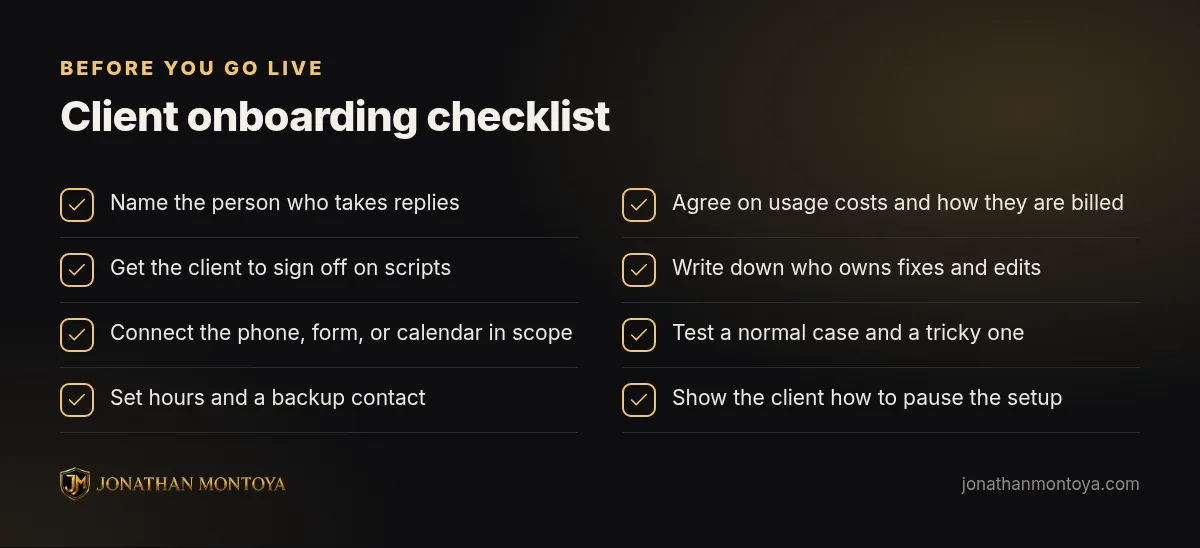
- Name the person who takes replies
- Get the client to sign off on scripts
- Connect the phone, form, or calendar in scope
- Set hours and a backup contact
- Agree on usage costs and how they are billed
- Write down who owns fixes and edits
- Test a normal case and a tricky one
- Show the client how to pause the setup
If you serve the same niche more than once, you can copy parts of your setup with a HighLevel Snapshot. It can carry items such as workflows and calendars. It leaves out contacts, past chats, and app connections. Check what came over, connect the tools the new client needs, and run fresh tests.
Test from the customer's side first. Fill out the form on a phone, call twice, or ask the bot a question that is outside its script. Then test from the team's side. Can they find the reply? Can they tell who should act on it? Have the client show you both steps before you turn the flow on.
Set clear limits on what you sell
- Lead follow-up. Commit to the flow you will set up and test. Actual bookings depend on who reaches out and what the shop does next. Leave booking counts out of the quote.
- Reviews. Agree on who gets a request and when. The customer chooses if they leave a review and what they write. Keep ratings targets out of your promise.
- AI. Give the bot a short list of jobs and a plan for gaps. Check how it handles a question the client has yet to answer. Name the person who takes over when needed.
- Support. State who makes edits and when you reply to a request. Set terms for work like new pages, extra call flows, or a new location.
When SaaS mode fits your offer
You can sell a managed service with the core tools, like setting up follow-up and checking that it runs. With SaaS mode, you can sell access to a software plan with set features. HighLevel lists SaaS mode on Founder. If you sell both, say which tasks your team handles and what the client will do on their own.
Start with the GoHighLevel agency guide if you plan to build and manage the setup. If clients will buy access to a set plan, read the SaaS mode guide and check what the white-label options cover.
Build your first agency offer
Start with one type of client and one task you can show in a demo.
See the free programStart HighLevelFreedom Launch Accelerator is my own free program. I earn a commission if you buy HighLevel through my link, at no extra cost to you. My HighLevel link shows a 30-day free trial for new customers on HighLevel's own offer page (checked Nov 18, 2026). HighLevel's standard pricing page lists 14 days. Your results depend on your own work.
FAQ
What is the best GoHighLevel offer for beginners?
I would start with missed-call text back for a shop that gets jobs by phone. Set up the text, show who will read replies, and test what happens when the same person calls twice.
Can I sell websites built with GoHighLevel?
Yes. You can build a site with the Website Builder or start from a prompt in AI Studio. Agree on the page count and who will handle edits. In AI Studio, connect the form or calendar and test it before launch.
Can I sell GoHighLevel services without SaaS mode?
Yes. You can sell work like building a site or setting up a workflow with the core tools. Choose Founder if you want to use SaaS mode to sell software plans.
How should I charge for a GoHighLevel service?
Use a setup fee for the build. Add a monthly retainer if you will keep doing work for the client. Spell out who pays for texts, calls, email, and paid AI. Check your plan before you offer to rebill those costs through HighLevel.
What is the difference between an AI chatbot and an AI receptionist?
Conversation AI works with messages on supported channels. Voice AI works with calls. Start with the channel the client needs help with. For Voice AI, check AI costs and Phone System charges.
Can I use the same setup for more than one client?
Yes. A HighLevel Snapshot can copy items like workflows and calendars to another sub-account. Contacts, past chats, and connected apps do not come with it. Set up and test each client account on its own.
Can I put my agency brand on GoHighLevel?
HighLevel lists the white-label desktop app on Unlimited. Founder includes what is on Unlimited. If you want to sell software plans through SaaS mode, HighLevel lists that feature on Founder.
Sources, checked Nov 18, 2026
- HighLevel pricing and plan features
- HighLevel wallet and rebilling guide
- HighLevel AI product pricing
- HighLevel Missed Call Text Back setup
- HighLevel review requests
- HighLevel AI Studio
- HighLevel Conversation AI setup
- HighLevel Prospecting tool
- HighLevel Snapshots overview
- HighLevel agency SaaS mode playbook
- HighLevel offer page for my link
Affiliate disclosure: I earn a commission if you buy HighLevel through my links, at no extra cost to you. Freedom Launch Accelerator and the GHL Clone are my own programs. HighLevel is a trademark of HighLevel, Inc. This site is not run by or affiliated with HighLevel.
