
Automation · Pricing
Airtable charges per seat, and only editors count. Here is what each plan costs, billed yearly or monthly, and the limits that decide when you need to upgrade.
Airtable is a tool that looks like a spreadsheet but works like a database. You can use it to track leads, content, orders, or almost any list. It has a free plan, and the paid plans are priced per seat.
The price you pay depends on two things: how many editors you have and whether you pay yearly or monthly. I read Airtable's pricing page on October 27, 2026. Here is the plain version.
Quick answer
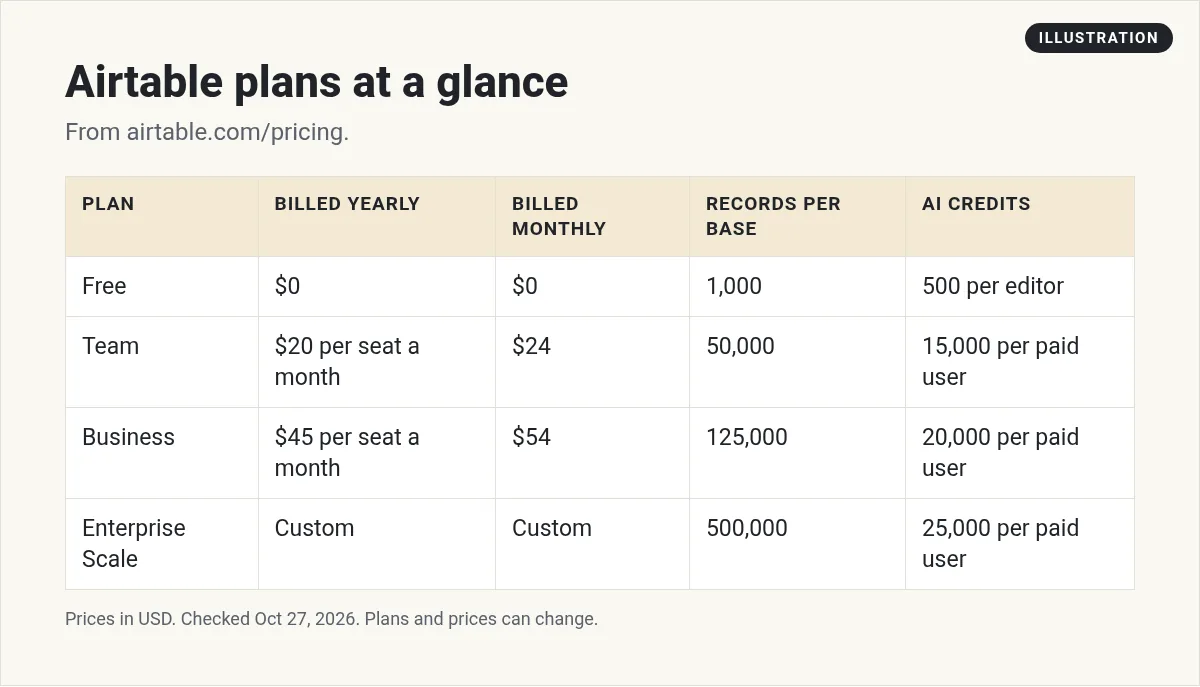
Airtable has four plans. Free costs $0. Team is $20 per seat a month billed annually, or $24 billed monthly. Business is $45 per seat a month billed annually, or $54 billed monthly. Enterprise Scale has custom pricing. You pay only for users who can edit at least one base. Read-only users, form submissions, and share links are free on Team and Business.
What you get with any Airtable plan
Every plan, even Free, includes unlimited bases and Interface Designer, per the plan cards. The compare table also lists realtime collaboration and comments, plus iOS and Android apps. Interface Designer lets you build simple screens on top of your data, so your team does not have to work in the raw table.
A base is like one project file. Inside a base, you have tables, and each row in a table is a record. Most of the plan limits are counted per base, so how you split your work into bases matters.
The compare table lists views like grid, kanban, calendar, gallery, and forms. The Team card adds "Gantt and timeline view," so those start on Team.
Airtable plans and prices
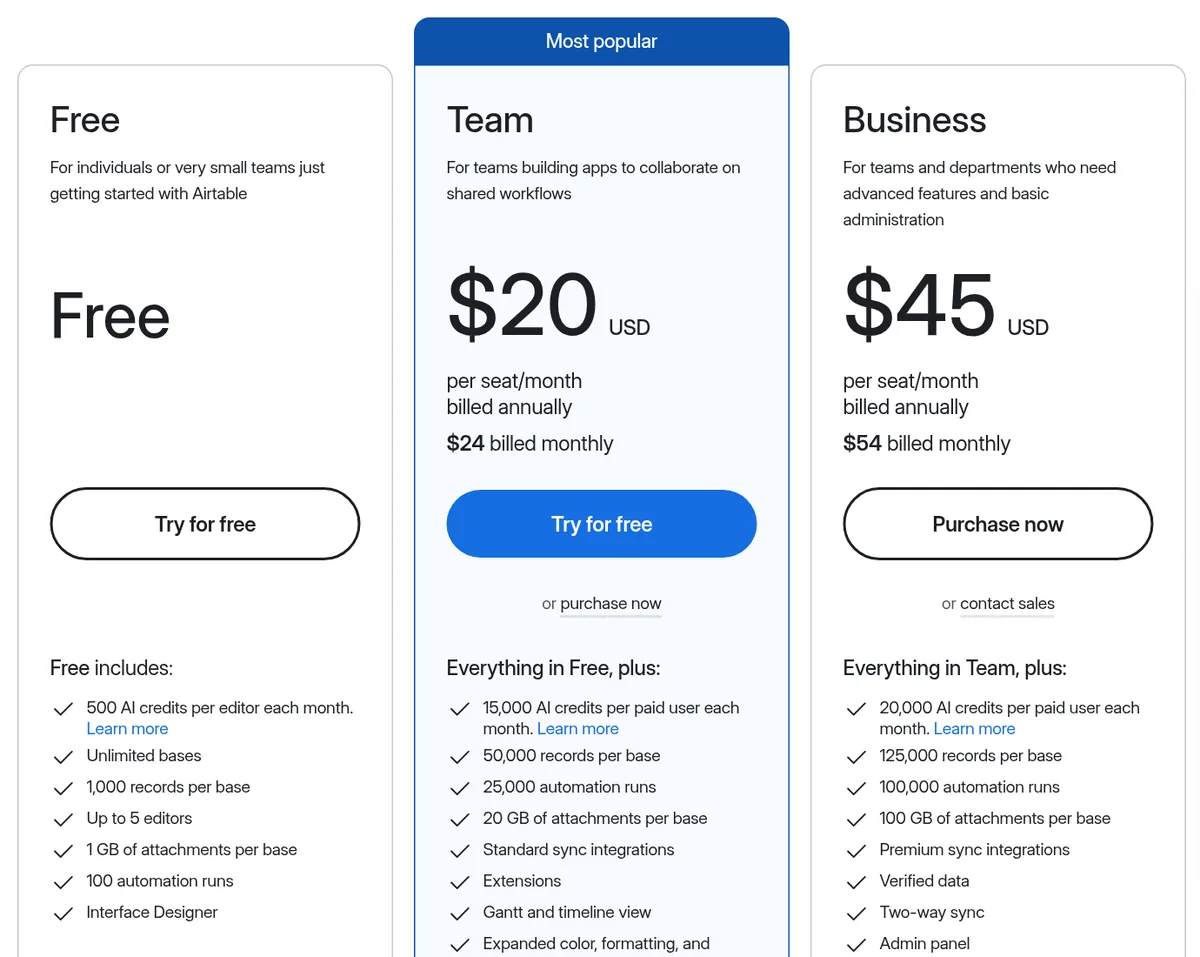
Airtable's pricing page shows both yearly and monthly prices for each plan. Here they are:
- Free: $0. The page says it is "For individuals or very small teams just getting started with Airtable."
- Team: $20 per seat a month, billed annually. Or $24 billed monthly. The page says it is "For teams building apps to collaborate on shared workflows."
- Business: $45 per seat a month, billed annually. Or $54 billed monthly. It adds admin tools and more capacity.
- Enterprise Scale: custom pricing. You contact sales.
Prices are in US dollars. Paying yearly saves $4 per seat each month on Team and $9 on Business.
Who counts as a seat
This is the most important part of Airtable pricing. The FAQ says "you will be charged for all users who have edit permissions for at least one base in the workspace."
Not everyone costs money. The FAQ says "No charges will apply on a Team or Business plan for read-only collaborators, form submissions, or share links." So if a client only needs to look at a base, give them read-only access.
Charges are prorated. If you add an editor partway through the month, the FAQ says they "will only be charged for the days after they were added."
A quick example
Here is my math for a team of 3 editors on the Team plan:
- Billed annually: $20 x 3 seats x 12 months = $720 a year.
- Billed monthly: $24 x 3 seats x 12 months = $864 a year.
Paying yearly saves $144 in this example. But you commit for a full year, so only do it once you know Airtable fits.
What the Free plan includes
The Free plan is more useful than many free plans. The pricing page lists:
- 500 AI credits per editor each month
- Unlimited bases
- 1,000 records per base
- Up to 5 editors
- 1 GB of attachments per base
- 100 automation runs
- Interface Designer
A record is one row. So 1,000 records means 1,000 rows in each base. That is enough to test an idea or run a small list.
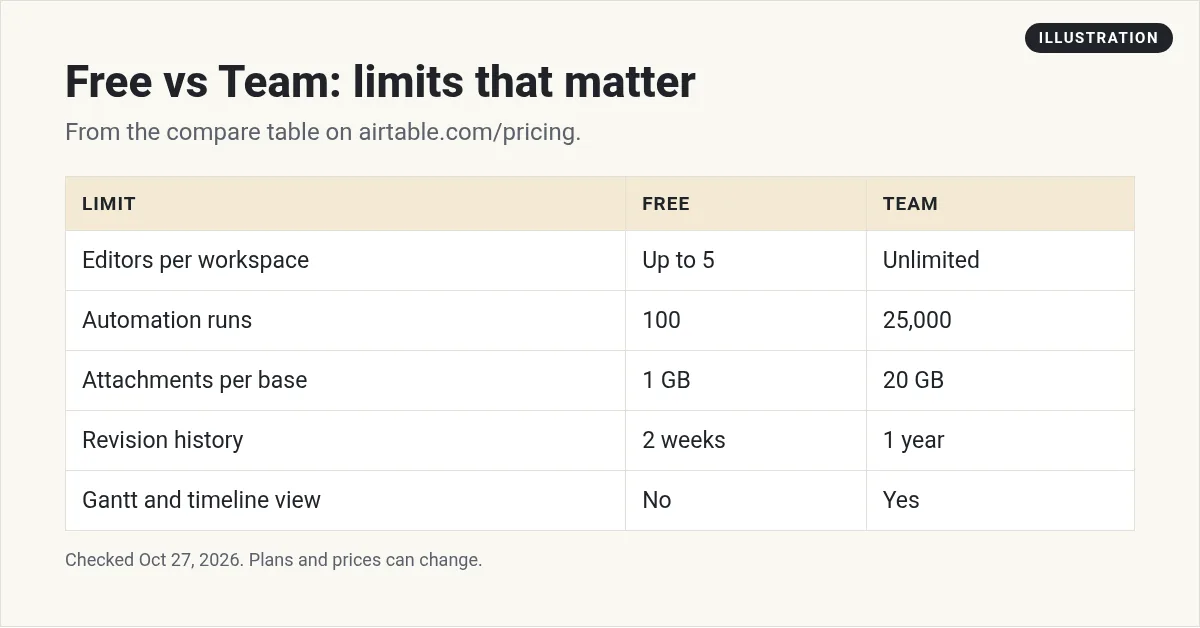
The limits to watch on Free are records, automation runs, and revision history. Free keeps 2 weeks of history. Team keeps 1 year.
What Team adds
The Team plan includes "Everything in Free, plus" these items, per the pricing page:
- 15,000 AI credits per paid user each month
- 50,000 records per base
- 25,000 automation runs
- 20 GB of attachments per base
- Standard sync integrations and extensions
- Gantt and timeline view
- More color, formatting, and calendar options
The compare table also shows Team has unlimited editors per workspace. Free is capped at 5.
What Business adds
Business is for bigger teams that need control. The pricing page lists:
- 20,000 AI credits per paid user each month
- 125,000 records per base
- 100,000 automation runs
- 100 GB of attachments per base
- Two-way sync, premium sync integrations, and verified data
- An admin panel and SAML-based single sign-on
Enterprise Scale goes further, with 500,000 records per base and 25,000 AI credits per paid user each month at list price.
Other limits worth knowing
The compare table on the pricing page has a few more limits that are easy to miss. Here they are for Free, Team, Business, and Enterprise Scale:
- Workspaces: 1 on Free, 1 on Team, unlimited on Business and Enterprise Scale.
- Commenters per workspace: 50 on Free, unlimited on paid plans.
- Automations per base: 75, 100, 150, and 200.
- API calls per month: 1,000 on Free, 100,000 on Team, and unlimited on Business and Enterprise Scale.
- Revision and snapshot history: 2 weeks, 1 year, 2 years, and 3+ years.
The API limit matters if you connect Airtable to other apps through its Web API. If you plan to do that on Free, keep an eye on the 1,000 calls a month.
Add-ons and extra costs
AI credits
Each plan comes with AI credits. If you need more, the compare table says credit packs start at "$20/month for 10k credits" on Team and Business.
Portals
Portals let outside guests use your app. The page lists Team at "Starting from $120 for 15 guests/month" and Business at "Starting from $150 for 15 guests/month." A footnote says Business "starts at $127.50/month for 15 guests on our annual plan." So I am showing both Business numbers.
Payment options
The FAQ says "All payments are made via credit card for Team workspaces." Business bought through sales can be paid by invoice.
What happens when you hit a limit
Good news here. The FAQ says "you'll still be able to use your bases and we will never remove your data." But you "will not be able to add more records or attachments until you upgrade."
Automations work in a different way. The FAQ says "For automations and API limits, you will be capped at the usage limit on your current plan." So if your automations stop, check your run count first.
How to keep your Airtable bill low
- Give edit access only to editors. Read-only users are free on Team and Business.
- Use forms to collect data. The FAQ says form submissions are not charged. A form lets anyone add a record without a seat.
- Use share links to show data. Share links are also free, per the FAQ.
- Start monthly, then switch. Pay $24 a month while you test. Move to yearly at $20 once you are sure.
- Check for special plans. The pricing page links to plans for nonprofits and education.
Which plan should you pick?
- Solo and testing? Start on Free. 1,000 records and 100 runs is plenty to learn.
- Small team that edits together? Team. Count only the people who need to edit.
- Need single sign-on or admin controls? Business.
Airtable often works with other tools. If you connect it to Zapier, see my Zapier pricing guide. If you are deciding between tools, my Notion pricing guide may help too.
Before you pay for Airtable
Nothing you check here is sent or saved. Download it if you want to keep it.
Meet AIM Agent
AIM Agent is an AI Chief of Staff for business owners. You give it a real task, and it brings the work back for you to review. You stay the one who approves.
Meet AIM AgentI am a co-founder of AIM Agent and have a financial interest in the product.
Frequently asked questions
How much does Airtable cost?
Airtable Free is $0. Team is $20 per seat a month billed annually, or $24 billed monthly. Business is $45 per seat a month billed annually, or $54 billed monthly. Enterprise Scale has custom pricing.
Is Airtable free?
Yes. The Free plan includes unlimited bases, 1,000 records per base, up to 5 editors, 1 GB of attachments per base, 100 automation runs, and 500 AI credits per editor each month.
Who counts as a paid seat in Airtable?
Airtable charges for all users who have edit permissions for at least one base in the workspace. Read-only collaborators, form submissions, and share links are not charged on Team or Business.
What happens if I go over Airtable's limits?
Airtable says you can still use your bases and it will never remove your data. You cannot add more records or attachments until you upgrade. Automations and API calls are capped at your plan's limit.
How can I pay for Airtable?
Team workspaces are paid by credit card. Business and Enterprise Scale accounts bought through sales can get an annual invoice.
Does Airtable charge for AI?
Each plan includes AI credits. More credits come in packs that start at $20 a month for 10k credits on Team and Business.
Sources
Checked October 27, 2026. Plans, prices, and rules can change.
