
Affiliate Marketing · Programs
The Amazon Influencer Program gives social media creators their own page on Amazon. Here is who qualifies, how you earn, how onsite commissions work, and how it differs from regular Associates.
If you post product videos or photos on social media, Amazon has a program made for you. It is called the Amazon Influencer Program, and it gives you your own shop page on Amazon.
I read Amazon's influencer page, its help pages, and its commission rate table on October 26, 2026. Here is what they say, in plain words.
Quick answer
The Amazon Influencer Program is an extension of Amazon Associates for social media creators. You need a YouTube, Instagram, Facebook, or TikTok account, and Amazon reviews your followers and engagement. If approved, you get your own storefront at a vanity URL like amazon.com/shop/yourname. You earn commission on qualifying purchases, and you may also earn onsite commissions when Amazon shows your videos on product pages.
What the Amazon Influencer Program is
Amazon's help page says the program is "an extension to the existing online Associates program for qualifying social media influencers." So it sits on top of regular Amazon Associates. If you are new to Associates, read my guide to the Amazon affiliate program first.
The big extra is your own page on Amazon. Amazon gives you a vanity URL in the form amazon.com/shop/handle. You can fill that page with products you recommend, plus photos, videos, and livestreams.
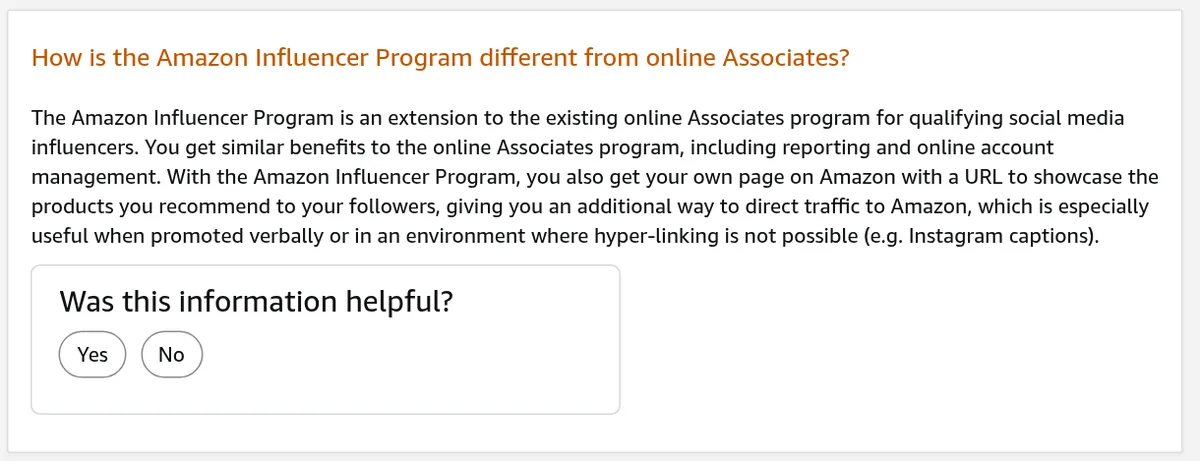
Why does that matter? Amazon's help page says it is "especially useful when promoted verbally or in an environment where hyper-linking is not possible." Think Instagram captions, or saying your link out loud in a video.
Who qualifies
Amazon's influencer page says it accepts all types of influencers, as long as you have a YouTube, Instagram, Facebook, or TikTok account.
Two details matter:
- Business accounts. If you apply with Instagram or Facebook, Amazon says you must use a business account.
- Followers and engagement. Amazon says it looks at "the number of followers you have in addition to other engagement metrics."
Amazon does not publish a minimum follower number on the pages I checked. So I will not give you one. Apply and see.
The program is for creators, not companies. Amazon says media companies and brands should apply to the Associates program instead.
It is also not open everywhere. Amazon's help page lists the US, UK, India, and Canada.
Amazon Influencer Program vs Amazon Associates
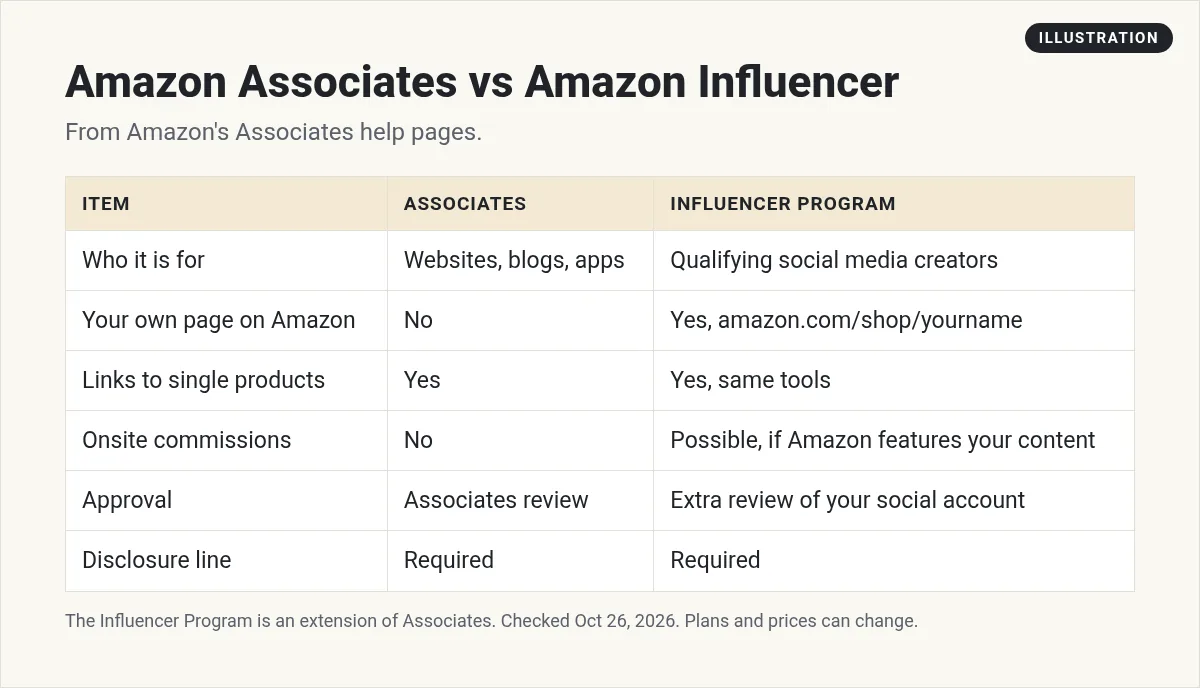
You can be in both. Amazon's help page says yes, and you do not have to sign up again. You "can use your existing Associates account and store ID to register" for the Influencer Program.
You can still link to single products too. Amazon says you are encouraged to use Associates tools like SiteStripe and Product Links. So the storefront adds to your links. It does not replace them.
Here is the simple way to think about it. Associates gives you links. This program gives you links, a shop page, and a chance to show up on Amazon.
How you earn
Amazon's influencer page says there are "multiple ways you can earn." You can share your storefront URL or your affiliate links. Amazon may also show the content on your storefront to Amazon shoppers.
The commission you get depends on what people buy. Amazon's page says "The amount you earn is based on the products sold." Rates are in your reports and on Amazon's rate table.
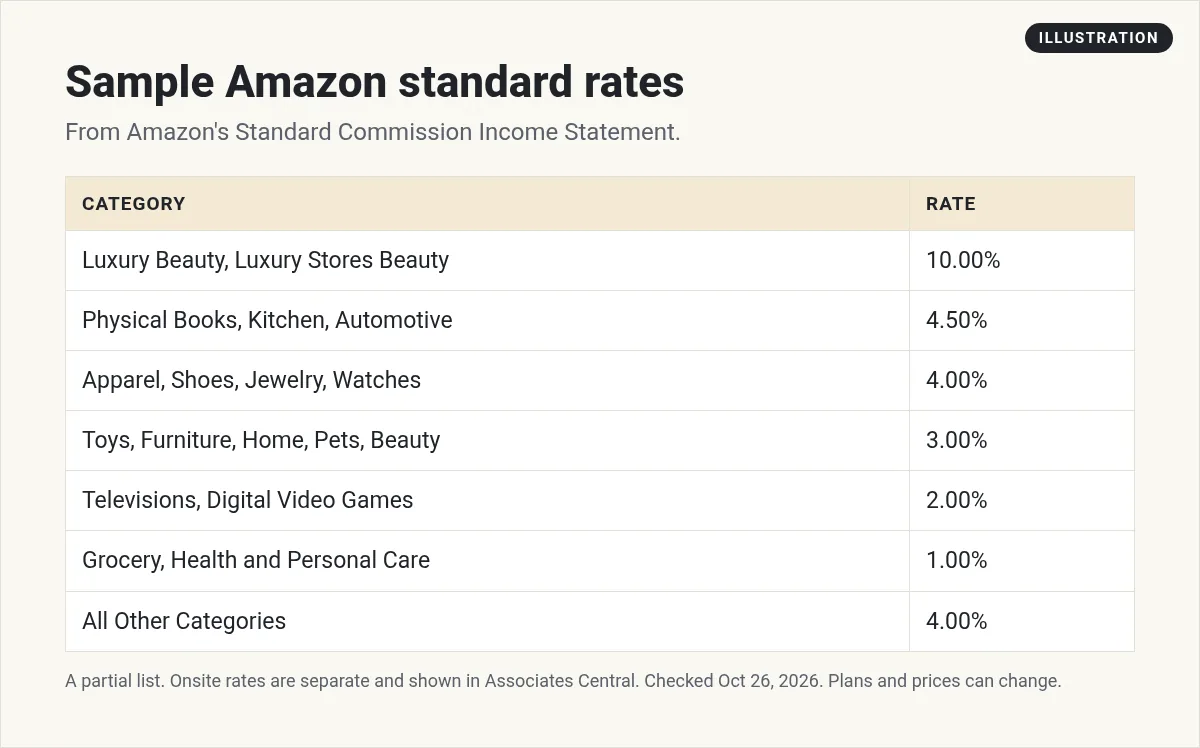
Here are some standard rates from Amazon's Standard Commission Income Statement, checked October 26, 2026:
- 10%: Luxury Beauty, Luxury Stores Beauty, and Amazon Explore.
- 4.5%: Physical Books, Kitchen, and Automotive.
- 4%: Apparel, Shoes, Jewelry, Watches, Luggage, and All Other Categories.
- 3%: Toys, Furniture, Home, Pets, Beauty, Sports, Baby, and more.
- 1%: Grocery, Health and Personal Care, and physical video games.
Rates can change, and some items pay nothing at all, like gift cards. Check the full table before you plan your content around one category.
Rates are a percent of the sale, so low priced items pay very little. Pick products your followers already want, not just the highest rate.
Onsite commissions, explained
This is the part most people find confusing. Onsite commissions are for when Amazon features your content on its own site.
Here is how it works, from Amazon's help pages:
- Upload videos. You upload product videos to your storefront from Creator Hub.
- Get 10 approved. Once you have "uploaded 10 videos approved by moderation" and signed up for onsite commissions, your videos may show on product detail pages.
- Get paid on direct buys. Onsite commission is limited to direct qualifying purchases, meaning the same product shown in your content.
Onsite earnings are tracked under a second Store ID that starts with onamz. Amazon says you need to add your payment and tax info to that Onsite Store ID to get paid. This step is easy to miss.
Onsite rates are separate from the standard table. Amazon says you can find them in Associates Central. I could not see them without an account, so I am not listing them.
Disclosure rules
Amazon is strict here. Its help page says you must add a clear disclosure near your links, such as "(paid link)", "#ad", or "#CommissionsEarned".
You also must show this exact line: "As an Amazon Associate I earn from qualifying purchases." On social media, Amazon says that statement must be associated with your account, such as in your bio.
Say it in your videos too. A quick line like, I may earn from links in my bio, is easy and honest.
My affiliate disclosure guide covers the FTC side in plain words.
How to join and get going
- Use a business account. Switch Instagram or Facebook to a business account first.
- Apply. Go to amazon.com/influencers and sign in. If you are already an Associate, pick your existing store ID.
- Set up your storefront. Add Idea Lists, photos, and videos for products you really use.
- Add your tax info twice. Do it for your main Store ID and your onamz Onsite Store ID.
- Post videos. Aim for 10 approved videos so you can qualify for onsite placements.
- Share your page. Say your vanity URL in videos and put it in your bio.
If you post on short video apps, my guides on TikTok affiliate marketing and Instagram affiliate marketing pair well with this.
Tips for a storefront people use
A page full of random items will not help anyone. Here is what I would do.
- Group items by need. Make lists like my desk setup, my gym bag, or gifts for new moms.
- Only add what you use. Your followers trust you because you are real. Keep it that way.
- Add a short note. Say why you like each item in one or two lines.
- Keep it fresh. Remove items that are gone or that you stopped using.
- Show the product in use. Short videos that show how a thing works do better than a plain photo.
Then point people to the page. Say it in your videos. Pin it in your bio. Put it in your story highlights.
Common mistakes to avoid
- Skipping the business account. Your Instagram or Facebook app may be turned down.
- Forgetting the second tax form. Onsite pay needs info on the onamz Store ID too.
- No disclosure. Amazon can close your account. Put the line in your bio and tag posts.
- Chasing the top rate. A 10% rate on things no one wants pays less than 3% on things people buy.
- Posting once and stopping. It takes many posts to see what your group likes.
Is it worth it?
If you already post about products on social media, I think it is worth applying. It costs nothing, and the storefront fixes the one link problem on many apps.
Keep your hopes real, though. Rates are often low, approval is not certain, and onsite placements are up to Amazon. Treat it as one income stream, not your whole plan.
Want more options? See my list of affiliate programs for beginners or the Walmart affiliate program.
Amazon Influencer setup checklist
Nothing you check here is sent or saved. Download it if you want to keep it.
Meet AIM Agent
AIM Agent is an AI Chief of Staff for business owners. You give it a real task, and it brings the work back for you to review. You stay the one who approves.
Meet AIM AgentI am a co-founder of AIM Agent and have a financial interest in the product.
Frequently asked questions
What is the Amazon Influencer Program?
It is an extension of Amazon Associates for social media creators. Approved creators get their own storefront on Amazon with a vanity URL.
How many followers do you need for the Amazon Influencer Program?
Amazon does not publish a minimum. It says it looks at your follower count plus other engagement metrics.
Can I be in Amazon Associates and the Influencer Program?
Yes. Amazon says you can use your existing Associates account and store ID to register.
What are Amazon onsite commissions?
They are commissions on direct purchases when Amazon features your storefront content, such as videos on product pages. You need 10 videos approved by moderation and onsite sign up.
Which platforms can I apply with?
YouTube, Instagram, Facebook, or TikTok. Instagram and Facebook applicants must use a business account.
Which countries have the Amazon Influencer Program?
Amazon's help page lists the US, UK, India, and Canada.
Sources
Checked October 26, 2026. Plans, prices, and rules can change.
- Amazon: Influencer Program
- Amazon: What is the Influencer Program
- Amazon: Influencer vs Associates
- Amazon: Uploading videos
- Amazon: Earning onsite commissions
- Amazon: Onsite Commission Income Statement
- Amazon: Standard Commission Income Statement
- Amazon: Disclosure on social media
- Amazon: Countries
- Amazon: Existing Associates
