
Build with AI · Comparison
Base44 is a good AI app builder, but it is not the only one. Here are four alternatives, what they cost, and how to pick the right one for your idea.
Base44 lets you describe an app in plain English and get a working app back. It is a simple way to start. But there are other tools that do the same kind of thing, and one of them might fit you better.
On October 24, 2026, I checked the pricing pages for Base44, Overskill, Lovable, and Bolt, plus Google's docs for AI Studio. Here is a plain comparison.
Quick answer
Four Base44 alternatives to look at are Overskill (from $25 a month billed monthly, no free plan but 500 starter credits), Lovable (free plan, Pro at $25 a month billed monthly), Bolt (free plan, Pro at $18 a month billed annually), and Google AI Studio (free to use unless you link a paid API key). Base44 itself had a free plan and paid plans from $20 a month on October 24, 2026.
Why look for a Base44 alternative?
Base44 is a strong tool. People still look around for a few reasons:
- Credits run out. Every one of these tools uses credits, and some ideas eat them fast.
- They want more control over the code. Some tools make it easier to export or sync your code.
- They want a different style. Some builders feel more like chat. Others feel more like a code editor.
- Budget. The entry price and what you get for it vary a lot.
If you are still deciding on Base44 itself, read my Base44 review first.
First, what Base44 costs today
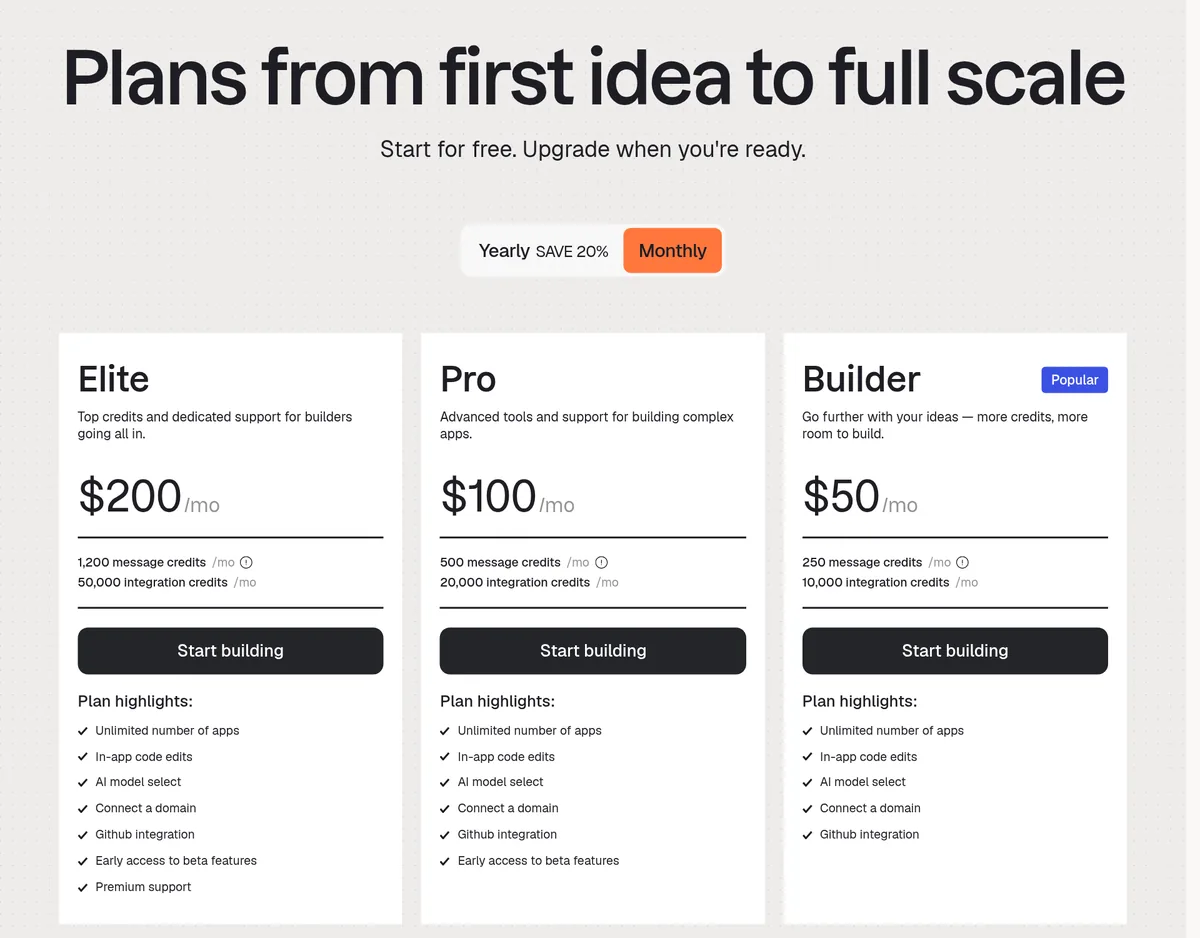
On October 24, 2026, Base44's pricing page showed these monthly prices:
- Free: $0, with 25 message credits, 100 integration credits, and up to 5 apps.
- Starter: $20 a month.
- Builder: $50 a month.
- Pro: $100 a month.
- Elite: $200 a month.
Paying yearly brought those down to $16, $40, $80, and $160 a month. The page says "Upgrade, downgrade, or cancel any time from your account settings." My Base44 pricing guide goes deeper.
Base44 alternatives at a glance
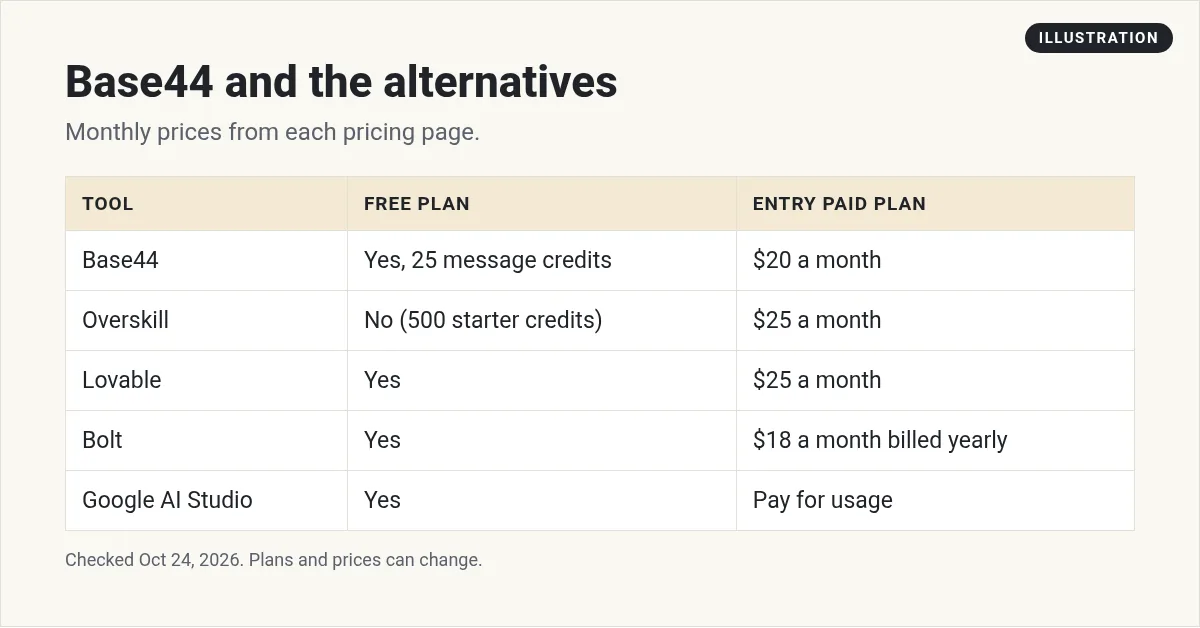
Prices are only part of the story. How far your credits go depends on how big your app is and how many changes you ask for.
1. Overskill: build by describing, keep your code
Overskill works a lot like Base44. You describe what you want, and it builds the app. I like it because it is clear about what you own.
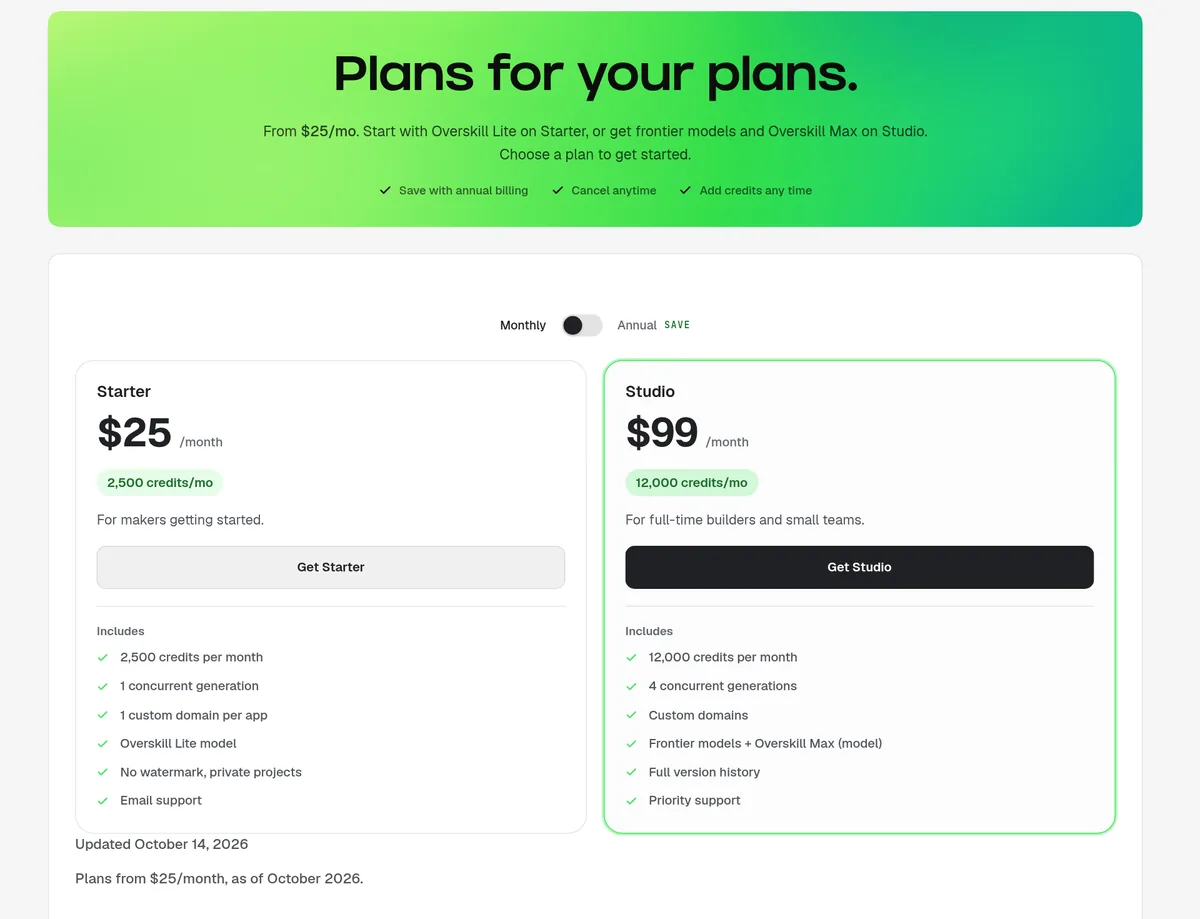
On October 24, 2026, the pricing page showed:
- Starter: $25 a month billed monthly, with 2,500 credits a month.
- Studio: $99 a month billed monthly, with 12,000 credits a month.
There is no free plan. The page says "Every new account starts with 500 credits so you can build something real before choosing a plan." Code and data export as a ZIP file is listed on both plans, and GitHub sync is marked "Rolling out."
One thing I like: the page says if you cancel, "Your published apps stay online and your data isn't deleted."
Best for: people who want a describe it and build it tool, with a clear way to take their code with them.
2. Lovable: polished design
Lovable is an AI app builder focused on fast, good looking apps.
On October 24, 2026, the pricing page showed a Free plan at $0, Pro at $25 a month, and Business at $50 a month, on monthly billing. Pro and Business each listed 100 monthly credits.
For a head to head, see Base44 vs Lovable. If Lovable is your main pick and you want even more options, see my list of Lovable alternatives.
Best for: people who care a lot about design.
3. Bolt: a builder that feels like a code editor
Bolt runs in your browser and shows you the code as it builds. It feels a little more technical, which some people love.
On October 24, 2026, the pricing page showed:
- Free: $0, "Free forever, no card required."
- Pro: $18 a month, billed annually.
- Teams: $27 per member a month, billed annually.
Best for: people who want to see and tweak the code while the AI builds.
4. Google AI Studio: the free option
Google AI Studio has a Build mode that turns a prompt into a working web app. Google's docs say AI Studio use stays free unless you link a paid API key.
The trade off: on the free tier, Google says your data can be used to improve its products. So do not put private info in it. It is a developer tool, so expect more setup for hosting, logins, and payments than on an all in one builder. I cover it more in my Google AI Studio guide.
Best for: trying ideas for free before you pay for a builder.
Why AI apps fail (and how to avoid it)
Picking a tool is the easy part. Building something people use is harder. In this video, I talk about why apps built with AI builders often stall, and what to do instead:
My video: Common reasons apps made with AI builders fail, and what to do differently. Recorded in February 2026.
Any results mentioned in videos are not typical and are not a promise of income. Your results depend on your work and your market.
The big lesson works on any tool: pick a real problem, build the smallest version that solves it, and get it in front of real people fast.
How to choose the right Base44 alternative
- Want to start free? Try Google AI Studio, Lovable, Bolt, or Base44's own free plan.
- Want to own and export your code? Look closely at Overskill's ZIP export and the GitHub options on each tool.
- Care most about design? Lovable is a strong pick.
- Like seeing the code? Bolt is built for that.
- Not sure? Build the same small app in two tools and compare.
A simple way to test any AI app builder
Before you pay, give each tool the same small job. For example: a simple app where a coach can list three packages and people can book a call. Then check:
- How many tries did it take to get something that works?
- How many credits did it use?
- Can you change one thing without breaking something else?
- Can you export or download your code?
An hour of testing like this will tell you more than any review, including this one.
How to make your credits last longer
No matter which tool you pick, credits are the thing that runs out. A few habits help on every builder:
- Plan before you prompt. Write down the main screens and what each one does before you start.
- Ask for one change at a time. Big, mixed requests often break things and cost more to fix.
- Fix small bugs yourself when you can. A text change does not need the AI.
- Save working versions. If something breaks, go back instead of asking the AI to untangle it.
These habits matter more than which tool you use. Two people on the same plan can get very different results from the same credits.
Mistakes to avoid
- Building a big app first. Start small so you do not burn credits on a huge idea.
- Vague prompts. Say who the app is for, what it does, and what the main screen shows.
- Ignoring export. Know how you would move your app before you need to.
- Switching tools every week. Pick one, build one thing, and finish it.
Want to compare two of these head to head? My Overskill vs Lovable post walks through both.
Pick your Base44 alternative
Nothing you check here is sent or saved. Download it if you want to keep it.
Try a builder that lets you keep your code
If you want to build by describing your app, try Overskill. New accounts start with 500 credits, so test one small idea first.
Try OverskillI earn a commission if you buy through this link. Overskill access may need an invite code or a waitlist spot. Plans and credits can change, so check the live pricing page before you buy.
Not sure which tool fits your idea? Join my free AI workshop.
Frequently asked questions
What is the best Base44 alternative?
It depends on what you want. Overskill is good if you want clear code export, Lovable for design, Bolt if you like seeing the code, and Google AI Studio if you want to start free.
Is there a free alternative to Base44?
Yes. On October 24, 2026, Lovable and Bolt had free plans, and Google's docs say AI Studio stays free unless you link a paid API key.
Does Overskill have a free plan?
No. Overskill's pricing page says there is no free plan, but every new account starts with 500 credits. Plans start at $25 a month.
How much does Base44 cost?
On October 24, 2026, Base44 had a Free plan and paid plans of $20, $50, $100, and $200 a month, or less if you pay yearly.
Can I export my code from these builders?
Overskill lists code and data export as a ZIP on its plans. Check each tool's pricing page for its current export and GitHub options.
Is Bolt cheaper than Base44?
On October 24, 2026, Bolt Pro was $18 a month billed annually, and Base44 Starter was $16 a month billed yearly or $20 monthly. Credits differ, so compare what you get.
Sources
Checked October 24, 2026. Plans, prices, and rules can change.
- Base44: Pricing
- Overskill: Pricing (overskill.com/pricing)
- Lovable: Pricing
- Bolt: Pricing
- Google AI for Developers: Gemini API billing
