
Build with AI · Claude Code
Subagents are helpers that Claude Code sends off to do one job and report back. Here is what they are, how to make one in a few minutes, and when they are worth it.
Long Claude Code chats get messy. Claude reads file after file, runs command after command, and soon your chat is full of stuff you will never look at again. Subagents fix that.
I read Anthropic's subagents docs on October 21, 2026, and turned them into a plain guide. You will learn what a subagent is, which ones come built in, how to make your own, and when to skip them.
Quick answer
A Claude Code subagent is a helper that runs a side task in its own separate chat and sends back only a short summary. Each one has its own instructions, its own tools, and its own permissions. Claude Code comes with built-in subagents like Explore. You can make your own by saving a Markdown file in .claude/agents/ for one project or ~/.claude/agents/ for all your projects. Only two fields are required: name and description. Subagents use the same plan limits as your main chat. Checked October 21, 2026.
What is a Claude Code subagent?
Think of Claude Code as a project lead. A subagent is a helper the lead sends off to do one job. The helper does the digging in its own space, then comes back with a short report.
Anthropic's docs put it this way. Each subagent runs in its own context window with a custom system prompt, specific tool access, and independent permissions. In plain words:
- Its own chat. The helper's work does not fill up your main chat.
- Its own instructions. You tell it how to behave, once.
- Its own tools. You can let a helper read files but not change them.
When Claude sees a task that matches a subagent's description, it hands the task off. The helper works on its own and returns the results.
Why subagents help
The docs list five reasons to use them. Here they are in plain terms.
- A cleaner main chat. Searching and reading stays out of your way.
- Safer limits. You choose which tools each helper can use.
- Reuse. Save a helper once and use it in every project.
- Focus. A helper with one job and clear rules does that job better.
- Lower cost. You can send simple jobs to a faster, cheaper model like Haiku.
One thing to know up front. Subagents are not free extra work. The docs say each one sends its own requests, and they count toward the same usage limits as your main chat.
The built-in subagents
You get some subagents without doing anything. The docs list Explore, Plan, and General-purpose. Claude uses them on its own when they fit.
Explore is the one you will see most. It is a fast, read-only helper for searching and understanding a codebase. It cannot write or edit files. When Claude needs to look around your project without changing anything, it often sends Explore. That keeps all the search results out of your main chat.
Explore and Plan also start without your CLAUDE.md files. The docs say that keeps research fast and cheap.
Make your first subagent in 5 minutes
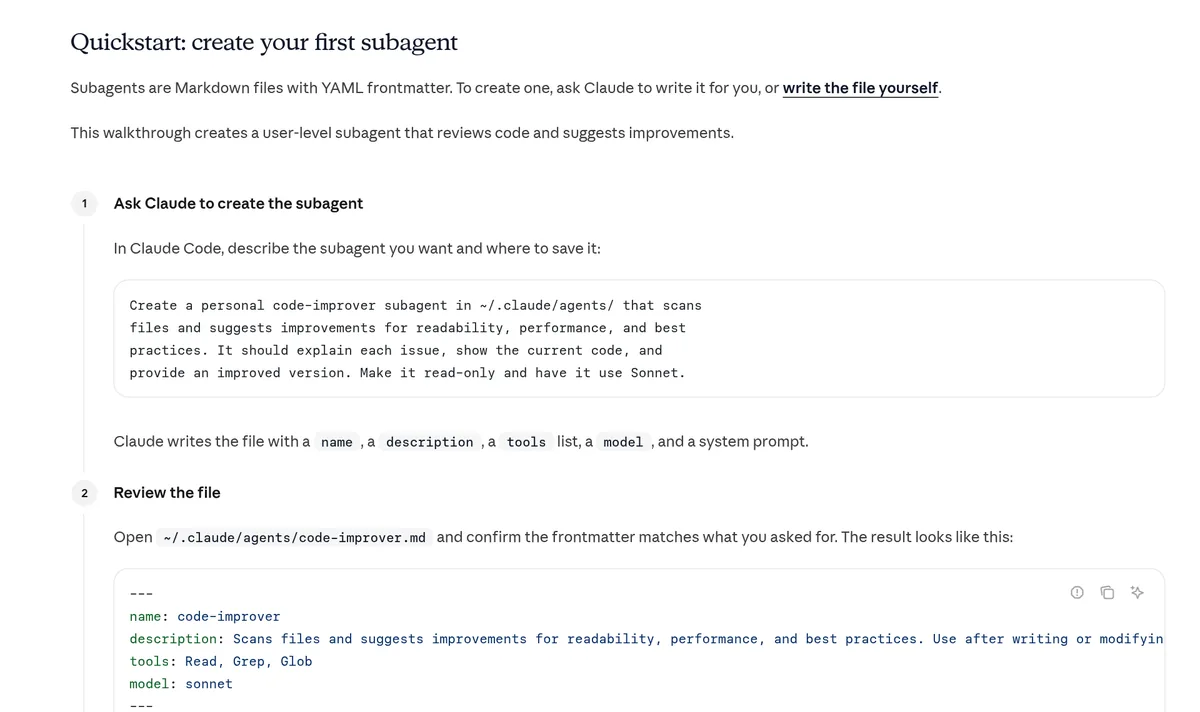
A subagent is just a Markdown file with a short header. The easiest way to make one is to ask Claude to write it for you.
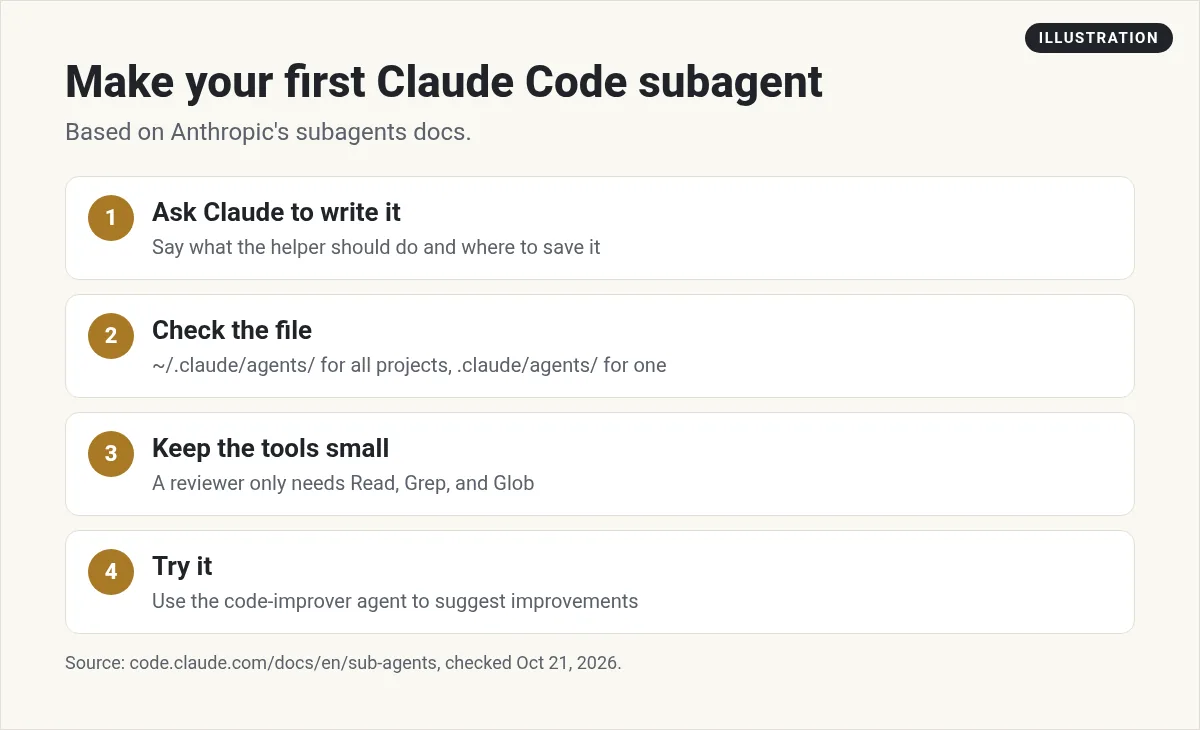
- Ask Claude. Describe the helper and where to save it. Anthropic's example asks for a read-only code-improver that uses Sonnet, saved in ~/.claude/agents/.
- Check the file. Open it and make sure the header matches what you asked for.
- Keep the tools small. Anthropic's example gives its code-improver only Read, Grep, and Glob, so it can read files but not change them.
- Try it. Ask Claude to use the code-improver agent on your project.
Here is the file from Anthropic's quickstart. The part between the dashes is the header. The text below it is the helper's instructions.
---
name: code-improver
description: Scans files and suggests improvements for readability, performance, and best practices. Use after writing or modifying code.
tools: Read, Grep, Glob
model: sonnet
---
You are a code improvement specialist. For each issue you find, explain
the problem, show the current code, and provide an improved version.
If Claude cannot find your new helper, restart Claude Code. The docs say this only happens when the agents folder did not exist before your session started.
Where to save a subagent
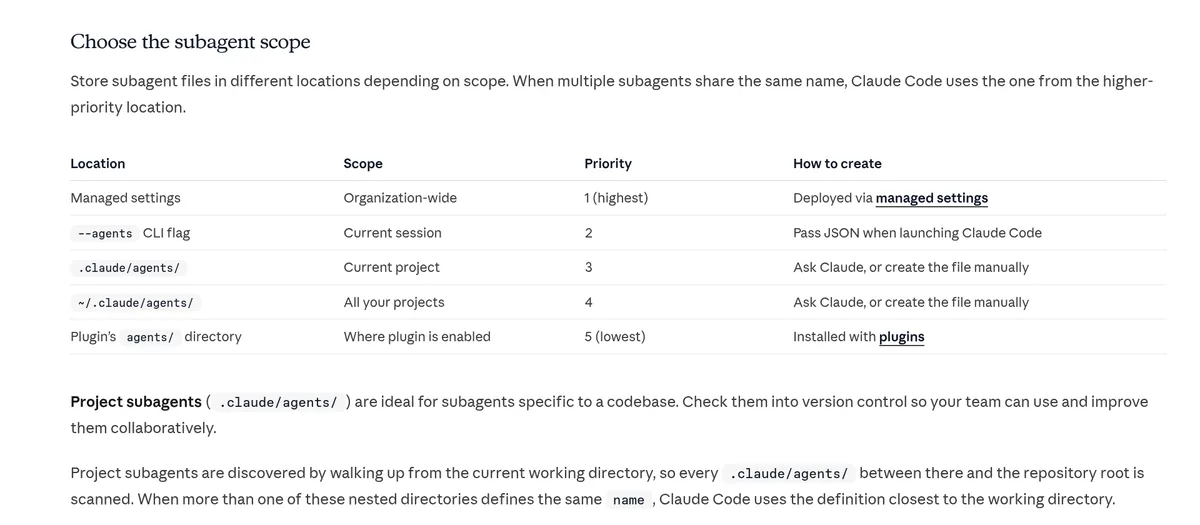
Where you save the file decides who can use it.
- .claude/agents/ inside a project: only that project. Good for helpers tied to one codebase. You can add them to Git so your team gets them too.
- ~/.claude/agents/ in your home folder: every project on your computer. Good for personal helpers.
If two helpers share a name, Claude Code uses the one with higher priority. Project helpers beat personal ones.
The header fields that matter
The docs list many settings. Only two are required. For a beginner, four are enough.
- name: required. A short ID like code-reviewer.
- description: required. When Claude should use this helper. Write it clearly, because Claude reads it to decide.
- tools: optional. Which tools the helper can use. Leave it out and the helper gets every tool.
- model: optional. sonnet, opus, haiku, fable, or inherit to match your main chat.
Keep descriptions short. The docs say all your descriptions load at startup, and Claude Code warns you when they pass 15,000 tokens together.
How to call a subagent
There are three ways, from soft to firm.
- Just ask. Anthropic's example: "Have the code-reviewer subagent look at my recent changes." Claude usually hands it off.
- Use @. Type @ and pick the helper from the list. This makes sure that helper runs.
- Make it the whole session. Start Claude Code with the --agent flag and the helper's name.
Want Claude to use a helper on its own more often? The docs suggest adding words like "use proactively" to its description.
When not to use a subagent
Subagents are great, but not for everything. The docs say to stay in your main chat when:
- You need lots of back and forth.
- Planning, building, and testing all share the same details.
- You are making a quick, small change.
- Speed matters, since a new helper starts fresh and needs time to catch up.
Use a subagent when the job makes a lot of output you do not need, when you want tight tool limits, or when the job can finish on its own and return a summary.
If you want a reusable workflow that runs in your main chat instead, use a skill. I explain those in my Claude Code skills guide. For actions that must happen every time, see Claude Code hooks.
Common subagent mistakes
- Vague descriptions. If the description is fuzzy, Claude will not know when to use the helper. Say exactly when it should run.
- Too many tools. Leaving out the tools line gives the helper every tool. Start small.
- Too many helpers. Every description loads at startup and uses context. Keep only the ones you use.
- Using a helper for quick fixes. A new helper starts fresh. For a one line change, just ask in the main chat.
- Forgetting the cost. Helpers use your plan limits too. Running many at once uses them faster.
- Misspelled fields. The docs say Claude Code ignores a field it does not recognize, with no error. So check spelling, like maxTurns, with care.
Three starter subagents to try
The docs include example helpers, like a code reviewer and a debugger. I added a third idea of my own.
- Code reviewer: read-only. Checks new changes for quality and safety issues.
- Debugger: finds the cause of errors and failing tests.
- Researcher: read-only. Answers questions about how the project works.
New to Claude Code itself? Start with my beginner guide to Claude Code first, then come back here.
My video: My full Claude walkthrough for beginners. It covers Claude more broadly, so use this post for the subagent steps.
Any results mentioned in videos are not typical and are not a promise of income. Your results depend on your work and your market.
My first Claude Code subagent
Nothing you check here is sent or saved. Download it if you want to keep it.
Know what you want to build first
Subagents help you build faster. In my free workshop, I show how regular people pick a simple app idea and build it with AI.
Join my free AI workshopFree to join. No credit card needed.
Frequently asked questions
What are subagents in Claude Code?
They are helpers that run a side task in their own separate chat, with their own instructions and tools, and send back a summary to your main chat.
Where do I save a Claude Code subagent?
Save it in .claude/agents/ inside a project for that project only, or in ~/.claude/agents/ in your home folder for all your projects.
What fields does a subagent file need?
Only name and description are required. Tools and model are optional but useful.
Do subagents cost extra?
They do not have a separate price, but each one sends its own requests. Those count toward the same usage limits as your main chat.
How do I make Claude use my subagent?
Ask for it by name, type @ and pick it from the list, or start a session with the --agent flag.
What is the Explore subagent?
It is a built-in, read-only helper that searches and reads your codebase without changing files.
Sources
Checked October 21, 2026. Plans, prices, and rules can change.
