
Build with AI · Comparison
Both can write real code now. The bigger differences are price, where each one works, and how its limits feel day to day. Here is a fair side by side and a quick way to choose.
People ask me this all the time: should I code with Claude or with ChatGPT? The honest answer is that both are good, and both change every few weeks. So I will not pretend one wins every task.
What I can do is show you the facts that do not change week to week. I checked both pricing pages and both help centers on October 21, 2026. Here is what each plan gets you for coding, where each tool runs, and how to test them on your own project.
Quick answer
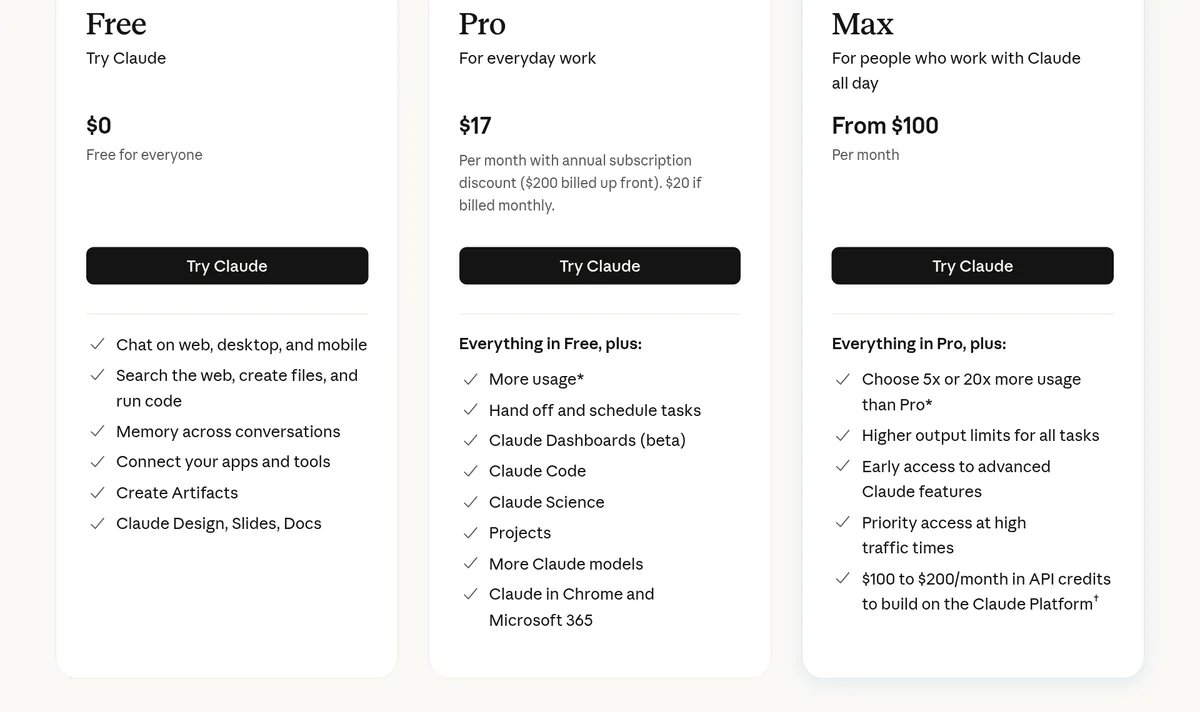
Pick ChatGPT if you want to start free. Every ChatGPT plan includes Codex, OpenAI's coding agent, with limited use on Free and Go ($8 a month). Plus is $20 a month. Pick Claude if you want Claude Code, which needs a paid plan: Pro is $17 a month billed yearly or $20 billed monthly, and Max starts at $100 a month. Both have bigger plans from $100 a month. The best test is to give both the same small task on your real project and keep the one you trust more. Checked October 21, 2026.
Two ways to code with AI
Before you compare, know that each company gives you two different things.
- The chat app. You paste code into Claude or ChatGPT and ask for help. Good for small snippets, errors, and learning.
- The coding agent. Claude Code or Codex works inside your project. It reads your files, makes changes, and runs commands. This is where the real time savings are.
Most of this post is about the agents, because that is how most people build things now.
Prices for coding, side by side
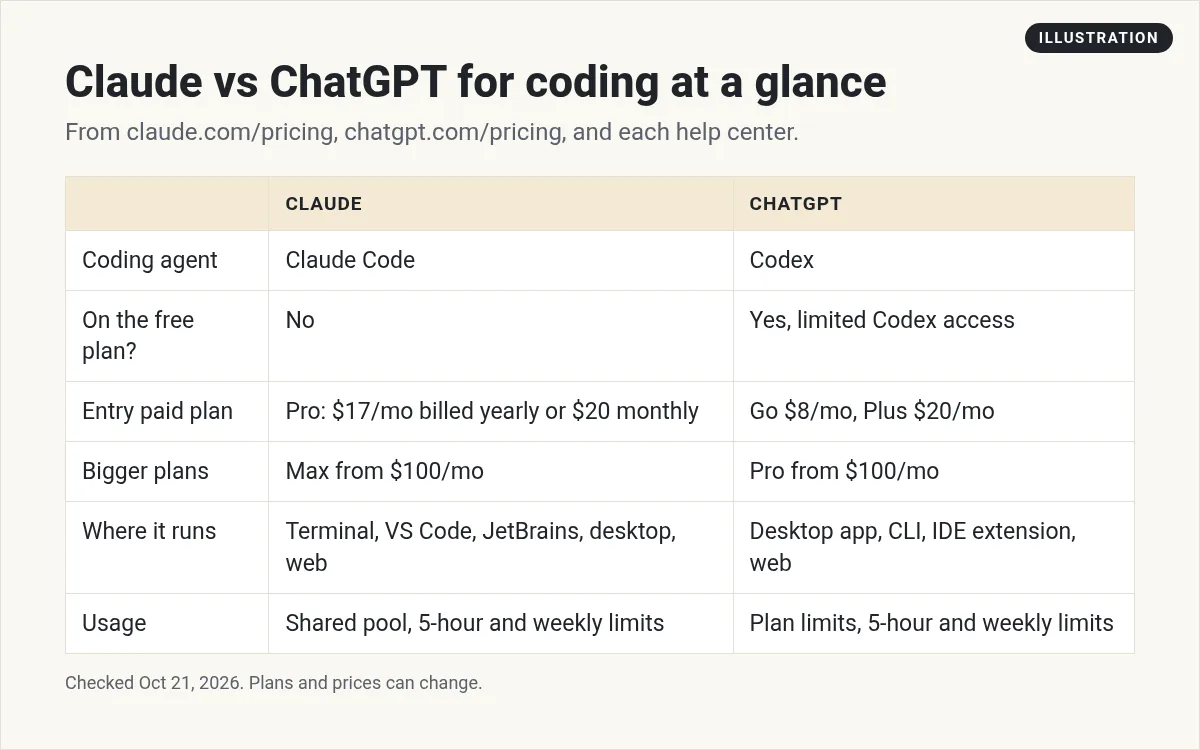
Here is what each plan gives you for coding, checked October 21, 2026.
| Plan level | Claude | ChatGPT |
|---|---|---|
| Free | $0. No Claude Code. | $0. Limited Codex access. |
| Low cost | None | Go, $8 a month. Codex for light tasks. May include ads. |
| Main paid plan | Pro, $17 a month billed yearly ($200 up front) or $20 billed monthly. Includes Claude Code. | Plus, $20 a month. Expanded Codex use, plus Codex on the web, CLI, and IDE. |
| Heavy use | Max, from $100 a month ($100 or $200, billed monthly) | Pro, from $100 a month ($100, $200, or $500) |
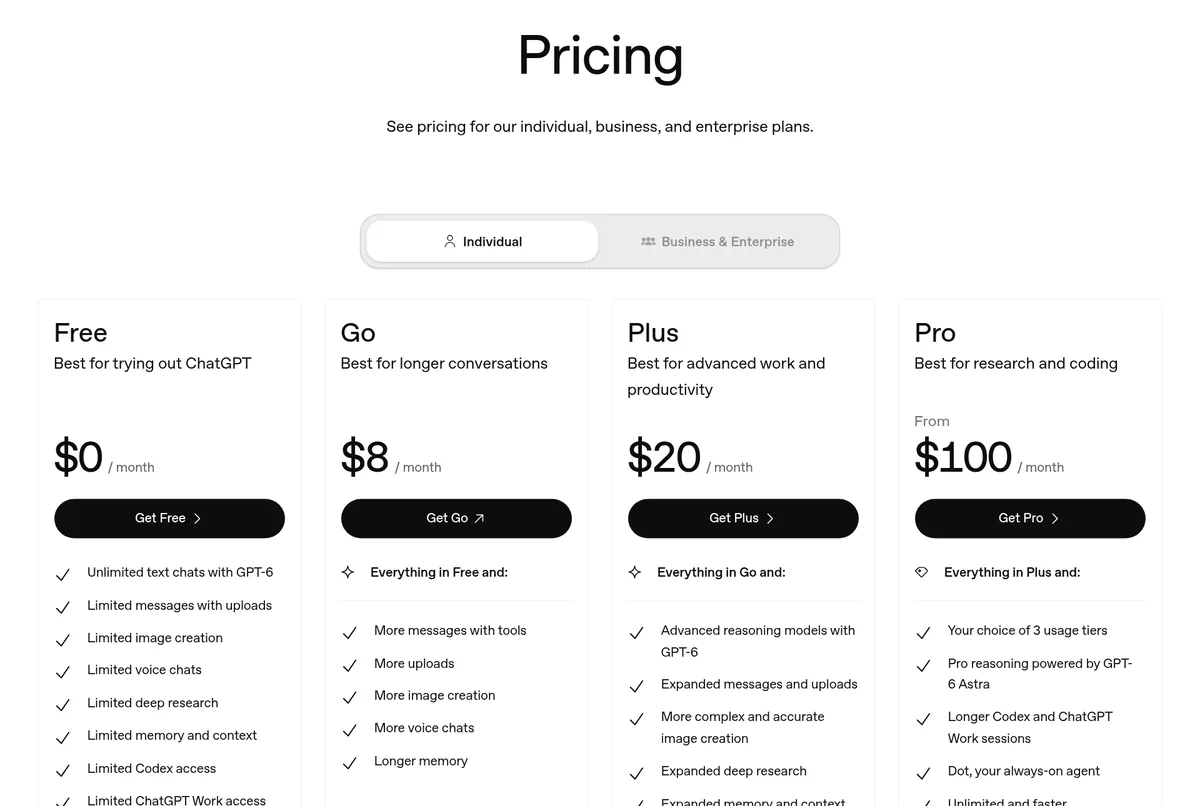
One more detail. OpenAI's help center says Codex Cloud, which runs tasks on OpenAI's computers, is not part of Free or Go. It is for eligible Plus, Pro, and business plans.
Where each one runs
Claude Code runs in your terminal, in VS Code and JetBrains editors, in a desktop app, and on the web. Anthropic's docs list all five.
Codex runs in the ChatGPT desktop app (in Codex mode), in the Codex CLI, in an IDE extension, and on the web. OpenAI's help center lists all four.
So both cover the same ground. If you live in VS Code, both work there. If the terminal scares you, both have a desktop app. If you are not sure where to start, my Claude Code beginner guide walks through the terminal setup.
How the limits feel
This is where people get surprised, so read this part twice.
Claude uses one shared pool. Claude's pricing page says your activity on the web, desktop, mobile, and Claude Code all draws from the same pool. Limits reset on a rolling five-hour window, and paid plans add weekly limits on top. So a long chat in the morning can cut into your coding time that afternoon.
ChatGPT also has five-hour limits on Plus. OpenAI's Codex pricing page gives ranges, not fixed numbers. For example, it estimates 15 to 160 local messages per five hours on Plus with GPT-6.1 Sol. It also says weekly limits may apply, and that Pro plans currently have no five-hour limit.
Both companies say the same thing in different words: bigger tasks use more. A quick fix costs little. Asking it to rebuild your whole app costs a lot.
What about the models?
Each company ships new models often. On the day I checked, Claude's Free plan included Sonnet and Haiku, and Opus started on Pro. ChatGPT's pricing page lists GPT-6 models on every plan, with more models and more usage as you move up.
I am not going to tell you one model is the best coder. That answer changes month to month, and it depends on your language and your project. Your own test, below, will tell you more than any chart.
When I would pick ChatGPT
- You want to try a coding agent for free first.
- You already pay for ChatGPT Plus and use it for other work.
- You want a cheap middle step, like Go at $8 a month.
- You want cloud tasks that keep going while your computer is asleep (Plus and up).
When I would pick Claude
- You want Claude Code, with its skills, hooks, and subagents.
- You like the way Claude writes and explains things.
- You already pay for Claude Pro, so Claude Code is included.
- You want to save on the yearly plan, at $17 a month.
If you are torn between the two agents only, I wrote a deeper Claude Code vs Codex comparison.
Watch: Claude vs Gemini vs GPT
My video: I compare Claude, Gemini, and GPT and talk about where each one is strong. It covers more than coding, and it was recorded in June 2026, so some models and prices have changed since. Use the prices in this post.
Any results mentioned in videos are not typical and are not a promise of income. Your results depend on your work and your market.
How to test both in one afternoon
- Pick one real task. Something small, like adding a contact form or fixing one bug.
- Save your work first. Commit it to Git so you can undo anything.
- Give Claude Code the task. Use the exact same words you will use for Codex.
- Roll back, then give Codex the task.
- Score both. Did it work? Did you understand the change? How much of your limit did it use?
- Keep the winner. Cancel the other plan if you only needed one.
To try Claude Code, you need Claude Pro or higher. To try Codex, the Free plan is enough for a small test.
If you have never coded before
Both agents assume you have a project folder and a little comfort with files. If that is not you yet, that is fine. Here is how I would start:
- Use the chat app first. Ask it to explain what a file does, or what an error means. You will learn fast.
- Then try the desktop app. Both companies have one, so you can skip the terminal at first.
- Keep the task tiny. One page, one button, one fix. Big asks are where beginners get lost.
- Ask it to explain every change. If you cannot follow what it did, ask again in simpler words.
And if you would rather not touch code at all, a no-code builder may fit you better. See my list of the best no-code app builders.
Common mistakes when choosing
- Trusting one viral demo. A demo shows the best case. Your project is not a demo.
- Paying for the top plan on day one. Start on the main plan. Move up only when you keep hitting limits.
- Forgetting chats share limits. On Claude, long chats use the same pool as Claude Code.
- Skipping Git. Both agents can change many files at once. Save first, so you can undo.
- Comparing on different tasks. Use the exact same task, or the test tells you nothing.
Can you use both?
Yes, and plenty of people do. Some use one tool to write code and the other to review it. If money is tight, though, one plan is enough. Pick one, learn it well, and switch only if it keeps letting you down.
Before I pick Claude or ChatGPT for coding
Nothing you check here is sent or saved. Download it if you want to keep it.
Know what to build before you pick a tool
In my free workshop, I show how regular people use AI tools to plan and build simple apps and products, step by step.
Join my free AI workshopFree to join. No credit card needed.
Frequently asked questions
Is Claude or ChatGPT better for coding?
Both are strong, and the lead changes often. The best way to choose is to give both the same small task on your own project and keep the one you trust more.
Can I code with ChatGPT for free?
Yes. OpenAI says Codex is included on every ChatGPT plan, including Free and Go, with usage limits that vary by plan. Codex Cloud is not included on Free or Go.
Is Claude Code free?
No. Claude Code needs a paid plan or a Console account. Claude Pro was $17 a month billed yearly or $20 billed monthly on October 21, 2026.
What is the ChatGPT version of Claude Code?
Codex. It is OpenAI's coding agent, and it runs in the ChatGPT desktop app, the Codex CLI, an IDE extension, and on the web.
Do Claude chats and Claude Code share limits?
Yes. Claude's pricing page says chats and Claude Code draw from the same usage pool, with five-hour and weekly limits on paid plans.
Which is cheaper for coding?
ChatGPT has more low-cost options: Free, and Go at $8 a month. At the main tier, Claude Pro is $17 a month billed yearly and ChatGPT Plus is $20 a month.
Sources
Checked October 21, 2026. Plans, prices, and rules can change.
