
AI Tools · Review
Gamma turns a short prompt or a pile of notes into slides, docs, and simple web pages. Here is how it works, what it costs, and where it falls short.
Making slides is slow. You stare at a blank deck, pick a theme, and push boxes around for an hour. Gamma tries to skip all of that. You tell it what you want, and it builds a first draft for you.
On October 23, 2026, I went through Gamma's home page, its pricing page with both billing toggles, and its help article on credits. Here is what Gamma does, what it costs, and how to get a good result on your first try.
Quick answer
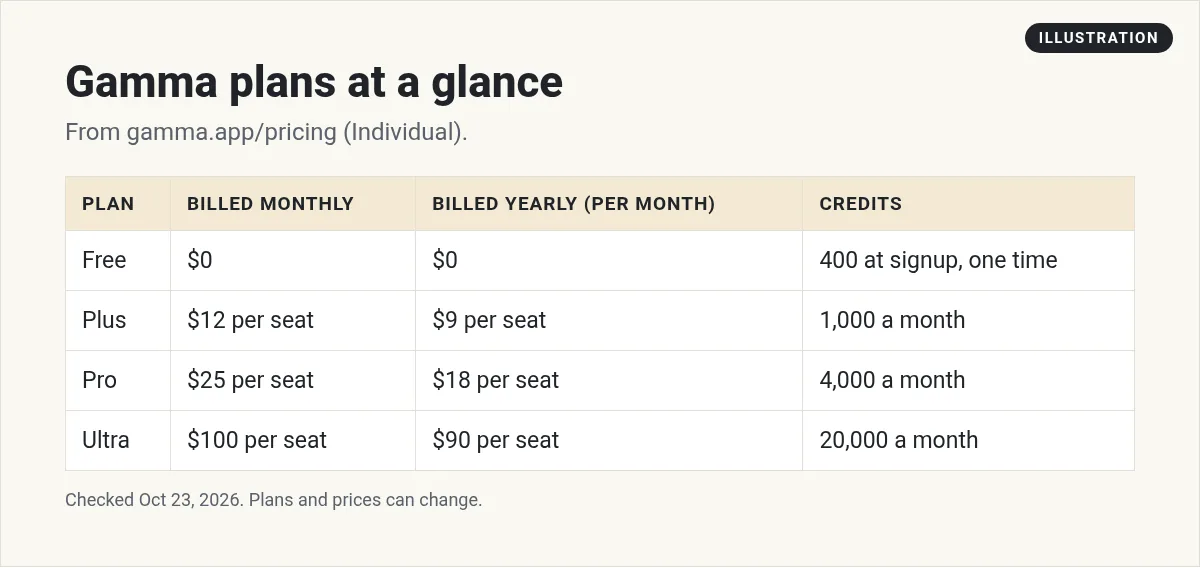
Gamma is an AI tool that makes presentations, documents, websites, and social graphics from a prompt, your notes, or an imported file. The Free plan costs $0 and gives you 400 credits at signup. Paid plans are Plus at $12, Pro at $25, and Ultra at $100 per seat per month when billed monthly, or $9, $18, and $90 a month billed yearly. Credits pay for AI actions. Checked October 23, 2026.
What is Gamma AI?
Gamma calls itself "the visual communication platform for presentations, documents, and more, with an expert AI agent that knows your goals." In plain words, it is a slide maker with an AI helper built in.
You can make four main kinds of things with it:
- Presentations. Slide decks you can show live or send as a link.
- Documents. One-pagers, guides, and reports.
- Websites. Simple pages you can publish and share with a link.
- Social graphics. Carousels and graphics sized for each platform.

Gamma says it has a community of "100+ million users." That is a big number for a slide tool, and it tells you this is not a tiny side project.
How it is different from PowerPoint
In PowerPoint or Google Slides, you build each slide by hand. In Gamma, you start with a chat. The home page says it works "Outlines first, so you shape the story." You approve the outline, and then Gamma designs the slides. After that, you can ask the AI for changes or move things around yourself.
You do not have to give up your old files, either. Gamma can import PowerPoint and PDF files, and it can export back to PowerPoint, PDF, PNG, and Google Slides.
Gamma pricing
Gamma has four plans for individuals. Here is what each one cost on October 23, 2026, with the "Pay monthly" toggle on:
- Free, $0: 400 credits at signup, up to 10 slides per prompt, import from PDF and PPTX, and export to PDF, PPTX, PNG, and Google Slides. No credit card needed.
- Plus, $12 per seat per month: 1,000 credits a month, up to 100 slides per prompt, and no Gamma branding.
- Pro, $25 per seat per month: 4,000 credits a month, custom branding, analytics, and up to 10 custom domains.
- Ultra, $100 per seat per month: 20,000 credits a month, the most advanced AI models, and up to 100 custom domains.
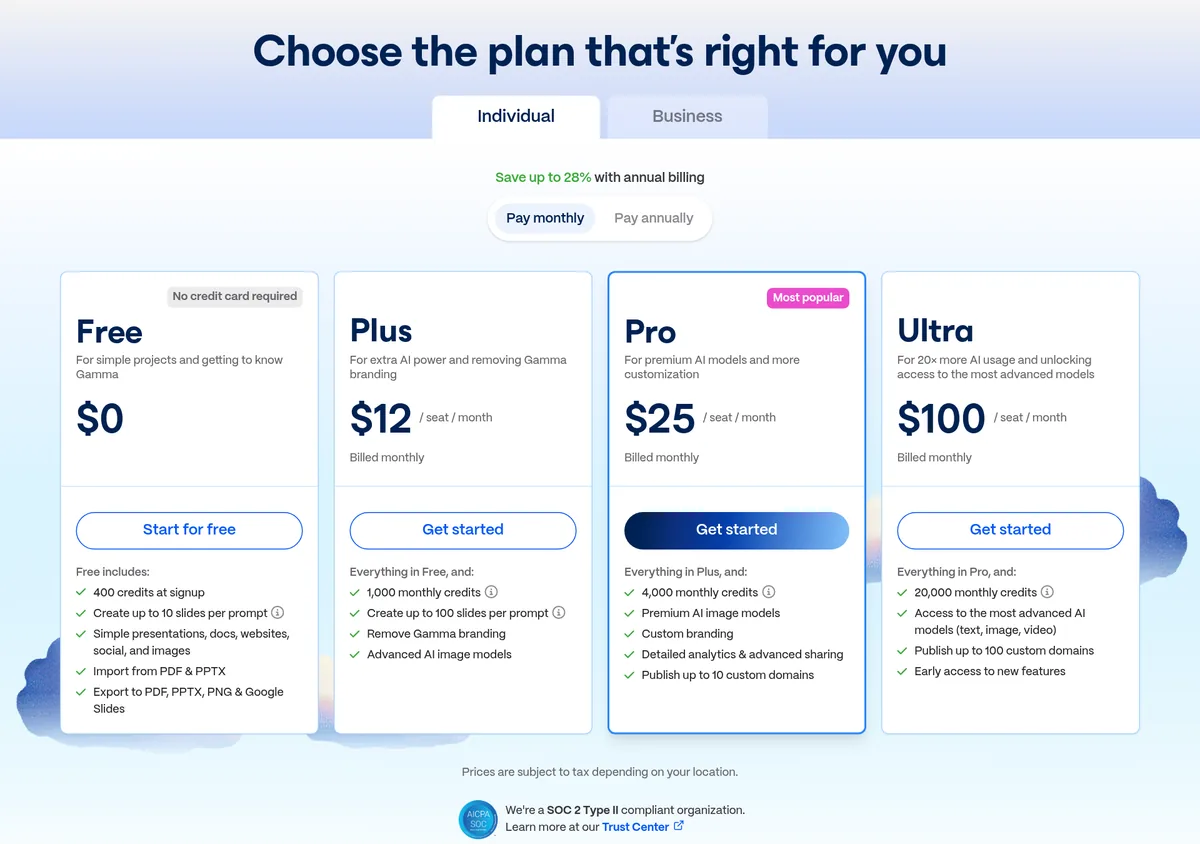
The page says you "Save up to 28%" with annual billing. With the "Pay annually" toggle on, the prices drop to $9 a month for Plus ($108 a year), $18 for Pro ($216 a year), and $90 for Ultra ($1,080 a year).
There is also a Business tab for teams. It showed $40 per seat per month, billed yearly, which is $480 per seat a year. It comes with 10,000 credits per seat and SSO. Enterprise is custom. I did not see a monthly price for Business on the page, so check it yourself if your team needs that.
How Gamma credits work
Credits are the part to read closely. Gamma's help center says, "Credits are used for AI features throughout Gamma." Making a deck with AI uses credits, "metered per slide and per image." Editing with the AI, adding cards with AI, and trying new layouts use credits too.
Here are the rules that matter most:
- Free credits do not refill. New Free users get 400 credits once. After that, you earn more through referrals or upgrade.
- Paid credits refresh on your billing date, not on the 1st of the month.
- Unused credits roll over, up to a cap. The help center says, "Unused plan credits roll over up to double the plan size." So Plus can hold up to 2,000.
- Bought credits are separate. They never expire while your plan is active.
- Failed actions are free. You are not charged when the AI fails, shows an error, or asks you a question first.
One more thing to know. If the AI finishes the job, you pay for it, even if you do not like the result. Fixing things by hand costs nothing. Asking the AI to redo the whole deck costs credits again.
Earning free credits
Free users can share a referral link. You get 200 credits when a friend signs up with it. Free accounts can hold up to 2,000 credits at once.
How to make your first deck in Gamma
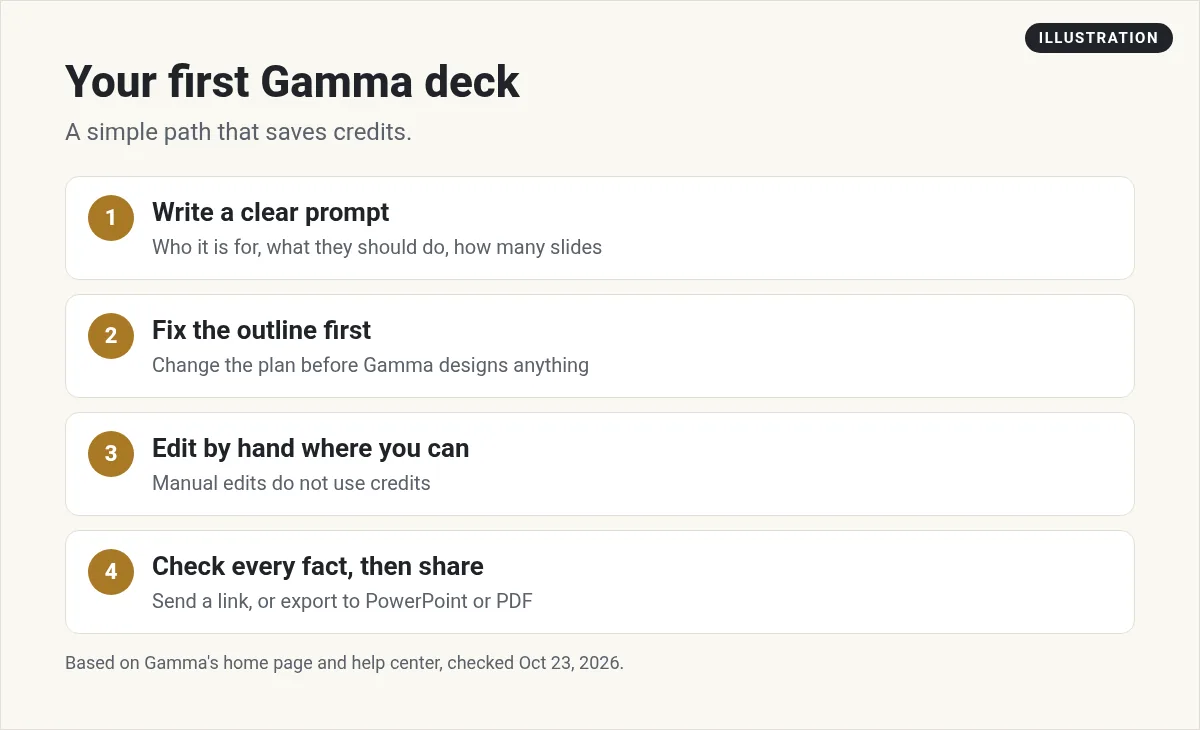
Here is the simple path I use with any AI slide tool. It works well in Gamma because of the outline step.
- Write a clear prompt. Say who the deck is for, what it should get them to do, and how many slides you want. For example, a 7-slide pitch for a local gym owner about using a text reminder system works much better than just gym presentation.
- Fix the outline first. This is the cheapest place to make changes. Move, cut, or add points before Gamma designs anything.
- Pick a look. You can describe a style, share an example, or let Gamma choose.
- Edit by hand where you can. Typing a fix yourself does not use credits.
- Check every fact. AI can make up numbers and quotes. Read each slide before you share it.
- Export or share. Send a link, or export to PowerPoint or PDF if your client needs a file.
If you already have a deck, start by importing it. Gamma says imported PowerPoints and PDFs "arrive the way you built them." Then use the AI to clean it up.
Who should use Gamma (and who should not)
Gamma is a good fit if you:
- Make a lot of decks, guides, or one-pagers and want a fast first draft.
- Pitch clients and want them to look clean without hiring a designer.
- Teach or coach and need simple slides for each lesson.
- Want a quick web page for an idea and do not want to learn a site builder.
It may not be right if you:
- Need pixel-perfect slides that match a strict brand guide on every page.
- Only make one deck a year. The Free plan's 400 credits may be all you need.
- Need a full website with logins, payments, or a database. That is a different kind of tool.
Which Gamma plan should you pick?
Here is how I would think about it:
- Start on Free. Make two or three real decks. Watch how fast your 400 credits go.
- Move to Plus if you run out and you mainly want more credits, longer decks, and no Gamma logo.
- Move to Pro if you share decks with clients and want your own branding, analytics, or a custom domain.
- Only pick Ultra if you use a lot of AI images or video and keep hitting the Pro limit.
If you know you will use it all year, the yearly price saves money. If you are still testing, pay monthly. Gamma's pricing FAQ says that if you cancel, you keep your paid features until the end of the period you paid for, then you move to Free.
Gamma also has an API on its plans, and API calls use credits too. That matters if you want to make decks automatically from another tool. If you are just starting out, you can skip it.
Simple tips for better Gamma results
- Give it your own words. Paste your notes or a rough script. Your real ideas make a better deck than a one-line prompt.
- Keep each slide to one idea. If a slide is crowded, ask Gamma to split it.
- Use your own photos where you can. Real photos of your work build more trust than stock images.
- Watch your credit balance. It shows in the top right corner, so you always know where you stand.
Want to learn how regular people are using AI tools like this to save time and serve clients? I walk through it in my free AI workshop.
Want to use AI to work faster?
In my free workshop, I show how regular people use AI tools to build simple online businesses and save hours each week.
Join my free AI workshopFree to join. No credit card needed.
Frequently asked questions
Is Gamma AI free?
Yes. The Free plan costs $0 and gives you 400 credits when you sign up. Those credits do not refill. You can earn more by referring friends or by upgrading.
How much does Gamma cost?
On October 23, 2026, Plus was $12, Pro was $25, and Ultra was $100 per seat per month billed monthly. Billed yearly, they were $9, $18, and $90 a month.
What are Gamma credits?
Credits pay for AI actions, like making a deck, editing with the AI, or making images. Manual edits do not use credits. Failed AI actions are not charged.
Do Gamma credits roll over?
Yes, on paid plans. Unused plan credits roll over up to double your plan size. Credits you buy never expire while your plan is active.
Can Gamma export to PowerPoint?
Yes. Gamma can export to PowerPoint (PPTX), PDF, PNG, and Google Slides, and it can import PowerPoint and PDF files.
What happens if I cancel Gamma?
You keep your paid features until the end of the period you paid for. After that, your account moves to the Free plan.
Sources
Checked October 23, 2026. Plans, prices, and rules can change.
