

GoHighLevel how-to · Simple guide
In GoHighLevel, a contact is the person and an opportunity is the deal. Here is how they connect, when to use each, and how to set up a pipeline that stays clean.
New HighLevel users mix these two up all the time. Then their pipeline fills with junk, or leads never show up on it at all.
This guide explains contacts and opportunities in plain English, shows how they link, and walks you through a simple setup that automates the boring parts. It is for beginners setting up their first sub-account.
Quick answer
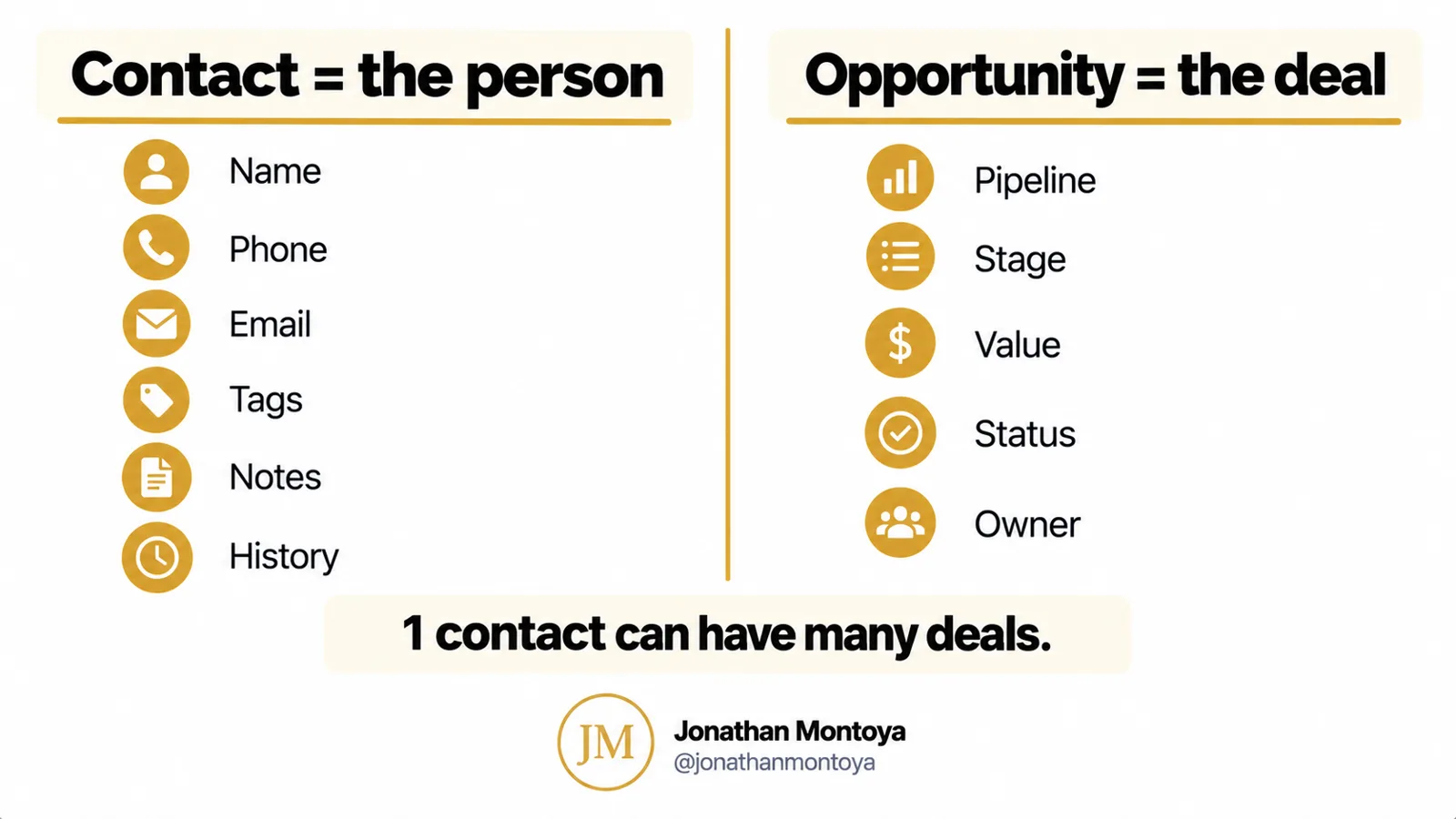
In GoHighLevel, a contact is a person: their name, phone, email, tags, and history. An opportunity is a deal with that person, shown as a card on a pipeline with a stage, value, and status like open, won, or lost. Every opportunity links to a contact, and one contact can have more than one opportunity.
Why this matters
When I was an engineer, my boss always said, "garbage in, garbage out." A CRM is the same.
If you put every person on your pipeline, you can't see real deals. If you never make opportunities, you can't see what is about to close. Getting this one idea right keeps your whole account clean.
What a contact is
A contact is a record of one person. It holds their name, phone, email, tags, custom fields, notes, and every text, email, and call with them.
Contacts get created when someone fills out a form, books a call, texts your number, or you import a list.
What an opportunity is
An opportunity is a possible sale. It lives on a pipeline, which is a board of stages like New Lead, Contacted, Quote Sent, and Won.
Each opportunity has a name, a linked contact, a stage, a dollar value if you want, an owner, a source, and a status: open, won, lost, or abandoned.
Contact vs opportunity side by side
| Contact | Opportunity | |
|---|---|---|
| What it is | The person | The deal |
| Where you see it | Contacts list | Opportunities pipeline board |
| How many | One per person | Zero, one, or many per contact |
| Key fields | Name, phone, email, tags, custom fields | Pipeline, stage, value, status, owner, source |
| Best for | Talking to people, tags, lists | Tracking sales progress and revenue |
| Common trigger | Form submitted, contact created | Pipeline stage changed, status changed |
Step 1: Build a simple pipeline
What to do: Go to Opportunities, then Pipelines, and create one with 4 to 6 stages that match how you really sell.
A good starter: New Lead, Contacted, Appointment Booked, Quote Sent, Won. Lost is a status, not a stage.
Why it matters: A short pipeline is easy to keep up to date. A long one gets ignored.
Step 2: Create opportunities automatically
What to do: Build a workflow: trigger "Form Submitted" or "Appointment Booked," then add the action "Create or Update Opportunity" in your pipeline's first stage.
Why it matters: Automation means no lead slips through because someone forgot to add a card.
Step 3: Move stages with workflows
What to do: Add actions that move the opportunity when things happen. Booked a call? Move to Appointment Booked. Sent a quote? Move to Quote Sent.
Why it matters: Your board stays current without manual dragging, and you can trigger follow-ups from stage changes.
Step 4: Mark won or lost
What to do: When a deal closes, set the status to Won. If it dies, set Lost and pick a reason.
Why it matters: Won and lost data show you your close rate and why deals fail. That is how you get better.
Training: how I sell AI voice agents to local businesses. Every call those agents catch becomes a contact, and the good ones become opportunities.
Results talked about in videos are not typical and are not a promise of income. Your results depend on your work and your market.
Common mistakes
- Duplicate opportunities. Check your settings for duplicate opportunity rules, and use "Create or Update" in workflows so repeat form fills update one card.
- Tags as stages. Tags describe people. Stages describe deals. Don't use tags like "quote sent" instead of a stage.
- No owner. Assign each opportunity to a person so someone is responsible.
Want a full first week setup? Follow my GoHighLevel tutorial for beginners. Need calls on the board? Read GoHighLevel outbound calls. To try HighLevel, you can start a HighLevel trial through my link (affiliate link: I may earn a commission).
Contacts and opportunities setup
Nothing you check here is sent or saved. Download it if you want to keep it.
Set up your first clean pipeline
Start a HighLevel trial, build the 5-stage pipeline above, and connect one form. You will see your first opportunity land in minutes.
Start a HighLevel trialAffiliate link: I may earn a commission if you sign up. Billing starts after the trial unless you cancel, and phone, email, and AI usage can cost extra, even during the trial.
Frequently asked questions
What is the difference between a contact and an opportunity in GoHighLevel?
A contact is the person, with their details and history. An opportunity is a deal with that person, tracked on a pipeline with a stage, value, and status.
Can one contact have multiple opportunities in GoHighLevel?
Yes. A contact can have opportunities in different pipelines, and depending on your settings, more than one in the same pipeline. Use Create or Update in workflows to avoid accidental duplicates.
Does deleting an opportunity delete the contact?
No. Deleting an opportunity removes the deal card. The contact and their history stay. Deleting a contact is a separate action.
How do I create an opportunity automatically in GoHighLevel?
Build a workflow with a trigger like Form Submitted or Appointment Booked, then add the Create or Update Opportunity action and pick the pipeline and stage.
Sources
Checked October 15, 2026. Plans, prices, and rules can change.
