
Grok Bot · Troubleshooting
Reconnecting or Couldn't Reach Grok Bot's Computer can look scary. Your chats are safe. Here is the order the help pages say to try, and what each button keeps.
Grok Bot shows Reconnecting or Couldn't Reach Grok Bot's Computer when its cloud computer is not responding. The good news from the help pages: your chats are stored separately, and your Bots, files, and logins are safe while it reconnects. The key is to fix it in the right order, and to save Reset for last.
I read the Grok Bot help and docs pages on November 4, 2026. The steps below come from them. My own tips are marked as my advice.
TL;DR
If Grok Bot can't reach its computer, first check status.cursor.com for a Grok Bot incident. If there is none, wait and choose Retry. Then fully quit and reopen the app. Then Update the computer in Settings if an update is offered. Then Recover. Use Reset only after all of that. Do not start a second Update or Reset while one is running.
First, what is safe
The help page says the Grok Bot computer is shared by your Bots. Files, logins, installed apps, and the browser live there. Chats are stored separately, so a computer problem does not delete your conversation history by itself.
The docs add that Bots, files, and logins are safe while the computer reconnects. So the first rule is simple: do not panic, and do not Reset.
Step 0: Is Grok Bot down?
The troubleshooting docs say to check status.cursor.com and look at the Grok Bot row. The app does not show service status, so that page is the place to look. If there is an incident, wait for it to be fixed, then send your message again. Do not Reset or reinstall. Neither fixes a service problem.
The fix order
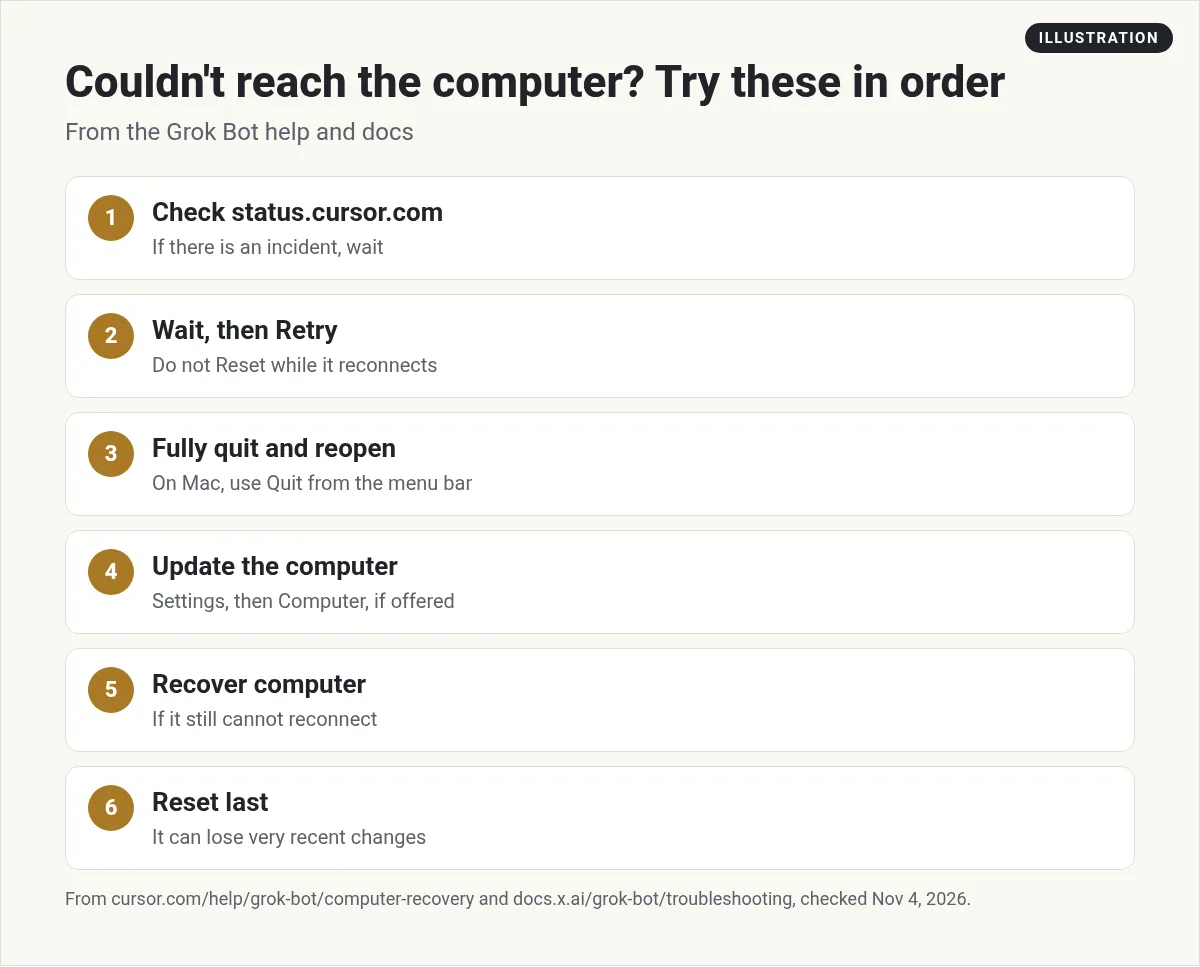
The help page gives this order:
- Wait, then Retry. If it says Reconnecting or Couldn't Reach Grok Bot's Computer, wait, then choose Retry. Do not Reset during this.
- Fully quit and reopen. On a Mac, choose Quit from the menu bar. Closing the window is not enough.
- Update. If an update is offered, open Settings, then Computer, and choose Update Bot's Computer.
- Recover. If it still cannot reconnect, or an update looks stuck and Recover computer is shown, choose Recover.
- Reset last. Use Reset only after those steps.
Reconnecting and Recover usually take a few minutes. You can choose Continue in Background.
What Update, Recover, and Reset keep
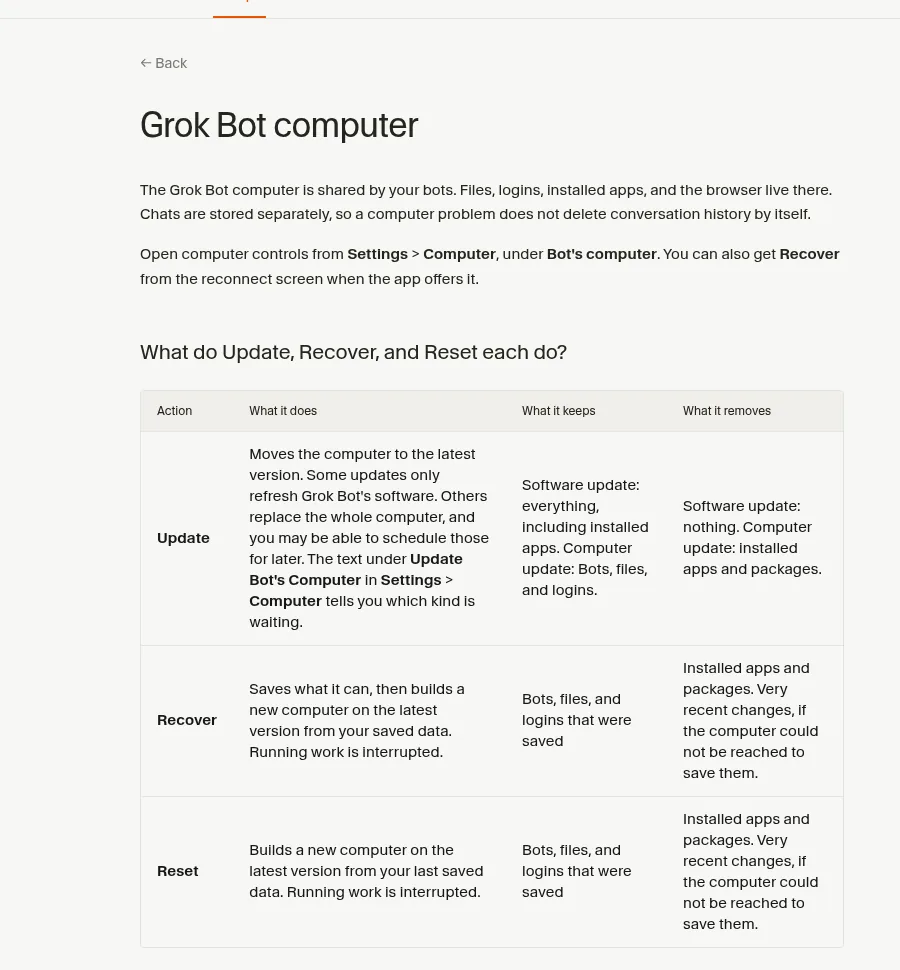
Here is the help page's table in plain words:
- Update moves the computer to the latest version. A software update keeps everything, including installed apps. A full computer update keeps Bots, files, and logins, but removes installed apps and packages. The text under Update Bot's Computer tells you which kind is waiting.
- Recover saves what it can, then builds a new computer from your saved data. Saved Bots, files, and logins stay. Installed apps and packages go. Running work stops.
- Reset builds a new computer from your last saved data. Same losses as Recover.
One big warning from the docs: Recover and Reset rebuild from your last save. If the computer cannot be reached to save first, very recent changes may be lost. If Bots recently disappeared, or saving failed, contact support before you use either one.
Three things not to do
- Do not start a second Update or Reset while one is running. The docs say repeated resets can interrupt a restore that is still finishing.
- If Recover or Reset fails, use Retry Recovery or Retry Reset once. Then stop and contact support.
- Do not Reset to force an Update. If Update says the files are not ready, wait a moment and try again.
On your phone
The docs say the phone app has Reset Computer under Settings, then Bot, then Bot Computer. Update and Recover need the desktop app. My advice: unless support tells you to, wait until you are at a desktop so you can try the gentler steps first.
After a Recover or Reset
The docs say project folders like node_modules or a Python virtual environment are not saved. Reinstall them after a computer update, Recover, or Reset. Apps and packages you installed yourself need to be installed again too.
The docs on computers also say that after an admin terminates a computer, the member's next message starts a fresh one on the same durable disk. Synced Bots, files, and logins come back, but my advice is to check your key sign ins, in case a session needs a fresh login.
Related problems
Bot failed to respond. The help page says to check the computer first. A Bot cannot finish a turn while the computer says Reconnecting. Fix that, then send the message again.
Low disk space. The help page says this is not data loss. Your Bot tells you once in chat, names the biggest files, and offers to delete them. Nothing is deleted unless you say yes.
Deleted files by mistake. Chats are stored outside the computer, and synced files usually come back from the saved copy. Files that live only on your own Mac or Windows machine are not covered, so keep your own backups.
When to contact support
The help page says to contact support instead of trying another Reset if Bots or chats still look missing on every device after you check Hidden Bots and your account, if saving failed, if Update keeps saying the computer's files aren't ready, if Recover or Reset fails after one retry, or if the computer is still empty after Recover. Also contact support if the computer is connected and the same prompt still fails. Include your Cursor account email, the Grok Bot version, which action you already tried, the agent name, the error title, the request ID, and a screenshot of the computer status. The Get help page on cursor.com lists how to reach support.
Two videos worth watching
Van Did This! covers costly Grok Bot mistakes, including the limits that come from every Bot sharing the same computer.
From the Van Did This! channel (not mine): Good background on why one shared computer matters when something breaks.
Matt Palmer's update video covers what changed in Grok Bot in early October 2026.
From the Matt Palmer channel (not mine): From October 7, 2026. Newer releases may have changed some screens.
My own advice
This part is my opinion. Keep anything you cannot lose somewhere besides the Bot's computer, like a cloud drive or a repo. Then a Reset is a small hassle, not a scary one.
Less setup to lose
When your team is built from ready made skills, getting back to work after a reset is faster.
AIM Agent is an AI Chief of Staff for business owners. It comes with an AI C-suite (COO, CMO, CFO, CRO and CTO), a Business Bot Builder and 100+ business skills, and it runs on AIM OS, a private vault that holds your notes and memory. AIM Agent is a ready-made AI business team that works inside Grok Bot, so you skip the setup and get to work.
Here is what you get:
- An AI Chief of Staff that helps you plan and run your business
- An AI C-suite: COO, CMO, CFO, CRO and CTO
- A Business Bot for each business or project. Give it a real task and it brings the work back for you to review
- 100+ business skills for content, offers, research and more
- Step by step setup guides and email support
So you skip the setup and get to work.

Want an AI team to help run your business? Meet AIM Agent, an AI Chief of Staff for business owners. I am a co-founder of AIM Agent and have a financial interest in the product.
Get a ready made team inside Grok Bot
AIM Agent gives you an AI Chief of Staff, an AI C-suite, and 100+ business skills, so you skip the setup and get to work.
See AIM AgentFrequently asked questions
Why does Grok Bot say Couldn't Reach Grok Bot's Computer?
Its cloud computer is not responding. Check status.cursor.com, then wait and choose Retry.
Will I lose my chats?
No. The help page says chats are stored separately from the computer.
Should I Reset right away?
No. Reset is the last step, after Retry, quitting and reopening, Update, and Recover.
What does Recover remove?
Installed apps and packages, plus very recent changes if the computer could not be reached to save them.
Can I fix it from my phone?
The phone app has Reset Computer. Update and Recover need the desktop app.
What if Recover fails?
Use Retry Recovery once, then stop and contact support.
Is there a faster way to get a working team?
AIM Agent gives you an AI Chief of Staff, an AI C-suite, and 100+ business skills inside Grok Bot.
Sources
Checked November 4, 2026. Plans, prices, and rules can change.
