
Grok Bot · Clay
Clay holds the data. Grok Bot builds the workflow and does the parts Clay cannot do alone, like filling out a web form. Here is how the two fit together.
Grok Bot Clay work starts with a sentence instead of a pile of clicks. You connect the Clay plugin, describe the workflow you want, and the Bot builds it in Clay. Clay supplies the data from over 200 providers. The Bot handles the steps around it.
I read the x.ai guide written by Alex Lindahl of Clay and watched the official Grok Bot X Clay workshop on November 3, 2026. Here is the setup, what the plugin unlocks, and one smart workflow to borrow.
TL;DR
Open Connect apps in Grok Bot, search for Clay, install it, and pick your Clay workspace. Then describe a workflow you already do by hand: the inputs, the steps, and the output. The Bot sets it up in Clay. It can search companies and contacts, enrich them, query your Audiences, run Clay Functions, and check your credits. The Bot can also do things Clay cannot do alone, like fill out a web form or update a Notion database.
How Grok Bot and Clay fit together
The guide sums it up in one line. Grok Bot builds the workflows, and Clay supplies the data and the setup to run them. Together they cover enrichment, research, signals, and outbound.
In the workshop, Matthew Silberman from x.ai puts it a little differently. He uses Grok Bot as the creative thinking partner and Clay as the steady engine for data and outreach. I like that split. The Bot is good at figuring out what to do. Clay is good at doing the same data job the same way every time.
How to set up Clay in Grok Bot
- Open Connect apps in the lower left of Grok Bot.
- Search for Clay and install it in one click.
- Pick your workspace. You sign in and choose the right Clay workspace.
- Add helpers if you want. The guide suggests Gmail, Slack, Granola, and Notion for full plays, like drafts, channel updates, and meeting next steps.
- Describe what you want and ask the Bot to build the workflow in Clay.
My Grok Bot connectors guide covers Connect apps in more detail.
What the Clay plugin can do
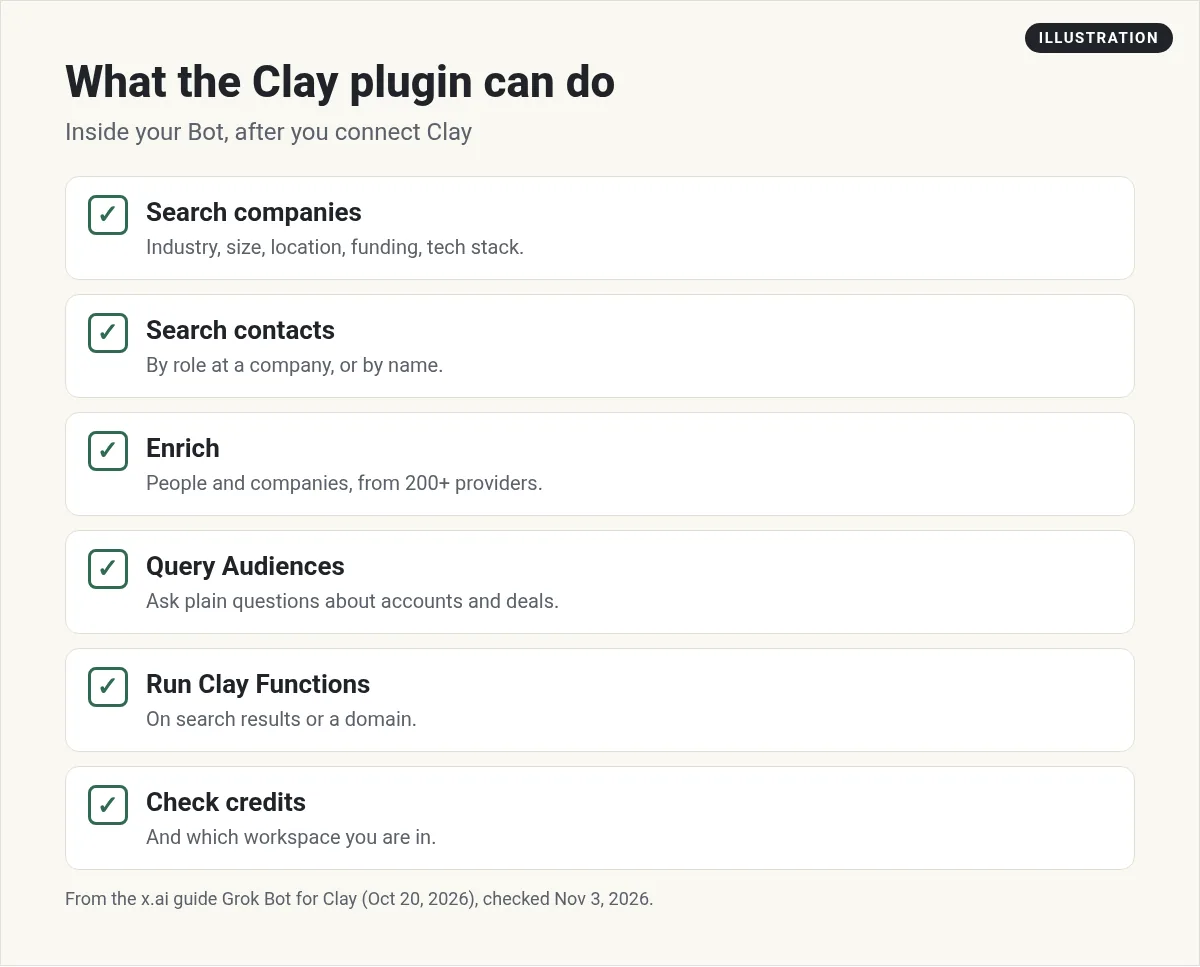
- Search companies with filters like industry, size, location, funding, and tech stack.
- Search contacts by role at a company, or by name.
- Enrich people (email, work history summary) and companies (funding, headcount growth, news, competitors).
- Query Audiences and CRM linked accounts in plain questions about deals and stakeholders.
- Run Clay Functions on search results or on direct inputs like a domain.
- Check credits and which workspace you are in.
The guide adds a good habit. You do not have to do everything in one shot. Search first, then layer on email lookups or research questions.
What the Bot adds that Clay cannot do alone
The guide lists four things:
- Do tasks on the web, like filling out a web form as part of a Clay workflow.
- Work from your phone, pulling data or starting a workflow from the Grok Bot mobile app.
- Log into apps. Give the Bot an email and it can log into accounts to take actions.
- Cross app systems, like starting in Clay and ending with the Bot updating a Notion database.
The speed to lead test
This is the clever one. Clay wanted a self serve tool that tests how fast a sales team answers a new lead. The hard part was filling out each company's demo form. The Bot solved it.
- A customer gives their email address.
- Clay enriches it.
- Clay posts a task in Slack.
- The Bot picks up the task and fills out that company's demo request form.
- The Bot has its own email, so it can time how long the company takes to reply.
- The result goes back to Clay, and the customer gets an email with the score.
The guide says customers wrote in to praise it. It runs on its own.
Common use cases
The guide says your data foundation comes first. After that, the most common plays are outbound prospecting, automated inbound, account research, CRM enrichment, ABM, TAM sourcing, territory planning, and rep productivity. In the workshop, an event marketing Bot pulls existing contacts from the CRM, finds new ones in Clay, builds a Google Sheet, and fills in missing emails, all in one thread.
Find 25 software companies in Texas with 50 to 200 people that raised money this year. Add the head of marketing at each. Put them in a Google Sheet with company, name, title, and one line on why they fit. Do not email anyone.
A simple first week with Clay and your Bot
Do not try to rebuild your whole sales process on day one. Here is how I would start.
- Day 1. Connect Clay and pick the right workspace. Ask the Bot to check your credits so you know what you have to work with.
- Day 2. Pick one list you already build by hand. Tell the Bot the inputs, the steps, and the output you want. Keep it small, like 25 companies.
- Day 3. Check the results line by line. Fix what is wrong and tell the Bot why, so it does better next time.
- Day 4. Add one more layer, like email lookups or one research question per company.
- Day 5. Turn it into a routine that runs once a week and saves to the same Google Sheet.
Keep a human on every email that goes out. The Bot can draft. You decide what sends.
Two videos worth your time
The official workshop with Clay shows these workflows live, including the speed to lead demo and a content dashboard.
From the Grok channel (not mine): This is an official workshop from the Grok team and Clay, so it shows both tools at their best.
Stan Stojanovic shows how he uses Grok Bot and Clay together to find clients for his own business.
From the Stan Stojanovic // frontBrick channel (not mine): Stan runs an agency and talks about his own client work. Your results depend on your offer and market.
Any results mentioned in videos are not typical and are not a promise of income. Your results depend on your work and your market.
Watch outs
- Clay credits. Lookups use Clay credits. Ask the Bot to check credits before a big run.
- Bad data in, bad data out. Fix your data foundation first, as the guide says.
- Outreach rules. Keep any send on approval, and follow the rules of each app you touch.
- Start small. Test on 10 rows before 1,000.
Get a whole team, not just a list builder
Clay finds the leads. You still need a team that knows your offer, writes in your voice, and follows up.
AIM Agent is an AI Chief of Staff for business owners. It comes with an AI C-suite (COO, CMO, CFO, CRO and CTO), a Business Bot Builder and 100+ business skills, and it runs on AIM OS, a private vault that holds your notes and memory. AIM Agent is a ready-made AI business team that works inside Grok Bot, so you skip the setup and get to work.
Here is what you get:
- An AI Chief of Staff that helps you plan and run your business
- An AI C-suite: COO, CMO, CFO, CRO and CTO
- A Business Bot for each business or project. Give it a real task and it brings the work back for you to review
- 100+ business skills for content, offers, research and more
- Step by step setup guides and email support
So every list turns into real conversations.

Want an AI team to help run your business? Meet AIM Agent, an AI Chief of Staff for business owners. I am a co-founder of AIM Agent and have a financial interest in the product.
Turn leads into a working sales team
AIM Agent gives you an AI Chief of Staff, an AI C-suite, and 100+ business skills, so your sales work has owners from day one.
See AIM AgentFrequently asked questions
Does Grok Bot work with Clay?
Yes. Clay has a plugin in Grok Bot. You install it from Connect apps and pick your Clay workspace.
What can the Clay plugin do?
Search companies and contacts, enrich them, query Audiences and CRM linked accounts, run Clay Functions, and check credits.
Do I still need to build Clay tables by hand?
The guide says you can describe the workflow and ask the Bot to build it in Clay.
What can Grok Bot do that Clay cannot?
Fill out web forms, work from the mobile app, log into apps, and connect steps across tools like Notion.
What is the speed to lead test?
A Clay workflow where the Bot fills out a company's demo form and times how fast the team replies.
Does using Clay cost credits?
Clay lookups use Clay credits. The plugin can check how many you have.
Is there a faster way to get a Bot team for my business?
AIM Agent gives you an AI Chief of Staff, an AI C-suite, and 100+ business skills, so you start with a team built for business work.
Sources
Checked November 3, 2026. Plans, prices, and rules can change.
