
Grok Bot · Marketing
Grok Bot for marketing works best when you stop treating it like a chat box and start treating it like a small team. Here is the six Bot setup from the x.ai guide, and how to start with just one.
Grok Bot for marketing is one of the most searched Grok Bot topics this month. Most people try it as a writing tool. The people getting the most from it treat it like a team: one Bot for research, one for positioning, one for ads, one for the website, and one for the numbers.
I read the xAI guide Grok Bot for Marketing and the Grok Bot docs on October 29, 2026, and watched two new marketing workshops. Here is the setup, in plain words, and a simple way to start this week.
TL;DR
To use Grok Bot for marketing, give each Bot one marketing job. The x.ai marketing guide uses six: a Market Researcher, a Product Marketer, a Performance Marketer, a Website Ops Bot, a Marketing Analyst, and a Project Manager. They work in tools like Google Docs, Google Ads, and Slack and hand work to each other, while a person approves anything that goes live or spends money. Start with one research Bot, connect only what it needs, and add more as the handoffs grow. AIM Agent gives you a ready business team, so you start with the roles built.
From chat box to marketing team
Grok Bot is an AI helper from xAI that works on its own computer, uses your apps, and can run jobs on a schedule. If you are new, my Grok Bot explained post covers the basics.
Josh Kim wrote the x.ai marketing guide. He says he used to treat marketing AI like a clever intern that never left the chat window.
Now he runs a small team of Bots through the whole loop, from research to a live page and ads, while he keeps the judgment calls.
The six marketing Bots
Here is the team from the guide. Each one has a job description. That is the whole idea.
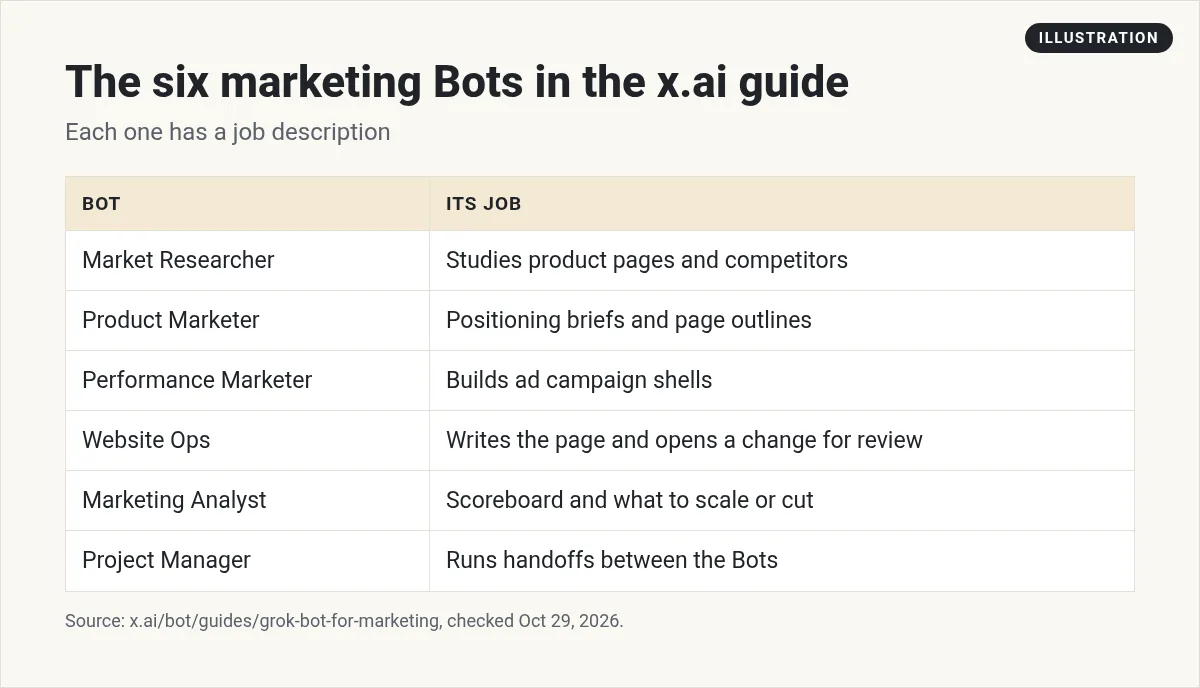
- Market Researcher reads product pages and competitors and finds gaps.
- Product Marketer turns research into positioning briefs, landing page outlines, and search ad ideas in Google Docs.
- Performance Marketer builds Google Ads campaign shells and adds approved copy.
- Website Ops writes the page and opens a change on the marketing site for review.
- Marketing Analyst pulls ad data, writes a scoreboard, and recommends what to scale, cut, or test. The guide is clear that
It does not change a live ad, bid, or budget.
- Project Manager runs the handoffs, so you have one front door instead of five chats.
Why not one Bot for all of it? The guide says a general chat that tries to do research, ads, and code in one thread gets bloated and forgets why you hired it. I have seen the same thing.
How the loop works
The guide walks through a fake airline as an example. The researcher reads the airline's site and competitors and finds a clear gap. The product marketer messages the researcher for context, then writes a positioning brief in a Google Doc.
Then the part I like. Josh reviews the Doc like a teammate's draft. He leaves a comment on a line that works, and the Bot revises. Next, the ads Bot builds campaign shells, the website Bot builds the page, and the analyst later reports what worked.
And who decides? He says The bot recommends and I approve what spends.
Watch a marketing team of Bots
In this xAI workshop, a field marketer takes an event from the first idea to an approved guest list with a team of Bots. It is a nice real example of handoffs.
From the Grok channel (not mine): An xAI workshop showing a field marketing event go from idea to approved guest list with a team of Bots.
If you want a simpler start, this second video shows a marketer's first two weeks of using Grok Bot for marketing.
From the Leveling Up with Eric Siu channel (not mine): A marketer shows how they have been using Grok Bot for marketing over the last two weeks.
Start with one Bot, not six
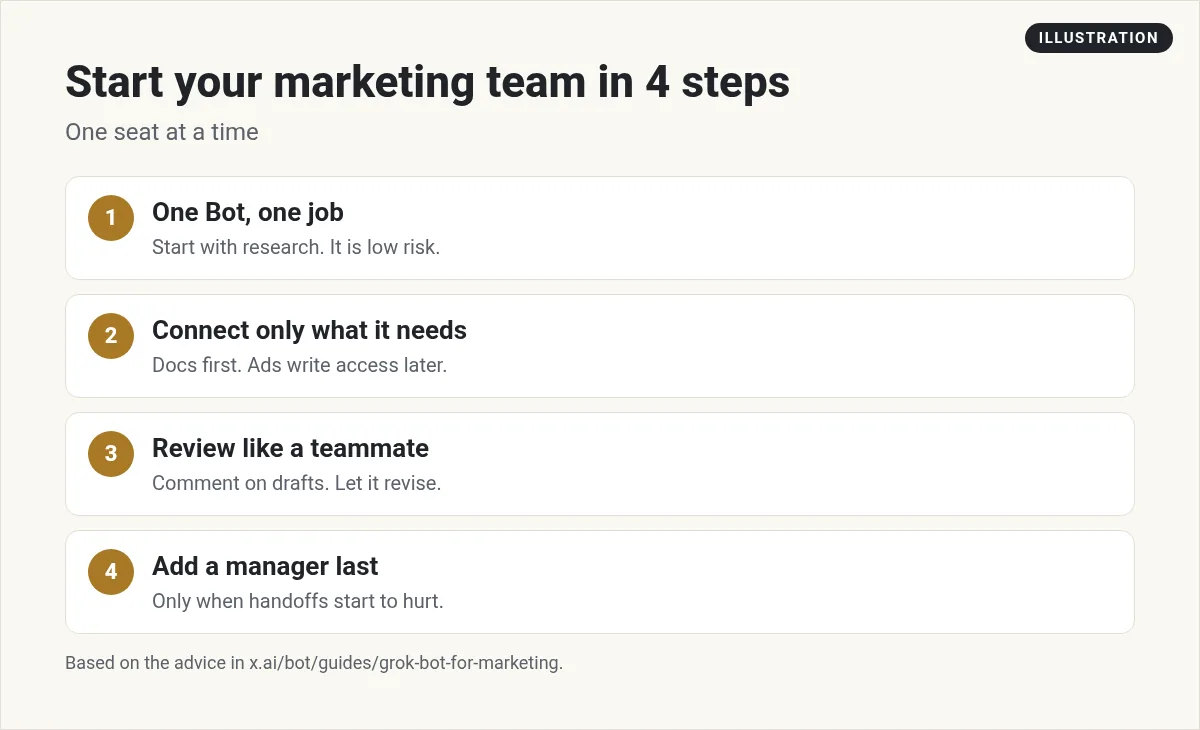
The guide ends with simple advice: stand up one specialist for one job, connect only the tools that job needs, and add a Project Manager only after the handoffs start to hurt. Here is how I would do it.
1. One Bot, one job
Start with research. It is low risk, because it only reads. Ask for a competitor read:
- Read these three competitor sites. Tell me what each one promises, who it is for, and one gap we could own. Link every source.
My Grok Bot research guide has more prompts like this.
2. Connect only what it needs
Josh starts permissions small. In his words, Trust comes from delivered work, not from handing over the company credit card on day one.
Docs and Slack drafts first. Ads write access much later, if ever.
3. Review like a teammate
Leave comments in the Doc and let the Bot revise. That teaches it your taste faster than rewriting it yourself.
4. Add a manager last
When you have three or more Bots passing work, add a Project Manager Bot. My Grok Bot chief of staff guide shows a similar front door Bot.
Templates are a recipe, not a meal
When a Bot is working well, you can share it with Share as Template. The guide explains what that means in a great line: That snapshot is a recipe another person can add. It is not a meal.
A template does not carry your computer, your logins, or your chat history. The other person connects their own tools.
That is good to know if you buy or share Bot setups. You get the operating style. You still do the connecting.
What you should still approve
The guide sums up the rule well: I still approve what leaves the building and what hits a live account.
- Anything that goes public: posts, pages, emails, ads.
- Any spend: budgets, bids, new campaigns.
- Any claim about results. Check it against real data.
Grok Bot asks before risky steps, and you can add your own Ask first rules. My Grok Bot safety guide shows how.
If you are a team of one
You do not need six Bots. A solo marketer can start with two: a researcher and a writer. Add a routine that runs every Monday, like a weekly competitor check. My Grok Bot routines guide shows how. Already use n8n for marketing workflows? Read Grok Bot vs n8n to see how they work together.
If you create content, read Grok Bot for content creators. If you promote other people's products, see Grok Bot for affiliate marketing. Agencies should read Grok Bot for agencies, and store owners Grok Bot for ecommerce.
A ready team for your marketing
Six marketing Bots with good job descriptions, handoffs, and rules is a lot to build. Most people stall after the first one.
AIM Agent is an AI Chief of Staff for business owners. It comes with an AI C-suite (COO, CMO, CFO, CRO and CTO), a Business Bot Builder and 100+ business skills, and it runs on AIM OS, a private vault that holds your notes and memory. AIM Agent is a ready-made AI business team that works inside Grok Bot, so you skip the setup and get to work.
Here is what you get:
- An AI Chief of Staff that helps you plan and run your business
- An AI C-suite: COO, CMO, CFO, CRO and CTO
- A Business Bot for each business or project. Give it a real task and it brings the work back for you to review
- 100+ business skills for content, offers, research and more
- Step by step setup guides and email support
So instead of starting from blank Bots, you get an AI Chief of Staff and a business team with skills already made, and you point them at your marketing.

Want an AI team to help run your business? Meet AIM Agent, an AI Chief of Staff for business owners. I am a co-founder of AIM Agent and have a financial interest in the product.
Get a ready AI team for your marketing
AIM Agent gives you an AI Chief of Staff, an AI C-suite, and 100+ business skills, so your Bots have real jobs from day one.
See AIM AgentFrequently asked questions
Can Grok Bot do marketing?
Yes. It can research competitors, draft positioning and pages, build ad shells, and report on results. A person approves what goes live.
How many marketing Bots do I need?
Start with one. The x.ai guide uses six, but it says to add a Project Manager only after the handoffs start to hurt.
Can Grok Bot change my live ads?
In the x.ai guide, the Marketing Analyst does not change a live ad, bid, or budget. The author approves what spends.
What apps does a marketing Bot use?
In the guide, Google Docs, Google Ads, Slack, the site code, and a browser. Connect only what each job needs.
What does Share as Template do?
It shares a Bot's setup as a starting point. It does not carry your computer, logins, or chat history.
Is Grok Bot better than a chat AI for marketing?
It can finish jobs in your tools, not just answer in a chat. See my Grok Bot vs ChatGPT post for a fair comparison.
Is there a faster way to get a business Bot team?
AIM Agent gives you an AI Chief of Staff, an AI C-suite, and 100+ business skills, so you start with a team built for business work.
Sources
Checked October 29, 2026. Plans, prices, and rules can change.
