
Grok Bot · Enterprise
Your team wants AI teammates. Your IT team wants control. Here is how Grok Bot handles access, isolation, rules, and audit, straight from the admin docs.
Grok Bot enterprise rollout is mostly about control: who gets access, what Bots can do, and what gets recorded. x.ai opened Grok Bot to enterprises on September 3, 2026, with access, network, and audit controls built for governing Bots at scale.
I read the Grok Bot docs on teams and enterprises, the identity and access guide, and the x.ai enterprise news post on November 3, 2026. Here is the plain version for owners and IT leads.
TL;DR
On the Enterprise plan, an admin turns Grok Bot on from the Cursor dashboard and can give access to everyone or to chosen groups. Members sign in with their Cursor account, so your SSO and SCIM setup carries over. Each user gets their own isolated cloud computer. Admins can set Team Rules, enforce Auto-review, add Ask first rules, control connectors and MCP servers, limit network access, and turn on action recording and audit logs. On the self serve Teams plan, Grok Bot is on by default, and several of these controls are Enterprise only.
What enterprises get
The x.ai news post calls a Bot a worker you create for a specific job. Each Bot runs on its own computer in the cloud and can use apps and websites the way you do. The post says thousands of organizations had adopted Grok Bot by then, and the heaviest use is outside engineering: sales, recruiting, marketing, finance, and engineering teams all have examples.
It also says each user's work runs in its own secure, isolated space. A Bot has no access by default and reaches only the accounts you sign it into.
Turning it on
- Teams plan. Grok Bot is on by default, and every member has access. There is no switch to turn it off.
- Enterprise plan. An admin turns it on from Grok Bot in the Cursor dashboard. You can give access to all members or limit it to groups with Manage Group Access. Turning it off blocks every member without deleting their computers.
- Inviting people. Admins use Invite Team on the Grok Bot page.
Before you roll out, the docs say to move off Privacy Mode (Legacy), because that setting blocks Grok Bot entirely. They also cover proxies, IP rules, and sign in planning.
Sign in, SSO, and SCIM
Grok Bot uses your Cursor account, so there is no separate Grok Bot app in Okta or Entra ID. The identity guide says Cursor single sign-on is SAML 2.0 and works with Okta, Microsoft Entra, Google Workspace, and OneLogin. SCIM provisioning works through your identity provider on Enterprise.
One extra step matters. The Bot's computer runs Linux and does not run device trust agents. If members need to sign in to company apps from that computer, the guide shows how to add an authentication rule in Okta or Entra ID.
How users are kept apart
Each user gets a dedicated computer with hardware level separation. One user cannot reach another user's computer. Inside one user, all their Bots share one computer. The docs are clear about what that means: treat a login or file on the computer as available to every Bot that user runs.
Shared Bots are the exception. A member can share a Bot with the team, and each person's chat with it stays private, even from the owner.
The admin controls that matter most
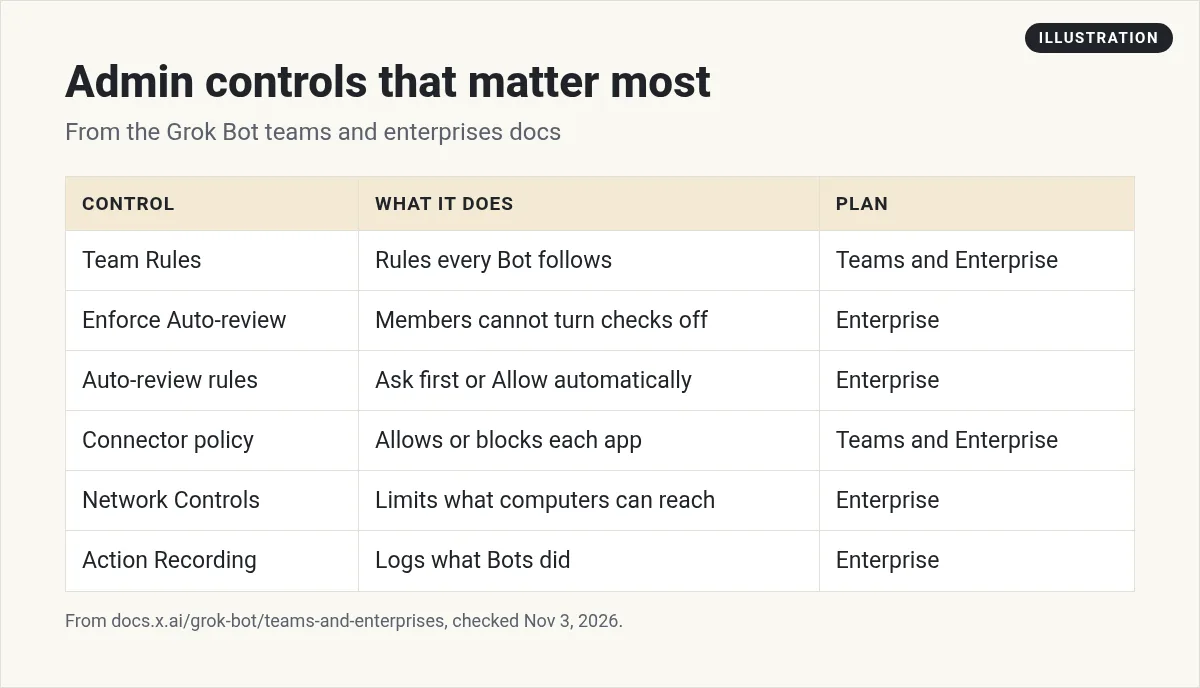
- Team Rules. Short rules every Bot follows, like never move company data to personal accounts.
- Enforce Auto-review. Stops members from turning off the safety check on risky actions. Enterprise only.
- Auto-review rules. Team wide Ask first and Allow automatically rules. Ask first wins when rules conflict. Enterprise only.
- Connector policy. Allows or blocks each app. My Grok Bot MCP post covers custom servers and the MCP allowlist.
- Network Controls. Limits which sites team computers can reach. Enterprise only.
- Execution on Local Computer. Decides if Bots may run commands on member laptops.
- Inference Hooks. Sends each model request to your own security server to allow or deny. In beta for Enterprise.
Logs and audit
Action Recording logs what a Bot did: tool calls, shell commands, browser visits, messages sent, and routine runs. It records metadata, not message content. Audit logs cover admin and security events like Bot creation and access changes. You can stream both to your own tools. These are Enterprise only. Admins on Enterprise can also see what kinds of work the team gives to Bots on the Conversation Insights page.
The recommended setup from the docs
For security sensitive teams, the docs list a baseline. For admins:
- Set Network Controls.
- Check your connector policy before you turn Grok Bot on.
- Turn on Enforce Auto-review.
- Set Execution on Local Computer to Never allow unless Bots need member machines.
- Turn off Cloud Agent delegation if you do not need it.
- Keep public template sharing off unless people should publish Bots outside the team.
- Add Ask first rules for production changes, outside email, payments, and accepting legal terms.
- Gate sign in to managed devices through your identity provider.
For members, the docs say to start new roles with read only tasks and drafts, and to keep sending, publishing, buying, deleting, and production changes behind approval. My Grok Bot safety post goes deeper.
A simple rollout plan
- Pilot. Start with one group and a few clear jobs.
- Set rules. Team Rules and Ask first rules before anyone connects real accounts.
- Share good Bots. When a Bot works well, share it with the team so people start from something proven.
- Review. Check logs and the kinds of work people hand off, then widen access.
Two videos worth your time
The official enterprise workshop shows how teams pick jobs for Bots and build their first ones.
From the Grok channel (not mine): This is an official workshop from the Grok team, so it shows the product at its best.
The official admin workshop covers guardrails, data security, and rolling out to a team.
From the Grok channel (not mine): Also an official workshop. Check the docs for which controls are on your plan.
Give every department a head start
After the controls are set, people still need to know which Bots to build and how to teach them.
AIM Agent is an AI Chief of Staff for business owners. It comes with an AI C-suite (COO, CMO, CFO, CRO and CTO), a Business Bot Builder and 100+ business skills, and it runs on AIM OS, a private vault that holds your notes and memory. AIM Agent is a ready-made AI business team that works inside Grok Bot, so you skip the setup and get to work.
Here is what you get:
- An AI Chief of Staff that helps you plan and run your business
- An AI C-suite: COO, CMO, CFO, CRO and CTO
- A Business Bot for each business or project. Give it a real task and it brings the work back for you to review
- 100+ business skills for content, offers, research and more
- Step by step setup guides and email support
So teams start from proven roles instead of a blank Bot.

Want an AI team to help run your business? Meet AIM Agent, an AI Chief of Staff for business owners. I am a co-founder of AIM Agent and have a financial interest in the product.
Start your team with Bots that know their jobs
AIM Agent gives you an AI Chief of Staff, an AI C-suite, and 100+ business skills inside Grok Bot.
See AIM AgentFrequently asked questions
How does an admin turn on Grok Bot for Enterprise?
From Grok Bot in the Cursor dashboard. Access can go to all members or chosen groups.
Does Grok Bot work with SSO?
Yes. It uses your Cursor account, and Cursor single sign-on is SAML 2.0 with Okta, Microsoft Entra, Google Workspace, and OneLogin.
Is there a separate Grok Bot app in Okta?
No. The identity guide says there is no separate Grok Bot app in Okta or Entra ID.
Can one user see another user's computer?
No. Each user gets a dedicated computer with hardware level separation.
Can admins force approvals on risky actions?
Yes, on Enterprise. Enforce Auto-review stops members from turning it off, and team Ask first rules add more checks.
Is there an audit log?
Yes, on Enterprise. Audit logs cover admin and security events, and Action Recording logs what Bots did.
Is there a faster way to give teams useful Bots?
AIM Agent gives you an AI Chief of Staff, an AI C-suite, and 100+ business skills inside Grok Bot.
Sources
Checked November 3, 2026. Plans, prices, and rules can change.
