
Grok Bot · Connections
Most people never need this. But when the app you want is not in the list, an MCP server is how a Bot gets a clean way to use it. Here is the plain version.
Grok Bot MCP support means a Bot can connect to tools that are not in its app list. You give it a server address or a command, and the tool's actions show up for your Bot to use. You do not need to write code to do it.
I read the Grok Bot docs on connecting apps and team controls, plus the official Model Context Protocol intro, on November 3, 2026. Here is what MCP is, how to add a server, and what to watch for.
TL;DR
MCP, the Model Context Protocol, is an open standard for connecting AI apps to outside tools and data. In Grok Bot, most apps are a click away under Connect apps. If the one you want is not in the catalog, ask your Bot to add its MCP server by URL or by a command that runs on its computer. A server started by a command is available to your other Bots too. Private network servers ask for your approval first. Enter keys only in the secure secret card. On teams, the admin's connector policy and MCP allowlist decide what is allowed.
What MCP is, in plain words
The official MCP site says MCP is an open source standard for connecting AI apps to outside systems. It compares MCP to a USB-C port for AI apps. One standard plug, many tools.
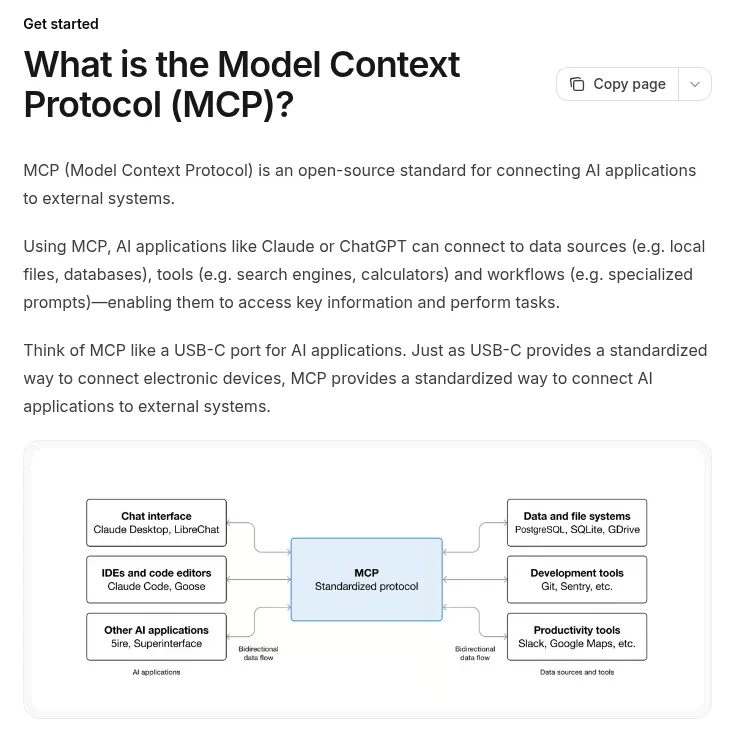
An MCP server is a small service that tells the AI what it can do with a tool, like search records, add a row, or send a message. The AI then uses those actions in a clean, structured way instead of clicking around a website.
Do you even need it?
Usually not. The Grok Bot docs say apps give a Bot a structured way to work with services like Gmail, Notion, and Slack, and are more reliable than clicking through a website when one exists. Most popular tools are already in Connect apps. My Grok Bot connectors post covers the built in list.
You need MCP when:
- The tool you use is not in the catalog.
- The tool's maker offers an MCP server.
- You or your developer built a small server for your own data.
How to add an MCP server
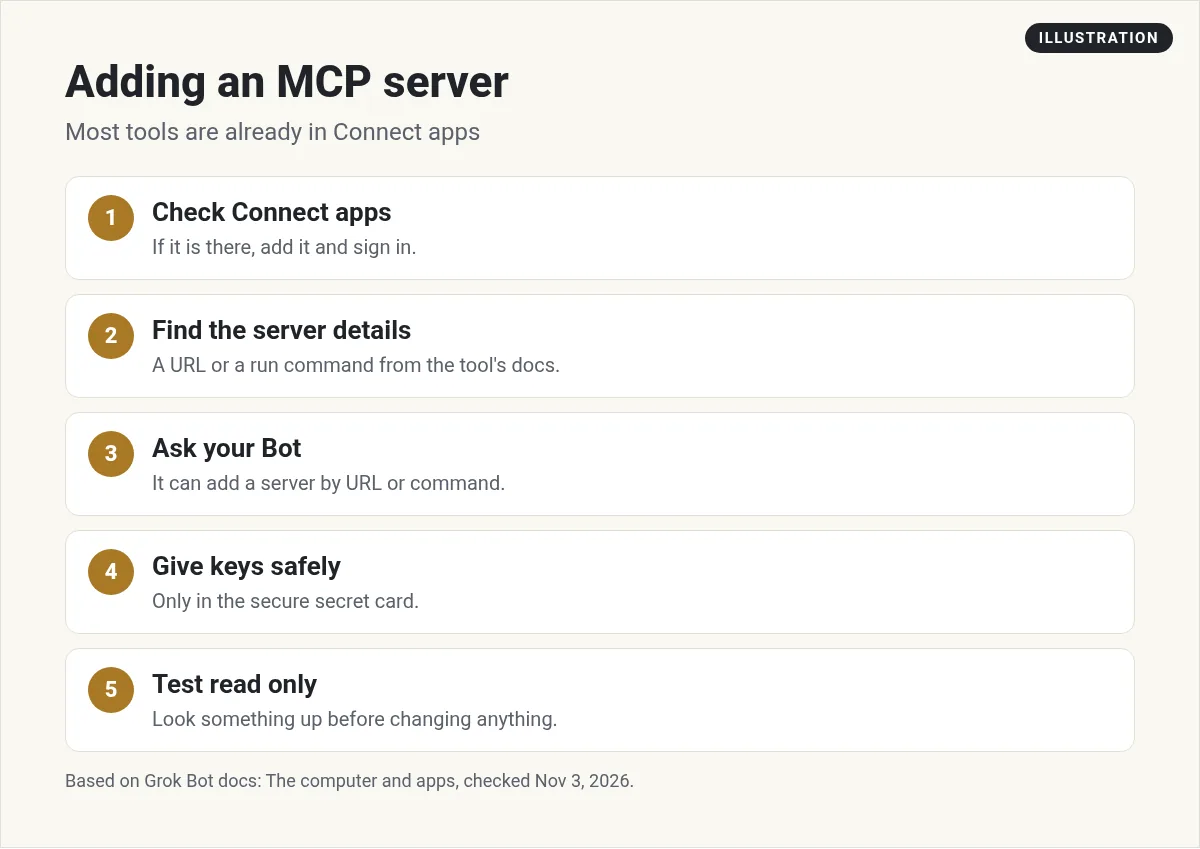
Step 1. Check Connect apps first. Open Connect apps from the sidebar and search. If it is there, add it and sign in. You can also just ask your Bot to add the app.
Step 2. Find the server details. Look in the tool's help docs for an MCP server URL or a run command.
Step 3. Ask your Bot. The docs say a Bot can add an MCP server that is not in the catalog, by URL or by a command that runs on its computer.
Add the MCP server for our booking tool. The URL is in this help page. Ask me for the API key with the secure secret card. When it is connected, list the actions it gives you, then wait.
Step 4. Give keys the safe way. If the server needs an API key, enter it in the secure secret card when the Bot asks. The docs say the field is masked, and the value is not written into the chat or shown to the Bot. Never paste keys into normal chat. My Grok Bot vault post explains where secrets live.
Step 5. Test with a read only task. Ask the Bot to look something up before you let it change anything.
Things the docs say you should know
- Command servers are shared. A server started by a command is available to your other Bots too.
- Private networks ask first. Adding a server on a private network, or one with a private certificate authority, asks for your approval first.
- Apps are account wide. A connected app is available to every Bot you run.
- Logins stay off the computer. For connected apps, sign in tokens are held on Cursor's connector backend. The Bot uses the tools without getting the tokens.
- Removing cleans up. When a Bot removes an app, everything it added goes with it and you are signed out.
If you are on a team
Your admin is in charge here. The teams docs say your team's MCP policy applies in full, allowing or blocking each connector. A blocked one shows as Disabled by team admin. On Enterprise, admins can also keep an MCP allowlist, and a network switch called Apply to MCP servers holds remote servers to the same allowed list. It is off by default.
If a tool you need is blocked, ask your admin. Do not try to work around it. My Grok Bot enterprise guide covers the admin side.
Stay safe with MCP
- Only add servers you trust. A server can see what you send it. Use the tool maker's official server when there is one.
- Use small keys. If the tool lets you make a key with limited access, use that.
- Keep approvals on. Let Auto-review stop anything that sends, pays, or deletes.
- Review now and then. Remove servers you no longer use.
Good first uses
- A booking or scheduling tool your business uses that is not in the list.
- A niche CRM or help desk with an official MCP server.
- A read only server for your own product database, set up by your developer.
Remember the other paths too. If a tool has no app and no server, a Bot can often use the website through its browser. My Grok Bot computer use post shows how. If a tool can send webhooks, a routine can start from them.
Two videos worth your time
Moritz covers plugins, Composio, and custom MCPs in one chapter of his Grok Bot hacks video.
From the Moritz | AI Systems channel (not mine): Moritz links to his own paid community and services in his description. The MCP chapter starts around 4:48.
Any results mentioned in videos are not typical and are not a promise of income. Your results depend on your work and your market.
This short setup video from inboxmcp shows a third party tool connecting email to a Grok Bot routine.
From the inboxmcp channel (not mine): This is a vendor video for their own tool. I have not tested it. Check any third party tool carefully before you give it access to your email.
Connections are step one. A team is step two.
Once your tools are connected, the real question is which Bots use them and for what jobs.
AIM Agent is an AI Chief of Staff for business owners. It comes with an AI C-suite (COO, CMO, CFO, CRO and CTO), a Business Bot Builder and 100+ business skills, and it runs on AIM OS, a private vault that holds your notes and memory. AIM Agent is a ready-made AI business team that works inside Grok Bot, so you skip the setup and get to work.
Here is what you get:
- An AI Chief of Staff that helps you plan and run your business
- An AI C-suite: COO, CMO, CFO, CRO and CTO
- A Business Bot for each business or project. Give it a real task and it brings the work back for you to review
- 100+ business skills for content, offers, research and more
- Step by step setup guides and email support
So your connected tools have Bots that know what to do with them.

Want an AI team to help run your business? Meet AIM Agent, an AI Chief of Staff for business owners. I am a co-founder of AIM Agent and have a financial interest in the product.
Put your connected tools to work
AIM Agent gives you an AI Chief of Staff, an AI C-suite, and 100+ business skills inside Grok Bot.
See AIM AgentFrequently asked questions
Does Grok Bot support MCP?
Yes. The docs say a Bot can add an MCP server that is not in the catalog, by URL or by a command that runs on its computer.
What is MCP?
The Model Context Protocol is an open source standard for connecting AI apps to outside systems like tools and data.
Do I need MCP for Gmail or Slack?
No. Those are in Connect apps. MCP is for tools that are not in the list.
How do I give an MCP server an API key?
Enter it in the secure secret card when the Bot asks. Never paste keys into normal chat.
Can all my Bots use the server?
A server started by a command is available to your other Bots too, and connected apps are account wide.
Why is an app Disabled by team admin?
Your team's connector policy blocks it. Ask your admin.
Is there a faster way to get a Bot team for my business?
AIM Agent gives you an AI Chief of Staff, an AI C-suite, and 100+ business skills inside Grok Bot.
Sources
Checked November 3, 2026. Plans, prices, and rules can change.
