
Grok Bot · File limits
Know the size limits before you hit them.
Grok Bot file upload limit is the first wall many people hit. You drag in a big video or a pile of photos and the composer says it is too large. The docs list the exact numbers, and they changed in October.
I read the Files and results page and the changelog on November 9, 2026. Here are the limits, the formats, and the fixes.
TL;DR
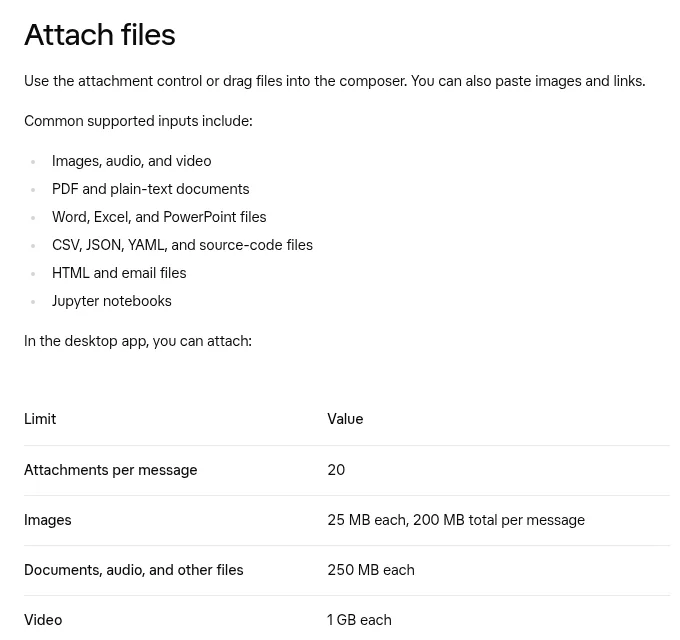
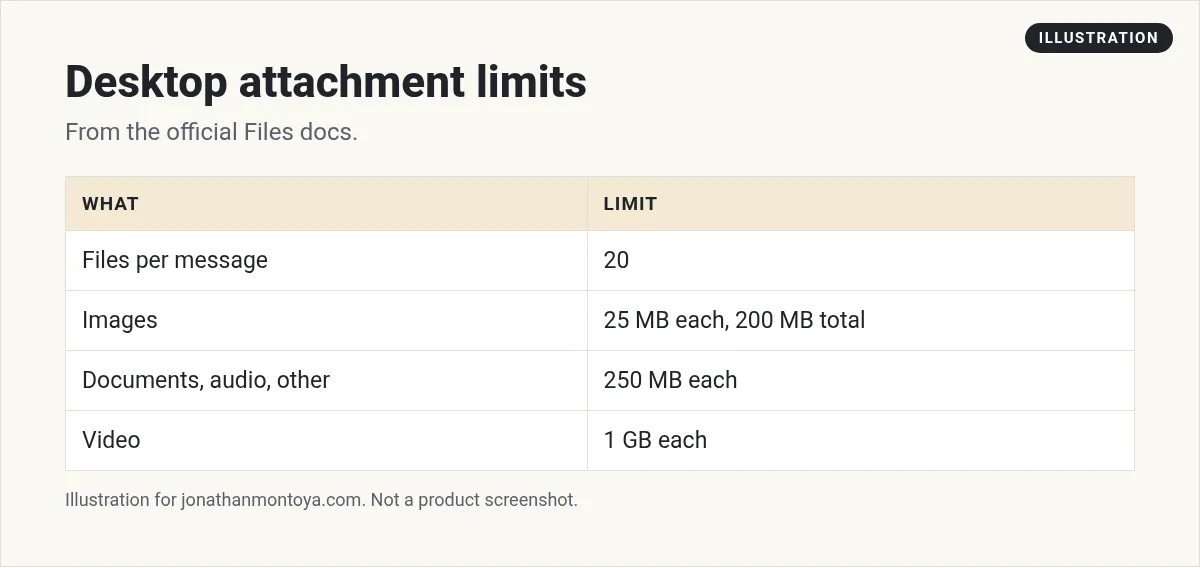
In the desktop app you can attach 20 files per message. Images are 25 MB each with a 200 MB total. Documents, audio, and other files are 250 MB each. Video is 1 GB each. Too big files are left out, so send the rest in another message.
The numbers
- Attachments per message: 20.
- Images: 25 MB each, 200 MB total per message.
- Documents, audio, and other files: 250 MB each.
- Video: 1 GB each.
These come from the desktop app section of the docs. The October 14 changelog explains the change: you can attach files up to 250 MB and videos up to 1 GB, one message can carry up to 20 attachments instead of 6, and a notice says how many were not added past the 200 MB total.
Supported formats
The docs list common supported inputs.
- Images, audio, and video
- PDF and plain text documents
- Word, Excel, and PowerPoint files
- CSV, JSON, YAML, and source code files
- HTML and email files
- Jupyter notebooks
HEIC and HEIF photos, like those from an iPhone, show as images in the conversation, the media viewer, and the Media tab.
From the Brock Mesarich | AI for Non Techies channel (not mine): A creator shares many practical ways to use Grok Bot.
What to do when a file is too big
If a file is over its limit, the composer says it is too large and leaves it out. Send the rest in another message. Then try one of these.
- Compress a video or cut it into parts.
- Export a large spreadsheet as CSV.
- For a PDF with huge images, export a smaller PDF.
- Put the file in Google Drive or OneDrive and ask the Bot to read it through the connected app.
Large, encrypted, damaged, or unusual files may not be readable. Export an unusual format as PDF, CSV, plain text, or an image.
Video notes
The Bot says when a video is too large to watch. Videos a Bot makes are a different matter. Clips run 1 to 15 seconds, with 6 seconds as the default, and are 480p unless you ask for 720p. Images you share for a clip must be JPEG, PNG, or WebP, and all images for one clip can add up to about 35 MB.
Tell the Bot what each file is
The docs suggest naming each attachment and its job. For example:
The PDF is the signed policy. The spreadsheet is this month's transactions. Check the spreadsheet against the policy and list every exception. Do not change the originals.
You can also reorder attachments in the composer by dragging them or by pressing Alt with the arrow keys. If two files in one message share a name, they are numbered, like report.pdf (2).
From the Nate Herk | AI Automation channel (not mine): A long overview video from Nate Herk.
Any results mentioned in videos are not typical and are not a promise of income. Your results depend on your work and your market.
On iPhone and Android
On iPhone, you can share a photo, file, link, or text from another app into Grok Bot with the system share sheet. Choose Grok Bot, pick a chat, and choose Attach. On Android, the share sheet currently accepts text.
Safe habits for files
- Do not upload files with private customer data unless you need to.
- Ask the Bot not to change originals.
- Keep durable results in /workspace or attach them to the chat.
What to do when a file is too big
The composer tells you when a file is over its limit and leaves it out. Your other files still go. You do not lose the message. Try one of these fixes.
- Send the big file in a separate message.
- Export it as a smaller PDF, CSV, or plain text file.
- Split a long document into a few parts.
- Share a link to the file instead of attaching it.
Tell the Bot what each file is
When you attach more than one file, name each one in your message. For example: the PDF is the signed policy, and the spreadsheet is this month's list. This helps the Bot use each file the right way.
On your phone
On iPhone you can share a photo, file, link, or text from another app straight into Grok Bot. Pick Grok Bot in the share sheet, choose a chat, then choose Attach.
Always check the table in the official docs for the current limits, since they can change.
A business team inside Grok Bot
Uploading is the start. A business team turns it into finished work.
AIM Agent is an AI Chief of Staff for business owners. It comes with an AI C-suite (COO, CMO, CFO, CRO and CTO), a Business Bot Builder and 100+ business skills, and it runs on AIM OS, a private vault that holds your notes and memory. AIM Agent is a ready-made AI business team that works inside Grok Bot, so you skip the setup and get to work.
Here is what you get:
- An AI Chief of Staff that helps you plan and run your business
- An AI C-suite: COO, CMO, CFO, CRO and CTO
- A Business Bot for each business or project. Give it a real task and it brings the work back for you to review
- 100+ business skills for content, offers, research and more
- Step by step setup guides and email support
So your Bots work inside a business system, not a pile of chats.

Want an AI team to help run your business? Meet AIM Agent, an AI Chief of Staff for business owners. I am a co-founder of AIM Agent and have a financial interest in the product.
Get a business team inside Grok Bot
AIM Agent gives you an AI Chief of Staff, an AI C-suite, and 100+ business skills, with step by step setup guides and email support.
See AIM AgentFrequently asked questions
What is the max attachments per message?
20 in the desktop app.
How big can an image be?
25 MB each, with 200 MB total per message.
How big can a video be?
1 GB each.
How big can a PDF be?
Documents, audio, and other files can be 250 MB each.
What if my file is too large?
The composer leaves it out. Send the rest in another message, or shrink the file.
Does it read Excel and Word files?
Yes. Word, Excel, and PowerPoint are on the supported list.
What is AIM Agent?
AIM Agent gives you an AI Chief of Staff, an AI C-suite, and 100+ business skills inside Grok Bot, with step by step setup guides and email support.
Sources
Checked November 9, 2026. Plans, prices, and rules can change.
