
Grok Bot · Data
The x.ai data team built a Bot that answers data questions for the whole company. Here is how it works, and how to start smaller with your own spreadsheets.
Grok Bot for data analysis means you ask a question about your numbers in plain English and a Bot does the digging. On November 2, 2026, x.ai shared how its own data science team built Data Bot, a Bot that every team in the company can ask.
I read that story and the Grok Bot docs on files and pages on November 3, 2026. Here is what Data Bot does, what you can copy, and a simple setup for a small business with a few spreadsheets.
TL;DR
Grok Bot can read Excel, CSV, and Google Sheets files, answer questions about them, and build a page with tables and charts. The x.ai data team went further. Their Data Bot is a shared Bot that knows their metrics, runs analyses on their warehouse, builds dashboards, and posts weekly updates in Slack. You can start smaller: give one Bot your spreadsheet, tell it what each column means, and ask for a weekly report you review.
What x.ai built: Data Bot
The x.ai data science team had a problem many teams know. People came to them all day with questions. The team became a bottleneck. So they built Data Bot. In their words, it is a Bot that the data science team teaches, so every team can query the warehouse, run analyses, and get answers the way a data scientist would.
The post says Data Bot handled about 70 hours of work in one week that would have landed on the data team. They still handle the hard analyses that need more judgment.
How they taught it
The key is skills. A skill is a saved set of steps and know how. The data team wrote skills in four areas:
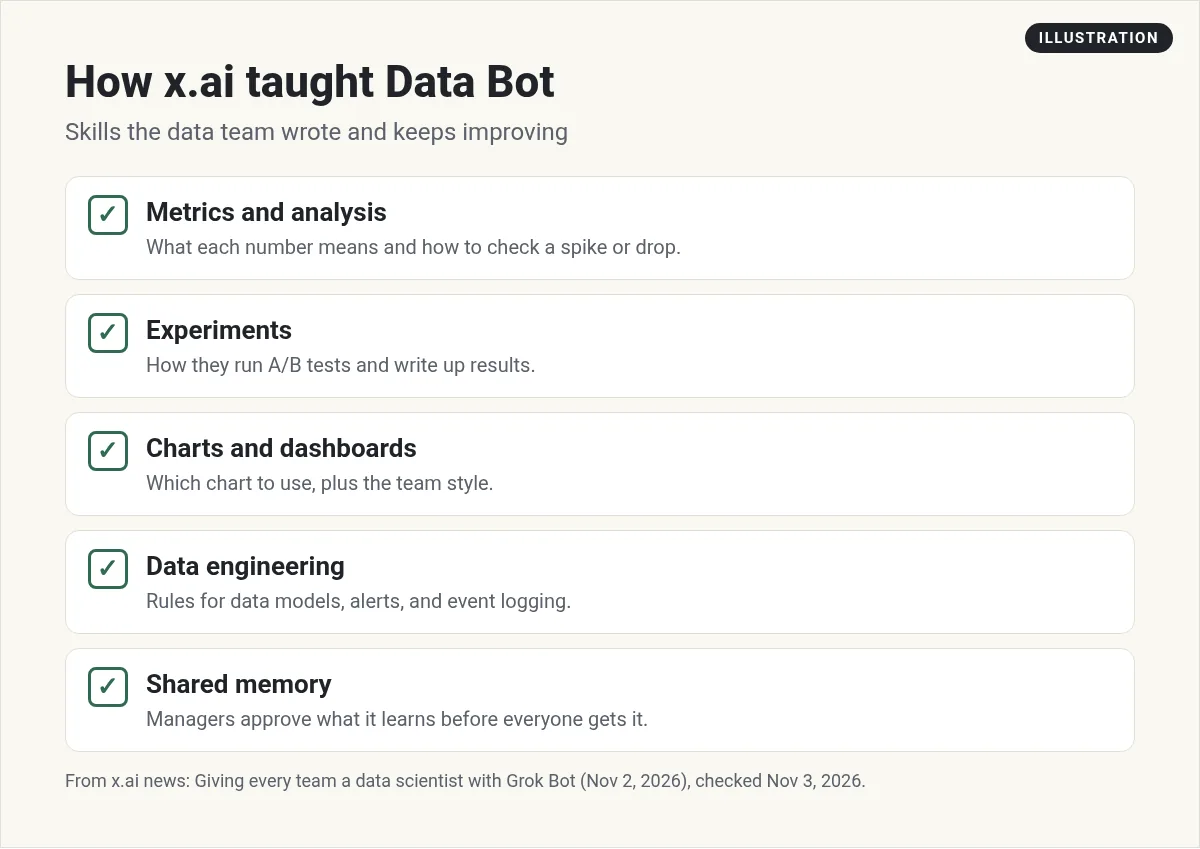
- Metrics and analysis. What each core number means, where it lives, and how to check a spike or drop by segment or region. It even checks for holidays before blaming a product change.
- Experiments. How they run A/B tests and write up results.
- Charts and dashboards. Line charts for trends, horizontal bars to compare groups, plus the team's chart style.
- Data engineering. Their rules for data models, pipeline alerts, and event logging.
Data Bot also has shared memory. It might learn that a past drop turned out to be a regional holiday. The managers review what it wants to remember and approve or reject it before everyone gets it. My Grok Bot skills post covers how skills work.
Who uses it and how
- Product managers message it like a teammate and get answers in minutes. One PM likes a short headline plus a chart, so that is how it answers him.
- Marketers give it a campaign ID and ask what people did after the email. It checks if people who clicked went on to use the feature.
- Revenue leaders use it to track how events help sales and to turn results into charts for slides.
- Whole teams add it to a Slack channel. It tracks a key number and posts a weekly update. People ask follow up questions right there.
It can also run a whole analysis. Ask why adoption changed, and it plans the work, runs the queries, looks at possible reasons, and writes a report with charts.
The small business version
You do not need a data warehouse to get value. Most of us have spreadsheets. The Grok Bot docs say a Bot can read Word, Excel, CSV, and JSON files. Google Sheets arrive on the Bot's computer as Excel files.
Step 1. Give it the file and the meaning. Attach your sales export and say what each column is. The docs say to tell the Bot what each attachment is.
Step 2. Ask one clear question.
This spreadsheet is our sales for the last 12 months. Column C is the product. Column F is revenue. Which three products grew the most, and which dropped? Show a short answer first, then a table. Do not change the original file.
Step 3. Ask for a page, not an image. The docs say image creation is not used for charts or tables. For those, ask for a page. A page can hold text, tables, charts, and filters, and it lives in the Bot's Library so you can share it. My Grok Bot pages post shows examples.
Step 4. Make it weekly. Once the answer looks right, turn it into a routine.
Every Monday at 8 AM, open the sales sheet in Google Drive. Build a page with last week's sales by product, compared with the week before. Flag anything that moved more than 20 percent. Send me the link.
Ideas to copy from Data Bot
- Write down what your numbers mean. Put it in a skill so the Bot never guesses.
- Check the boring reasons first. Holidays, a broken form, a tracking change. Teach the Bot to check these before it blames anything else.
- Pick a chart style. Tell it how you like charts so every report looks the same.
- Review what it learns. Look at its memory now and then.
Two videos worth your time
Matt Palmer explains Team Bots, the shared kind of Bot that Data Bot is.
From the Matt Palmer channel (not mine): Team Bots are for teams. If you work alone, a personal Bot with your spreadsheets is the place to start.
Snapper AI walks through four real pages, including dashboards, built from chats with Bots.
From the Snapper AI channel (not mine): This is a creator walkthrough. Pages may look a little different in your version of the app.
Watch outs
- Check the math on anything big. Spot check a few numbers by hand before you act.
- Keep the original safe. Tell the Bot not to change your source files.
- Do not trust a screenshot of live data. The docs say to keep a link or an export from the source instead.
- Pages is still rolling out. The docs say it is not on Enterprise teams yet.
A finance and ops team from day one
Data answers get better when the Bot already knows how a business runs.
AIM Agent is an AI Chief of Staff for business owners. It comes with an AI C-suite (COO, CMO, CFO, CRO and CTO), a Business Bot Builder and 100+ business skills, and it runs on AIM OS, a private vault that holds your notes and memory. AIM Agent is a ready-made AI business team that works inside Grok Bot, so you skip the setup and get to work.
Here is what you get:
- An AI Chief of Staff that helps you plan and run your business
- An AI C-suite: COO, CMO, CFO, CRO and CTO
- A Business Bot for each business or project. Give it a real task and it brings the work back for you to review
- 100+ business skills for content, offers, research and more
- Step by step setup guides and email support
So your numbers have someone looking at them every week.

Want an AI team to help run your business? Meet AIM Agent, an AI Chief of Staff for business owners. I am a co-founder of AIM Agent and have a financial interest in the product.
Give your numbers a team
AIM Agent gives you an AI Chief of Staff, an AI C-suite, and 100+ business skills inside Grok Bot, so your reports and reviews have owners from day one.
See AIM AgentFrequently asked questions
Can Grok Bot analyze a spreadsheet?
Yes. The docs say a Bot can read Excel and CSV files, and Google Sheets arrive on its computer as Excel files.
Can Grok Bot make charts?
Yes, as a page. The docs say image creation is not used for charts or tables, so ask for a page instead.
What is Data Bot?
A shared Bot the x.ai data science team built and taught with skills, so every team can query their warehouse and get answers.
How did x.ai teach Data Bot?
With skills for metrics, experiments, charts and dashboards, and data engineering, plus shared memory that managers review.
Can a Bot post data updates in Slack?
Yes. In the x.ai story, teams add Data Bot to a Slack channel and it posts weekly updates on a key number.
Should I trust every answer?
Check a few numbers by hand before acting on anything big, and keep your original files unchanged.
Is there a faster way to get a Bot team for my business?
AIM Agent gives you an AI Chief of Staff, an AI C-suite, and 100+ business skills inside Grok Bot, so you start with a team built for business work.
Sources
Checked November 3, 2026. Plans, prices, and rules can change.
