
Grok Bot · Google Drive
Most of your business files probably live in Google Drive. Here is how your Bots find them, work on them, and save them back, without making a mess.
Grok Bot Google Drive support lets your Bots find, open, and save the files you already keep in Drive. That includes Google Docs, Sheets, and Slides. Once it is connected, you can ask a Bot to find last month's report and sum it up, and it does the digging.
I read the Grok Bot docs, help pages, and changelog on November 4, 2026. Here is how it works, the rules worth knowing, and my own tips, which I label as mine.
TL;DR
Connect the Google Drive app in Grok Bot. Your Bots can then search and read files your Google account can open, bring files onto their computer to work on them, and save new files back to Drive. Google Docs, Sheets, Slides, and Drawings arrive as .docx, .xlsx, .pptx, and .png files. Editing cells uses the Google Sheets app. A Bot can only do what your account can already do, and it cannot change sharing.
How Drive works with your Bots
The Grok Bot docs say that when you connect Google Drive, a Bot can move files between its own computer and your Drive, without pasting the contents into chat. That means it can:
- Search and read files your Google account can open.
- Bring a Drive file onto its computer to work on it.
- Save a file it made or downloaded back to Drive.
- Attach a file to a Gmail draft.
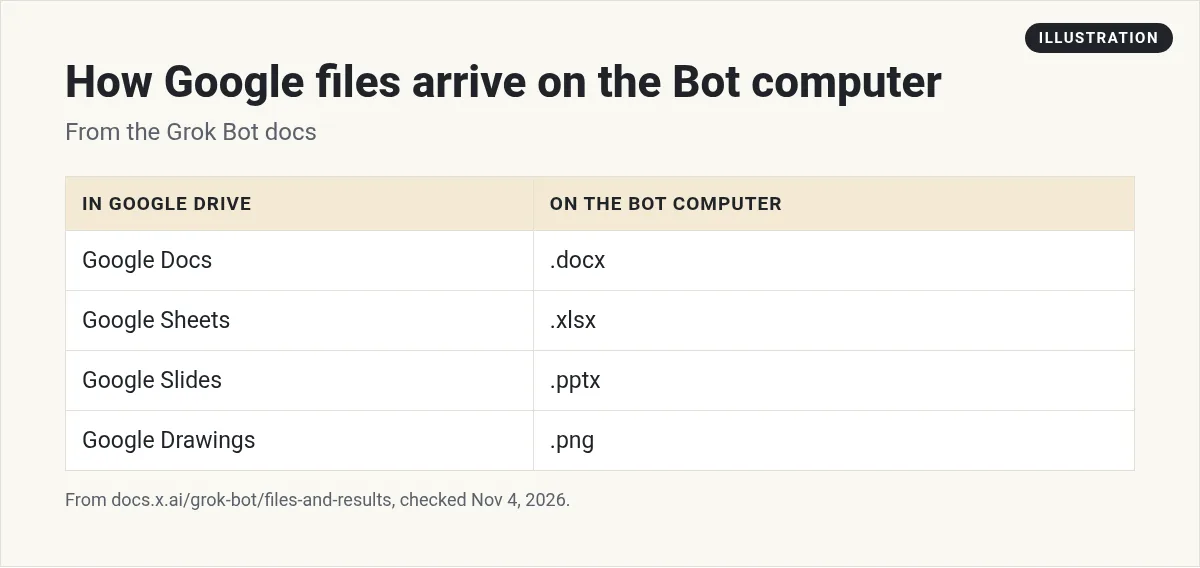
When a Google file comes onto the Bot's computer, it changes format. The docs say Docs arrive as .docx, Sheets as .xlsx, Slides as .pptx, and Drawings as .png. That is handy. It means the Bot can use normal tools on the file, then save a clean copy back.
Google Sheets, Docs, and Slides
Drive and Sheets are separate apps in Grok Bot. The help page explains the split:
- Google Drive searches and reads files.
- Google Sheets reads and edits cells in spreadsheets your account can edit.
So if you want a Bot to update a live spreadsheet, connect both. If you only want it to read reports and write summaries, Drive alone is enough. Fewer apps means fewer things that can go wrong. The changelog also says Bots can build slide decks with you and deliver them as PowerPoint files or Google Slides, and that large Google Slides edits update the live deck.
Rules worth knowing
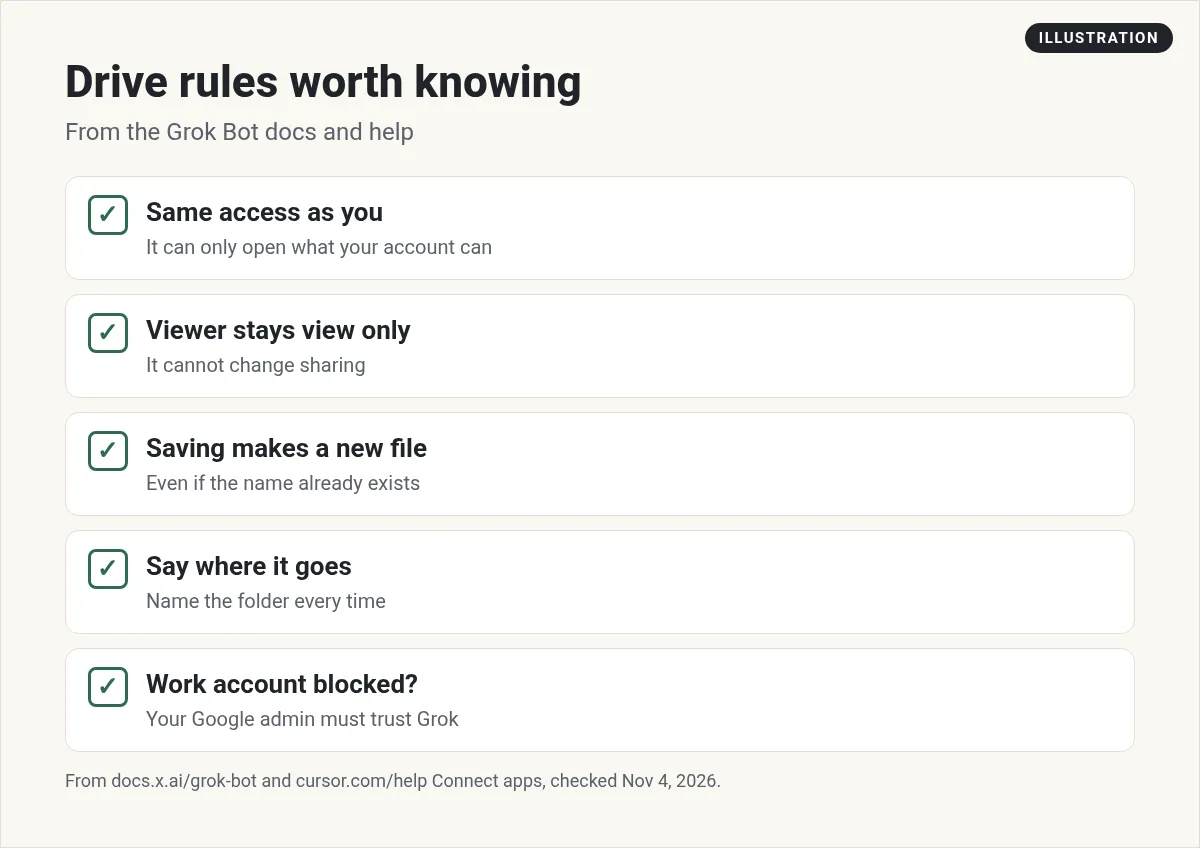
- Same access as you. The help page says an app can only do what your account can already do. It cannot raise your access.
- Viewer stays view only. A file shared with you as Viewer stays view only, and the app cannot change who has access.
- Saving makes a new file. The docs say saving to Google Drive always creates a new file, even when one with the same name exists. So you may see two files with the same name.
- Say where it goes. The docs say to tell the Bot where a file should go.
- More than one account. The changelog says adding a second Google Drive account opens Google's account picker, and removing one leaves the others in place.
When a work account is blocked
A company Google account can stop the connection. The help page says Grok Bot signs in to Google as Grok, not Cursor. Here is what each screen means:
- Your admin needs to review Grok. Grok is not approved for that Workspace yet. Request access if you see the button, and wait for your admin.
- Access blocked. Google refused the sign in. The help page says a personal Gmail account does not need a company admin. A company account often hits this when the admin blocks outside apps.
Your IT admin approves Grok in the Google Admin console under Security, then API controls, and sets it to Trusted. The help page also says changing browsers or connecting again does not clear an admin block.
How to ask for good file work
The docs suggest naming the result you want and how you will judge it. Their examples include a document with headings and source links, a spreadsheet with set columns and formulas, and a slide deck with speaker notes.
Here is one way I would put it:
Find the three newest invoices in my Drive folder named Invoices. Make a new Google Sheet with columns for client, date, amount, and status. Save it in the same folder. Do not edit the invoices.
Good first Drive jobs (my picks)
These are my own picks for low risk ways to start. Each one reads your files and makes something new, so nothing you already have gets changed.
- Weekly summary. Read the newest files in a project folder and write a one page summary.
- File finder. Find every contract that mentions a client name and list them with links.
- Clean copy. Turn a messy notes doc into a tidy Google Doc with headings.
- Report from data. Read a sales spreadsheet and build a short slide deck with the key numbers.
Two videos worth watching
Kevin Stratvert's beginner tutorial builds a first Bot team, with Bots that watch your inbox, keep your books, and answer support tickets.
From the Kevin Stratvert channel (not mine): Clear and well paced. His description has a discount link, so treat that as an ad.
Airdev explains what Grok Bot is and walks through several real Bots, like an executive assistant and a project manager.
From the Airdev channel (not mine): Good examples of Bots that pull from your files and apps. Their description links to their own services.
My own advice
This part is my opinion. Make one Drive folder just for your Bots, like a Bot Inbox and a Bot Outbox. Ask Bots to read from your real folders but save new files only to the Outbox. That keeps your Drive tidy, and it stops the same name files from piling up next to your originals.
Also, name your files clearly. A Bot finds Q3 Sales Report much faster than Untitled spreadsheet 7.
Also, start with read only jobs. Summaries and reports first. Editing live spreadsheets comes later, once you trust the results.
Files are ready. Is your team?
Drive gives your Bots the files. You still need Bots that know which jobs to do with them.
AIM Agent is an AI Chief of Staff for business owners. It comes with an AI C-suite (COO, CMO, CFO, CRO and CTO), a Business Bot Builder and 100+ business skills, and it runs on AIM OS, a private vault that holds your notes and memory. AIM Agent is a ready-made AI business team that works inside Grok Bot, so you skip the setup and get to work.
Here is what you get:
- An AI Chief of Staff that helps you plan and run your business
- An AI C-suite: COO, CMO, CFO, CRO and CTO
- A Business Bot for each business or project. Give it a real task and it brings the work back for you to review
- 100+ business skills for content, offers, research and more
- Step by step setup guides and email support
So you skip the setup and get to work.

Want an AI team to help run your business? Meet AIM Agent, an AI Chief of Staff for business owners. I am a co-founder of AIM Agent and have a financial interest in the product.
Get a ready made team inside Grok Bot
AIM Agent gives you an AI Chief of Staff, an AI C-suite, and 100+ business skills, so you skip the setup and get to work.
See AIM AgentFrequently asked questions
Does Grok Bot work with Google Drive?
Yes. Connect the Google Drive app and your Bots can search, read, bring in, and save files your account can open.
Can Grok Bot edit Google Sheets?
Yes, with the Google Sheets app. It can edit cells in spreadsheets your account can edit.
What format do Google files come in?
Docs arrive as .docx, Sheets as .xlsx, Slides as .pptx, and Drawings as .png on the Bot's computer.
Will it overwrite my files?
Saving to Google Drive always creates a new file, even if one with the same name exists.
Can a Bot change who a file is shared with?
No. The help page says the app cannot change sharing.
Why is my work Google account blocked?
Your Google admin may need to approve Grok in the Google Admin console. Retrying does not clear an admin block.
Is there a faster way to get a working team?
AIM Agent gives you an AI Chief of Staff, an AI C-suite, and 100+ business skills inside Grok Bot.
Sources
Checked November 4, 2026. Plans, prices, and rules can change.
