
Grok Bot · Post-Sales
Post-sales is relationship work buried under context. Here is how one chief of staff Bot keeps the system so you stay in the rooms.
Grok Bot for post-sales is about getting more of your day back for customers. Kickoff, onboarding, value, and renewal all need attention. The hard part is the pile of transcripts, Slack threads, emails, and promises you made in passing.
I read the x.ai guide Grok Bot for Post-Sales by Blake Schuller, dated September 24, 2026, on November 5, 2026. It is the cleanest pattern I have seen for running many accounts with one front door Bot. Here is how to copy it.
TL;DR
Grok Bot can help post-sales owners with a daily brief, before-call prep, unfinished promise lists, unanswered ask watches, account specialists, and Friday dashboards. The Post-Sales guide centers on one chief of staff Bot that manages the rest so you are not bouncing between twenty chats. You still own the relationship and every send.
Why you only manage one Bot
Blake's guide starts with a mistake many of us make. He tried running twenty agents himself. Twenty chats, twenty personalities, all wanting a reply. Now he has one chief of staff Bot named Gus. Gus manages the bench. Blake keeps the parts he loves: relationships, strategy per account, face time, and the final yes on anything with his name on it.
Behind Gus sit specialists: Follow-ups, account specialists (one per account), Ink for email and Slack voice, Questions wired to docs, Career for weekly feedback, and Scout for internal channels. Days go by where he does not open those chats. They report to Gus.
My Grok Bot chief of staff post covers the front door pattern. This post is how post-sales uses it.
What the computer is for
Plugins cover calendar, Slack, mail, docs, and call transcripts when connectors exist. The Bot's own computer covers everything else: LinkedIn before a first call, internal pages with no connector, deck review in PowerPoint, and screenshots or short recordings for how do I questions.
The docs say Bots share a computer, files, and logins on your Bot team. Treat customer data with care. Share what the Bot needs, not everything you have.
The routines that matter
A routine has a trigger, scheduled or event based, and runs whether or not you show up. Most runs of Blake's watches produce nothing, and that is by design. A routine that looks and decides you do not need to know is doing its job.
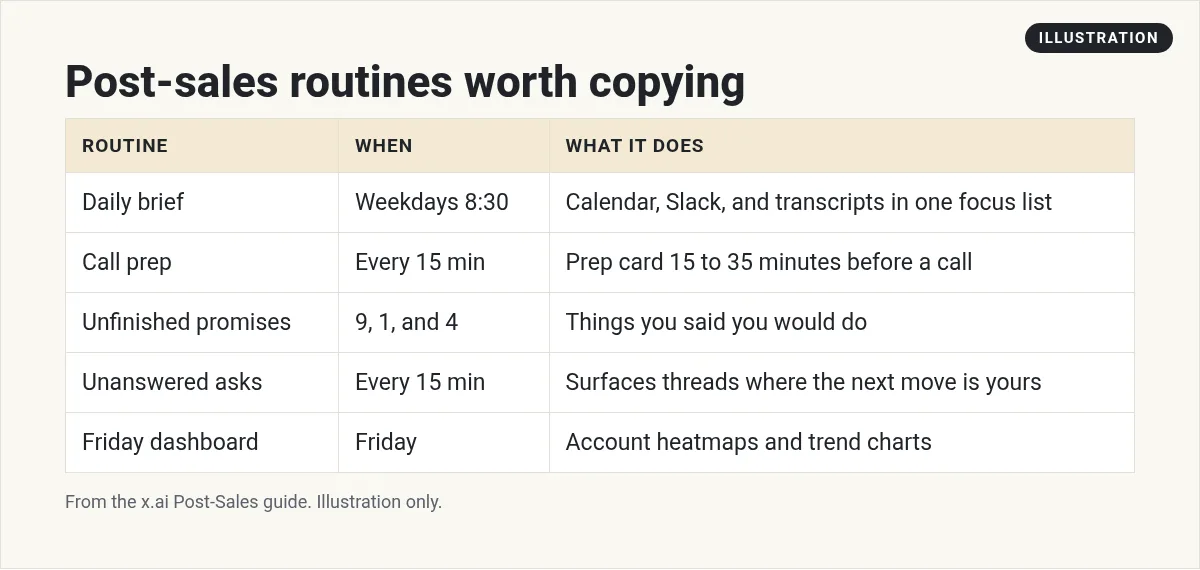
- Daily brief at 8:30 on weekdays. Calendar, Slack, and transcripts folded into one focus list.
- Before every call prep. Checks every fifteen minutes. Writes a prep only when a call is fifteen to thirty five minutes out. Who is on the invite, who accepted, the one thing to leave with, talking points, and a short do not list.
- Unfinished promises at 9, 1, and 4. Things you said you would do, linked back to where you said them. Done items drop off.
- Unanswered asks every fifteen minutes. Only surfaces messages you sent that got no reply when the next move is yours. It never replies for you.
- Visibility and exhaust watches on weekday mornings. One customer win worth sharing, plus usage cliffs or brewing escalations.
- Friday dashboard. Regenerates account heatmaps and files them so Friday is one view.
- Self improvement scan on Wednesdays. Gus audits which routines fired and got ignored, what you asked by hand three times, and what should exist. He proposes. You say yes or no.
See my Grok Bot routines guide to set these up. Routines run in the cloud while your laptop is closed.
When an account has you underwater
Blake's prompt is simple: tell Gus you are overwhelmed with that account. Gus pulls transcripts, calendar, and Slack into one picture: what happened, what you promised and to whom, and what to do next. That is the opposite of opening twelve tabs and hoping.
A day shaped by Bots
In the guide, the brief is waiting at 8:30. Prep cards land just in time. While Blake is in back to back meetings, transcripts land, recaps get drafted, and research for customer questions is ready. He tweaks and sends. The delta between draft and send becomes feedback for Ink. Questions drafts Slack answers with sources. Scout knows the feature request process. Career quietly logs wins.
From the Grok channel (not mine): Official Grok Bot 101 workshop. Useful for the teammate model behind this post-sales setup.
How to build your version
- Record a voice memo of your day: what you love, what you hate, what you refuse to automate.
- Send it to your first Bot and ask it to design a system with one front door.
- Create one account specialist for your hardest account before you make ten.
- Add the daily brief and call prep routines first. Test them.
- Only then add promise and unanswered ask watches.
My Grok Bot for customer success post is a broader CS view. This post follows the Post-Sales guide's one Bot boss pattern closely.
Account specialists without twenty chats
Blake's bench includes one specialist per account whose whole job is to know that customer. That sounds like chaos until you remember they report to Gus. You do not live in those chats. You ask Gus. Gus asks them. The specialist memory stays sharp because it is not diluted across every account you own.
A practical start is one specialist for your hardest account. Give it call transcripts, the Slack channel, the kickoff notes, and a rule: never message the customer. Draft only. When that feels useful, add a second account. Do not create ten empty specialists on day one.
Copy and paste prompts to try
You are my post-sales chief of staff. All other Bots report to you. Send me one morning brief on weekdays with calendar, open promises, and the one account that needs attention. Do not contact customers.
Fifteen to thirty five minutes before each customer call on my calendar, send a prep card: who accepted, the one outcome to leave with, three talking points with links, and a short do not list. If nothing is coming up, stay quiet.
I am overwhelmed with [account]. Summarize what happened across transcripts, Slack, and email this week, list promises I made and to whom, and give me the next three moves. Do not send anything.
Customer privacy habits
- Share what the Bot needs for prep, not every private note you have ever written.
- Keep health or legal details out unless your own rules require them, and check those rules first.
- Remember Bots on your team share a computer, files, and logins.
- Never auto send to a customer. Every message they read, you read first.
My Grok Bot safety post covers approvals and safe defaults in more depth.
A business team for the work after the sale
Customers need follow through. Marketing and ops need owners too.
AIM Agent is an AI Chief of Staff for business owners. It comes with an AI C-suite (COO, CMO, CFO, CRO and CTO), a Business Bot Builder and 100+ business skills, and it runs on AIM OS, a private vault that holds your notes and memory. AIM Agent is a ready-made AI business team that works inside Grok Bot, so you skip the setup and get to work.
Here is what you get:
- An AI Chief of Staff that helps you plan and run your business
- An AI C-suite: COO, CMO, CFO, CRO and CTO
- A Business Bot for each business or project. Give it a real task and it brings the work back for you to review
- 100+ business skills for content, offers, research and more
- Step by step setup guides and email support
So you can stay in the rooms that matter.

Want an AI team to help run your business? Meet AIM Agent, an AI Chief of Staff for business owners. I am a co-founder of AIM Agent and have a financial interest in the product.
Get a business team inside Grok Bot
AIM Agent gives you an AI Chief of Staff, an AI C-suite, and 100+ business skills, so follow up, content, and ops each have an owner.
See AIM AgentFrequently asked questions
What is Grok Bot for post-sales?
It is using Bots for call prep, promise tracking, account context, and drafts so you spend more time with customers.
Do I need twenty Bots on day one?
No. Start with one chief of staff Bot, then add specialists as jobs prove out.
Will it message my customers on its own?
Only if you set that up. The guide drafts and you send.
Can routines run while I am in meetings?
Yes. Routines run in the cloud while your laptop is closed.
How is this different from customer success software?
CS tools store data. These Bots work across Slack, calendar, mail, and docs to prep and draft for you.
What if I am overwhelmed with one account?
Tell your chief of staff Bot. Ask for promises, recent threads, and the next three moves.
Is there a faster way to get a business team?
AIM Agent gives you an AI Chief of Staff, an AI C-suite, and 100+ business skills inside Grok Bot.
Sources
Checked November 5, 2026. Plans, prices, and rules can change.
