
Grok Bot · Customer Success
Customer success is mostly context. Calls, threads, promises, and usage data spread across ten tools. Here is how a post-sales lead at x.ai uses Grok Bot to keep all of it in one place.
Grok Bot for customer success works best as a small team with one manager. In the x.ai guide on post-sales, the writer talks to one chief of staff Bot. That Bot runs a bench of helpers: one Bot per account, a writer, a docs expert, and a set of routines that prep calls and track every promise.
I read that guide and the Grok Bot docs on November 3, 2026. Here is the setup, the routines worth copying, and a smaller version you can build this week.
TL;DR
Start with one chief of staff Bot that you talk to. Add an account Bot for each big customer, a writer that sounds like you, and a Bot wired to your product docs. Then add routines: a morning brief, call prep before each meeting, a promise tracker, and a weekly account health check. The Bots draft and remind. You still own the relationship and the final send.
The real problem in customer success
The guide says it plainly. The hard part is not the customer. It is the context. Every account is a pile of call notes, Slack channels, email threads, calendar invites, and promises made in passing. And one person owns a lot of accounts.
The writer, Blake Schuller, says Grok Bot did not replace the people side of the job. It gave him more time for it, because the context he used to chase now shows up before he asks.
Talk to one Bot, not twenty
This is my favorite part. He tried running twenty agents himself first, and it was too much. Twenty chats, all wanting a reply. So now he talks to one Bot, a chief of staff named Gus. Gus manages everyone else.
Behind Gus sits a bench he built over a few weeks:
- Follow ups holds every draft waiting on him.
- Account specialists, one per account, whose whole job is to know that customer.
- Ink writes emails and Slack messages that sound like him.
- Questions is wired to the product docs for anything a customer asks.
- Career gives him weekly feedback and keeps a list of his wins.
- Scout reads internal channels so he does not have to.
He says some days he does not open a single one of those chats. They report to Gus, and Gus decides what needs him. If you want to build your own manager Bot, my Grok Bot chief of staff guide walks through it.
The routines that do the heavy lifting
A routine tells a Bot when to run. It can run on a schedule or when something happens. These are the ones from the guide I would copy first.
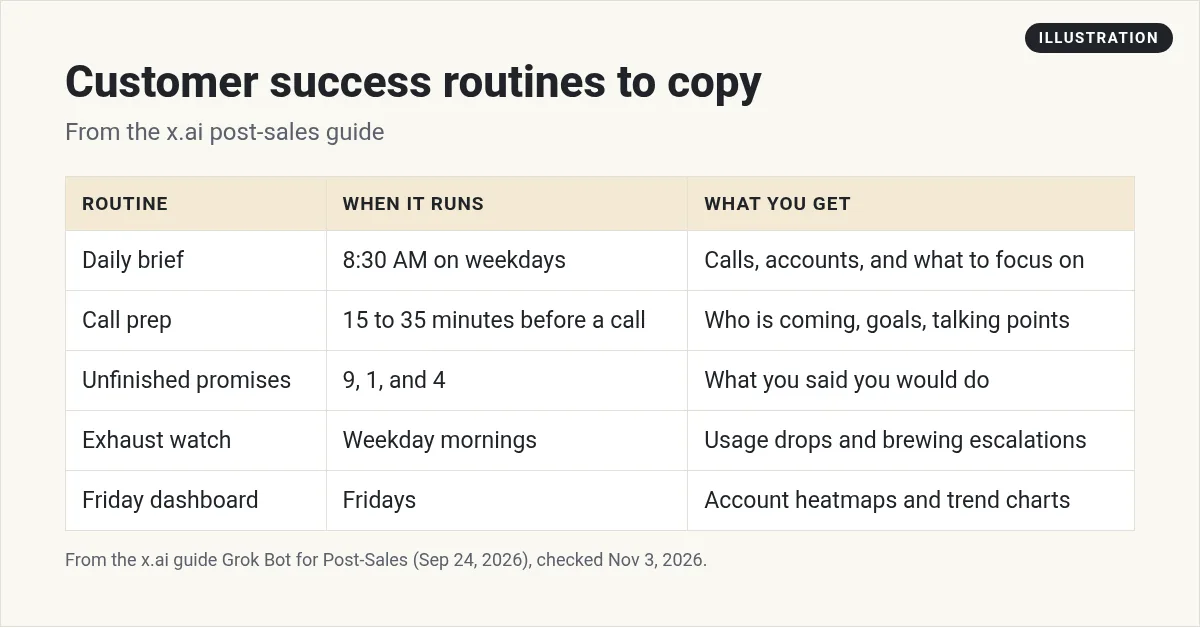
- Daily brief at 8:30 on weekdays. Calendar, Slack, and call transcripts folded into one note about what to focus on.
- Call prep. It checks every fifteen minutes but only writes a prep card when a call is fifteen to thirty five minutes away. The card covers who accepted the invite, the one thing to leave with, talking points, and a short do not list.
- Unfinished promises at 9, 1, and 4. Things he said he would do, with links back to where he said them.
- Unanswered asks. Only messages he sent that got no reply, and only when the next move is his. It never replies for him.
- Exhaust watch. Each weekday morning it scans live accounts for a usage drop or a brewing escalation.
- Friday dashboard. It rebuilds account heatmaps and trend charts and files them in the Drive tracker.
He makes a great point about these. Most runs produce nothing, and that is by design. A routine that looks and decides you do not need to know is doing its job. My Grok Bot routines guide shows how to set them up.
Add a weekly account health Bot
The Grok Bot docs list an account health Bot as a use case. It owns risk and expansion signals across your accounts. You connect your CRM, product usage, support, and billing sources. Here is the sample job from the docs:
Review the accounts in this portfolio. Combine recent usage, support escalations, renewal timing, and stakeholder activity into a ranked watch list. For each account, include the evidence, why it matters, and a suggested next step. Do not contact customers or edit the CRM.
The docs also suggest putting your risk rules in the Bot's description, so the weekly result stays the same week to week. That one tip saves a lot of back and forth.
What a day looks like
The guide walks through a normal day. At 8:30 the brief is waiting: four calls, six accounts, and one flag that usage at one account dropped by a third. Before the 9:45 meeting a prep card lands. During back to back calls, recaps get drafted and research gets done for questions customers asked. By 11:30 three recaps and email replies sit in his drafts. He tweaks them and sends. The gap between the draft and what he sent goes back to Ink as feedback.
Notice who presses send. He does. The Bots draft, remind, and research. He still makes the call on anything that goes out with his name on it.
Build a small version this week
Step 1. Record your day. The guide's own tip: he talked for over ten minutes about how he spends his time, what he loves, and what he refuses to hand off. Then he sent it to his Bot and asked it to build a system.
Step 2. Connect the basics. Calendar, email, Slack, and your CRM if there is a connector. See my Grok Bot connectors guide.
Step 3. Start with two routines. A morning brief and call prep. Add the promise tracker once you trust them.
Every weekday at 8:30 AM, read my calendar, Slack, and yesterday's call notes. Give me a short brief: today's calls, any account that needs me, and anything I promised and have not done. Do not send anything.
Step 4. Keep sends on approval. Customer email should wait for you. My Grok Bot safety guide shows how approvals work.
Two videos worth your time
Eric Siu shows the ten Bots he uses to run his business, which gives you ideas for Bots beyond customer success.
From the Leveling Up with Eric Siu channel (not mine): Eric promotes his own companies in his description. His Bot list is still a useful set of ideas.
Any results mentioned in videos are not typical and are not a promise of income. Your results depend on your work and your market.
The official Grok Bot 101 workshop covers the basics of Bots, routines, and skills that this setup is built on.
From the Grok channel (not mine): This is the official workshop from the Grok team, so it shows the product at its best.
Watch outs
- Customer data. Account notes hold private details. Only connect what each Bot needs.
- Too many Bots too soon. Start with the manager Bot and two routines.
- Silent errors. Spot check the brief against your calendar for the first week.
- Your voice. A writer Bot learns from your edits. Keep editing early drafts so it learns.
Get the whole team, not just the account Bots
Customer success Bots work best inside a team that already knows your business, your offers, and your voice.
AIM Agent is an AI Chief of Staff for business owners. It comes with an AI C-suite (COO, CMO, CFO, CRO and CTO), a Business Bot Builder and 100+ business skills, and it runs on AIM OS, a private vault that holds your notes and memory. AIM Agent is a ready-made AI business team that works inside Grok Bot, so you skip the setup and get to work.
Here is what you get:
- An AI Chief of Staff that helps you plan and run your business
- An AI C-suite: COO, CMO, CFO, CRO and CTO
- A Business Bot for each business or project. Give it a real task and it brings the work back for you to review
- 100+ business skills for content, offers, research and more
- Step by step setup guides and email support
So the context your customers need is ready before you walk into the call.

Want an AI team to help run your business? Meet AIM Agent, an AI Chief of Staff for business owners. I am a co-founder of AIM Agent and have a financial interest in the product.
Get a team that keeps your promises
AIM Agent gives you an AI Chief of Staff, an AI C-suite, and 100+ business skills, so your account work has owners from day one.
See AIM AgentFrequently asked questions
Can Grok Bot help with customer success?
Yes. The x.ai post-sales guide shows a lead using a chief of staff Bot, account Bots, and routines for call prep, promises, and account health.
How many Bots do I need?
Start with one manager Bot you talk to and one or two helpers. The guide's writer tried twenty chats first and found it too much.
Does the Bot email customers for me?
In the guide, Bots draft and the person sends. Email a Bot writes from a routine waits as a draft until you press Send.
What is an account health Bot?
A Bot from the Grok Bot docs that combines usage, support escalations, renewal timing, and stakeholder activity into a ranked watch list.
What routines should I start with?
A weekday morning brief and a call prep routine. Add a promise tracker after you trust the first two.
Do routines run when my laptop is closed?
Yes. The help center says routines run in the cloud while your laptop is closed.
Is there a faster way to get a Bot team for my business?
AIM Agent gives you an AI Chief of Staff, an AI C-suite, and 100+ business skills, so you start with a team built for business work.
Sources
Checked November 3, 2026. Plans, prices, and rules can change.
