
Grok Bot · Google Ads
The Grok Bot team runs its own paid ads with a team of Bots. Here is what they hand off, the daily check that catches problems early, and how to start with a simple weekly report.
Grok Bot can help you run Google Ads without living in the dashboard. A Bot can check your spend and conversions every morning, stay quiet when things look normal, and ping you the moment something breaks. It can also write you a plain weekly report. You still make every budget call.
I read the official Grok Bot guide on performance marketing and the latest changelog on November 2, 2026, and watched two creators set this up. Here is a safe way to start.
TL;DR
Connect Google Ads to your Bot from Connect apps, or let the Bot sign in through its browser with a login saved in Vault. The changelog says the Bot offers the Google Ads connector when it reaches the Google Ads sign in page. Start with reporting: a weekly routine that sums up what changed, what works, and what wastes spend. Then add a daily check that only pings you when spend is far off pace, drops to zero, or conversions stop. Keep every change to budgets, bids, and ads as a draft for your approval.
Why a Bot fits paid ads
Paid ads are a lot of clicking around. Every platform has its own screens and rules. The official Grok Bot guide for performance marketing makes this point: because Bots have their own computer, they can work inside the ad platforms the same way you do, then hand back the part that needs a decision.
The guide is written by the person who runs paid media for Grok Bot. Their team used Bots to stand up a whole new ad program for the product launch. Bots did the first draft of demand research, the budget split, the campaign structure, ad copy, conversion tracking, and the reporting sheet. People made the calls.
Their line I like most: Bots do not replace the media buyer, but they make the job a lot easier.
How to connect Google Ads
You have two paths.
- The connector. Open Connect apps in the sidebar and look for Google Ads. The Grok Bot changelog also says that when a Bot lands on the Google Ads sign in page, it offers the Google Ads connector right there.
- The browser. The Bot can sign in to Google Ads in its own browser, like you would. Save the login in the Grok Bot Vault so the Bot never sees the password.
If you use a company Google account, your Google admin may need to approve the connection first. My Grok Bot connectors guide covers that screen.
Some people use a third party tool to connect ad accounts. That works too. Just know you are adding one more company to trust with your data.
From the Markifact channel (not mine): This is a vendor tutorial from Markifact, so it shows their own tool for connecting Google Ads and Meta Ads to Grok Bot. Still a clear look at what Bots can read once an ad account is connected.
Start with reporting
The guide says it plainly: start with reporting. It is the easiest job to hand off, and it buys back time for everything else.
Here is a weekly routine you can ask for:
Every Monday at 8 AM, look over my Google Ads account for last week. Send me a short plain English summary: what changed, what is working, what is wasting spend, and one or two ideas. Do not change anything in the account.
That last line matters. The Bot reads and writes a report. It does not touch your campaigns. Learn more about schedules in my Grok Bot routines guide.
The daily check that catches problems
Once reporting works, add a daily check. The guide describes theirs. Every morning a Bot checks spend and conversions by channel. Pacing is measured against the monthly budget goal and against the last 7 days. When things look normal, nobody hears about it. The Bot only pings when something is off.
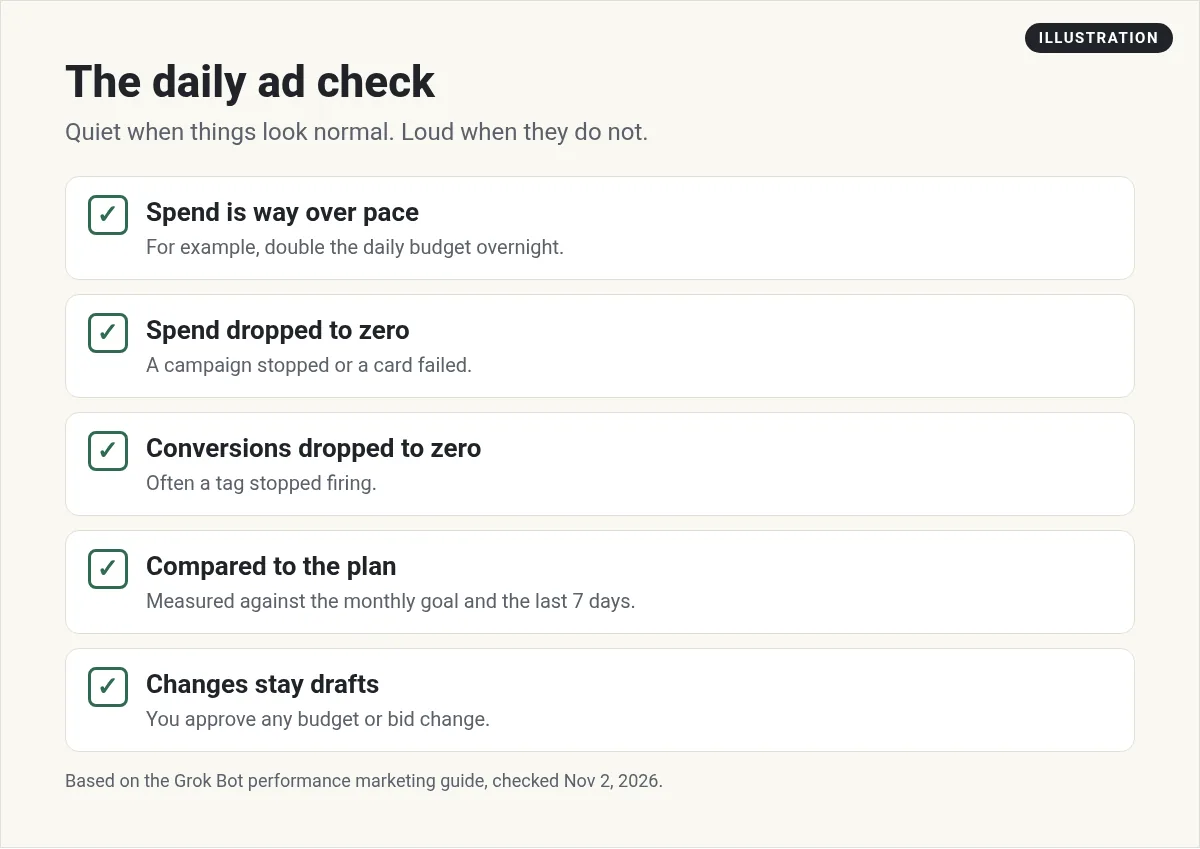
The guide lists three alerts that matter most:
- A channel spends double its daily budget overnight.
- A channel's spend drops to zero.
- Conversions drop to zero because a tag stopped firing.
Each of these is easy to miss and costly to find late. A Bot that checks every morning catches them before your coffee.
A sample request:
Every morning at 7 AM, check yesterday's Google Ads spend and conversions for each campaign. Compare to my monthly budget and the last 7 days. Only message me if spend is far over pace, spend is zero, or conversions are zero. Include the campaign name and the numbers.
How the Grok Bot ads team is set up
The guide shares four Bots they run, each with one job:
- Fuse is the gatekeeper. It stops other Bots from clicking around an ad account too much or firing so many requests that the account gets in trouble. It was one of the first Bots they set up.
- Tally watches Slack for can you pull requests and drafts answers from their data.
- Leadsworth tracks lead quality down the funnel and keeps them on pace for lead goals.
- Iris keeps creative briefs and approvals moving so ads ship on time.
They also run a weekly check where a Bot reads the product changelog and sees if their search campaigns cover each new feature. Gaps go to a sheet with ideas.
You do not need four Bots to start. One reporting Bot is plenty. But notice the gatekeeper idea. Before Bots can take actions in an ad account, put a rule or a Bot in place that limits what they can do.
From the Grok Bot Is De-Ballarks channel (not mine): This short episode builds the weekly plain English ads summary as a routine, with changes left for you to approve. The creator notes the voice is AI made and the visuals are illustrations, not real app screens.
Keep your ad account safe
The guide asks a good question: can Grok Bot change my ad budgets on its own? Their answer is only if you tell it to, and they keep guard rails so nothing changes without approval. Here is how I would set yours:
- Drafts first. The guide says to keep platform actions as drafts for the first few weeks. You will trust it faster when you see what it would have done.
- One channel at a time. A Bot that knows one platform well beats one that kind of knows six.
- Teach it a path you know. The guide suggests recording a click path you have done a hundred times, so the Bot can learn it.
- Write it like a job. Say what the Bot owns, the number it is responsible for, and where it must stop and ask you.
- Use approvals. Set an Ask first rule for anything that changes spend. My Grok Bot safety guide shows how.
Other ad jobs a Bot can help with
- Search term review. A list of search terms that look off topic, for you to add as negatives.
- Ad copy drafts. First drafts that fit the character limits. You edit and approve.
- Landing page check. The Bot opens each ad's landing page and flags broken links or slow pages.
- Competitor watch. A summary of what others in your space are running.
For the wider marketing picture, read Grok Bot for marketing.
Connect your ads to the rest of your business
A report tells you what happened. Growth comes from what you do next: better offers, better pages, and faster follow up with the leads your ads bring in.
AIM Agent is an AI Chief of Staff for business owners. It comes with an AI C-suite (COO, CMO, CFO, CRO and CTO), a Business Bot Builder and 100+ business skills, and it runs on AIM OS, a private vault that holds your notes and memory. AIM Agent is a ready-made AI business team that works inside Grok Bot, so you skip the setup and get to work.
Here is what you get:
- An AI Chief of Staff that helps you plan and run your business
- An AI C-suite: COO, CMO, CFO, CRO and CTO
- A Business Bot for each business or project. Give it a real task and it brings the work back for you to review
- 100+ business skills for content, offers, research and more
- Step by step setup guides and email support
So your ad reports turn into next steps, and your team of Bots acts on them with your approval.

Want an AI team to help run your business? Meet AIM Agent, an AI Chief of Staff for business owners. I am a co-founder of AIM Agent and have a financial interest in the product.
Put a business team behind your ads
AIM Agent gives you an AI Chief of Staff, an AI C-suite, and 100+ business skills, so your ad data turns into real next steps.
See AIM AgentFrequently asked questions
Can Grok Bot connect to Google Ads?
Yes. Use Connect apps, or let the Bot sign in through its browser. The changelog says the Bot offers the Google Ads connector on the Google Ads sign in page.
What should I automate first?
Reporting. The official performance marketing guide says it is the easiest job to hand off.
Can a Bot change my budgets on its own?
Only if you let it. Keep changes as drafts and set approvals for anything that touches spend.
What does the daily check look for?
Spend far over pace, spend at zero, and conversions at zero, measured against your monthly goal and the last 7 days.
Do I need a Bot for each ad platform?
Not to start. The guide says one Bot that knows one platform well is a good first step.
Will it work when my laptop is closed?
Yes. Routines run on the Bot's cloud computer on a schedule.
Is there a faster way to get a Bot team for my business?
AIM Agent gives you an AI Chief of Staff, an AI C-suite, and 100+ business skills, so you start with a team built for business work.
Sources
Checked November 2, 2026. Plans, prices, and rules can change.
