
Grok Bot · Known issues
A short list of problems the docs already admit, and what to do.
Grok Bot known issues are the limits the official docs list out loud. Knowing them saves you hours. You will not waste an afternoon on a Zoom error that has no fix yet.
I pulled these from the docs and changelog on November 9, 2026. They can change fast, so check the dates on the pages in the sources list.
TL;DR
Zoom sign in from the desktop app fails with error 4700. SharePoint needs delegated permissions for admins. 1Password only offers logins from your Personal vault. The X plugin needs X API credits. Some Google Calendar settings are off limits.
Zoom error 4700
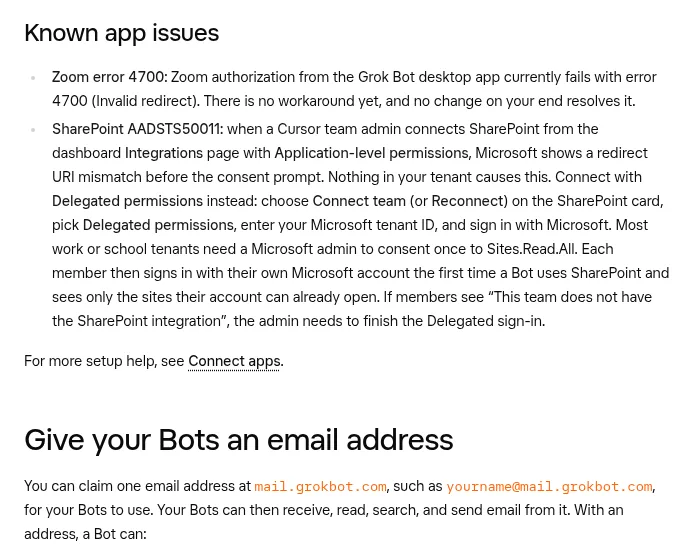
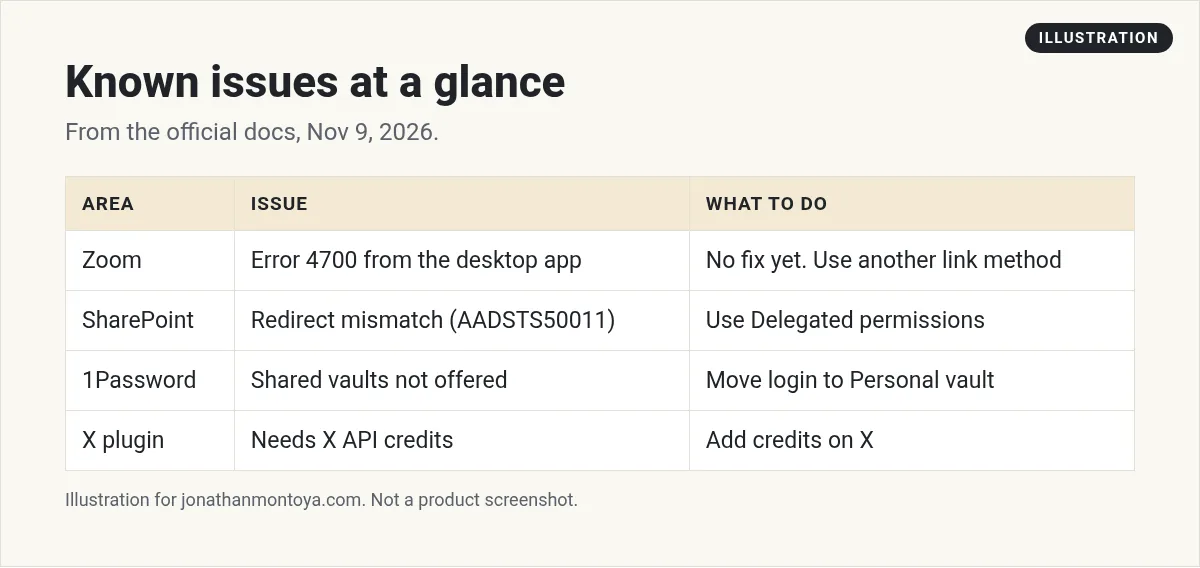
The docs say Zoom authorization from the Grok Bot desktop app currently fails with error 4700, Invalid redirect. There is no workaround yet, and nothing on your side fixes it.
What to do: do not burn time on it. Use Google Calendar or Outlook for scheduling, and put the Zoom link in the event description yourself. Check the changelog for a fix.
SharePoint and error AADSTS50011
When a team admin connects SharePoint from the dashboard with Application level permissions, Microsoft shows a redirect URI mismatch before the consent prompt. The docs say nothing in your tenant causes this.
The fix is to connect with Delegated permissions instead. Choose Connect team or Reconnect on the SharePoint card, pick Delegated permissions, enter your Microsoft tenant ID, and sign in. Most work or school tenants need a Microsoft admin to consent once to Sites.Read.All. Each member then signs in with their own Microsoft account, and sees only the sites that account can already open.
From the Brock Mesarich | AI for Non Techies channel (not mine): A creator gives an honest review soon after launch.
Any results mentioned in videos are not typical and are not a promise of income. Your results depend on your work and your market.
1Password limits
1Password only offers logins from your own Personal vault, called Private on Family accounts. It does not offer shared vaults. Move or copy the login into that vault, then ask the Bot to try again. It needs 1Password 8.12.42 or later. If no approval prompt shows up at all, update the app.
The new setup no longer uses a service account. If you used 1Password with Grok Bot before, connect it again. 1Password does not fill payment cards.
Google Calendar limits
The Bot can read calendars you can see, create and update events, check free time, and answer invites on calendars you can edit. It cannot change Google Meet settings, such as the waiting room or host controls. It cannot add a Zoom link, because Google's Zoom add on is not available to the app.
Easy workaround: create the event in Calendar, then ask the Bot to update the other fields.
The X plugin needs credits
The docs say the X plugin needs X API credits on your X developer account. Reconnecting the plugin does not add them. The good news is that Bots can search and read public posts on X without you connecting an account. That access is read only. For your DMs, bookmarks, or timeline, you add the X plugin.
Pages and rollouts
Pages is rolling out gradually and is not available on Enterprise teams yet, according to the Files docs. If you do not see Pages, update the app. The 1Password integration is also rolling out in stages, and iPhone push notifications are rolling out gradually.
From the alexusadays channel (not mine): A creator shares an honest review of trying Grok Bot.
Private networks and Tailscale
Adding an MCP server on a private Tailscale network explains that Grok Bot cannot reach it yet. The changelog suggests exposing it with Tailscale Funnel. The Tailscale plugin shows Not available yet on accounts that cannot use it.
What to do when you hit a limit
- Read the exact words on the screen.
- Search the docs for those words.
- Check the changelog for a newer version.
- Look for a workaround, like a different calendar.
- If it still fails, contact support with a screenshot and the request ID.
A habit that saves time
Keep a short note called known issues in your /workspace folder. Each time you hit a limit, write the date, the exact words on the screen, and the workaround. When you start a new Bot, tell it to read that note first.
This also helps when you work with a team. A new teammate can read one page instead of asking the same questions. It takes two minutes to add a line and it can save an afternoon later.
Why honest limits are a good sign
It is a good sign when official docs list what does not work. It means you can plan around it. Be careful with any video or post that says a tool does everything with no limits. Check the docs, check the date, and test on a small task first.
A business team inside Grok Bot
Every tool has limits. A business team helps you plan around them.
AIM Agent is an AI Chief of Staff for business owners. It comes with an AI C-suite (COO, CMO, CFO, CRO and CTO), a Business Bot Builder and 100+ business skills, and it runs on AIM OS, a private vault that holds your notes and memory. AIM Agent is a ready-made AI business team that works inside Grok Bot, so you skip the setup and get to work.
Here is what you get:
- An AI Chief of Staff that helps you plan and run your business
- An AI C-suite: COO, CMO, CFO, CRO and CTO
- A Business Bot for each business or project. Give it a real task and it brings the work back for you to review
- 100+ business skills for content, offers, research and more
- Step by step setup guides and email support
So your Bots work inside a business system, not a pile of chats.

Want an AI team to help run your business? Meet AIM Agent, an AI Chief of Staff for business owners. I am a co-founder of AIM Agent and have a financial interest in the product.
Get a business team inside Grok Bot
AIM Agent gives you an AI Chief of Staff, an AI C-suite, and 100+ business skills, with step by step setup guides and email support.
See AIM AgentFrequently asked questions
Is there a fix for Zoom error 4700?
Not yet. The docs say there is no workaround and nothing on your side fixes it.
Why does SharePoint fail for my admin?
Application level permissions cause a redirect mismatch. Use Delegated permissions.
Why does 1Password not show my login?
It only offers logins from your Personal or Private vault. Move the login there.
Can the Bot add a Zoom link to a Calendar event?
No. Put the link in the location or description yourself.
Does the X plugin work without credits?
No. It needs X API credits. Public search and reading works without the plugin.
Where do I check for fixes?
Check the official changelog and docs, which list new fixes by date.
What is AIM Agent?
AIM Agent gives you an AI Chief of Staff, an AI C-suite, and 100+ business skills inside Grok Bot, with step by step setup guides and email support.
Sources
Checked November 9, 2026. Plans, prices, and rules can change.
