
Grok Bot · Linear
xAI just published a guide on using Grok Bot with Linear. Here is what it does, how to set it up, and how to keep your team in charge.
Grok Bot Linear is one of the newest ways to use your Bots. On November 2, 2026, xAI published a guide called Grok Bot for Linear. It shows how a Bot can read customer feedback, plan the work in Linear, hand a small task to a coding agent, and then follow the result.
I read the full guide and the Grok Bot docs on November 4, 2026. Here is the plain version, with my own tips marked as mine.
TL;DR
Grok Bot works with Linear through the Linear project operations Bot. You add the Bot, connect Linear, and give it an issue or project. It can read feedback, write issues with acceptance criteria, hand a small task to your chosen coding agent, watch for the pull request, and draft a project update. Your team keeps control of scope and final approval.
What the Linear Bot is
Linear is a tool many software teams use to track issues and projects. The x.ai guide introduces the Linear project operations Bot. It comes set up with Linear, instructions, and routines.
The guide sums up the split of work like this: your team sets direction, and Grok Bot handles the investigation and coordination you allow. That is a good way to think about it. The Bot does the legwork. People make the calls.
The guide lists five things you can do with it:
- Understand a product problem. Read related issues, customer requests, and discussions.
- Shape a project. Turn an agreed plan into a brief and issues with acceptance criteria.
- Coordinate coding agents. Hand the work to your chosen agent with the right context.
- Follow through. Watch for a linked pull request and flag blockers.
- Keep the team informed. Draft updates based on real progress.
A real example from the guide
The guide walks through one story. Several customers say failed uploads are hard to recover from. Some want a retry button. Others lose their files and have to start over. Here is how the Bot helps, step by step.
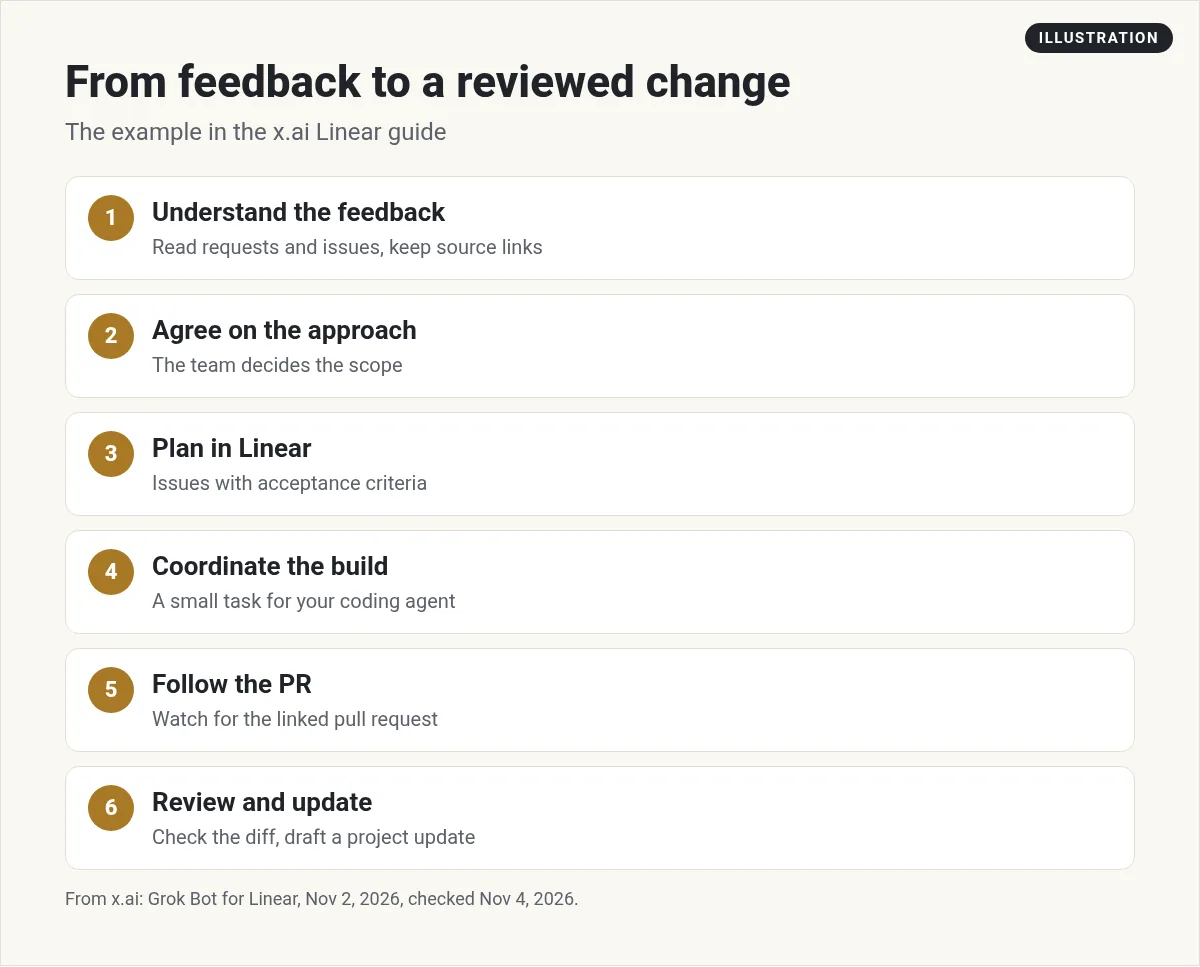
- Understand the feedback. The Bot reads the requests and issues. It keeps source links and separates the problem from the proposed fix.
- Agree on the approach. The Bot sums up the evidence. The team decides to add retry and keep the selected files.
- Plan in Linear. The Bot writes or updates the issues, with acceptance criteria.
- Coordinate the build. Once allowed, it hands a small, reviewable task to the coding agent the team picked.
- Follow the PR. It watches for a linked pull request and shares the review link.
- Review and update. It checks the change against the goal, flags what is not verified, and drafts an update.
One line from the guide is worth remembering: "A merged PR is recorded as merged; release and verification remain separate steps." In plain words, a merge does not mean the job is done. Someone still checks it in the real product.
Six ways teams use it
The guide lists six product uses. You do not need all of them on day one.
- Product discovery. Group feedback into the real problems behind it.
- Project planning. Keep specs, decisions, and dependencies connected.
- Engineering coordination. Prepare clear handoffs and track pull requests.
- Design and product review. Check loading, empty, error, and recovery states.
- Triage. Review new issues for clarity, duplicates, and owners.
- Project communication. Keep shared documents current and write short updates.
How to set it up
The guide gives five setup steps:
- Add the Linear project operations Bot. Read its instructions and included integrations first.
- Connect Linear. Allow access to the workspace you want.
- Connect your coding tools. Only needed if you want it to build. The Bot asks which agent to use if you have not picked one.
- Give it a starting point. Share a Linear issue or project and the outcome you want.
- Choose the scope. Start with research or planning. Allow building only when you are ready.
Good news for non coders: the guide says you can use the Bot for discovery, planning, and updates without connecting a coding agent at all.
The guide also gives a starter prompt. In short, you ask the Bot to review a project, explain the problem, list what is already underway, name any blockers, and recommend a next step before it starts building. I like that last part. It makes the Bot think first.
Routines that start from Linear
The guide says a proven task can become a routine. It lists five parts each routine should have: an owner, a trigger, allowed actions, an escalation path, and a stop condition. That is a smart list. It tells the Bot what it may do, who to ask when stuck, and when to stop.
The Grok Bot docs say a routine can start from Linear events, like when a Linear issue is created. That means you can set up a Bot that reads each new issue and checks it for duplicates or missing details. Keep these routines small at first. My Grok Bot routines post explains how routines work.
Two videos worth watching
Travis shows how a Bot can coordinate Cursor coding agents from plain English. It pairs well with the Linear flow above.
From the Travis Automates channel (not mine): Shows Bots handing coding work to Cursor agents. Watch for how he scopes each task.
Matt Palmer, who works on the product, walks through his real Bot workflows, from simple to advanced.
From the Tenex channel (not mine): A good look at Bots that call each other. Useful before you build a bigger setup.
My own advice
This part is my opinion, not from the guide. Start with triage only. Let the Bot read new issues and suggest labels and duplicates for one week. Read every suggestion. If it is right most of the time, add planning next. Only then let it hand work to a coding agent. Small steps make it easy to trust the Bot, and easy to spot mistakes early.
Also, keep a person on final review. The guide itself leaves final product judgment with the team. I would never skip that step.
Want a team that already knows its jobs?
The Linear Bot is great for product teams. Most business owners need more: a Chief of Staff, marketing, sales, and ops.
AIM Agent is an AI Chief of Staff for business owners. It comes with an AI C-suite (COO, CMO, CFO, CRO and CTO), a Business Bot Builder and 100+ business skills, and it runs on AIM OS, a private vault that holds your notes and memory. AIM Agent is a ready-made AI business team that works inside Grok Bot, so you skip the setup and get to work.
Here is what you get:
- An AI Chief of Staff that helps you plan and run your business
- An AI C-suite: COO, CMO, CFO, CRO and CTO
- A Business Bot for each business or project. Give it a real task and it brings the work back for you to review
- 100+ business skills for content, offers, research and more
- Step by step setup guides and email support
So you skip the setup and get to work.

Want an AI team to help run your business? Meet AIM Agent, an AI Chief of Staff for business owners. I am a co-founder of AIM Agent and have a financial interest in the product.
Get a ready made team inside Grok Bot
AIM Agent gives you an AI Chief of Staff, an AI C-suite, and 100+ business skills, so you skip the setup and get to work.
See AIM AgentFrequently asked questions
Does Grok Bot work with Linear?
Yes. xAI has a Linear project operations Bot. You add it, connect Linear, and give it an issue or project to work on.
Do I need a coding agent to use it?
No. The guide says you can use it for discovery, planning, and updates without a coding agent.
Can Grok Bot write code from a Linear issue?
It can hand a small task to the coding agent you connect, then watch for the pull request. It does this only after you allow it.
Does a merged pull request mean the work is done?
No. The guide says a merged PR is recorded as merged, and release and verification are separate steps.
Can a routine start when a Linear issue is created?
Yes. The Grok Bot docs list Linear events as routine triggers.
Who makes the final call?
Your team. The guide says the team keeps control of scope and final approval.
Is there a faster way to get a working team?
AIM Agent gives you an AI Chief of Staff, an AI C-suite, and 100+ business skills inside Grok Bot.
Sources
Checked November 4, 2026. Plans, prices, and rules can change.
