
Grok Bot · Computer
Do not hit Reset first. Use this order instead.
Grok Bot reset computer is a button you should use last. Your Bots work from a cloud computer, and Settings gives you three tools for it: Update, Recover, and Reset. They sound alike. They do very different things.
I read the computer pages in the official docs on November 9, 2026. This guide puts the table and the safe order in plain words.
TL;DR
Try waiting and Retry first. Then restart the app, then Update, then Recover, and Reset last. Chats are stored outside the computer, so they survive. Installed apps and packages do not survive Recover or Reset.
What lives on the Bot computer
Your Bots work from a persistent cloud computer with a browser, command line, and filesystem. Every Bot on your account shares the same one. Work continues while your laptop is closed, and files, sign ins, and browser sessions stay between tasks.
The shared workspace is at /workspace. Keep important project files there in clear folders. The docs say files, browser state, and supported sign ins survive normal updates and recovery. Temporary folders, hand installed packages, and unsaved app state are replaceable.
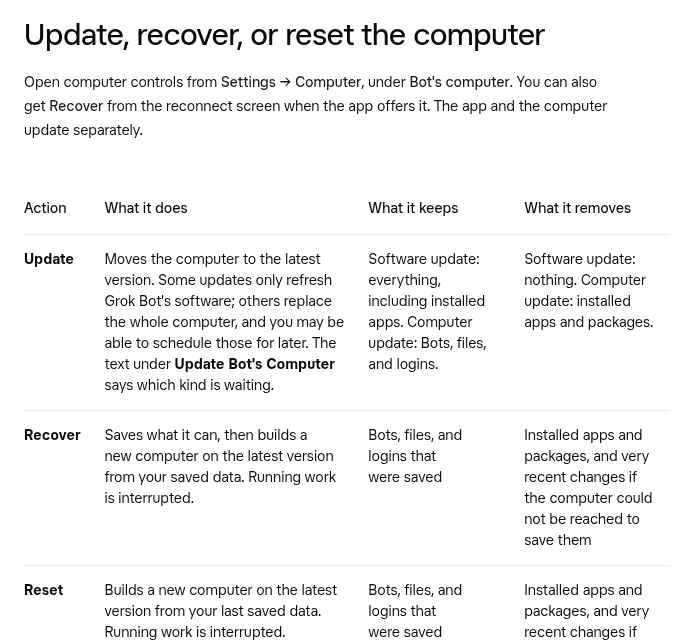
Update, Recover, and Reset side by side
- Update moves the computer to the latest version. A software update keeps everything, including installed apps. A computer update keeps Bots, files, and logins but removes installed apps and packages.
- Recover saves what it can, then builds a new computer from your saved data. Running work stops. It removes installed apps and packages, and very recent changes if the computer could not be reached to save.
- Reset builds a new computer from your last saved data. It is the same result as Recover, and it is a last resort.
Your chats are stored outside the computer. Even a reset does not delete them. Deleting files with rm does not delete chats either.
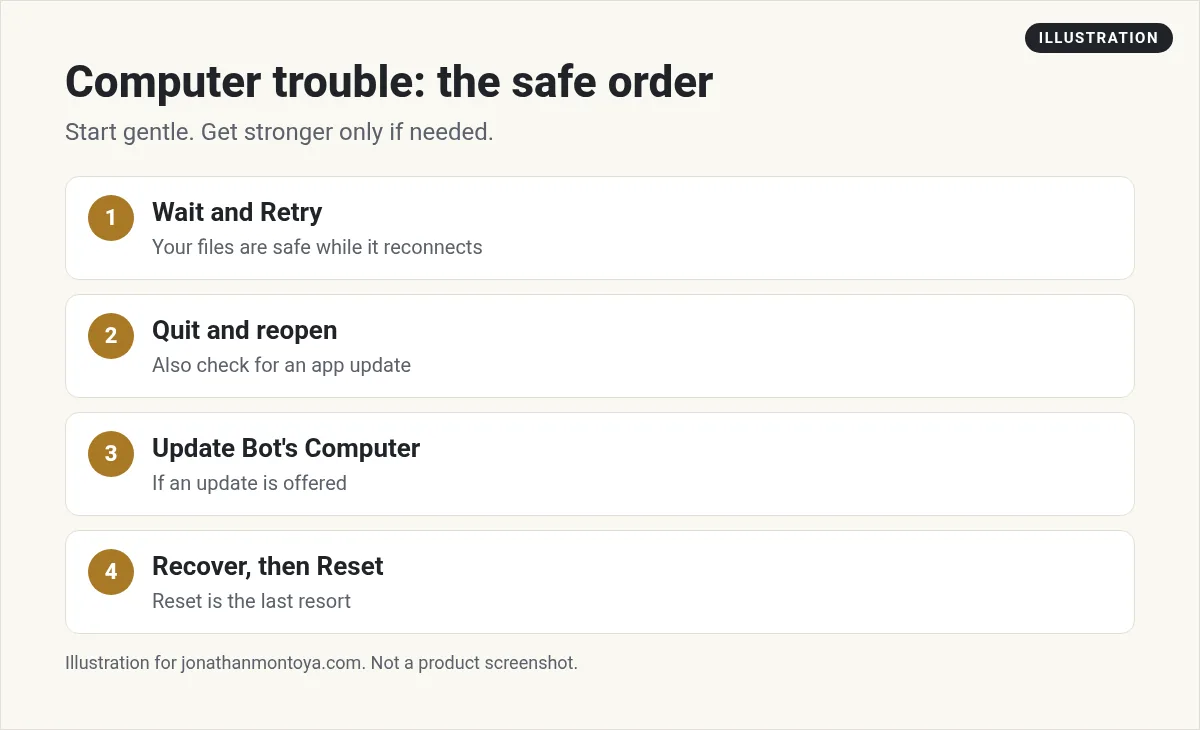
The safe order to try
- Wait, then Retry. If it says Reconnecting or Couldn't Reach Grok Bot's Computer, your Bots, files, and logins are safe. Do not Reset yet.
- Fully quit and reopen the app. On Mac, choose Quit from the menu bar. Also check for an app update.
- Use Update Bot's Computer in Settings, then Computer, if an update is offered.
- Choose Recover computer if it still cannot reconnect, or an update looks stuck.
- Use Reset Bot's Computer only after those steps.
Do not start a second Update or Reset while one is running. Repeated resets can interrupt a restore that is still finishing.
From the Debbie O'Brien channel (not mine): A walkthrough of the cloud computer, browser, and email.
How long things take
Reconnecting and Recover usually take a few minutes. You can choose Continue in Background. An Update can also take a few minutes. If it says Update still running, keep waiting. On a slow update, Keep waiting is the safe default.
If Recover or Reset fails, use Retry Recovery or Retry Reset once. Then stop and contact support.
What you will have to redo
Project folders such as node_modules or a Python virtual environment are not saved. Reinstall them after a computer update, Recover, or Reset. Files that exist only on your Mac or Windows machine are not covered, so keep your own backups for those.
If your Bots recently disappeared, or saving failed, contact support before you use Recover or Reset.
From the Matt Palmer channel (not mine): A long Q and A session about Grok Bot from Matt Palmer.
Any results mentioned in videos are not typical and are not a promise of income. Your results depend on your work and your market.
Low disk space is not data loss
When the computer is almost full, your Bot tells you once, names the biggest files or folders with their sizes, and offers to delete them. Nothing is deleted unless you say yes. The Bot only cleans computer files, not chats.
Habits that prevent trouble
- Save results in /workspace and attach key files to the chat.
- Write down which packages your project needs, so a reinstall is quick.
- Do not put a credential on the computer if another Bot should not use it. All Bots share it.
- Check for app updates now and then.
An example from start to finish
Say your Bot says it cannot reach its computer. First, wait two minutes and press Retry. Nothing changed. Next, quit the app fully and open it again. Still stuck. Then you open Settings, then Computer, and see that an update is waiting. You choose Update and wait, because the docs say it can take a few minutes.
If the update still looks stuck, the screen offers Recover computer. You choose it, and the Bots, files, and logins that were saved come back on a fresh computer. Then you reinstall the packages for your project. Reset was never needed.
Notes before you click
- Read the text under Update Bot's Computer. It says if the update only refreshes software or replaces the whole computer.
- You may be able to schedule a full computer update for later.
- If a Bot cannot pause in time, let it finish and choose Update again.
- If the files are not backed up yet, Update says so and changes nothing. Wait a moment and try again.
A business team inside Grok Bot
A working computer is the start. A working business team is the goal.
AIM Agent is an AI Chief of Staff for business owners. It comes with an AI C-suite (COO, CMO, CFO, CRO and CTO), a Business Bot Builder and 100+ business skills, and it runs on AIM OS, a private vault that holds your notes and memory. AIM Agent is a ready-made AI business team that works inside Grok Bot, so you skip the setup and get to work.
Here is what you get:
- An AI Chief of Staff that helps you plan and run your business
- An AI C-suite: COO, CMO, CFO, CRO and CTO
- A Business Bot for each business or project. Give it a real task and it brings the work back for you to review
- 100+ business skills for content, offers, research and more
- Step by step setup guides and email support
So your Bots work inside a business system, not a pile of chats.

Want an AI team to help run your business? Meet AIM Agent, an AI Chief of Staff for business owners. I am a co-founder of AIM Agent and have a financial interest in the product.
Get a business team inside Grok Bot
AIM Agent gives you an AI Chief of Staff, an AI C-suite, and 100+ business skills, with step by step setup guides and email support.
See AIM AgentFrequently asked questions
Will Reset delete my chats?
No. Conversations are stored outside the computer.
What is the difference between Recover and Reset?
They rebuild the computer the same way. Recover is offered from the reconnect screen, and Reset is the last resort in Settings.
Will I lose my files?
Synced files and logins usually come back. Installed apps, packages, and very recent changes may not.
What should I try first?
Wait and Retry, then restart the app, then Update.
Do all my Bots share one computer?
Yes. Files, sessions, and credentials are shared by all your Bots.
When should I call support?
If Recover or Reset fails twice, or if Bots disappeared or saving failed.
What is AIM Agent?
AIM Agent gives you an AI Chief of Staff, an AI C-suite, and 100+ business skills inside Grok Bot, with step by step setup guides and email support.
Sources
Checked November 9, 2026. Plans, prices, and rules can change.
